not "pip" but try "pips" 
M
Posts made by miro1360
-
RE: Question about 'Adjust'posted in Questions & Answers
I dont see whole name for your marked constant, lets say name is Pips_plus_for_trail_Ca
you have at least 3 possibilities how to do ittype into adjust field:
-Pips_plus_for_trail_Ca
and your constant must be typed as 0.0008 (8 pips price fraction for EURUSD, or 0.08 for GBPJPY)or you can make it from mql functions (SymbolInfoDouble(....)) but that is not so elegant
...
admin was thinking about this solution, but I have not tried it yet if it is done:
https://fxdreema.com/forum/topic/4286/10pips/6
so in adjust try this:
-Pips_plus_for_trail_Ca pips
or
-(Pips_plus_for_trail_Ca) pipsor maybe this?
but this is probably not working yet (I have not tried) :
-Pips_plus_for_trail_Ca@pipsif none of them is working for you, try this not recommended solution with function from fxdreema (admin dont recomended this because it must not working 4-ever, after fxdreema update when is here name change of this function it stop working (only project compiling, not previously created EA) and you need rename it if you made some changes in project
) ...
in adjust type:
-(toDigits(Pips_plus_for_trail_Ca,SYMBOL))
or
-(toDigits(Pips_plus_for_trail_Ca,symbol))
or
-(toDigits(Pips_plus_for_trail_Ca,Symbol()))
or
-(toDigits(Pips_plus_for_trail_Ca))...
-
RE: Tutorial 08 - Candle Formationsposted in Tutorials by Users
the same for mql4 not now but you can do it yourself in mql4 because blocks are the same and custom code is in this type also the same (here is only working with variables and few operands) ...
-
RE: RSI XOver Issueposted in Questions & Answers
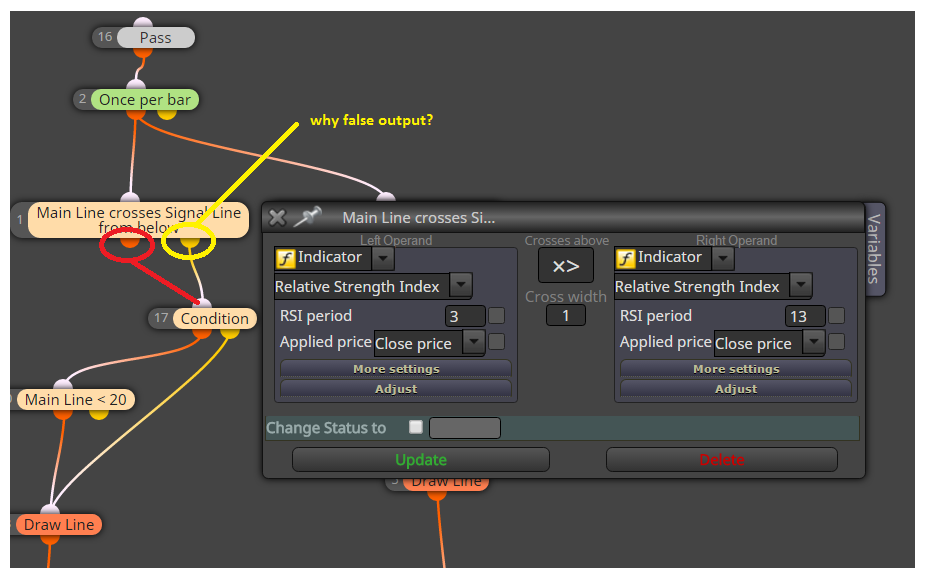
maybe it is issued with "Candle ID" because current candle have ID 0 (and is not closed and can close far away from its open price)
... try to give in condition block (in More settings) Candle ID to 1 ... -
RE: plz help me make eaposted in Questions & Answers
run it with tester and observe with few ways, like value on candle1 (first closed) and when this value move on next candle, check if the value is same or was changed (change can happen on few candles later) ... some indicators are made as repaint (zigzag, triangular MA) based on first idea
-
RE: plz help me make eaposted in Questions & Answers
it is not possible to fix because your indicator "repaints", that means it recalculates few history candles and is holding own peak to lowest/highest point (something like zigzag) ...
-
RE: Candle touching MA?posted in Questions & Answers
now you have in tutorials small answer for doji, you can improve it in your project

-
Tutorial 08 - Candle Formationsposted in Tutorials by Users
Here I provide few ways (not all
because here is a lot of ways) how to create something called "pattern formations".Lets say we need identify Doji candle. Doji is candle with really small body, so our Doji have body smaller than 1.5 pips, we need it on H4 TF and we need alert + symbol on that candle, here is how to do it:
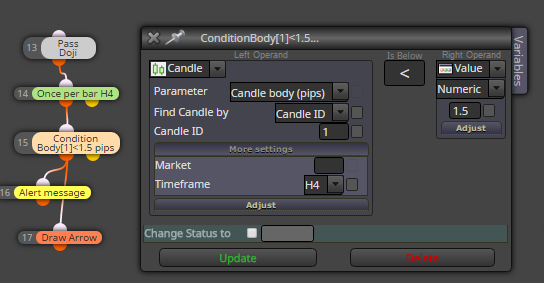
With similar way we can identify engulfing bar, this is how to find Bullish and Bearish Engulfing:

When we need 2 or x bulls/bears in row, when each have some amount of body pips, this can be way:
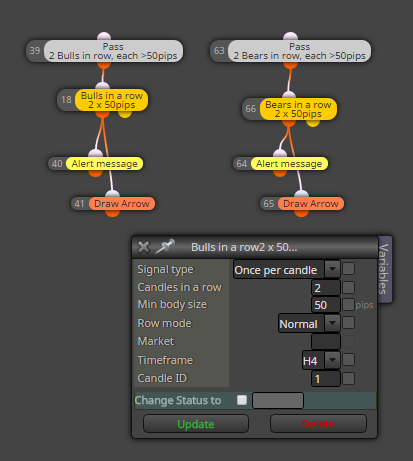
Or something more complicated called 3 White Soldiers / Black Crows, which are 3 consecutive bull/bear candles in row when each of candles is greater than 10 pips, and for Soldiers/Crows is each new High/Low/Open/Close higher/lower than previous this is how to do it
(identify 3 bulls, identify if new High is higher than previous, the same for Low, Open, Close and opposite for sell):
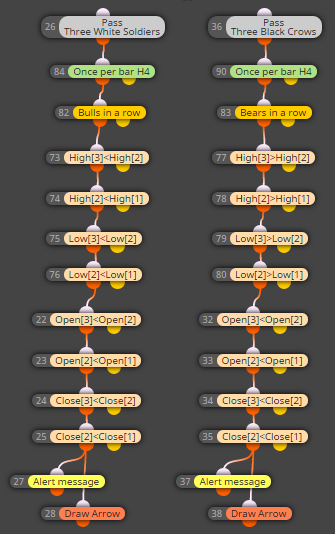
More complicated is to find Hammer based on % size, or any other Candle type based on some math calculation, this is one of ways how it can be done (other way can be using formula block + more variables, I did it with Custom code block as example)
(firstly read into variables prices for calculation - Open, Close, High, Low ,,, next make variable which hold state when condition is meet in custom code, next do custom code with calculation and comparison, result save into our variable for state (conditionPass=true or false) and last is Condition for alert)
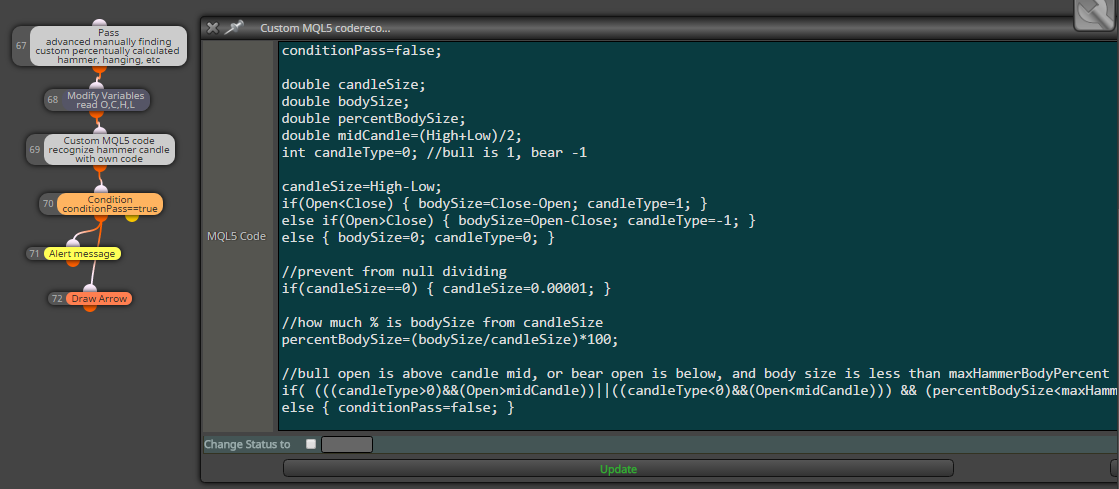
This is result from visual tester:

shared link for this tutorial:
https://fxdreema.com/shared/VrzXQhufcor import code into your projects to see all variables/inputs:
0_1484370393489_Formations1.mq5Wish you green pips!
-
RE: Help with Trading Conditions in Renkoposted in Questions & Answers
just use Condition block for your conditions, connect more blocks togethed and it is
learn it on something easier and step after step, combination after combination you can do your work ... dont forget test in tester all changes you did -
RE: Defining constant for MA Methodposted in Questions & Answers
yes they can be, just your constant is:
int maMethod 0
values can be from 0 as SMA, 1 as EMA, 2 ssma, 3 lwma (I think this is order for methods) ...
the same you can do for Timeframes, but note that they values are 1 for M1, 5 for M5, 60 for H1, 1440 for D1, 10080 for W1 ... -
RE: Candle touching MA?posted in Questions & Answers
for candle touch use something like cross condition
and for identify pinbar, well this is not easiest .... but probably I made tutorial for candle formations (or how to work with candles), maybe this weekend ... -
RE: plz help me make eaposted in Questions & Answers
two buffers, follow my tutorial for it or look in help section, both are custom indicators explained how to work with them
-
RE: EA based on custom indicator not runningposted in Questions & Answers
"missing" numbers are not important, important are only top blocks numbers, this is how is connections order working:
blue is order, and next colors are blocks runned in each blue order:
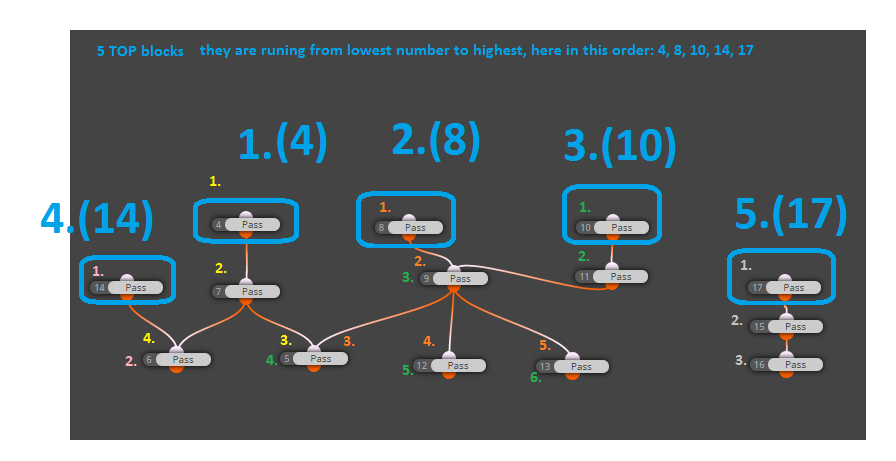
somewhere in help you can find next explanation for this ...and the blocks what you mean as "hidden" are not hidden, it are normal blocks in fxdreema, but they are only renamed (right click - rename) (I left original name in begin of this block) .... only "Custom MQL4 block" is little special, because here you can type own "math" or some functions, working with variables in text, etc. ...
-
RE: Defining time constantsposted in Questions & Answers
in fxdreema are these parameters as "string" ...
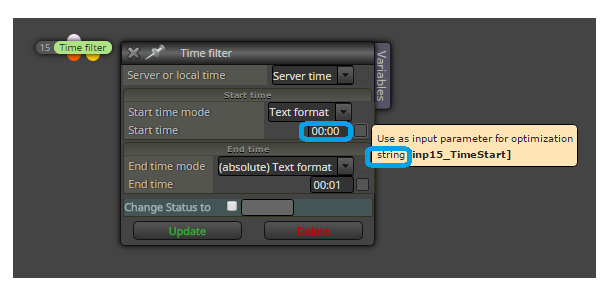
but some can be datetime, if you go through check box by input, popup window tells you what type is used ...
-
RE: Time based exitposted in Questions & Answers
expiration parameter in block Buy/Sell (EA must be running) .... for pendings must not be running because it depends on brokers side ...
-
RE: EA based on custom indicator not runningposted in Questions & Answers
as I have not found bugs in fxdreema integrated pivots, here is solution for you how to calculate pivots based on formula which you posted in post above ...
calculate it like this:
https://fxdreema.com/shared/mJqHifx5ddont forget define variables:
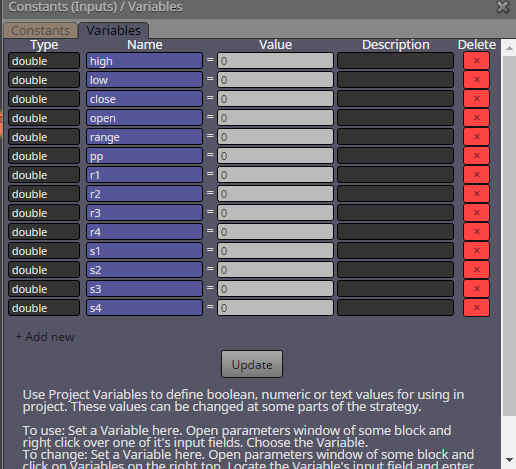
and make sure that calculation of pivots is made first (first block number of pivot calculation is 1 or lowest, as in example project) ...
pivots are than stored in variables pp, r1-4, s1-4 and you can work with these variables in your next blocks, like open prices etc .... -
RE: EA based on custom indicator not runningposted in Questions & Answers
I come here later, now I need to go offline (I must just before but :D)
... and here is how you can resolve your problem with "errors", change first few parameters in your imported custom indicator in fxdreema MyIndicators manager, exactly to this manually (in data type):
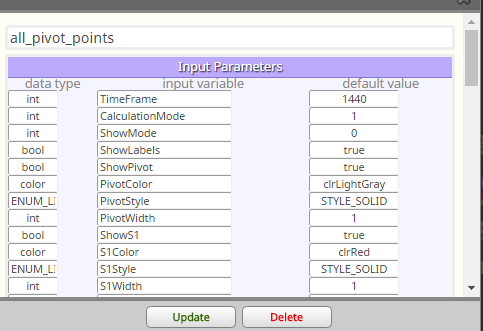
but again, you are working in your project with buffers, which values must not be in your requested time as true values for opening order (when is here at 08:00 not value in buffer, EA can not open order with "EMPTY_VALUE" because empty value can be something weird, like big number) ...
for this you need filter this time, or on top give some condition which compare this value from buffer if exist (like buffer1 < 300 && buffer 1 > 0 to be sure, that price is from this limit)
....or just wait and I look at pivot points that are in fxdreema, if their are calculated right as you typed here .... but you need wait for this reply few hours (because I am now offline)
-
RE: EA based on custom indicator not runningposted in Questions & Answers
send here formula for your calculations I check it ...
and what you sent me project, I can not open it because I dont have your custom indicator ... you need send me this indicator
without it I can not open your project ...