maybe this can help you, it is not exactly your situation but is there object existention checking 
https://fxdreema.com/forum/topic/4292/horizontal-line-for-buy-and-sell/2
M
Posts made by miro1360
-
RE: Object over and under priceposted in Questions & Answers
-
RE: I rented a indicator to do a only robô an ex5 file I can not put it in the fxdreema. How I do??posted in Questions & Answers
type all input parameters, one after another, like:
int barSize 50
double retracementFactor 1.0
bool symmetricalReversals true
bool showWicks true
datetime startBuilding D'1970.01.01 00:00:00'
bool synchronizeFirst false
bool showCurrentBar true
color bullishBar clrLime
color bearishBar clrRed
etc., add all parameters ... last one is
int periodOfAveraging 20and output buffers names, define there 8 different buffers, like:
0buff
1buff
2buff
3buff
4buff
5buff
6buff
7buff -
RE: I rented a indicator to do a only robô an ex5 file I can not put it in the fxdreema. How I do??posted in Questions & Answers
here are types:
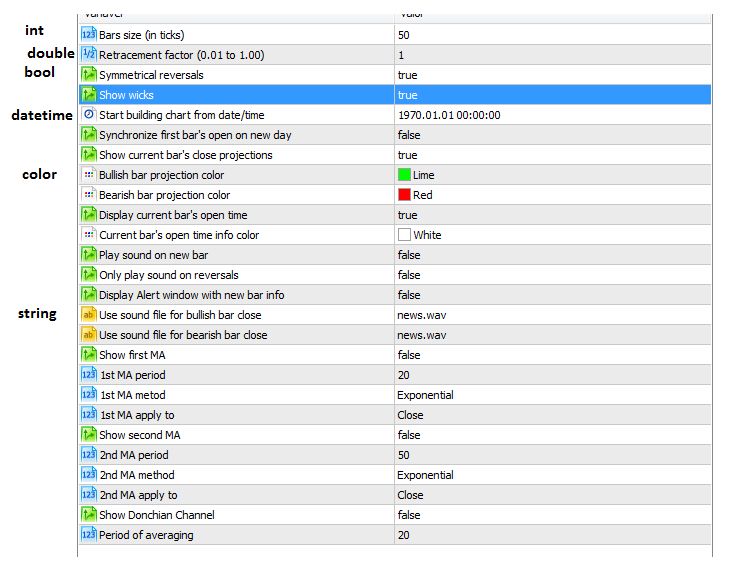
and buffers are numbered from 0 to 7 ...
-
RE: MA Deviation Orders (Hot to do it?)posted in Questions & Answers
try this change for your condition block (1 and opposite for 11):
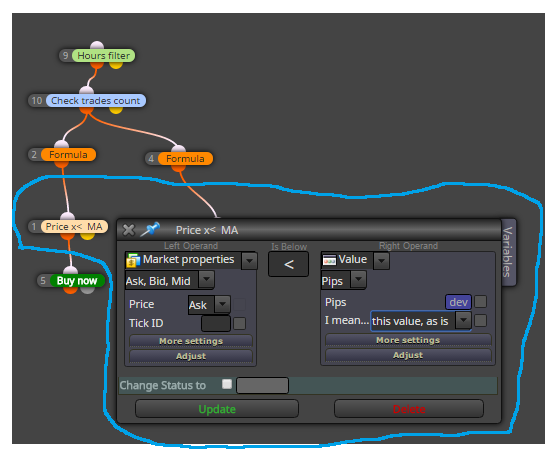
-
RE: Custom indicator does not open in fxdreema because it is .ex5 file and not mq5. Because?posted in Questions & Answers
check one of my last replies ...
-
RE: horizontal line for buy and sellposted in Questions & Answers
maybe this can help you:
https://fxdreema.com/shared/ZxDeyXP5c
I used section on Trade for detecting trade closed on TP ...
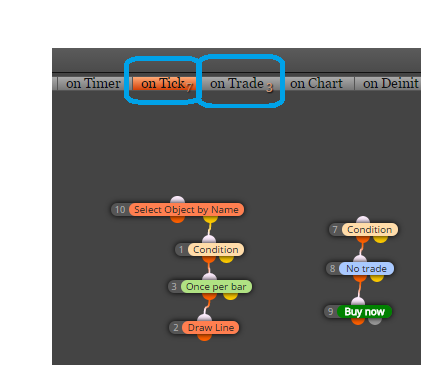
-
RE: I rented a indicator to do a only robô an ex5 file I can not put it in the fxdreema. How I do??posted in Questions & Answers
https://fxdreema.com/help/working-with/custom-indicators
https://fxdreema.com/forum/topic/4208/tutorial-06-my-indicators-in-fxdreema
in both topic is info how to add ex file into my indicators
-
RE: Applying an indicator to Previous / First Indicator's Data in fxDreemaposted in Questions & Answers
problem si, that MQL code is not supporting this option directly - that is why it is not in fxdreema drop down menu ... if you can little code, you can do this with custom indicator using iMAonArray function in mql ... if you cant code, search for custom indicator with this mode ... if you need it for RSI, search for TDI (traders direction index) indicator ...
-
RE: Tutorial 05 - EMA cross, part 5 - Buttons behavior [beginners]posted in Tutorials by Users
Hi, it is fast the same, only more strict:
https://fxdreema.com/shared/f8D0nyZKc
ObjectSetInteger(0,LoadedObjectName(),OBJPROP_STATE,0);
ObjectSetInteger(0,LoadedObjectName(),OBJPROP_BGCOLOR,clrGray);
ObjectSetInteger(0,LoadedObjectName(),OBJPROP_COLOR,clrLightSkyBlue); -
RE: No Trade Nearblyposted in Questions & Answers
block No Trade Nearby use for "both side",
here is more about in details, how it is working:
https://fxdreema.com/forum/topic/4007/No-trade-nearby-case-1-and-case-2-something-missing/7 -
RE: Conditional within loopposted in Questions & Answers
ma cross happens - it happens between two candles, but on next candle there is no cross, only MA5>MA20 ... on next candle will be your condition (block 307) false ...
instead of AND block 379 you can connect block 307 directly
... but result from your blocks connection is repeatly adding to volume when conditions are true (tick after tick) ... for this, after adding to volume (after whole loop) you need some flag to deactive cross condition and wait for next one -
RE: EA doesn't open in MT4posted in Questions & Answers
your issue is not issue itself ... it is how it works ... it was explained many times, just read about difference here:
https://book.mql4.com/metaeditor/files
https://www.mql5.com/en/forum/113982
in few words:
ex files are executable files, that means ex file is not source code but compiled program and this file can not be imported into fxdreema, but these files can be placed into chart as expert advisors (or indicators if it is indicator)
mq files are source files and they can be imported into fxdreema if they were created with fxdreema (from other sources they can not be imported as project), but mq file is not executable program and can not be placed into chart .... when you are updating new EA update both files ... mq and ex ... or you can update only mq file but after this you need run metaeditor, open this new mq file and click on Compile button (it compile new ex file) -
RE: Trading only on specific daysposted in Questions & Answers
block Weekday filter have you tried?
-
RE: How to make distance 500 pips from current priceposted in General Discussions
talk with admin about your download issue
-
RE: select certain orderposted in Questions & Answers
this is also working ok for your situation, have a success with that
-
RE: Question regarding the "adjust" fieldposted in Questions & Answers
you dont need specify symbol, leave symbol free, it is loaded automatically from chart info (from chart where EA is located)
-
RE: how i can control in the spread ?posted in Questions & Answers
each your EA must have this filter in blocks, that means, create our EA with all functionality + give spread filter into this EA ...
-
RE: select certain orderposted in Questions & Answers
here: https://fxdreema.com/shared/RGv1NaAwe
but you need vitalize your effort, it is important for big projects, more effort in logical problems gives you faster thinking in other logical problems ...
effort can be 101 attempts, where 100x are big fails and 1x is small success and accumulate this success! -
RE: how i can control in the spread ?posted in Questions & Answers
note: manually opened trades have magic 0
next is explained here:
https://www.youtube.com/watch?v=h38Wd7NH4_4