blocks:
Check trades count + For each trade + pips away from open price + once per trade + modify stops or extend stops
maybe I something left out, when you try it you will see result, if is not working, try other ways, there are always ways ...
M
Posts made by miro1360
-
RE: select certain orderposted in Questions & Answers
-
RE: select certain orderposted in Questions & Answers
for checking trades count you can use block Check trades count
-
RE: Pips away from open priceposted in Questions & Answers
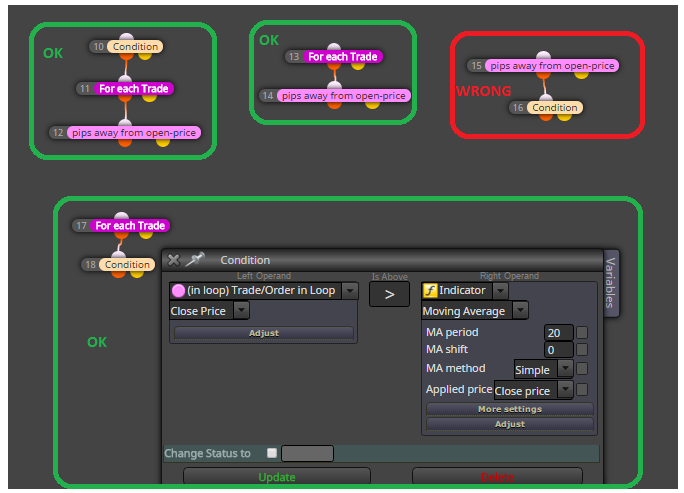
for me, this block is working well when is connected with block "For each trade" ... block For each trade is working for pre-selected trade. When is trade selected, you can apply on this trade blocks with light-pink color (like your pips away from open price) ... but without preselecting trade using block For each trade - who know which trade is selected ...
-
RE: how i can control in the spread ?posted in Questions & Answers
you can give more EAs on the same pair (each EA for own chart), you give different MagicNumber while inserting EA into chart and each EA will control own trades
-
RE: select certain orderposted in Questions & Answers
try this:

but for me are working both examplex that I provided to you ... maybe is something else wrong in your project ... my testing project where open price from second-last opened trade is printed on the chart:
https://fxdreema.com/shared/7HurHl0Q -
RE: how i can control in the spread ?posted in Questions & Answers
before buy/sell blocks connect block named: Spread Filter, you can find this block under Time Filters drop-down menu, or just in condition block is this option under Market properties
here you can see 3 examples how to use spread filters:
https://fxdreema.com/shared/63ondNL9e -
RE: new share profitable EAposted in Questions & Answers
you forgot to define variables in this project

-
RE: Pips away from open priceposted in Questions & Answers
if you never used block for each trade, it is time to start trying this block in smaller parts of EA and learn in tester what is your work doing ... go through all examples and tutorials (in my tutorials is also using For each trade as example, there are my replies how to use this block, check my replies on all questions, I am sure you can find here how to use this block :D) ...
-
RE: Draw Custom Indicator automaticallyposted in Questions & Answers
I looked at this indicator and .. what to say ..., one you can try is remake logic from this indicator into blocks, I think it is possible for this indicator, but dont expect something easy, it can be a lot of work, maybe more time consumed as visual mode tester and result testing can be again slow
other you can try to do is make this indicator faster or add into this indicator usefull buffers (do in indicator code logic where you get values what you are expecting into buffers) --- again this can cost you a lot of time ... maybe somebody here find better solution for you
-
RE: example: For each tradeposted in Tutorials by Users
you mean list as array like:
openPrice[0]=1.10
openPrice[1]=1.15
openPrice[2]=1.12
.....
openPrice[x]=y
?
yes you can do this now ...
just define in variables these:
double openPrices[100]
double openPrice=0
int myInc=0take 4 blocks:
- reset variable myInc=0
- For each Trade
- Modify Variable block: save Open price into variable openPrice
- custom code block where you put:
openPrices[myInc]=openPrice;
myInc=myInc+1;
after this you have open price from all trades in array openPrices[] and you can get values from it like:
openPrices[0] ... open price from first loaded trade
openPrices[1] ... open price from second loaded trade
.. etc
or using Loop/for where you use your increment variable myInc and you can get values one after another: openPrices[myInc]
of course you can resize this array using some functions from mql code, or all what you will do, all next is up to you ... -
RE: Pips away from open priceposted in Questions & Answers
problem can be, that you are using blocks from: Loop for Trades & Orders without previous selecting trades, that means, you are using block "pips away from open price" without block "For each Trade" ....
block For each trade need be used first for pre-selecting/filter trade, from which are calculated pips from open price using block "pips away from open price" ...
without this here can be situation, that you open price is changed ...
the same is with condition or formula block, where you use parameter "in loop trade order in loop" ... before this block you need select trade using block "For each trade" ... it is sometimes not easy ... -
RE: Pips away from open priceposted in Questions & Answers
post here example what you mean - using blocks and shared link
-
RE: I am having problems with renko indicator, help?posted in Questions & Answers
saddly, I have nothing tried for MT5 ... but you can and if you find something, tell us here about
-
RE: I am having problems with renko indicator, help?posted in Questions & Answers
I dont know reply to your question because of way how indicator is made, hard to tell if it can work in real conditions for EA ... but you can stay with offline charts in MT4 and wait when MT5 will support this charts ... metaquotes told last summer they made support for offline charts, summer is over and support is not, so maybe next summer
-
RE: I am having problems with renko indicator, help?posted in Questions & Answers
it is slowly indicator, but I think it is working:
https://fxdreema.com/shared/UW3N1Hcld
... for faster testing you need something else and I dont know if there is something for MT5 -
RE: I am having problems with renko indicator, help?posted in Questions & Answers
there are 5 buffers,
BoxOpenBuffer
BoxHighBuffer;
BoxLowBuffer
BoxCloseBuffer
BoxColorsuse them in fxdreema in condition block like:
BoxOpenBuffer[1] < BoxCloseBuffer[1] .... output is Bull candle1
BoxOpenBuffer[1] > BoxCloseBuffer[1] .... output is Bear candle1but yes, it must not working
-
RE: I am having problems with renko indicator, help?posted in Questions & Answers
it depends how is this indicator made, it create objects or fill buffers for indicating renko candles?
-
RE: Errors in "Custom Mql4 Code" blockposted in Bug Reports
try it now, what I tried is repaired ...
