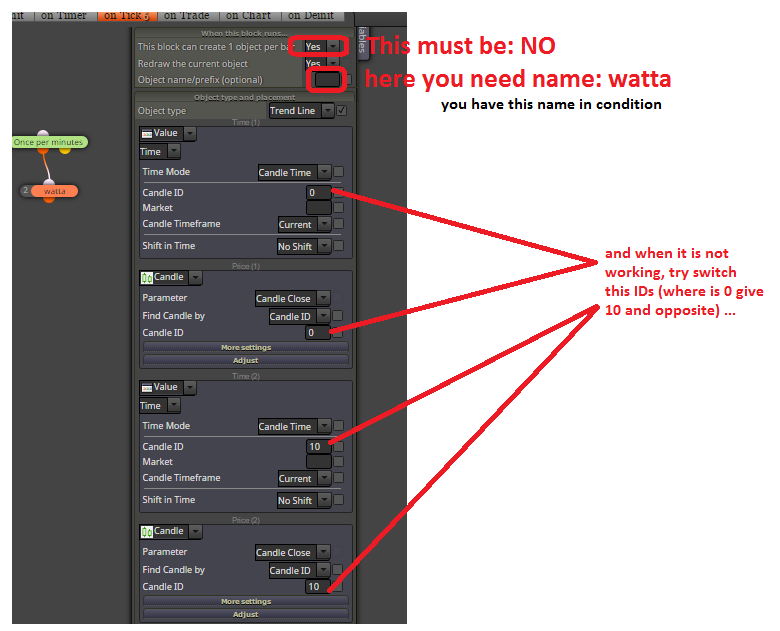
you forget give name for your "watta" in block settings, and you need also parameter:
This block can create 1 object per bar: set to NO
...
I tried it sometime in past and it was working for me 
you forget give name for your "watta" in block settings, and you need also parameter:
This block can create 1 object per bar: set to NO
...
I tried it sometime in past and it was working for me
@YOSEF ... you can change in conditions to candle ID 2 to 1 and 1 to 0 ...
@haliloo ... try change (switch) Time coordinates in creating trendline and also create this trendline with ray
hi, you can start with this and step after step add&try your next conditions:
https://fxdreema.com/forum/topic/4233/example-trendline-ea
Here I show you how to work with trendline.
Use this example only with Demo account and learn perfectly how it is working. I am not responsible for your money losses.
https://fxdreema.com/shared/Q13po8uvc

In example I will open trade on 4 possible situations:
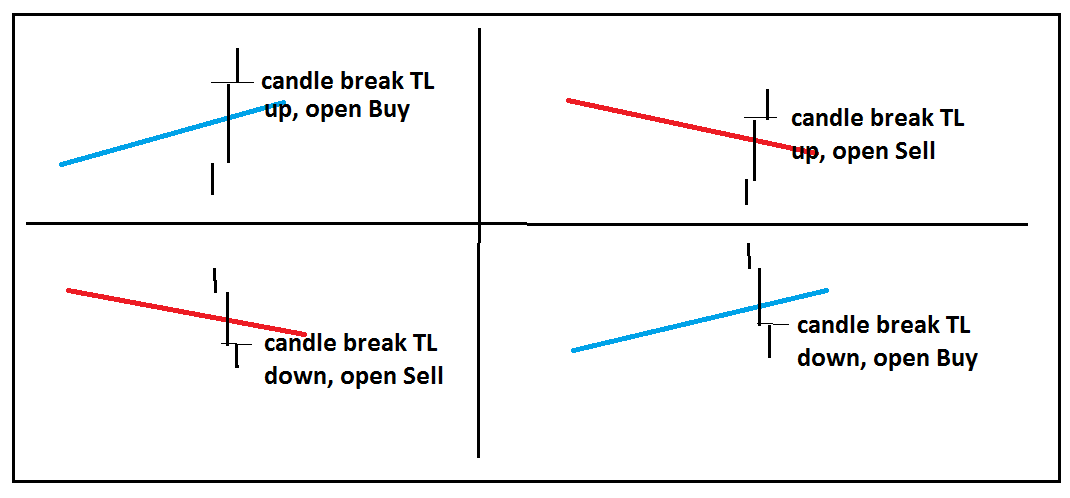
you need create trendlines manually (for this example, but you can do this also automatically with EA using buttons, check my previous tutorial how to work with buttons)
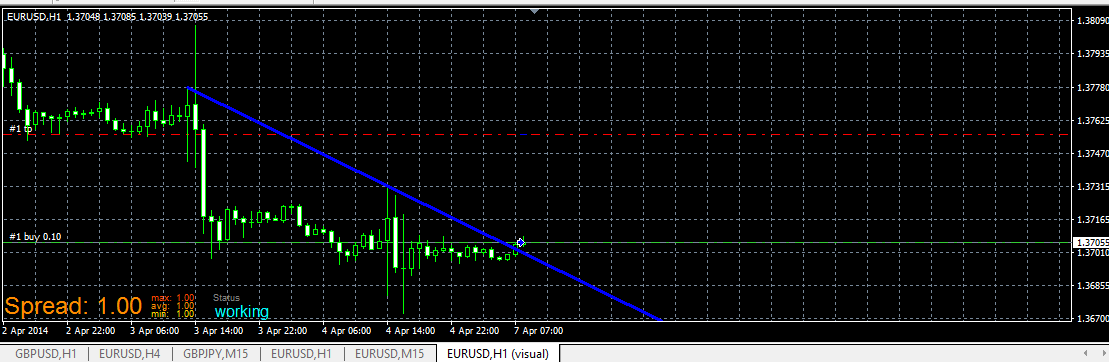
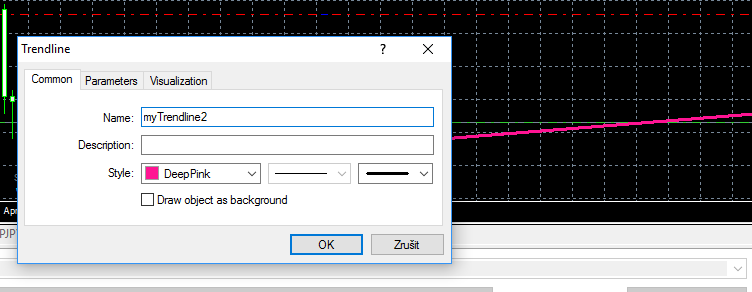
in EA give name for this trendline in condition, and also the same name in chart for your trendline:
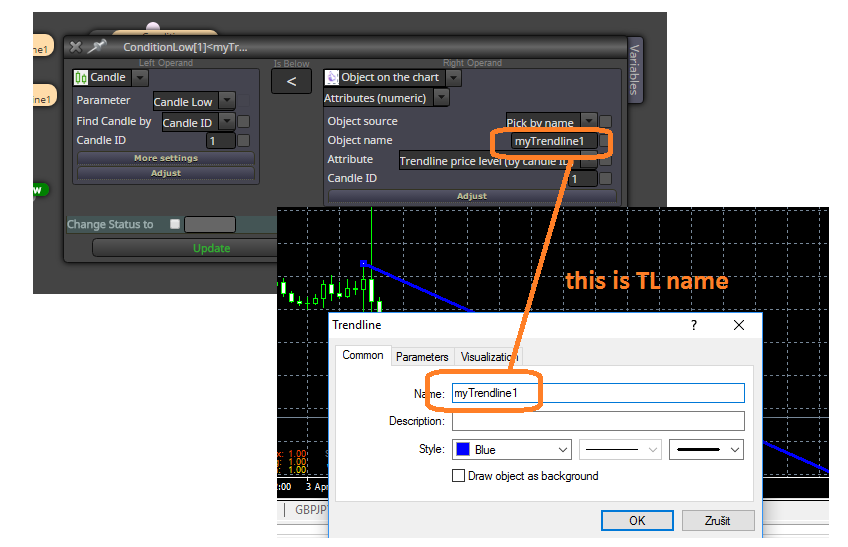
and this is live example:
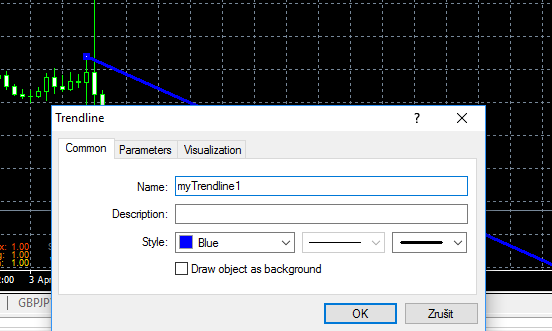
dont forget, right name for trendline in chart:
trade when price break your TL from bellow above (buy based on conditions for myTrendline1):
or Sell for myTrendline2:
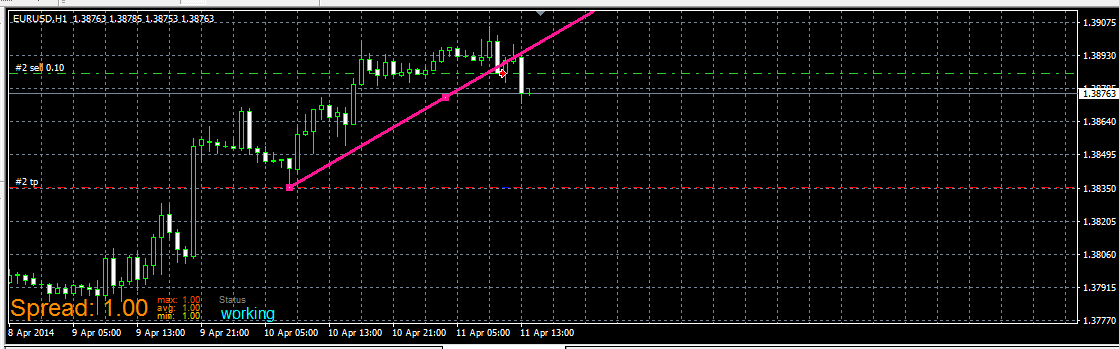
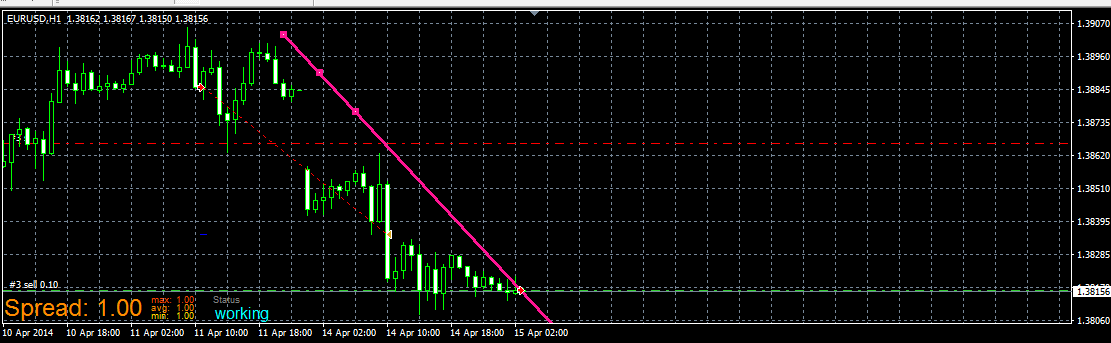
and when you place myTrendline2 (for Sell trade) above price, you wait for Sell when it break it from bellow, like this:
you can improve this example by other things, like delete TL after trade is opened (to prevent open another trades when your first is closed) or other things ...
have a fun
if you need opposite conditions, just reverse blocks between buy and sells or change parameters 
psar is value --- dot on the chart is value and it can be above or bellow current price
compare this psar value with current price, like this:
current price > PSAR (buy condition? because PSAR is bellow price)
current price < PSAR (sell condition? because PSAR is above price)
with stochastic it can be like this:
https://fxdreema.com/shared/0XVVRqU8d
dont forget trying and learning stuffs with that way - try and learn
all you described can be easily done, behind this closing can be trailing (and ofc. missing block for filtering - once per bar - daily if you will one trade per daily candle - placed before block for opening trade), look here (trailing is off, you can turn on if you will) :
https://fxdreema.com/shared/f3F0AWBF
it is also example how to make closing on opposite situation with period 10 for highest/lowest ...
this block is working like Check, next action you need connect after block (closing trades, and other what you will do) ... in block are filters, you can set only for buy trades or only for sell trades, group, market, and also trades with some minimal amount of profit (for MT4), next you select if you will compare pips or money ...
EA stops for n minutes, try to working with blocks in Time Filters, I recommend you first try how are this blocks working (one after another, you can observe behavior when you connect something after this block, like Trace, or creating objects on candles) ...
have you tried block Check profit (unrealized)?
hi, from my view, 1 day training and than going to make more complex EA is not enough, but how help you ... firstly try goes through all available stuffs here, that is help:
https://fxdreema.com/help
examples: https://fxdreema.com/examples
try to figure out how are stuff working, which values are compared, try to look for some tutorials:
https://fxdreema.com/forum/category/4/Tutorials
... try to find in forum if somebody else is not asking for psar indicator and how to work ...
try make easy things as first and try every thing on chart with visual tester (also use block trace to trace values) ... when you are complet with easy stuff try to add something and look what it is doing or if it is working
... look also for my answers, sometime I share working examples ...
and also share what you are trying to do, when you share, somebody here tell you what you are doing wrong
for this indicator I see fibo levels stored in buffers, that means you can use buffers, check tutorial 06 how to import indicator into My indicators or help section where is also describtion about my indicators:
https://fxdreema.com/help/working-with/custom-indicators
https://fxdreema.com/forum/topic/4208/tutorial-06-my-indicators-in-fxdreema
Hi, I looked at your indicator and buffers are ok, they must working with fxdreema,
but arrows are not in buffers, they are only as Objects on the chart, in that case you need working with objects on chart (which is not easy) or buffers logic because object appears on some buffers combination, that means when is there arrow some combination of buffers are meet. I sugest you working with buffers.
Dont forget import your indicator into My indicators using this tutorial or help:
https://fxdreema.com/forum/topic/4208/tutorial-06-my-indicators-in-fxdreema
https://fxdreema.com/help/working-with/custom-indicators
Here is my goodness to help you and this is working example with your indicator:
https://fxdreema.com/shared/mkwESX6Tc

Notice: This is not proved EA and is not prepared for real trading. Test it only with demo account.
All you are doing is your own responsibility, not mine.
How to make price PullBack EA.
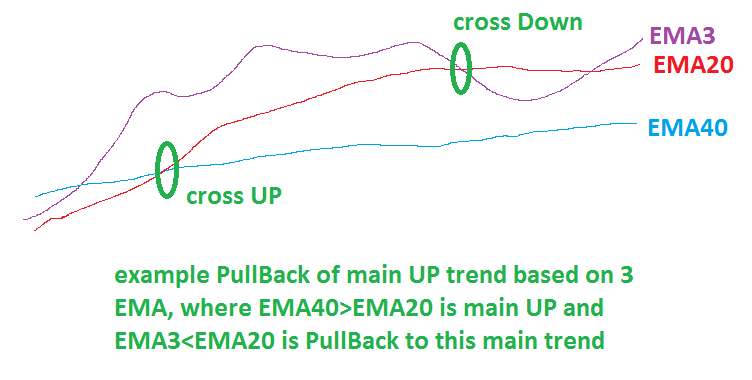
It is a lot of meanings what price PullBack can be, here is one of them based on 3 exponential moving averages:
and here is my example of EA in fxDreema how to make this one with more additional settings:
https://fxdreema.com/shared/1IpxvLruc

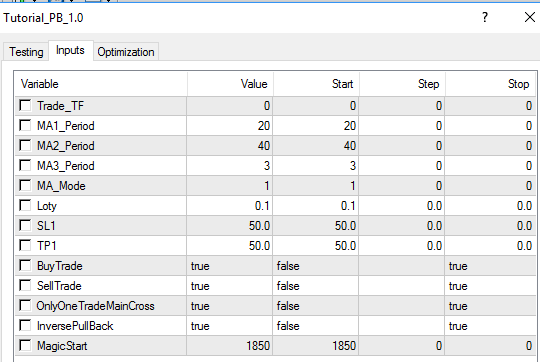
I added few next options, like "OnlyOneTradeMainCross" if true, only one trade is taken on main cross and after that wait for next main cross
EMA20 x> EMA40 for main UP (buy)
EMA20 x<EMA40 for main DN (sell)
if OnlyOneTradeMainCross is false, more trades are opened on one cross and for simplify cross is not needed, only condition EMA20>EMA40(buy), or EMA20<EMA40(sell)
next option is InversePullBack, this option is probably bad named, but when it is false it wait for cross: EMA3 x> EMA20 and next condition EMA3>EMA40 for buy
when it is true pullback for buy is when EMA3<EMA20
With "BuyTrade" or "SellTrade" selected as false can be trading buy/sell disabled.
These additional options shows you, how to make more alternatives for EA easily switched in EA settings.
Default EA settings for above described strategy:
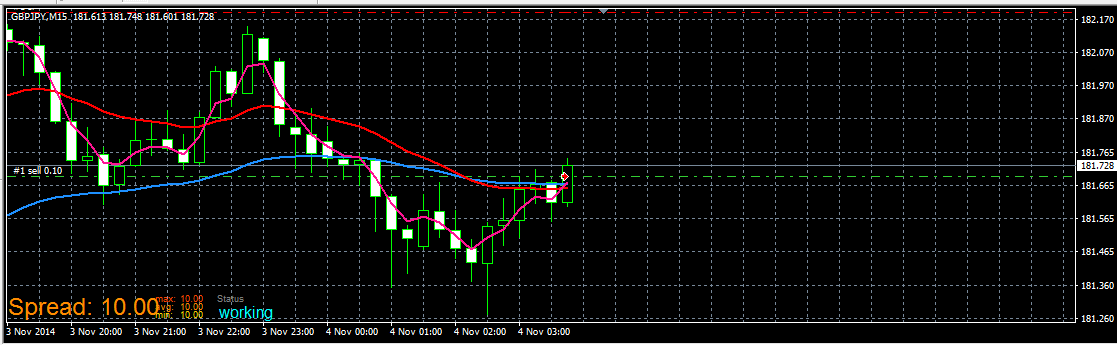
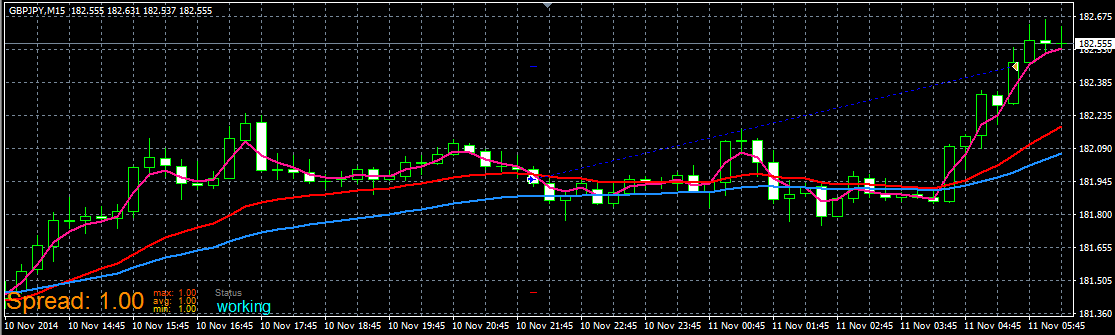
Demo trades from EA:
start of Sell
completed Buy:
In other tutorials you can find how to work with buttons. Using buttons you can create this EA for better manual control.
have fun!
in my opinion this can be made only manually in code using enum structure
https://docs.mql4.com/basis/types/integer/enumeration
I am not sure if you will do that (maybe exists something easier) ... but this can be way:
in top of code you place something like this (manually):
enum USE_INDICATOR
{
movingAverage,
rsi,
macd,
adx
};
in input parameters (again manually):
input USE_INDICATOR useIndicator = movingAverage;
after that you can make case switch (manually):
switch(useIndicator)
{
case 1: { //code and functions for calling rsi }; break;
case 2: { //code and functions for calling macd }; break;
case 3: { //code and functions for calling adx }; break;
default: { //code and functions for calling moving average }; break;
}
........
........
you see how crazy it can be, but you can try ...
I think, it is better creating few separated EAs with fixed indicators in fxdreema, give for each EA right name to demark and start with optimalization for each EA, results into excel and there you can make own form of sorting and comparison results from optimalization ....
generate mq code and import it to your projects from this link:
https://fxdreema.com/shared/1xokGRsgc
dont forget click between sections "on Tick" and "on Trade", both are used
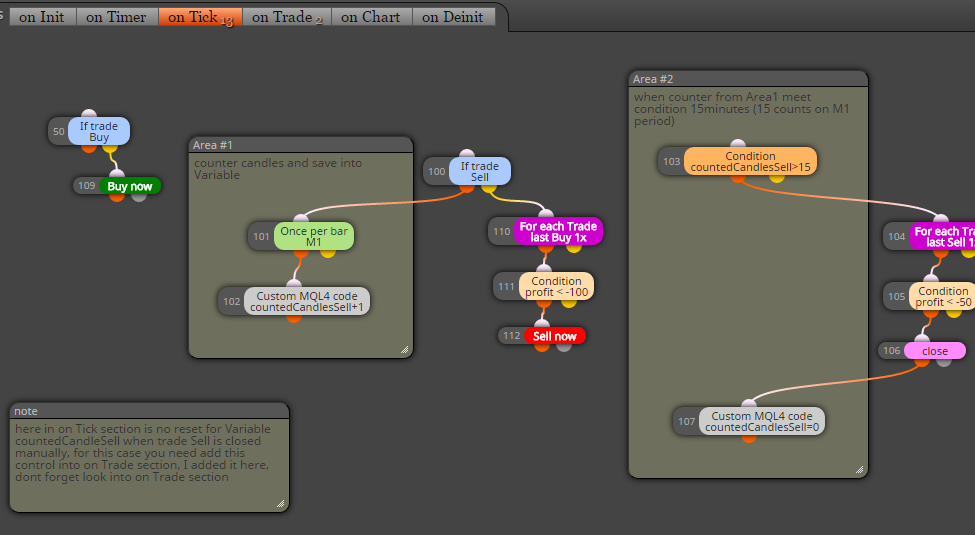
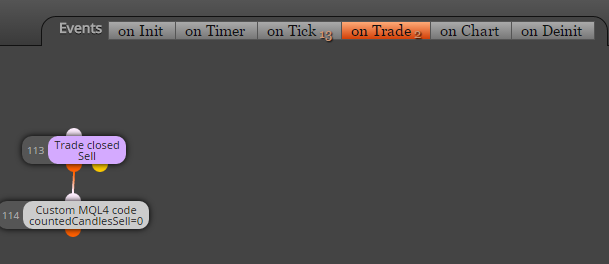
also 1 variable:
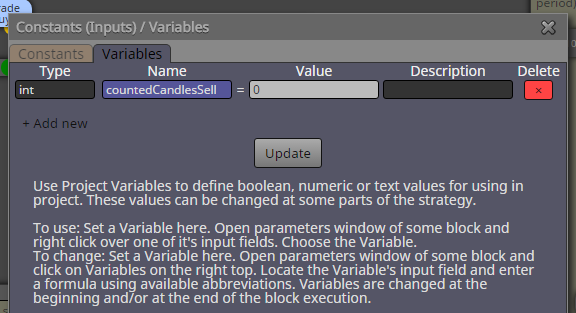
for opposite situation create another one variable ...
hope you understand it
check tutorials about that, there is example how to work with this kind of indicators
https://fxdreema.com/forum/category/4/Tutorials
tutorial 07
that is question more to you, what will you or your system accept (in case if your broker offer slippage control)
because if you will enter trade at high spread (this can you also filter, when spread is more than you will have, EA must not enter trade), but if you will enter at high spread, if you and your system can accept high slippage (in other words, you can accept your trade on other price as requester offseted with some amount of pips depends on actual slippage) than you can have slippage also 100 (that is 100 pips :D), but if you will have slippage maximal 10, you enter this number ....
in most cases slippage 4-10 is satisfactory
note, a lot of brokers have not this slippage option, so only way how to detect potentially slippage is through spread (if your broker offer for EU spread 0.5-1.2 in time with normal volatility, and suddenly is spread >2, this can detect high volatililty and your EA dont enter)
slippage is not spread, spread is spread ...
slippage is something what is broker not guaranted to you, it happens in ECN accounts (also normal accounts), when big volatility is here (news) and you place Sell on Bid price 1.1000 (when is spread 15, for this example Ask is 1.1015), your order must not be filled on this Bid price, can be filled on 1.1008 or 1.0992 (when slippage is +-8) .... your Buy order is normally filled at 1.1015 (spread 15) but when is slippage +8, will be filled at 1.1023 ...
back to your question, when you give into EA slippage, 4,10,20, all depends on your broker if he is guaranted slippage, when is, your order will not be filled if slippage from broker is > your in EA, but when is not guaranting, order will be filled on slippaged price and doesnt matter what you have in EA ...
