fxDreema

    • Register
    • Login
    • Search
    • Back to the main page
    • Categories
    • Recent
    • Tags
    • Popular
    • Search
    1. Home
    2. Sauce
    3. Posts
    • Profile
    • Following 0
    • Followers 1
    • Topics 5
    • Posts 107
    • Best 0
    • Controversial 0
    • Groups 0

    Posts made by Sauce

    • RE: TP hit.. move stop loss to break even

      @bk7 so basically I need to adjust stop to breakeven when price has reached 1:1 in profit, there is no set profit target. The take profit is when price closes below (buy trade) or above (sell trade) the 21EMA. My project is 3 separate strategies all in one, keyword being separate (different group #'s).

      Basically, what's the best way to set a stop to breakeven upon reaching +1:1 in profit on an order with a conditional close? (close below/above 21EMA). If you need more info, I can provide a detailed explanation/diagram, but don't want to make it more complicated than necessary. Thanks for your help @bk7 !

      https://fxdreema.com/shared/oJIZTRWMd

      posted in Questions & Answers
      Sauce
      Sauce
    • RE: TP hit.. move stop loss to break even

      @l-andorrà thank you, as always, greatly appreciated!!

      @bk7 so I have the orders grouped separately so that basically each buy/sell action is it’s own (different saved EAs too). Can I use the breakeven block via On Tick tab? Trying to figure out a way that when price has moved 1:1 into profit it moves the stop for Group #2 trade to break even, just not sure what the settings would be?

      posted in Questions & Answers
      Sauce
      Sauce
    • RE: TP hit.. move stop loss to break even

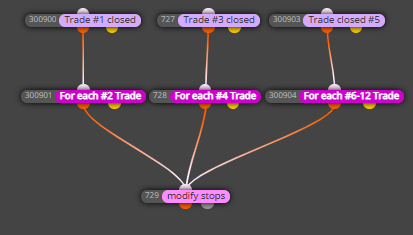
      @l-andorrà thanks, but it seems it doesn't work even for the ones that are separate/single groups already (see Trade #1 closed > For each #2 Trade > modify stops (b/e))

      0_1613760618604_2114735f-d036-47fc-be0c-38d403dae177-image.png

      @indaplace2be said in TP hit.. move stop loss to break even:

      so my EA opens two positions when the conditions are hit... 1st has a TP the 2nd has conditions for closing.

      how can I make my 2nd position move its stops loss after the 1st trade hits its TP?

      @indaplace2be did you ever figure out a solution? I have the exact same issue, TP1 closed and I want to move my conditional TP2's stop to breakeven.

      posted in Questions & Answers
      Sauce
      Sauce
    • RE: TP hit.. move stop loss to break even

      @l-andorrà thanks for advice, yeah I just wanted to make sure the On Trade tab structure was correct. I'm wondering if it's because I have the % from stop loss as 100%, should that be 0% to make it breakeven? (don't worry about the rest of the project, its too complicated haha)

      For example, I've noticed that when Group #1 trade is closed, the stop loss for Group #2 trade is still at it's original stop loss and has not been moved to breakeven (I guess it doesn't matter that much since I have a different EMA cross profit stop coded so it would closed in profit before reaching breakeven again, but the fact that it isn't moving bothers me)

      posted in Questions & Answers
      Sauce
      Sauce
    • RE: TP hit.. move stop loss to break even

      @l-andorrà I tried creating the On Trade tab blocks you suggested, but it isn't working correctly for me. I'd like to do as this topic says, my EA opens two trades with different take profits and I want to move the 2nd trade's stop loss to breakeven once the first trade is closed. There are multiple buy/sell actions with different strategies, but for each type of trade I'm looking to have it move the 2nd half of the trade to breakeven once the first half is closed. Thanks!

      Here is my project: https://fxdreema.com/shared/Q2gMvw2O

      posted in Questions & Answers
      Sauce
      Sauce
    • RE: Avoid trading correlated pair

      @miki lets say we are currently trading EURUSD. I do not want to enter any new trades in any pairs of EUR or USD until this trade is exited. That means even if a buy/sell condition occurs, it should be ignored on any EUR or USD pairs to avoid over-leveraging on one currency pair.

      @l-andorrà suggested using "if order/trade" block, but wondering if there's an easier way since that method would require a specific EA for each specific pair, I was looking for a way to set that as a parameter so it can be changed in expert advisor inputs on each chart instead. Is there a way to make it so that instead of typing every combination of EUR and USD pairs, I could just do a one all by simply saying "EUR" and "USD" ? 0_1612499847391_763a583c-a73a-474f-b32a-ba35a8814a05-image.png

      posted in Questions & Answers
      Sauce
      Sauce
    • RE: Avoid trading correlated pair

      @l-andorrà thanks for trying! I wonder if @miki could help on this one?? (appreciated miki's help on my CSM project)

      posted in Questions & Answers
      Sauce
      Sauce
    • RE: Avoid trading correlated pair

      @l-andorrà is there any way to make this an input that can be edited on the chart expert's properties rather than FXdreema? (I don't see the checkbox that's usually next a parameter as input)

      I ask because I want to set this up for all 28 major forex pairs that I'm scanning, hence it will be a lot of typing of symbols. Is there a better way to do just all EUR pairs and all USD pairs for example, or do I have to write out all of the pairs specifically?

      posted in Questions & Answers
      Sauce
      Sauce
    • RE: Avoid trading correlated pair

      @l-andorrà I'm looking to do something very similar so I'll just reply here rather than make a new thread. Not sure if what you mentioned above will work, I was wondering if a "if order/trade" block would work instead?

      Here's what I'm looking to do... lets say we are currently trading EURUSD. I do not want to enter any new trades in any pairs of EUR or USD until this trade is exited. That means even if a buy/sell condition occurs, it should be ignored on any EUR or USD pairs to avoid over-leveraging on one currency pair.

      (example: I've had times where my bot Buys EURUSD, GBPUSD, NZDUSD, AUDUSD which makes me too dependent on USD)

      posted in Questions & Answers
      Sauce
      Sauce
    • RE: Tutorial 08 - Candle Formations

      @miro1360 Is there a way to separate bearish pin bars only and bullish pin bars only? Like you have made for Bullish Engulfing and Bearish Engulfing separately.

      For example, if a pair is trending downward and I'm entering short, I'm only looking for a bearish pin bar, not bullish pin bars. Thank you so much for this project!

      UPDATE: nevermind! I just realized it separates all in one already. thanks again for these pattern indicators!

      posted in Tutorials by Users
      Sauce
      Sauce
    • RE: Adding custom Currency Strength Meter indicator

      @miki my apologies! I found the error... totally my fault. I added the indicator to the chart and forgot to make OutputGlobals to true instead of the default false. Works now! Thanks again, my apologies for the confusion!

      posted in Questions & Answers
      Sauce
      Sauce
    • RE: Adding custom Currency Strength Meter indicator

      @miki okay, I've added that and re-tried however it still isn't alerting, not sure what else I'm doing incorrectly, sorry!

      posted in Questions & Answers
      Sauce
      Sauce
    • RE: Adding custom Currency Strength Meter indicator

      @miki

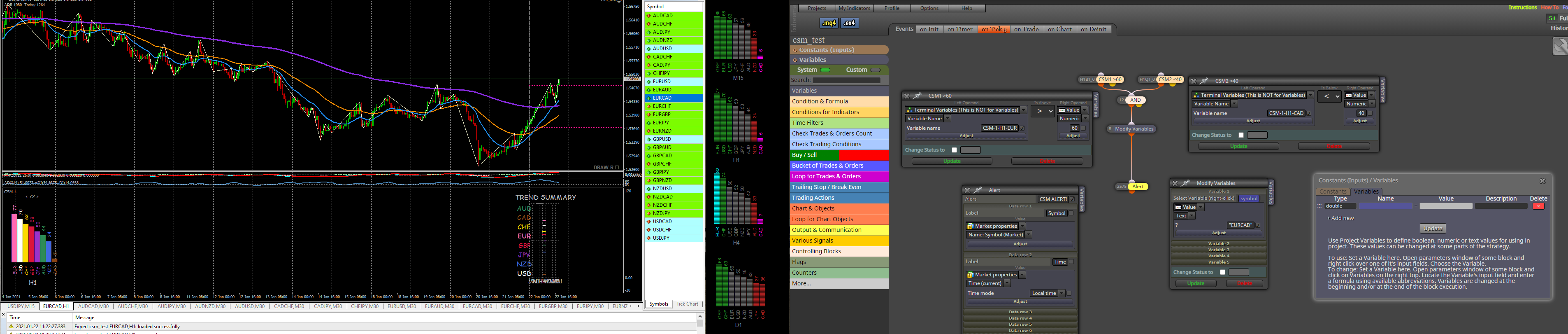
      0_1611332638907_b900b04a-52a9-4375-ade2-aaee5ac366d1-image.png
      Not sure what's incorrect, I'm not receiving any alerts. I'm missing something because my other EA's alerts are working fine.

      You can see in this example, EURCAD should be alerting since EUR >60 and CAD <40.

      Let me know if you see any errors, thanks!

      posted in Questions & Answers
      Sauce
      Sauce
    • RE: Adding custom Currency Strength Meter indicator

      @miki I can't seem to get that to work as an alert, can you share that project? I've tried recreating including any variables but I'm afraid I'm missing something, not sure if it's how it's integrated on the chart on MT4 or I'm missing constants/variables. Any directions are appreciated! Thanks!!

      posted in Questions & Answers
      Sauce
      Sauce
    • RE: Adding custom Currency Strength Meter indicator

      I would like to add a condition where all open trades are closed every Friday at 23:54:50 (or just before close). This is to avoid gaps over my stop loss which have been messing up my EA. I've tried several ways, but haven't figured out the correct blocks to use.

      posted in Questions & Answers
      Sauce
      Sauce
    • RE: Adding custom Currency Strength Meter indicator

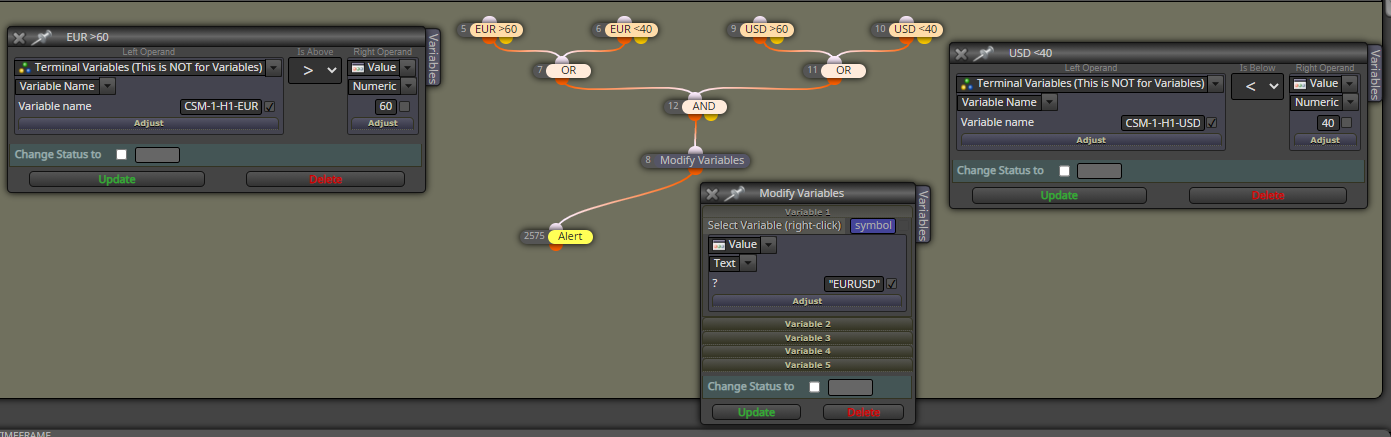
      @miki okay, so I've tried multiple times and trying to isolate the problem, but it isn't sending an alert out when it should be?
      I've tried isolating the problem but not sure what's missing in order for those conditions to trigger the alert?

      Also, with this setup using OR/AND... isn't it possible that it could send a false alert with EUR<40 and USD<40? We're only looking for a >60 and <40 to pass or vice versa <40 and >60.

      Thanks again for the help, hoping it's something minor that I'm missing! Here's a screenshot of the isolated project down to just the CSM scanning:
      0_1610423840504_284cdec3-6b1c-4879-9cd9-06a6d2534143-image.png

      posted in Questions & Answers
      Sauce
      Sauce
    • RE: Adding custom Currency Strength Meter indicator

      @miki no worries! That is quite alright, thank you so much for figuring this out for me, very excited to give it a go!

      posted in Questions & Answers
      Sauce
      Sauce
    • RE: Adding custom Currency Strength Meter indicator

      @miki Oh boy, this looks like fun, haha. Will it work if on each condition and the modify variables blocks, I click the checkbox/input parameters for optimization and just type the appropriate label (i.e. CSM-1-H1-AUD) on each chart and change the magic number?

      (Trying to avoid the mammoth project!) 😂 thanks again for all your help Miki!!

      posted in Questions & Answers
      Sauce
      Sauce
    • RE: Adding custom Currency Strength Meter indicator

      @miki thank you so much!!

      1. Is there a way to set that condition so that it finds any variable >60 value on H1 timeframe?
      2. How can I add on a 2nd condition for any variable <40 on H1 timeframe too?

      Example, on H1 timeframe say AUD = 64 and JPY = 25, can we have that filter out a >60 condition (as above) AND a <40 condition for the other currency so that only pairs that have currencies with a >60 and a <40? Thus, AUDJPY would pass with 64/25 combo.

      Another example using your screenshot above, it currently would only pass if EUR >60 on H4. I'm looking for a way to have it pass any pairs on H4 with a >60 and <40 pair.

      Hope that makes sense! And thank you again so much!!

      posted in Questions & Answers
      Sauce
      Sauce
    • RE: Adding custom Currency Strength Meter indicator

      @miki @l-andorrà Finally figured out what @miki meant by this type of .CSV output file, haha. I'm looking to use H1, H4 timeframes with numbers that are >60 or <40 to filter only pairs that have a strong/weak correlation.

      Example: Condition passes if a pair has H1: >60 and <40.
      So only these pairs would pass: AUDJPY(65/37), CADJPY(78/37), CHFJPY(64/37), EURAUD(27/65), EURCAD(27/78), EURCHF(27/64), GBPAUD(28/65), GBPCAD(28/65), GBPCHF(28/64).
      0_1610277397813_1f2ddaa8-aea2-4b77-8136-0fcadae53cdb-image.png

      How would I create this condition in FXDreema? I did find these instructions below on how it can be integrated using a CSV file or using Global variables, but this is beyond my knowledge...

      0_1610277933344_e1ed5525-059d-4492-9a23-21d21849848a-image.png

      CSM indicator instructions: https://www.forexfactory.com/thread/852082-csm-indicator-hanover
      Shared project link: https://fxdreema.com/shared/Ju6jYxVbe

      Thanks for the help!

      posted in Questions & Answers
      Sauce
      Sauce
    • 1
    • 2
    • 3
    • 4
    • 5
    • 6
    • 4 / 6