UPDATE time, write here if you have problems!
-
ERROR REPORT 2017-09-04!
Has worked fine all night for .ex4, until about CET 07.10. Still not working at 18:20. This error occurred...
New error: undefined - this block model doesn't exist (used by block 2)
-- which is a simple PASS block.
-- ALSO, ALL CONSTANTS DISAPPEARED in the EA I was working on!
However, says: 24 Constants (Inputs) before trying to open the dialog.Hope you can make them visible again, and that all functions again very soon. Was a lot work.
-
Sometimes because of unknown reasons the project may fail in strange way, but you can always click on the previous point in History. Each History point is a whole independent copy of the project. Will this work for you?
-
@fxDreema Wow! History did the trick. My EA is back. Thank you.
I didn't know of the "History" function. Very helpful. Good protection.
I could have been waiting the whole month for you to fix compilation.
However, compilation works now, since I back-rolled 4 steps in the History.
Very good function. Thank you. Continue with your good work.

-
@fxDreema Please do not forget to solve the still remaining problem of worse results out of the same EA after the last big update!
-
@fxDreema The problem still isn't fixed. Did you compare results from before and after the update already? My time is running out.

-
@fxDreema Would you please be so kind to take care of the problem already described several times and not just ignore it?
It is very unsatisfying that I can not continue here after all the time invested.
(But indeed - I should not forget to mention what a great tool you've created! Besides the current problem, there's no doubt about that.) -
download older offline version of fxdreema and create project in that offline version .... it is older, so here are not new blocks and updates ... but few people still use it ...
https://fxdreema.com/index/desktop/download/fxdreema_install_build_100.exebut I need note it again, dont trust metatrader tester results when you are using candle ID 0, ticks here are modeled with some math and this can be different for "strict" and no strict mode and even different when oop in code is used ... you can trust only forward demo tests (trading in demo) or than live results
 ... tester use mostly in visual mode and when are you sure what are you doing with candle ID 0, than run it forward ....
 -
@miro1360 Thanks for that good idea and the link, Miro.
I really thought, I could localize the cause of the problem a little bit. But unfortunately, the desktop version doesn't work on my two computers.
Tested on Windows 10 and Windows Server 2012 R2.Even the easiest EA containing "No Trade" and "Buy" (see picture, I didn't find "share copy" or anything like that) results in no trades at all. Same EA from online version trades.
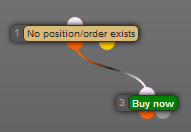
Also, I couldn't import (error pic 1) or copy&paste (error pic 2) any EA's:


@fxDreema So there still is an action urgently required from you!!!
-
@anse33 said in UPDATE time, write here if you have problems!:
@fxDreema Please do not forget to solve the still remaining problem of worse results out of the same EA after the last big update!
I can fix everything, but first I need to know what is that I need to fix. I don't know why exactly you have different results, in which block is the problem.
I compared the results from those EAs in /examples while the update was still only in my local PC. I did that also to see which one is faster - the EA before or after the update. And I'm pretty sure that in most blocks everything works the same. But it is also very possible that I missed something somewhere... unfortunately I don't know where.
Ok, you know your EAs best. When you backtest them, does everything works as expected or something is clearly broken. Because you know, one of the small things I fixed was that I used NormalizeDouble for some values. The difference before and after that variable is something like 0.0000000001, but in some situations this can change everything. What if the EA before was wrong and now the new one is more right? This is also possible.
-
@fxDreema I posted this link several times:
https://fxdreema.com/shared/k7s6vOlzc
Also, I described the problem several times in this thread.
From my point of view, the problem is in the block "Indicator moves within limits". I tried to localize the source of the error as far as I could. But I can not compare the block compiled before and after the update. So you have to do it.The EA is not clearly broken now. The results differ. Maybe, it was "more wrong" before and is "more good" now. If this is the case: Please tell me what to do, to receive the results I've had before. (If is is possible in any way.) Because this always was better. In every backtest and also in demo trading.
-
Help:
The Magic number is not visible in the set-file after compiling- not active?How can I see the magic number?
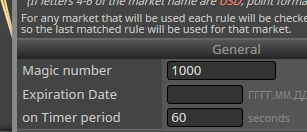

-
it is visible in set file:
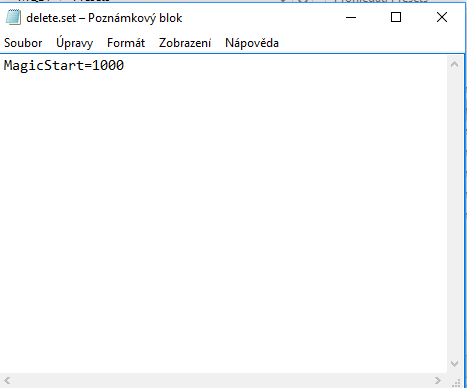
-
...it works perfect!
-
Hello @fxDreema I hope you can help me... since the last update my EAs started to show long weird numbers... I've spent several days trying to solve this but without luck..
I posted this issue in bug reports.@TecnoTrader said in NormalizeDouble not working... long flating numbers issue...:
Hello everyone, I'm asking for help because of this issue that manifested lately that is getting me crazy.
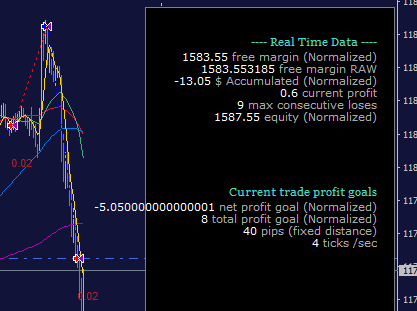
Since the last update of fxDreema my EA started to show long numbers in the info panel, like 9.140000000000001I searched the forums and tried all the solutions mentioned like using using the function NormalizeDouble() but that only worked with some cases so I could NOT resolve this issue. My variables are in fact of the type double.
I found several references in the forums about fxDreemas' Admin mentioning something about 'strict mode' and the issues related to printing long numbers, we are talking about post from 2015 so this seems and old issue.
I created a shared example to show the problem, even with nomalized doubles this long numbers appear.
Shared project: NormalizeDouble example mt4Any help would be much appreciated!

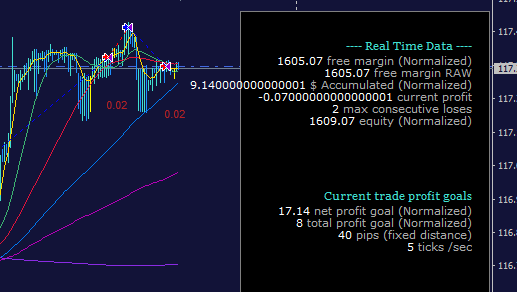
Related forum posts:
@fxDreema said in self updating/refreshing grid, compare two groups of trades:
Yes, there was some error. As you probably know, I was experimenting with "strict" mode, but with it some problems appeared. Then I disabled it and these errors appeared. Now I fixed those errors, I guess, and currently I disabled this "strict" mode, mostly because of some issues when printing numbers. Are you sure about the restore? Note that when I restore some project, it's only data about when blocks are located and their settings. The actual code that is generated does not come with the project itself.
@fxDreema said in self updating/refreshing grid, compare two groups of trades:
I don't know what to tell you, as I also have troubles with this
 Floating numbers are crazy in C/C++, and MQL4 comes from there. NormalizeDouble() is used to cut digits, but sometimes it doesn't work as expected. For displaying data DoubleToString() is used, the input here is a number and the output is string (text).
I discovered that in strict mode if I try to get the Equity, which is some floating number, the result can be some number followed by many random numbers. And if I apply NormalizeDouble to the 2nd digit for example, it still does not cut the number to the 2nd number, there is something like 000001 left at the end. Then if I put (double) in front it appears that everything is ok. But the whole thing becomes something like:
(double)(NormalizeDouble(AccountEquity(), 2))... only to cut some floating number to the 2nd digit. And I'm still not sure that the number is actually cut or I am only hiding the truth
This is for strict mode. Currently I disabled it, because... because. With strict mode people are complaining more from weird looking numbers coming out of "Comment"
While in normal mode at least numbers are outputted in the way they should be. -
halloo FX Dream
let suppose i have 3* long trade in the same time and the total volume is 0.3 lot.
how can open short trade that is equal to 0.03 , is there any block helps me in this case ?
tnks in advanced -
Heey, I just want to buy if a candle close breaks through the highest price of the previous 24 periods. Did I make any stupid mistakes? https://fxdreema.com/shared/9YHJmI31c
-
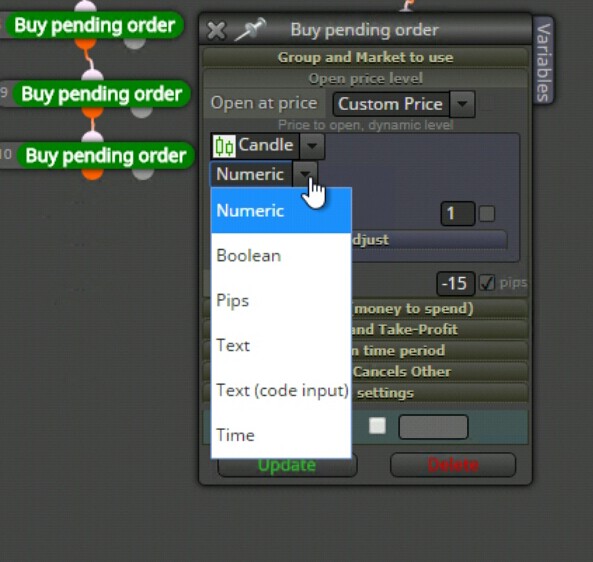
why this happen
-
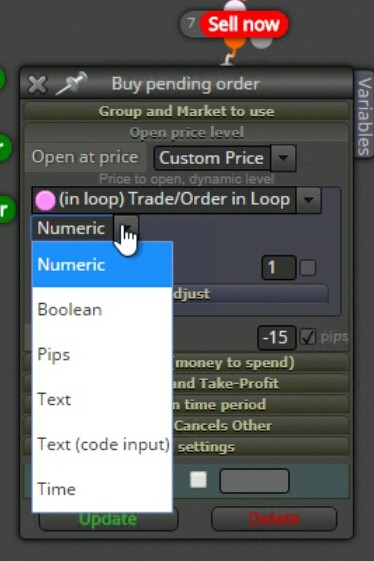
here another problem.
-
https://fxdreema.com/shared/SSLxzcUZ condition block not working
-
Fixed (I believe). By the way I will unpin this topic now, because it was about a relatively big update that happened before, but now everything looks fine with it. If there is a problem now, it is more likely to be related to other small updates that I'm doing from time to time