How to display Labels or Text Input on the Chart
-
I would like to display the following on my chart but am failing. For the Current Market:
1 No of Pending Orders:
2 No of Sale Orders:
3 No of Buy Orders:
4 No of Open Trades:
5 No of Open Sale Trades:
6 No of Open Buy Trades:
7 Current Profit of Open Trades:
Please help me. -
@kekhumbo Hello, I feel bad that you haven't gotten any help for 3 days, so I'll try to help you.

Use block Output & Communication / Comment.
Most of the things you want to display you can find under "Trade Statistics" & "Account". See image...
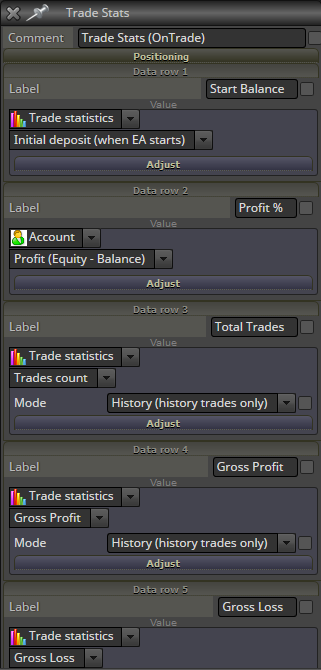
In the second dropdown you can choose things like Now for current open trades or Historical for close trades or count both.
If you place the comments onTick it will be updated on every tick, BUT not during weekends.
If you place the comments onTrade it will be updated only on position modification, which means nothing will be visible, until a trade has been placed, closed etc. I like this method, since it places less workload on MT4 and processors.
You can also use onCart, which will also lessen load on processing, to only when you do something on the chart. When you are not there, nothing is updated.
You can also use onTimer. Just decide how often you want this to update, like once per second or minute.
I believe you can find all of the things you ask for in these menus. Hope this helps. Good luck.
-
How to cut extra decimals off (Draw text) , any idea? ... Custom Block & DoubleToString ?
https://docs.mql4.com/convert/doubletostring
-
Example:
In Comment field replace your "Price"-variable with:
NormalizeDouble(Price,2)
(Where Price is your Price-variable)
Change "2" to how many decimals you want.
The above should show Price: 0.78
Use this principle for all your other variables.
Have Fun Processman!

-
No fun ... Does not work(NormalizeDouble) comment field. And I actually use
"Draw text" block (more features , font type , etc.) ... FXDreema previous version
contained how many decimals parameter for numeric value ... I would like this back.
Sorry my bad english :simple_smile: -
Some Fun anyway... It works for me, even with "Draw Text"-block and formatting. See image how to do it... and evidence it works.

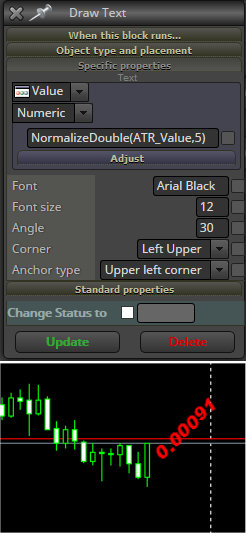
Now, I will agree that lately it seems a bit glitchy, meaning it works, but suddenly it will not work, and then the glitch goes away and it works again. Sometimes I switch Timeframe and it's then not working.
That must be an error in FXDreema, and there is only one man on earth that can fix that: Mr FXDreema himself - Radoslav!
Radoslav has also promised to fix Normalizing for the built in functions, which also seem to have lost its normalization lately, like when I want to show Balance. Sometimes it looks like: 525.1200000001 - which is ugly.
But these things are out of your and mine control.
-
Now is fun , this works and the numbers look better. Maybe not best way
use NormalizeDouble ? ... But this is better than nothing ... Thanks man
-
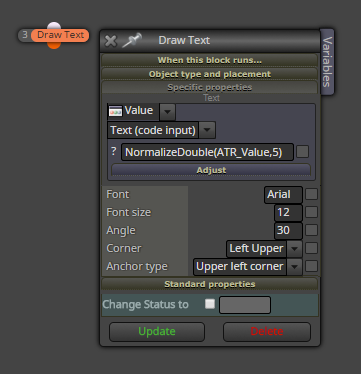
maybe when you use option "Text (code input)" it can be better ...
-
OK , this works too , maybe a better choice ? ... Thanks
-
dfhudfhdi,ufd
