@l-andorrà Hi, i need it working in MT5 because that's where my account is. My guess is that Fxdreema uses the "Shift" for something related to its "Candle ID" functions.

@l-andorrà Hi, i need it working in MT5 because that's where my account is. My guess is that Fxdreema uses the "Shift" for something related to its "Candle ID" functions.
Uploaded the indicator i am trying to use:
0_1559414747342_tirone_levels_x3.mq5
The error will show up as soon as you try to modify/update a single Candle ID parameter. Thanks in advance.
I have had this problem with several indicators that have a "Shift"function, does anybody know a way around this?

Explanation: Whenever i try to change the Candle ID from a condition, it will also automatically change the "shift"parameter from indicators after i close the window, it also does that when i use constants:

Hello i am working on currency strength indicators, and am looking for a way to count every tick up and down separately, but the only way i have found is to add +1 every time the close is equal to the high or low of the current candle (missing the ticks inside the candle). The question is, does anybody know any function i could use to count every tick separately? Or point to an indicator that does exactly that?
Thanks in advance
After some time crafting, the block lists to the left won't unfold when clicked on.
I have to restart the window everytime this happens. I had experienced this before but not as often. Have not tried another explorer yet, but i thought it would be a good idea to report on this.
Thank you.
Whenever i change the Candle_ID space for the indicator attached:
0_1526278505133_afl_winnerv2.mq5
It will replace the "shift" value, with whatever there is on Candle_ID:
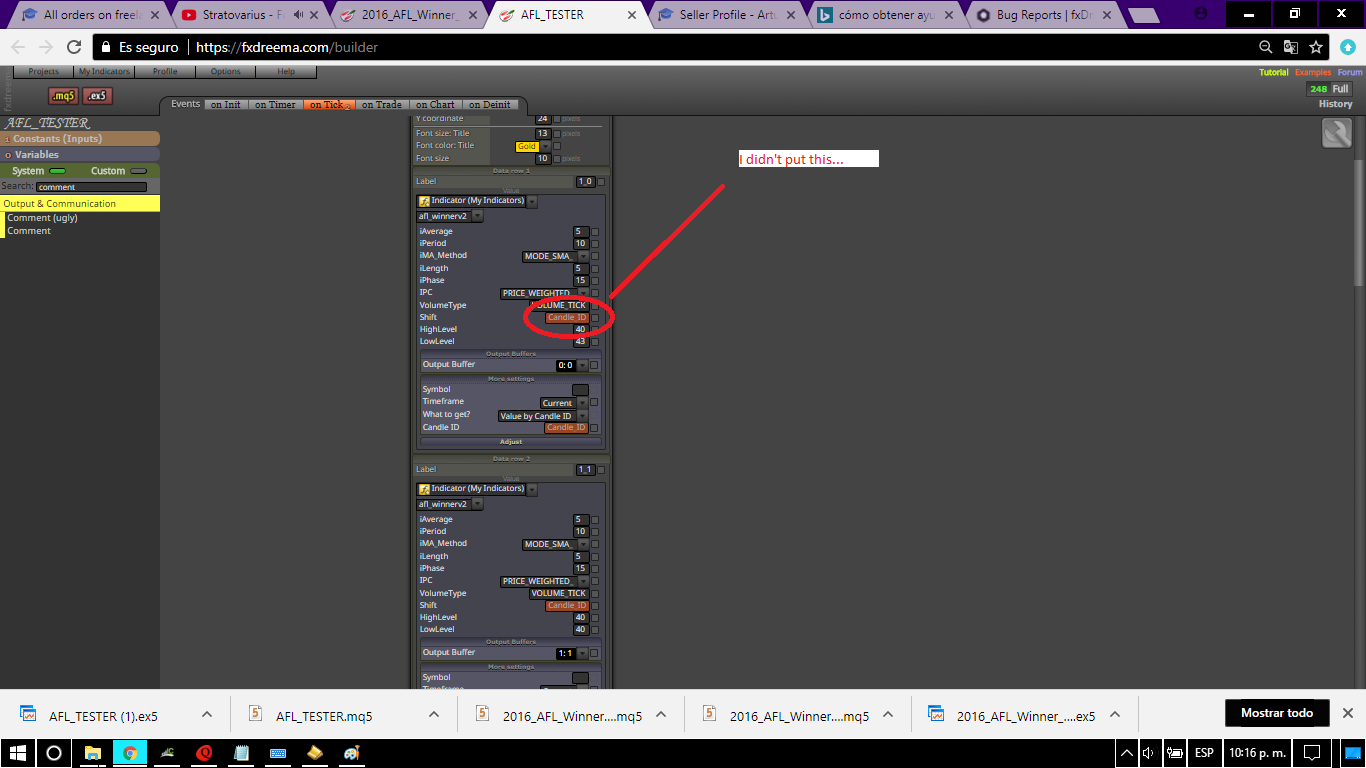
This also happens when manually inserting any value in the box.
Hello, is there a way to send local variables from one EA to another in a different platform?
Greetings! I was not getting this bug before for an old EA!
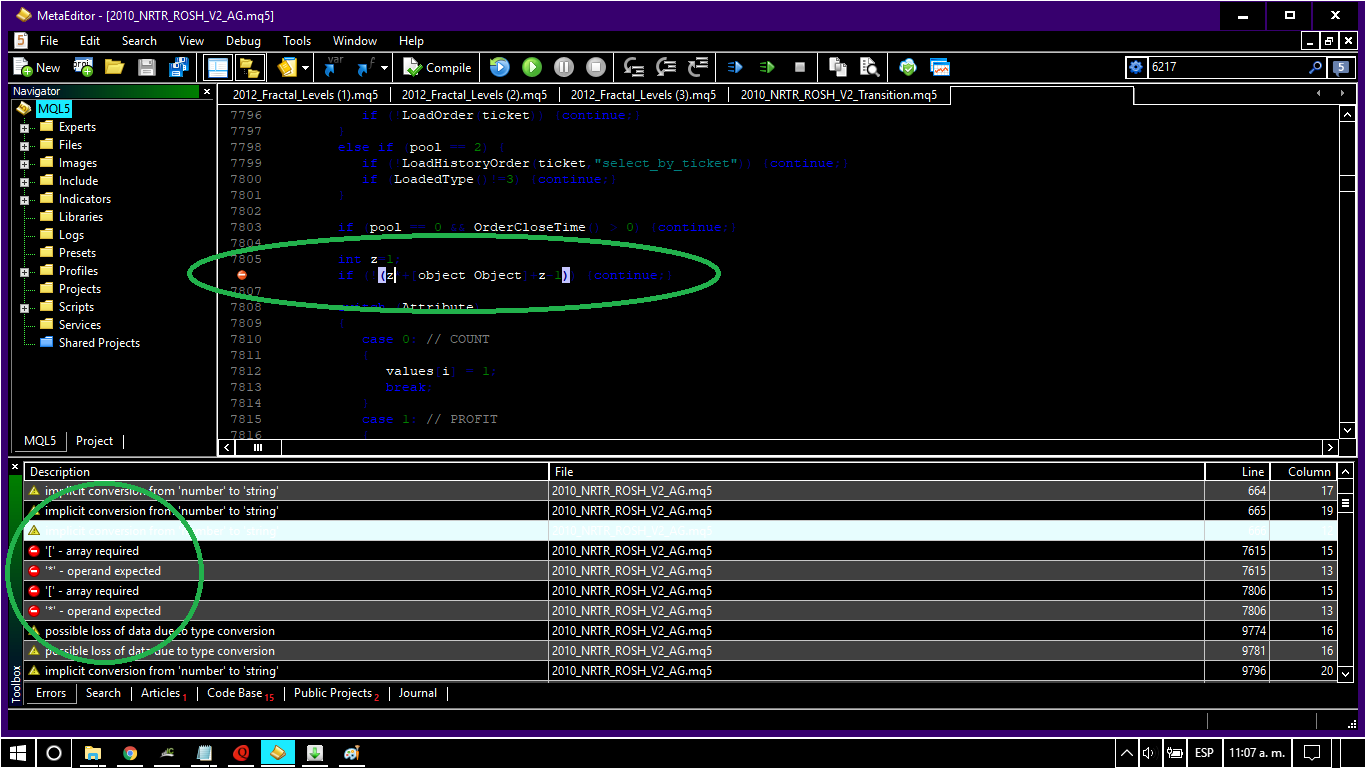
@sirderrick822 That is odd. You can try:
@sirderrick822 Hi, yes you can test with your very own broker's data feed (variable spreads, slippage, and real ticks), MT5 will download them for you. However:
For the EA to show on the adviser section just copy/paste both the mq5 and compiled version to the "experts" folder (note that there are several within).
You can also use 1M bars and simulate "ticks" using elliot-wave-like movements (note that they are not real ticks), this can help with intermedium time-frames.
I preferably use calculations on every open, on carefully made EA's for quick optimizations (the difference between tick tests and these do not vary when done this way), i cannot use hard stops, but they don't work in the long run anyways, only technical stops are O.K.
@fxdreema Nice, this could be used to gather information from various time-frames without cloning blocks 
@miro1360 Nice, this is exactly what i was looking for, you have my many thanks 
@miro1360 I right clicked the time-frame menu and WHOA! The variable menu appeared (feel so dumb now xD).
So if i understand correctly the variable used needs to be int and ranges from 0 to 8 for each time-frame, is this the same for MQ5?
@yalgaar If you want the mean of the high/lows just add the formula blocks at the end of the loop (the yellow conection).
@yalgaar Hi, create a loop with "x" as limit, every round add +1 to the candle ID counter, a condition checks the number of candle ID being checked at that round and after it stores the high/low info it in a separate variables (using the modify variable blocks).
You must think what is the max number of candles you are willing to check beforehand.
Hope this helps If not i am sure savy coders may have a better solution.
@miro1360 Thanks a lot for this information
Maybe you can also point me out on a new question i have had for very a long time (made new topic).
I think this may be asked a lot.
Sometimes i need to create EA's that use multiple-timeframes but need the parameters to be editable to prevent duplication (and excessive work). This would add a lot of flexibility for creation AND for testing/optimization.

A view from one of my projects to demonstrate how big it can get without this option:
https://fxdreema.com/builder/shared/YUoEVLcvb
Thanks in advance