fxDreema

    • Register
    • Login
    • Search
    • Back to the main page
    • Categories
    • Recent
    • Tags
    • Popular
    • Search
    1. Home
    2. Abade69
    3. Posts
    • Profile
    • Following 0
    • Followers 3
    • Topics 33
    • Posts 125
    • Best 10
    • Controversial 1
    • Groups 0

    Posts made by Abade69

    • RE: Drawing a line in another chart

      @jstap Yes! An example to clarify: Chart #1 is "EURUSD_Renko" which is a custom chart I create and attach the EA into. The EA plots different lines for entry, TP and SL of hypothetical pending orders, this helps me visualize the ranges before I put an order. But it is impossible to execute directly on custom charts (MT5), so the EA sends an order to the original live chart "EURUSD" (chart #2) to do this. I have no problem reading or executing on a second chart, the problem is that I cannot draw or update an object on the second chart because there doesn't seem to be an option for any "draw" blocks:
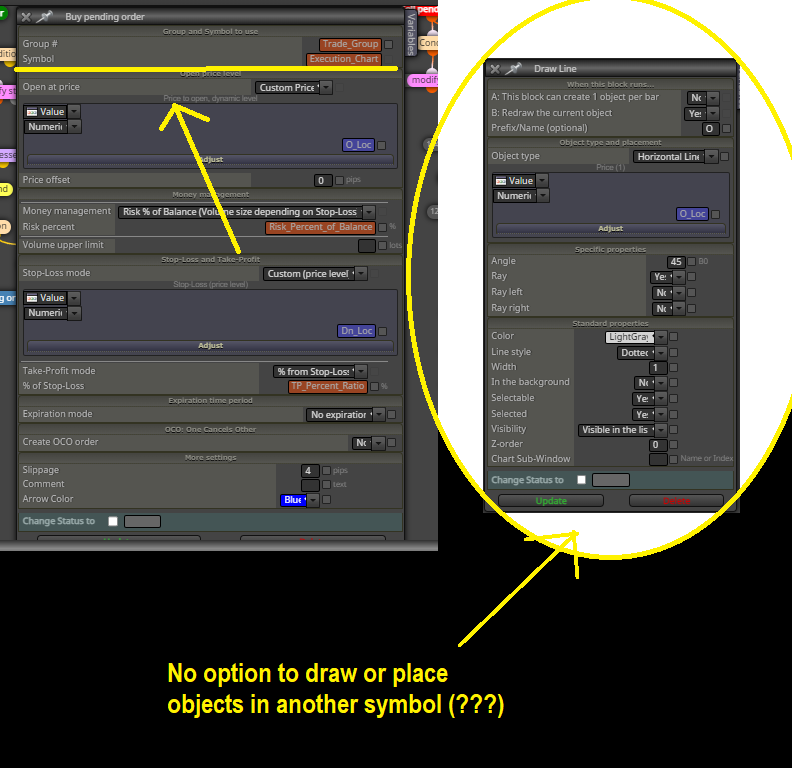
      Draw.png

      I want to be able to analyze/view these ranges/objects in both the custom chart (renko chart) and the execution chart (time bar chart).

      posted in Questions & Answers
      Abade69
      Abade69
    • RE: Drawing a line in another chart

      Hi @l-andorrΓ , thanks for the response, but if I do that I would be able to see the line on EURUSD (or whatever instrument the EA is attached to), but it would NOT draw and update on AUDUSD because there is no secondary "symbol" option in the "draw" block configuration. In other words, it only seems to be able to draw objects on the current symbol the EA is attached to.

      I could use global variables and two EAs to synchronize these objects, but I would like to know if there is a simpler solution that can be executed from a single EA instead of using two.

      This is the EA I try to use: https://fxdreema.com/shared/BUf6SjRVc . It is a scalping tool that uses horizontal level variables and objects (for visualization) to trade renko charts.

      MT5 doesn't allow trading/execution on custom charts directly, but the EA can handle that already. I just need help to synchronize the objects in both charts using the same EA.

      posted in Questions & Answers
      Abade69
      Abade69
    • Drawing a line in another chart

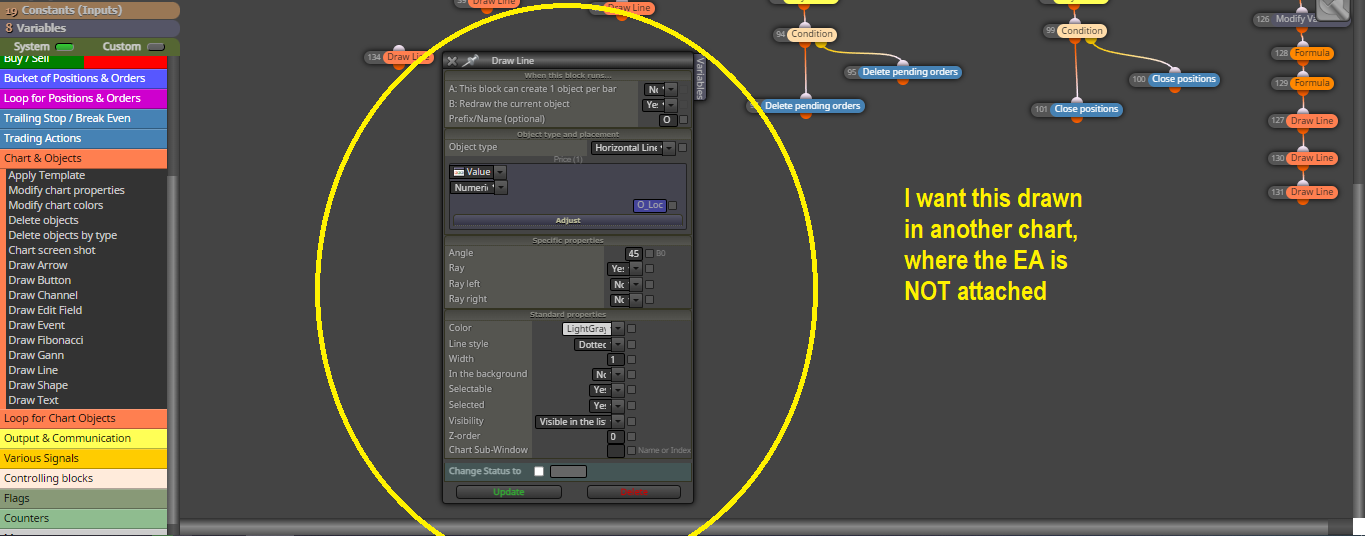
      Does someone know a way to draw a line (or any object) in a secondary chart? I:e using AUDUSD variables to draw a line in EURUSD within the same EA logic. There doesn't seem to be a "Symbol" option like in other blocks.

      Drawing_Line.png

      Thank you.

      posted in Questions & Answers
      Abade69
      Abade69
    • RE: Optimization by mql5 cloud

      Hi!

      a) What kind of strategy are you trying to optimize? (i.e. scalping?)
      b) What's the timeframe it operates on?
      c) What are the type of operations it does intra-bar? (i.e. real-time trailing, etc.)

      In many cases you don't even need anything beyond open price modelling for optimizing (as long as your EA operates once per bar) . It'll save you a ton of time and money.

      posted in Questions & Answers
      Abade69
      Abade69
    • RE: πŸ€” Stop Loss - Middle of Last Candle?

      @davidmcc Always check the "Candle ID" box, that's where the EA is taking the information from.

      Candle ID = 1 means you are reading the last candle information.
      Candle ID = 2 means you are reading the information of the candle before 1
      and so on..
      Candle ID = 0 means you are reading information of the current candle, so the total size will always be zero if you try to read it too early (that's the default value if you leave it empty).

      posted in Questions & Answers
      Abade69
      Abade69
    • RE: How do I use several buffers at the same time?

      @clubdio I believe you need to add an aditional block for your "trigger" signal.

      i.e.: You have your 3 (slower) signals as pre-conditions reading "Candle ID" = 1, then you have your "trigger" which also uses "Candle ID" = 1, so the new block should measure the state before that (Candle ID = 2). this way the EA should not open AGAIN during the same cycle of the fastest reading when the first trade closes after taking profit (which is the problem right now).

      Did I get your idea right?

      Another solution is to catch the precise buffer that triggers the arrow painting, I'll try to do that.

      Edit: I couldn't find it, but the rest of the buffers could be used to mimic the logic of the arrows, or better yet... Creating a MT5 version with the original CCI indicator readings (zero-cross signals) and remove the repainting "feature", it can work exactly the same or even better.

      posted in Questions & Answers
      Abade69
      Abade69
    • RE: πŸ€” Stop Loss - Middle of Last Candle?

      @davidmcc This option brings the same results and it's much cleaner:

      2.png

      MT5 distorts the levels and candles, that's why it may seem a bit off in some places. Hope it works!

      posted in Questions & Answers
      Abade69
      Abade69
    • RE: πŸ€” Stop Loss - Middle of Last Candle?

      @davidmcc Here it is: https://fxdreema.com/shared/mnDuTcAvd

      It will paint a pink line where the mid point of the last candle is. Included execution examples for buys and sells and how to trail it using the mid point, hope it is a good starting point for your EA.

      posted in Questions & Answers
      Abade69
      Abade69
    • RE: πŸ€” Stop Loss - Middle of Last Candle?

      @davidmcc Wait, I'll prepare an example... Are you using MT4 or MT5?

      posted in Questions & Answers
      Abade69
      Abade69
    • RE: Bollinger bands - Not taking orders

      @stlastla Glad it works now!

      MT5 journal section is very detailed and helpful.

      posted in Questions & Answers
      Abade69
      Abade69
    • RE: πŸ€” Stop Loss - Middle of Last Candle?

      @davidmcc You could:

      1. Substract the distance between the candle's high minus the low
      2. Divide this distance by 2.
      3. Sum that quantity to the low of the candle you are interested in.

      This should point out the exact middle. Then in "Stop-Loss" you use "Custom-pip" and insert the variable you are using.

      Keep in mind that the stop loss placement may fail if your entry price is invalid.

      posted in Questions & Answers
      Abade69
      Abade69
    • RE: Bollinger bands - Not taking orders

      @stlastla It seems to be working on my platform, there is nothing wrong with the code:

      6831246b-ac85-47be-b8ee-93f90073ef8a-image.png

      1. Check the "Journal" tab in your platform for errors.
      2. Check your initial balance (increase it), period and timeframe.
      posted in Questions & Answers
      Abade69
      Abade69
    • RE: Martingale principles

      @AlphaOmega I agree that backtesting is not good enough by itself, but it's x1000 times better than just assuming (hoping) that something works and then put money into it without any kind of analysis.

      The way I judge experts now is not how good or bad these are in isolation, but how good they are in relation to each other in specific markets and situations, and how they would be able to complement each other when one of the pieces fail.

      Markets change constantly and rigid strategies lose their edge and start underperforming when new volatility and structure regimes arise. This is why we also have to adapt and improve our strategy continuously.

      The new AI technology will make trading A LOT harder than it already is.

      posted in Questions & Answers
      Abade69
      Abade69
    • RE: Martingale principles

      @seb-0 It's exactly like that:

      If you have a good reversal/momentum entry/exit logic you are wasting it by using martingale because the bad positions always get a fat leverage/size and the best positions get a small one. It's not smart at all.

      posted in Questions & Answers
      Abade69
      Abade69
    • RE: Is possible to use a mql5 indicator in an EA?

      @gery I almost forgot to tell you that MT4 doesn't add the indicator directly when you start a backtest, so you have to do it manually (drag from menu), and then you start comparing the indicator readings in your chart with the numbers you see in the comment block.

      Most indicators have all of their buffers within the first 10 places.

      posted in Questions & Answers
      Abade69
      Abade69
    • RE: Is possible to use a mql5 indicator in an EA?

      @gery Glad to help my friend πŸ˜„

      To get the buffers of any indicator you can open a "comment" block, just like the one that is provided in the two examples, and then set an "Output buffer" reading for each row:

      2.png

      I recommend that the output buffers are declared like this for easy recognition:

      3.png

      I have never tried to read the output of any commercial indicator. I am guessing it's possible to do it, as long as it doesn't have any active protection or very specific limitation (i.e. It uses random objects instead of internal calculations).

      posted in Questions & Answers
      Abade69
      Abade69
    • RE: Is possible to use a mql5 indicator in an EA?

      I finished a very simple demo for trading execution using this indicator (please note that I don't recommend you trade like this in a real account), you can find it here:

      https://fxdreema.com/shared/WfOK6fDhb

      After a random backtest the MT4 platform will give you the indicator settings it was using for the signals:

      image.png

      So now we know that appliedPrice = 1 is "Open Price", so:

      0 = Close
      1 = Open
      2 = High
      3 = Low
      4 = Median
      5 = Typical
      6 = Weighted

      For TimeFrame "0" is equal to "current", and the rest of the list is in order (0,1,2,3,4,5).

      The reason why I don't recommend using "enum" is that you don't have the source file where they are enlisted, so you don't have a way to know the correct way of declaring them. The labels may be different from those shown in the site tutorials. And enums may cause conflict when two indicators within the same EA use similar declarations.

      posted in Questions & Answers
      Abade69
      Abade69
    • RE: Is possible to use a mql5 indicator in an EA?

      When using "int" types the list of options is usually in the same order as the indicator and may start from "0" or "1", for example:

      1 = Close Price
      2 = Open Price
      3 = High Price
      4 = Low Price
      5 = Median
      6 = Typical
      7 = Weighted

      OR

      0 = Close Price
      1 = Open Price
      ... And so on...

      You'll have to backtest with active orders and let the backtest finish to know if the values start from either "0" or "1".

      I will prepare a small demo so you can see how it may be used to trigger orders.

      posted in Questions & Answers
      Abade69
      Abade69
    • RE: Is possible to use a mql5 indicator in an EA?

      @gery Okay, you have to do this:

      1. Re-paste your indicator in the "Indicator" folder. If it's under the "market" sub-folder (the one MQL5 market uses to place your downloaded stuff) your EA won't be able to read it and will return a lot of "0"'s.
      2. I set it like this in the "my indicator" window inside Fxdreema:

      4ffacd53-7ccd-474a-b8b4-5cf94c17bc9a-image.png

      Make sure the buffers below are labelled correctly.

      1. I made a comment block to attempt and read the buffers, you can download it here: https://fxdreema.com/shared/l4flUoj3 (you can see how the buffers work in the backtester).
      • When the indicator is in a downtrend Buffer #3 value is equal to "-1", like this:

      58d55f26-762f-4882-a368-ba4818882497-image.png

      • When the indicator is in an uptrend Buffer #3 value is equal to "1":

      4c7d46d4-49ce-4d6a-870e-b09dd8c48dd8-image.png

      The rest of the buffers seem to point at current price levels that the indicator is painting on.

      posted in Questions & Answers
      Abade69
      Abade69
    • RE: Is possible to use a mql5 indicator in an EA?

      @gery Thanks, I'll test it.

      posted in Questions & Answers
      Abade69
      Abade69
    • 1
    • 2
    • 3
    • 4
    • 5
    • 6
    • 7
    • 1 / 7