The line is made out of Candle Close values

The line is made out of Candle Close values
If there are 2 buffers - one buffer for each color, then you can try "Indicator appear" block.
I don't know if this is what is wanted, but: https://fxdreema.com/shared/wUkmrbYVd
This is my result:

I don't know what stops to use, so I don't use any stops.
Take a look at this example that shows how to make simple trailing stop out of pink blocks:
https://fxdreema.com/demo/mt4-loop-trailing-stop
In this case we have 3 blocks. The blue Trailing stop block is like all 3 pink blocks combined + more. The situation is something like this, imagine that the blue rectangle is a "Trailing stop (each trade)" block:
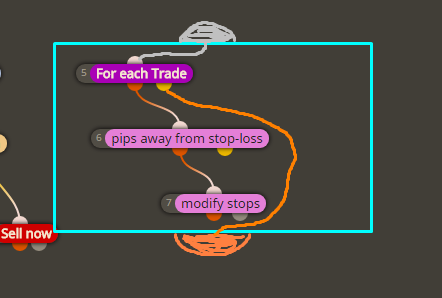
Each Trailing stop block has a loop inside, it loads each existing trade and checks whether or not its SL needs to be moved. If you have 10 trades at the moment, it will check all of them. If you have 1 - it will check only that one. And if SL of some trade needs to be moved, it is moved. When the loop finishes and all trades are checked and their SL moves, then the orange output becomes active. But the orange output becomes active even if there are no trades in the loop at all. This output always passes, it's like that "Pass" block. Trailing stop just does its thing and doesn't care for the other blocks around.
I think that you expect that block 23 would pass only when SL of the trade is moved. But remember, this block has it's own loop inside that is designed to work with multiple trades, it doesn't care if you have only 1. You can work with 1 trade at a time, but MetaTrader is still capable of putting 10s and 100s of trades, so the Trailing stop block is designed with that in mind. That's why it has (each trade) in its name, this means that the block does something over each trade. And because it can move SL of 1, 2, 3... or 0 trades, and in any case it will do its job, the output is not related to any trade. The output is used only to be able to connect multiple blocks.
I also do Ctrl + F and I usually find the block in question in seconds
You can play with some Variables or blocks from the Flags category to switch between "above" and "below". I think you want to remember that you reached the "above" or "below" level, so you at any time you can check for the correct side (above or below). Variables are used to remember values, and also those Flags blocks do the same job. You can even use some object on the chart as a memory.
There is a block to write information "Write on file". But I used "Comment" for this example: https://fxdreema.com/shared/ooSeSTUHb
I don't see what is wrong. I made this example now: https://fxdreema.com/shared/3BN8jwtV
Test this on M1. In Block 6 I selected M15, so a new random trade is created ever 15 minutes. I set expiration time for the Buy trade to be 10 minutes and for the Sell trade to be 20 minutes... so we can have different situations.
If the last detected trade is Buy - white arrow is printed. If the last trade is Sell - red arrow is printed.
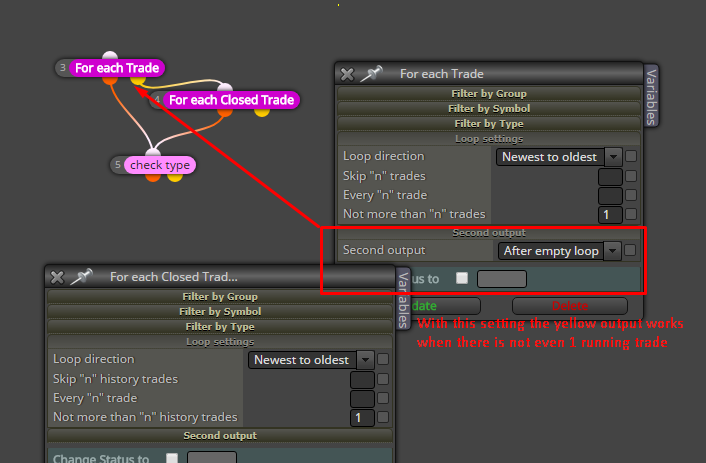
Both "Draw Arrow" blocks can draw one new arrow on every run and that's how I want to check whether or not "check type" passes twice on a run. You see this "Once per bar" (block 10) above that allows the loop blocks to run only once per bar, so in the ideal situation we would see 1 arrow per bar. You can connect the other "Once per bar" (block 11) to see that you will start to see 2 arrows per bar... well, arrows overlap actually, so you have to move one around to see the one below.
I checked this and I see no problems for now. Here is a screenshot:

I think you are talking about these blocks:

Even I forgot how I made it and I keep them only because there are there for a long time. No data escapes from them. Basically, long time ago I wanted to make blocks for everything, but not all of my ideas were good. Now I think that for such things custom indicators should be used - they are better optimized to do such calculations and they also print the information on the chart.
If I remember correctly, I made this block to read the data for how many seconds, then do that again for the next period of such seconds, then again and again. Not a very clever block in my opinion. Don't even try to backtest it, the results will not be correct 
Oh no, why The only way is if I add 10 more... I don't like the idea so much
There is a function to send requests, but even then MetaTrader cannot read JSON... I believe... at least not natively.
No. I don't even look at those that seriously. I know that often people want to check pretty much all of them and I don't understand that. For me it's enough to check 2-3 of these, to play with them for a while and then uncheck them. For something more serious then use the Constants.
In MetaTrader you can access those with F3. They are called "Global Variables" there, but this is in the scope of MetaTrader, not the EA itself. In the EA you also have global variables, but they are soemthing different. So I use the name "Terminal Variables" to describe those F3 kind of variables.
If you know what cookies are for the browser, I imagine that those F3 variables are pretty much the same. They are stored somewhere in a file and can be accessed from all EAs. So they are just values that MetaTrader shares between all EAs, and they are also persistent... for some time.
Maybe some picture? I don't really understand what "both Stop levels" mean, because it could mean SL and TP of the same trade... because SL is a stop, but TP also stops the trade
Yes, these blocks work with a temporary memory.
You may try something like this, I hope it works:
 ,
,
If in any case you need persistent memory, take a look at those: https://fxdreema.com/tutorial/builder/constants-and-variables#terminal_variables
I wrote you an email. No one can help about MT4 on 2 different pairs, it's how it's made and now MT4 is also discontinued.
 There is a button