This block sets a value in one variable, which is then checked in OnTick(). The block prevents all the other blocks from running for some time. Look at the screenshots below.
I think you should be able to use values like 0.5 for the minutes.
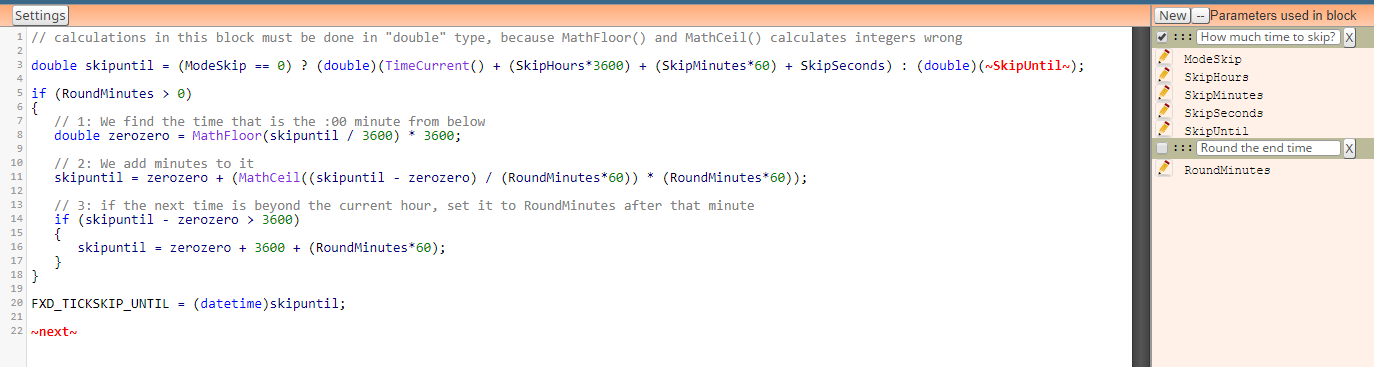
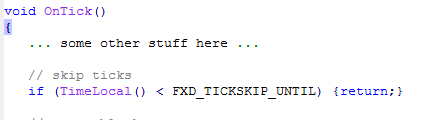

This block sets a value in one variable, which is then checked in OnTick(). The block prevents all the other blocks from running for some time. Look at the screenshots below.
I think you should be able to use values like 0.5 for the minutes.
Try one of these: 
So, this gives you some highest value, but I don't know with what you want to compare it 
I think that you expect the sum of both profits to be > 3, but the profit is calculated in pips, not in money. Click on "Profit is the sum of...", there is small explanation there
If I'm not wrong, Fractals repaints a little bit. You can try this on Visual mode while having the indicator, you will probably see the arrows at the moments of trade, and some of them might disappear after that.
Richart, make a small test project in your projects that shows the problem, and I will see it. Or you can share this test project here
@riccardo Yes, because its 1 variable, not 2 But why don't you use some Money Management method... Martingale is very customizable.
I don't understand what you want to do now. You got the max loss and max profit values?
Somehow it jumped up in the Expiration section. I will eventually fix it, but it's not a big problem now, especially when this parameter probably does nothing at all on today's brokers.
Visual bug, this input field appears where it doesn't need to appear. I always forget how the bug happens
I did this: 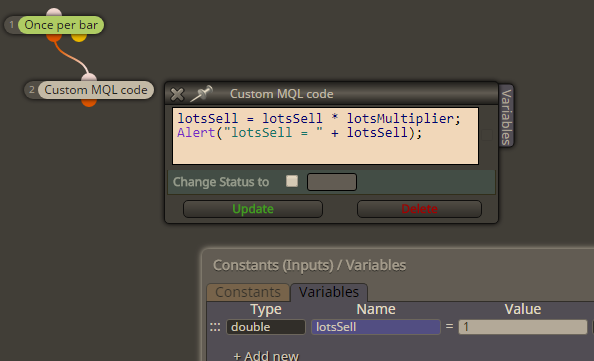
And this is my result:
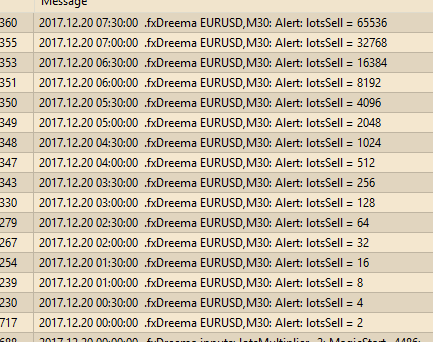
I don't see problems in the calculation
Once per bar limits by time, while No trade (No position) limits by the number of trades you have. One block passes 1 time for each bar, while the other passes when there is not a single trade at the moment. They do different things
You can also set this to 0 and not touch any Group settings: 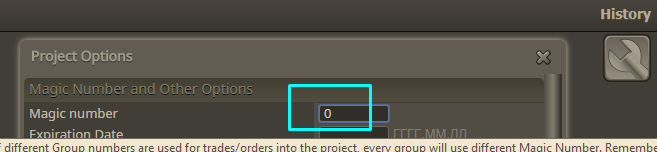
Very basic math can be done in Formula block. Also, you can do math in all input fields, but it's not that pretty. So, you can use "Formula" here and there, also define some Variable and use "Modify Variables" as well. But I have another idea - define few Variables, one for High, one for Low and so on. Then in "Modify Variables" set the value for each one. Then in the second Condition block (the one with darker color) you can write long formula, using each Variable as many times you want.
https://fxdreema.com/shared/UJeap4JMd
Note that this works when you have 1 trade at a time, because the variable is one
Expiration means that the pending order is deleted after some time. I also added similar option for the running trades. I'm not sure that "modify expiration" works for trades, I have to check. But I don't really understand what do you want to do
We discussed this and it appears that the problem is that because he loads the same indicator with different settings like in something like 100 blocks, this takes long time. For some reason MQL5 loads indicators slowly. And in the EAs I programmed MQL5 to load them on demand, which is not the official way of doing that. So I have a "while" loop that waits for indicator to load for 500 ms and then throw that error. So I changed that time to 5 seconds. Unfortunately I still don't know how to make MQL5 to load indicators more quickly.
This is a custom basic trailing stop - https://fxdreema.com/demo/mt4-loop-trailing-stop
But how do you decide the right order?
I don't remember changing blocks these days, I was working about something else. Also the spread is important
I would not use "Delay" for more than few seconds.
There are blocks to find nearby trades and pending orders, but I didn't made one for closed trades. Anyway, I can imagine something like this:
