Yes, there is a bug in this block, when the color is selected to be "Any color". I still don't know how to fix it, but until I decide what to do you can specify the exact color over there and it should work.

Yes, there is a bug in this block, when the color is selected to be "Any color". I still don't know how to fix it, but until I decide what to do you can specify the exact color over there and it should work.
I think that it's only you, because obviously no one else is reporting the same problem in the forum and in emails. But you can also compile the EA on the website and download the .ex4 version. What MetaEditor is this, maybe it belongs to MetaTrader 5? Because in MQL4 we have HideTestIndicators(), while in the new MQL5 they added this function named TesterHideIndicators(). That's why I'm just defining TesterHideIndicators() for MQL4. And MetaTrader 4 is actually stopped, at least on my PC the version that I have is from 19 May 2017.
Example or a screenshots with the settings you are using? 
I see your project. You don't need the pink block, just use "Pass" instead. For "Delete pending orders" set the Group number to 0. I see you set the magic number in the project's options to 0, so I expect that you are trying to close the manually created orders, which have magic number of 0. So, zeroes everywhere
Maybe something like this: https://fxdreema.com/demo/mt4-loop-add-to-volume-on-loss
At the moment the pink blocks cannot open for some reason and I will go to fix that, but I hope that you will get the idea anyway.
@isp00rt said in Could someone please tale a look on my EA?:
for a reason I don't understand
Well, I always recommend to use that "For each Trade" block before using any other pink block or option in Condition. You say that block 33 is not working properly and what I see in its left size is something that is pink, you are getting some Open Price over there. But do you really know which Open Price? Remember, at any given time you can have many many trades and orders and each of them has Open Price. That Condition option is giving you Open Price of the last loaded trade... but trades are loaded in many blocks - in "For each Trade", in "If trade", even in "Buy now"... I think. So better place some "For each Trade" above this block, before using that pink option. And set "Not more than N trades" to 1, because I guess you want to get Open Price of one specific trade. By default "For each Trade" will select the newest trade first.
I think you need to do it in a custom way, using some Variable. So, before the Buy block you can have a block to check the profit of the last trade (whether it was profitable or not), then set the value of some Variable depending on that, and then in the Buy block to use that value for the risk % option.
Now the Martingale option looks at the actual lot size of the last trade and multiplies that lot size to 2 (by default) on loss. It doesn't care what the balance it, it looks at the lot size.
Well, I'm not sure that I will recommend to use these divergence blocks. The truth is that I made them somewhere in 2011 or 2012 and they remained the same since them, even I don't know how they work now
Otherwise you can play with some Variables and giving some state of the strategy that way. Let's say you have one variable with type "int", such variable can have any integer value - 0, 1, 2, 3... - you decide which number means what. Those Flags block are pretty much the same thing, so you decide. I guess you need to need to reset the Variable/Flag after certain number of candles. So, what if you actually use a Variable that is from type "datetime" and you store the Time of the event in it? Then you can compare that time with the current time and decide whether the signal was too old or not.
Wait, you are getting Heiken Ashi values for both sides, and Heiken Ashi returns positive values bigger than 0. I understand why in the top Condition you ask whether Heiken Ashi is > than 0, but why you ask < 0 in the bottom Condition (for the Sell)? Try with > 0 again.
I think this should work:
Also, this "pips away from open-price" block has a parameter called "Open Price belongs to..." that changes the behavior of this block in this situation. Here is an example, and in this example I don't use this "once per..." block:
https://fxdreema.com/demo/mt4-loop-partial-close (unfortunately at the moment of writing the pink blocks in the example doesn't work, but I will probably fix this soon after posting this)
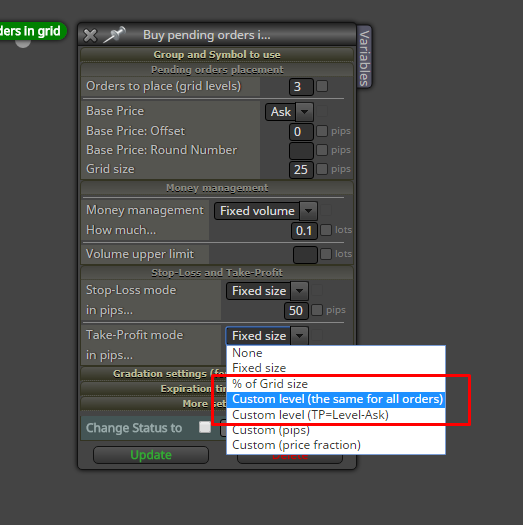
Fibonacci is an object, let's start with that. Do you have any success in reading its levels? Then, after you get that level of 100 for example, what is the method of calculating the other levels - 98, 99... ? By the way, there is a block to place bunch of pending orders - Buy(Sell) pending orders in grid - you need to know the level of the first order and all the other orders are placed at certain distances from that first order.
Ahaaa, I was also feeling that this window (Project Options) is not very intuitive. I guess I need to redesign it again
I was thinking about what a custom indicators builder should look like, and I think that the interface would be very different. I don't know exactly what, but the thing is, in the EA builder each block is doing something big - buying, selling and so on. Each block contains many many small pieces of code. Indicators are more about mathematical calculations. In the EA builder, if you want to make a simple calculation, you can use "Formula" for example, but even in this case 1 whole block for just a simple calculation is very big... in my opinion. So I can't imagine how to use that blocks structure to make an indicators builder.
Yes, it is something new that I am testing, but it should appear for another mode "% of the price". You see this parameter because of visual bug, it is not part of "Custom (pips)".
What if you do:
Buy pending order -> For each Pending Order (with Not more than... set to 1, so you really select only the latest pending order that was just created) -> Buy now (and for SL select Custom (price level) and the pink (in loop) stuff)
If you have indicator in a subfolder in MQL5/Indicators, then in fxDreema you can add the subfolder in the name field. If the indicator is named "indicator", then you can write "subfolder/indicator"
No, you don't need to manually add indicators on the chart. The EA is connecting with the indicators on its own, you can't see this process.
"Shortname too long" - if this comes from the indicator itself, then I guess you can't help much. I think that this is some property of the indicator itself and is located in its code, but you don't have that code anyway.
I have "Invalid SL" errors, so obviously something is wrong around those "modify stops" blocks.
I'm afraid of what is going at this places, because there is no "For each Trade" above:
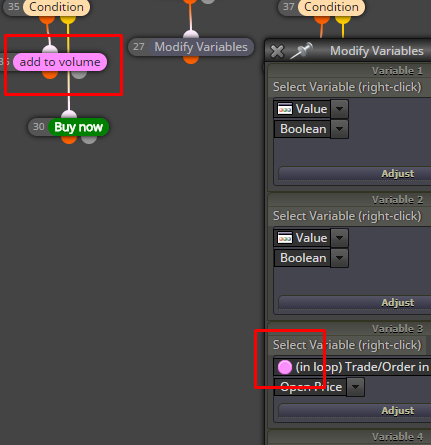
About the modification in the same candle, I can suggest "check age" to check if the trade is old enough before going to change its SL.
Working with those variables can be tricky. If you notice that something is "memorized", then it probably it is memorized After all, this is what these variables do, they memorize different values Maybe you need to reset some variables sometimes.
"Trailing stop (each trade)" normally does not need to sit below "For each Trade", as it already has its own "for each trade" loop inside. "Trailing stop" is already like "For each Trade" block, combined with "modify stops" and other blocks.
But why don't you make the strategy for the Buy part first, and then add the Sell part after everything is working.
I don't know really I think that some extra code is needed for such thing, it's not available in the blocks
Interesting. I think this happens when the second symbol in the pair is not the same as the deposit currency. It works properly for me on EURUSD when the deposit currency is USD. I need to check what is going on.