As you are asking for the best way, it is to (pay someone?) make a custom indicator 

As you are asking for the best way, it is to (pay someone?) make a custom indicator
Well, as you probably know, lines are normally drawn by indicators. And their lines are actually a little bit different kind of lines. If you try the "Trace" block, it draws a line, but that line is made out of multiple trend-lines, multiple objects. Compared to that, Moving Average draws a line that does not appear on the list of objects. So the best is to make a custom indicator. EAs are primarily designed to read indicators data and put trades and orders here and there.
Error messages? Browser? Another browser? Chrome plugin used (try to reinstall it if you are using it)? Sometimes certain Chrome extension prevents some of the scripts from loading, but this normally means that the project cannot load and has nothing to do with the file exports. Or maybe one particular project is broken for some reason, but which one of your projects doesn't work?
I found that this option didn't worked and I did some updates to fix it. Maybe something broke visually now, but in any case this option is only for x> and x<, so the fact that you see it under > is only a visual bug. Which is an old bug I think, I knew that something like this happened from a long time, but when I decided to finally fix it I forgot how to cause the problem. Now I know 
@drayzen If the blocks are connected one after another, these numbers mean nothing. In this case if a block passes, the one after that is executed and so on... but the numbers are meaningless in this case. Numbers are only important if after a block there are 2 or more paths to take.
In a text (string) field, when you want to use variables, add ""+ in the beginning and + "" at the end. Something like this:
"" + "Buy " + MyVariable + ""
By the way I didn't made this "hack" intentionally. Long time ago I just found out that it works this way and I was doing it like that since then. But if you are not doing it that way, it could not work properly. Make sure that you have ""+ in the beginning and + "" at the end.
No trade -> Buy now? Sounds to me like you want to have only 1 trade at a time...
Are those running trades or pending orders? If trades, try "For each Trade -> modify stops" - run this pair of blocks when you need to set this TP.
I think there is a bug and I will fix it
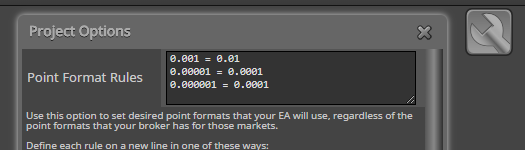
EA generated with fxDreema doesn't care too much what the broker is. The idea is that the EA decides how many digits to use and this is done with these settings:
I must say that I'm not very good with indicators and I only know that Stochastic draws 2 lines and I don't know with what calculations are they made
When the EA sends a request to the server, this action should be logged. Otherwise there is no request to the server, most probably. In the modify blocks I have some checks, so that modify request is only sent when needed. For example, if you want to modify SL and TP with the same levels, nothing is sent to the server, because the stops are already on the requested levels.
Also make sure that the EA is actually working and allowed to trade. The "Auto Trading" button should be green.
Look for error messages. Be sure that you run the newly generated EA files. Test simple projects, such as "No trade -> Buy now".
Sorry, I was not around lately because of family problems.
You have many blocks I see. In this case I don't know what is going on and what else could be wrong. You know your project much better than me. So I don't know what is the problem exactly, but I can tell you how would I check what is wrong.
To be sure that certain block passes, connect "Draw arrow" after it. Or some other Draw block... it depends. I personally use "Draw arrow" most of the time. Run the EA and look if there are arrows where you know that they must appear. If you expect to see them, but they don't appear => the block in question doesn't pass => you know that something is wrong with that block or another block above it. After few tests you should know where is the problem.
Make simple project only to test the functionality in question. You think that "on Trade" doesn't work, then make a project with few blocks in "on Trade" - only those blocks who are involved with the problem. Another way is to remove all the blocks that are not involved with the problem.
By the way, I don't use that CTrade class. I use only low level functions in MQL4 and MQL5.
Inputs are global variables... in fxDreema I call them Constants - https://fxdreema.com/tutorial/builder/constants-and-variables
When you select Custom (pips), the expected value is some number like 10 (for 10 pips), not 0.0010. The difference between Ask and Bid is not that kind of a value. Work with Custom (price fraction) instead.
I don't know, this version is so old and I don't remember its error messages. But it is a portable application, so whatever happens, it is local. This version only connects to fxdreema.com when logging in and after that it is completely offline.
You know that normally fxDreema can try to read all the data from the source code file. In this case, the parameters names are the names of the global variables. For example:
input int MaxHistBars = 1000; // Maximum History Bars
Here "MaxHistBars" is the name of the global variable used in the code. Variables can only contain latin letters, numbers or underscore. Space and everything else is not allowed.
"Maximum History Bars" is just a comment in the code, it describes what the variable is used for. This text obviously can contain space and special characters. In MT5 this comment text goes in the input parameters... if it is present. You can see what you have in your source code. If there is no comment, you will see "MaxHistBars" instead of "Maximum History Bars".
In the EA you call the custom indicator with the iCustom() function. This function does not care about the names of the input parameters, it cares about their data type and order. So everything could work properly if you give non-variable names, but it's better if the names are at the same as the variable names.
For example, I added fake parameter for this test indicator:

The name of the parameter is "<==>" and normally these letters are not written in the output code, but if you check that checkbox (for optimization) they are written and everything breaks. So it's better if the name is a valid variable name.
Also, the idea is that each parameter should have a name that is unique. Each parameter has its own name and when you save the block, each parameter<->value pair is collected and then written in the database. Parameter "Period" was giving troubles because such parameter already exists:
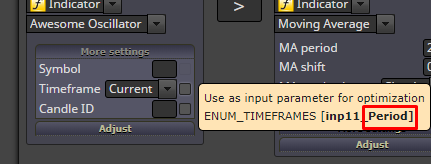
The same situation happens now when you have few parameters with the same name "<==>", they are simply combined into one parameter.
This is the situation at the moment. Given these problems, I can think of some alternative way of giving names to the parameters. Something like... they can have hidden names like this - param1, param2, param3... - and <==>, Period and Max Hist Bars could be just display names. But I think that I can't do that transition very easily and I'm not sure what possible problems could emerge.
Now my suggestion is to give unique names for each parameter and don't use Period, Symbol, Shift and CORRECTION... and few more names actually. Meanwhile I will try to find a way to fix this situation.