fxDreema

    • Register
    • Login
    • Search
    • Back to the main page
    • Categories
    • Recent
    • Tags
    • Popular
    • Search
    1. Home
    2. JayPhillbrooks
    3. Posts
    J
    • Profile
    • Following 1
    • Followers 3
    • Topics 3
    • Posts 199
    • Best 22
    • Controversial 0
    • Groups 0

    Posts made by JayPhillbrooks

    • RE: My EA update

      Here is an update on the first example USD/JPY. If you go back to the first page, you will see that I posted the entries beforehand. I am no longer in need of the wall Template. It has done it's job. The upside that I noticed with this strategy is that if timed right, there is plenty of time to access and get out if I choose too. Statistically even if lets say that price does decide to go down further, It more times than not comes back up enough to give a chance to get out with some profit. This is just what I observed through a lot of backtesting and it's playing out here at least with this pair. There is what I consider a high probable entry after it played out but I did enter there and will post the template that given me that signal as well as the trade itself.

      Here's what I look for in these setups from start to end.
      When the Wall and other templates line up, I expect immediate to mid term upside. Sometimes price never returns, sometimes it comes back down. Usually there is 150- 250 pip upside before it comes back down.
      I look for how price interacts with the green line level and interest level when price retraces back to it. I've drawn dashed rectangle boxes around it.
      From there it's just letting the trade mature and watch for it to hit the higher levels.
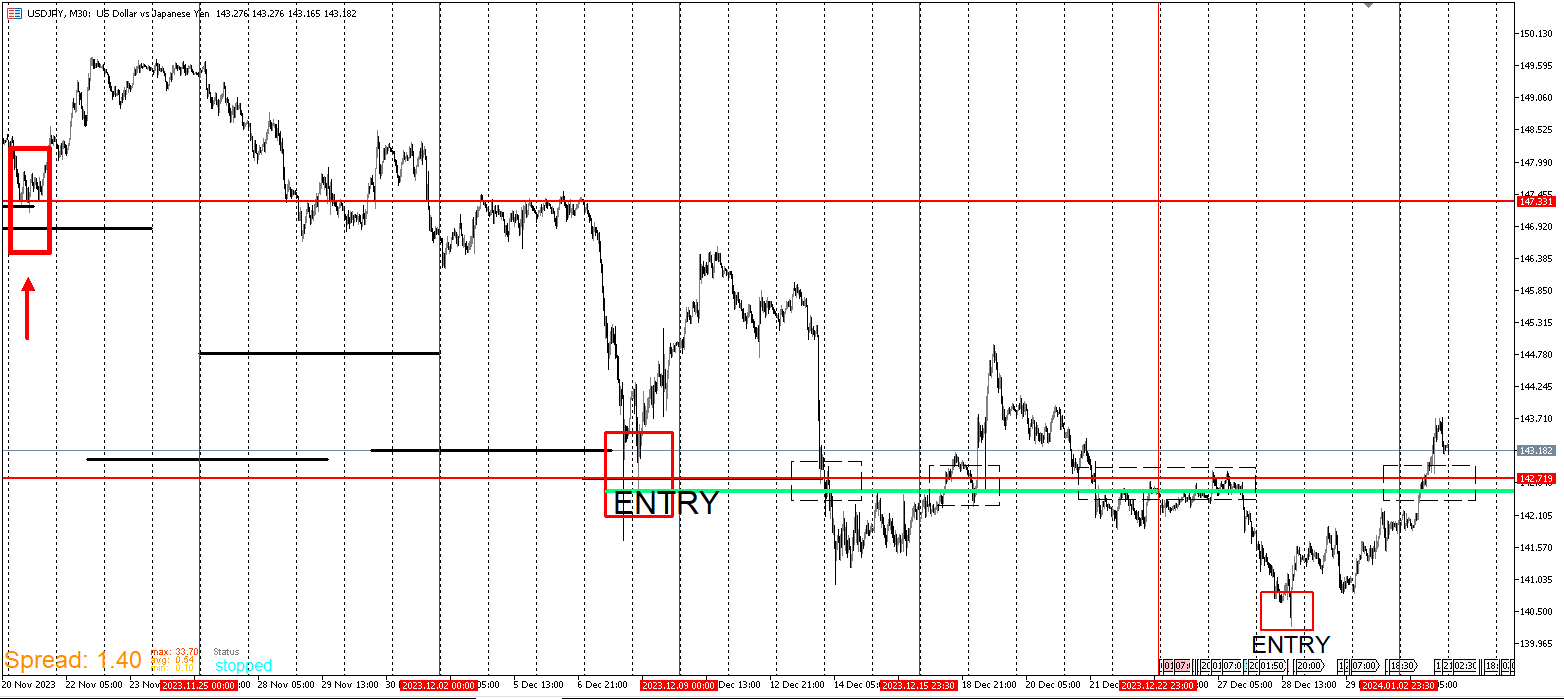
      USDJPY_UPDATE.png

      posted in General Discussions
      J
      JayPhillbrooks
    • RE: My EA update

      I'm back and I'm about to post an update on the positions I entered and why. I know it's been a while since I last posted but as I mentioned at first, I built this for swing/position strategies. So I have to let the trades develop over time. These are positions for both personal and prop firm evaluation. So you are seeing my live thought process and can compare it to what's actually transpiring. I'm displaying a method that utilizes backtesting and that when done right, there can be an edge to it.

      posted in General Discussions
      J
      JayPhillbrooks
    • RE: My EA update

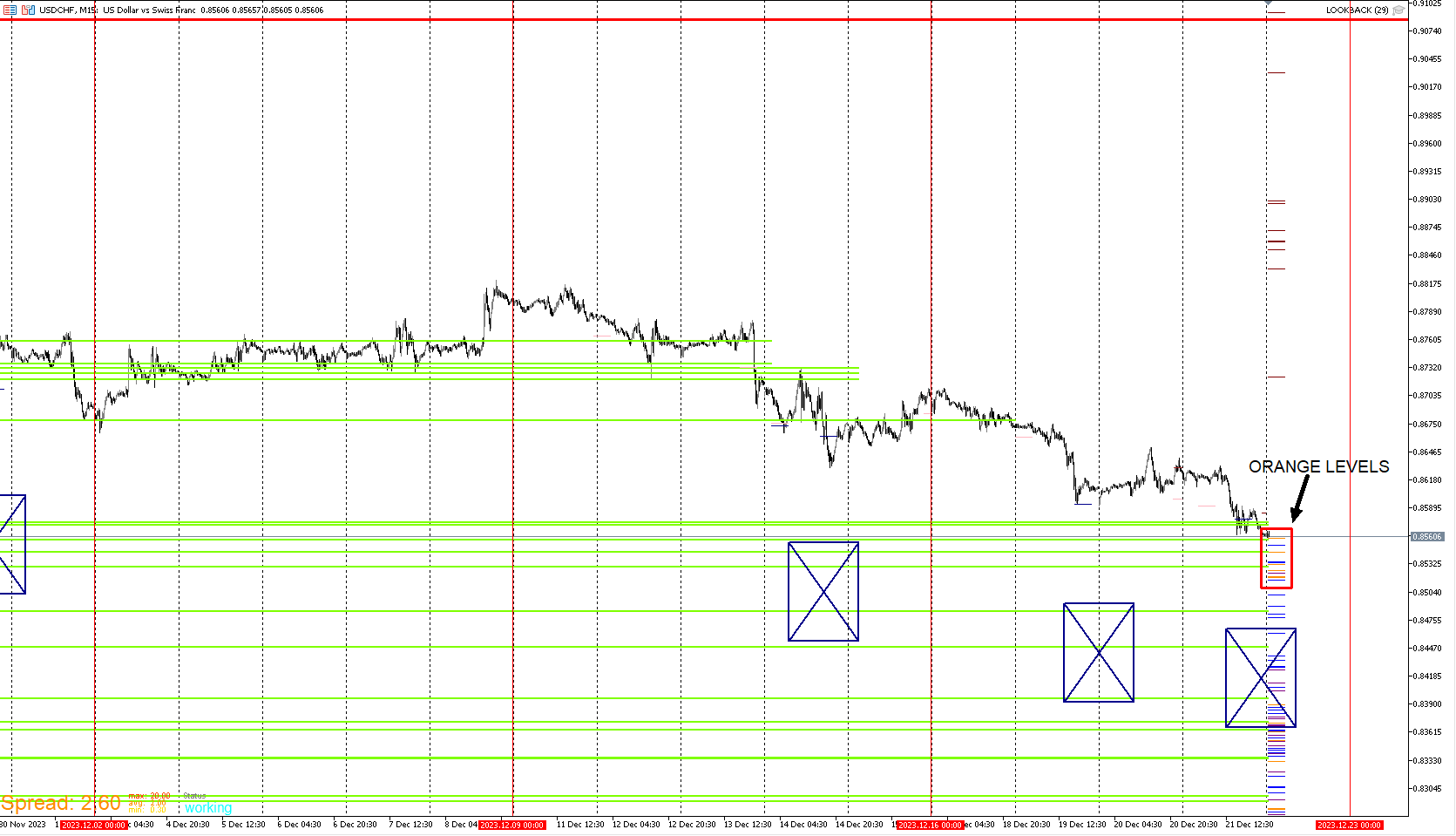
      Here is a live example of USD/CHF. Price is reaching a fresh Orange level . This is a rare occurrence that I look for. Doesn't mean that I enter. This gets my attention and puts me on notice.

      USDCHF_SETUP1.png

      posted in General Discussions
      J
      JayPhillbrooks
    • RE: My EA update

      @l-andorrà That number isn't the number of levels. That number represents a 500 pip stop loss being hit from the virtual order that was taken. Sometimes there are very few, sometimes there are clusters. My other templates help narrow it down and they use opening range and breakout strategies. The concept is the same for those too. Where those strategies tend to fail, That's when I look to enter. Price tends to close well above after it reaches a level. Vice versa for selling. If that level is aligned with other templates, I enter just off that fact. The JPY pairs I entered on hit levels too. I'll update the status on those later in the week. As of now it's pretty clear it was a solid callout.

      posted in General Discussions
      J
      JayPhillbrooks
    • RE: My EA update

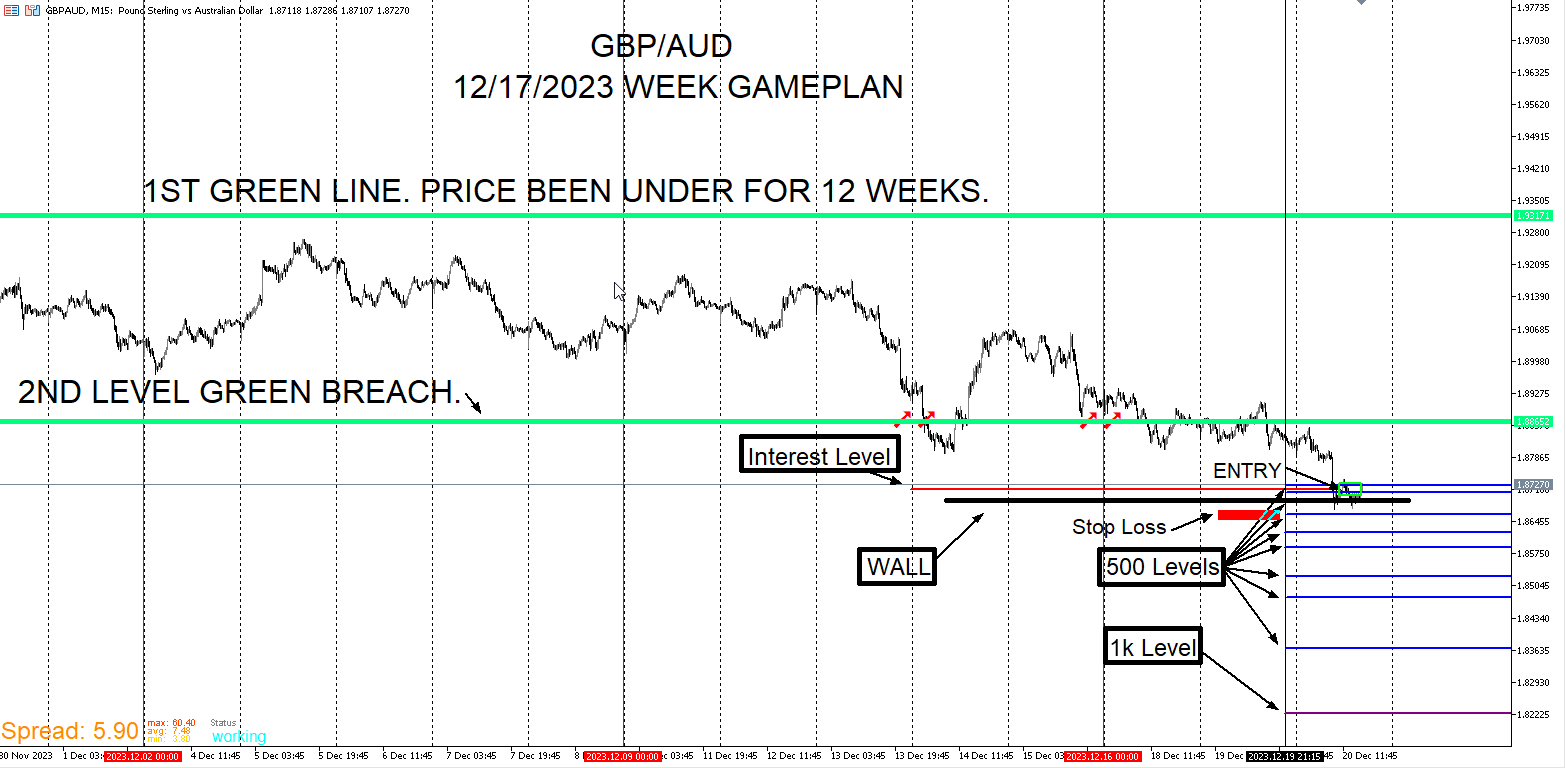
      GBP/AUD I entered on this setup. My logic here is that if I believe there is a chance that wall could hold up, I may as well put a position on there and the stop loss shortly underneath it. Though I can't be for certain either way, This is the type of setup I take like a robot. Very minimum risk.

      GBPAUD_Setup.png

      posted in General Discussions
      J
      JayPhillbrooks
    • RE: My EA update

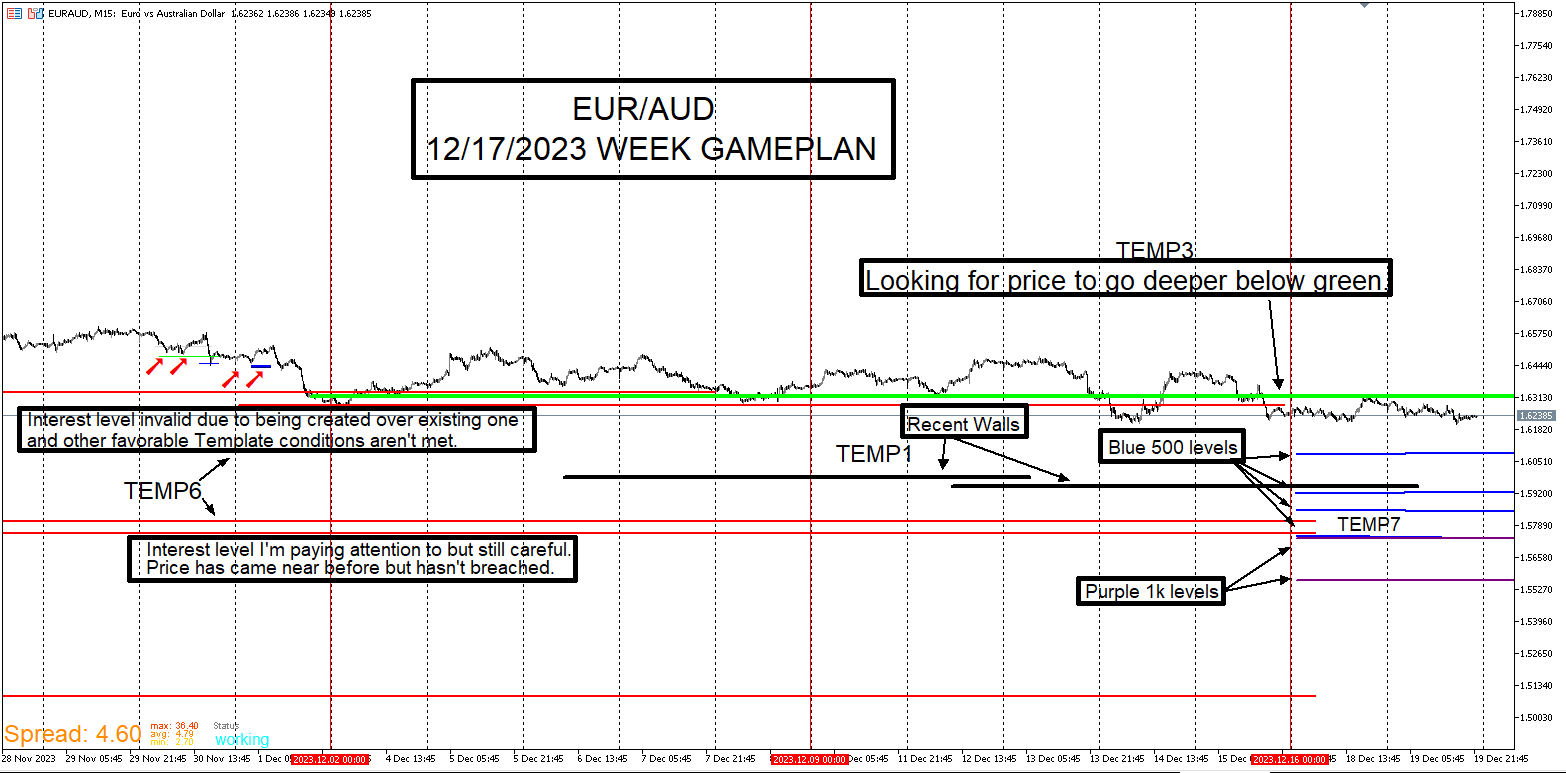
      EUR/AUD Update
      Still watching this pair. Still doesn't look like a good time to enter.

      EURAUD_UPDATE.png

      posted in General Discussions
      J
      JayPhillbrooks
    • RE: My EA update

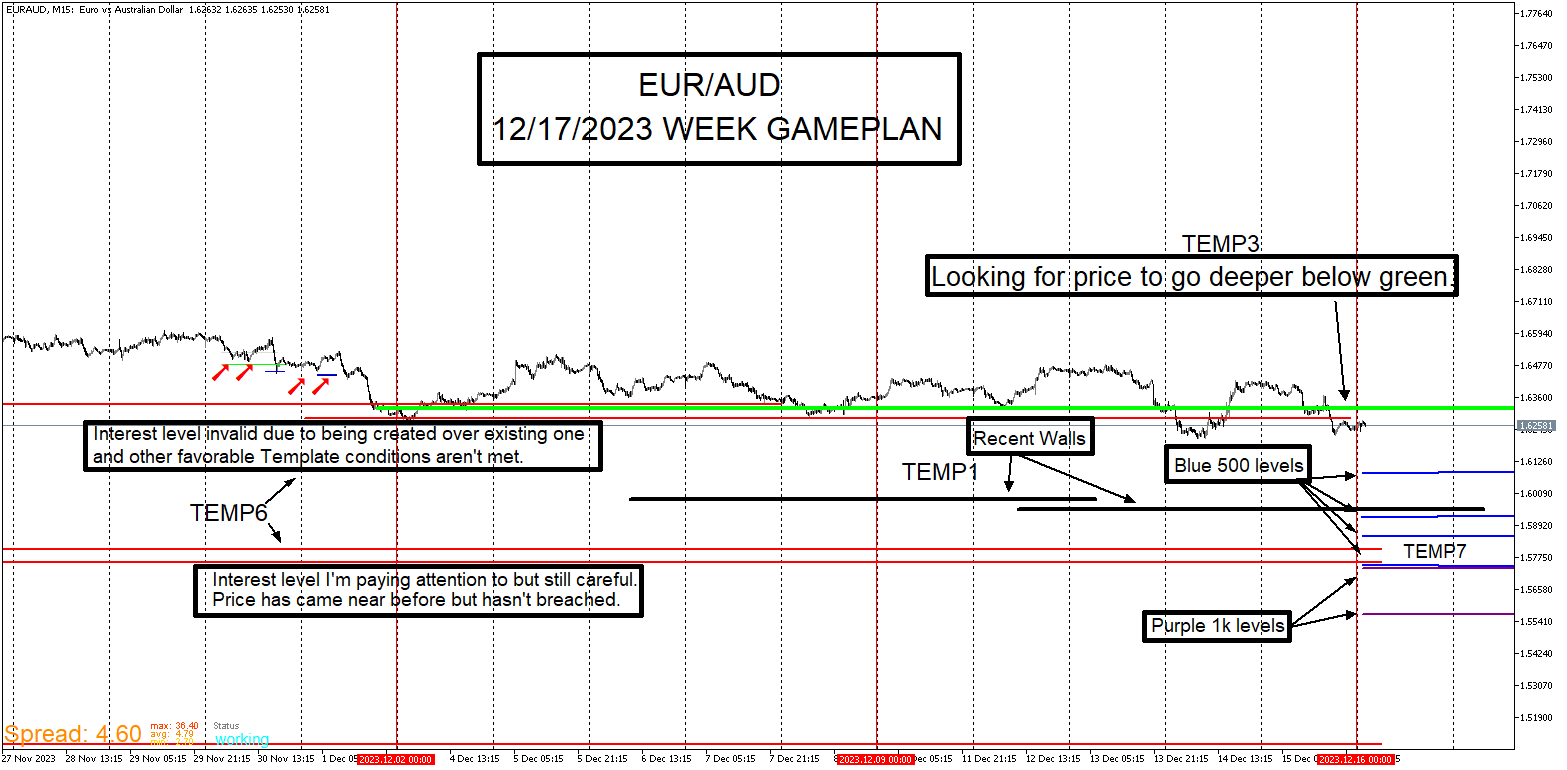
      This is how it visually play out when I see setups forming. If price comes down as I want it to, I believe that template4 will set up. As of now, it's just not there plus my other templates aren't there yet though I see them setting up potentially. Template4 can and do form anywhere on the chart, I'm only interested in it when it aligns with my other Template setups.

      EURAUD_Gameplan.png

      posted in General Discussions
      J
      JayPhillbrooks
    • RE: My EA update

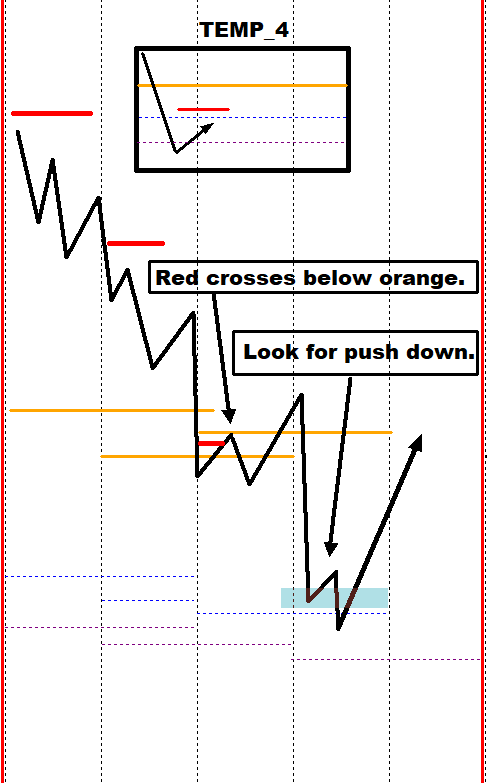
      I will now demonstrate Template4. It's another important Template I monitor for each pair especially when other Templates show an opportunity. It may seem to be a lot going on in this template but I'm only looking for two things. I look for the short red line to either pinch on the orange or cross below. Whenever I see this, I draw a box around the area and wait for price to dig lower. The second thing I look for is if price digs down into the blue dotted and purple dotted lines. I look for this setup in a deep downtrend preferable below a major structure break. It can happen in a continuation in an uptrend But the other Templates need to confirm for me to take it. Mainly the wall. I will post examples to show what I visually look for when i check the charts with this Template.

      TEMP_4.png

      posted in General Discussions
      J
      JayPhillbrooks
    • RE: My EA update

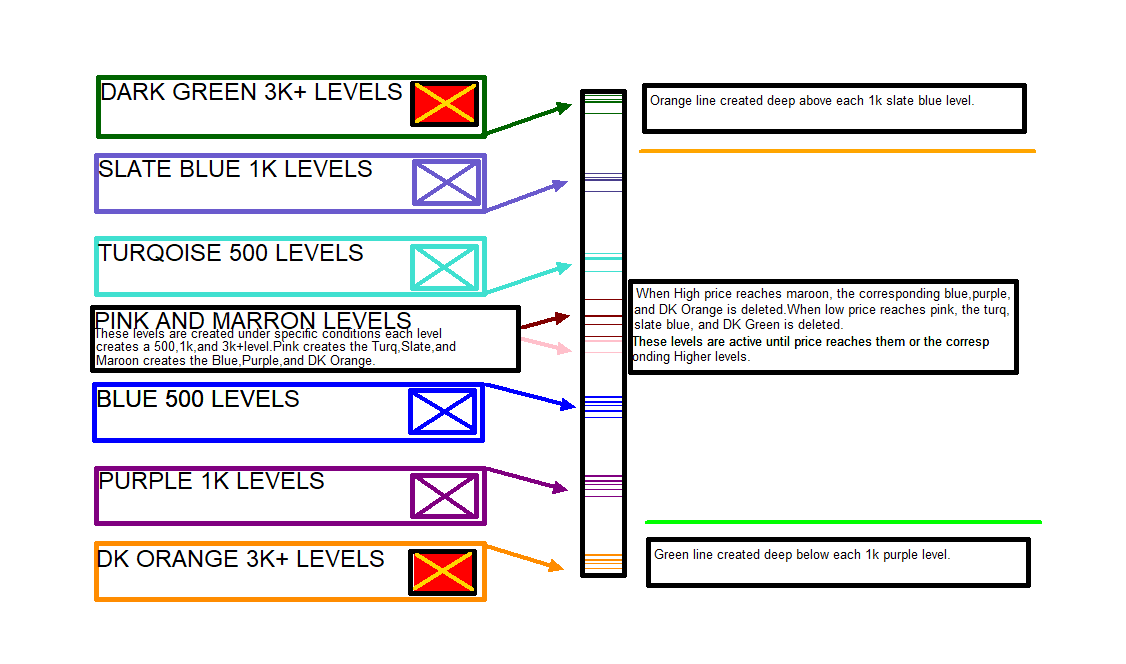
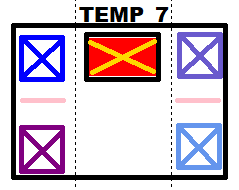
      Here is a closeup of the basic layout of Template7. The overall Idea of this Template is to help identify extremes that I'm interested in. Doesn't mean I blindly enter on them. They do get my attention especially when other Templates are setting up to my preference.

      Template7Explanation.png

      posted in General Discussions
      J
      JayPhillbrooks
    • RE: My EA update

      Here is a video of Template7 EA. Sorry the colors are off. The quality is not so great because I recorded sped up versions so that it wouldn't take forever to view. This just demonstrates how it looks in the tester before the template is applied to a live chart followed by the EA.

      https://vimeo.com/895101071?share=copy

      The video is slowed down towards the end to accurately show the colors.

      posted in General Discussions
      J
      JayPhillbrooks
    • RE: My EA update

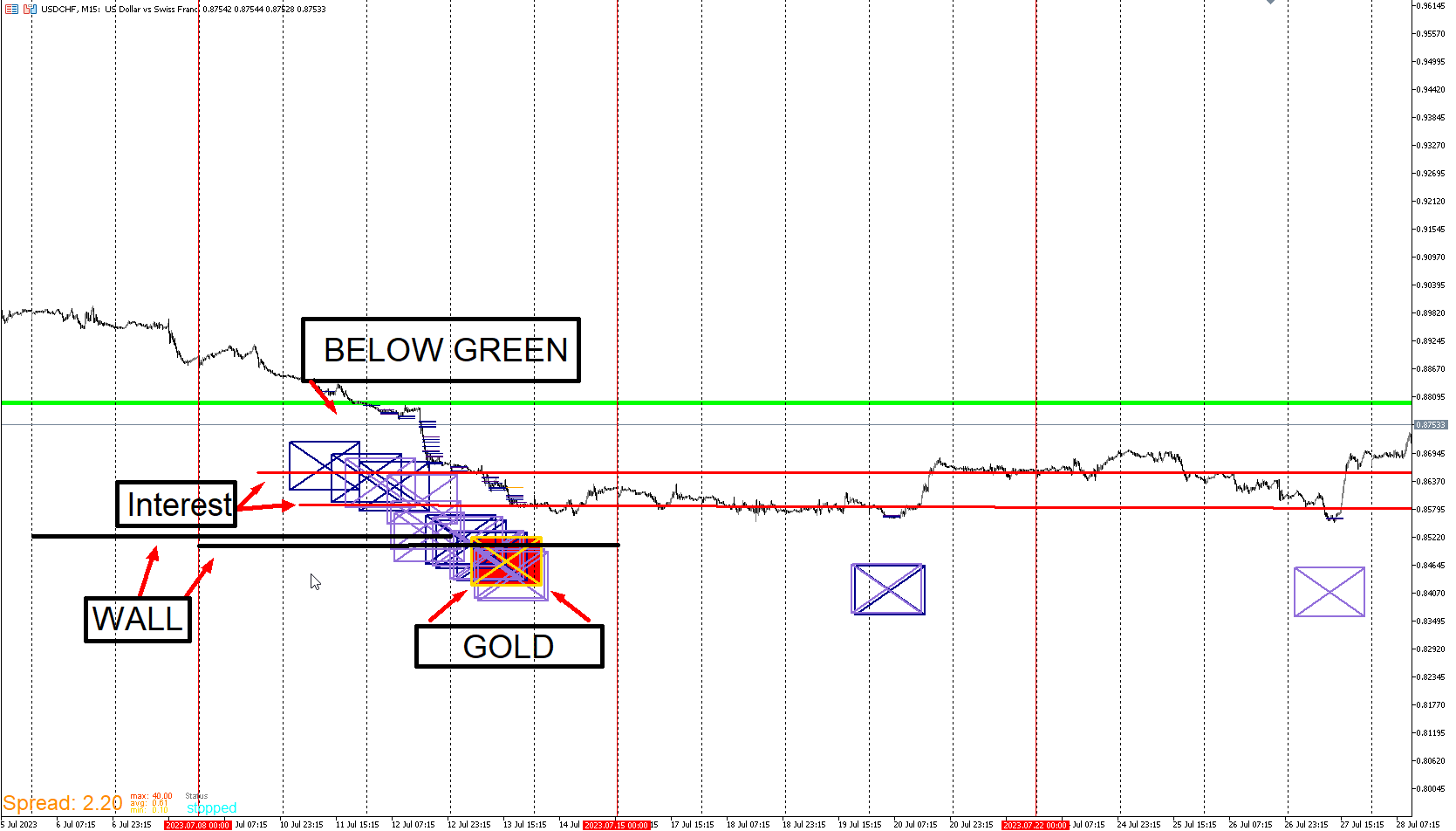
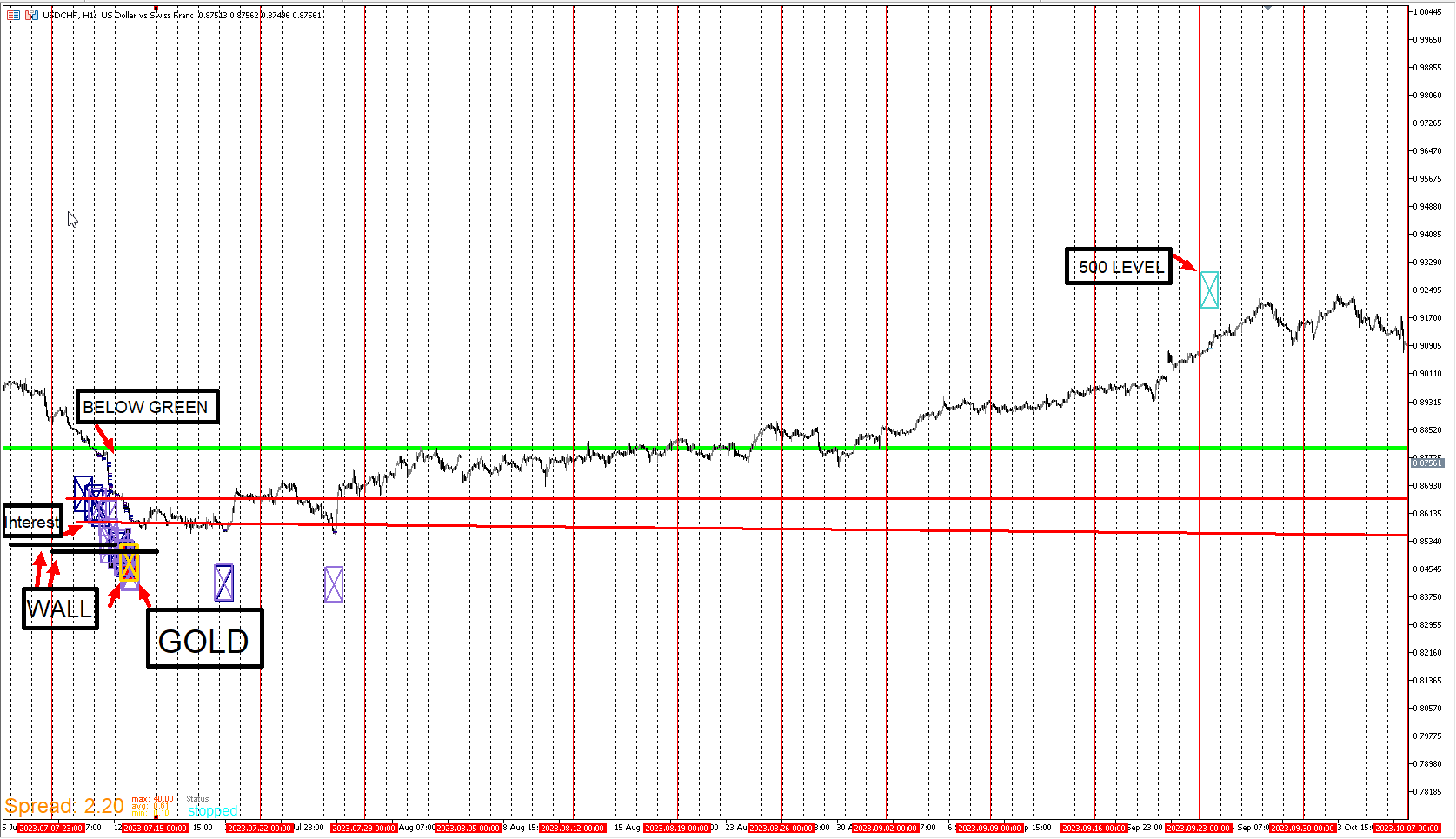
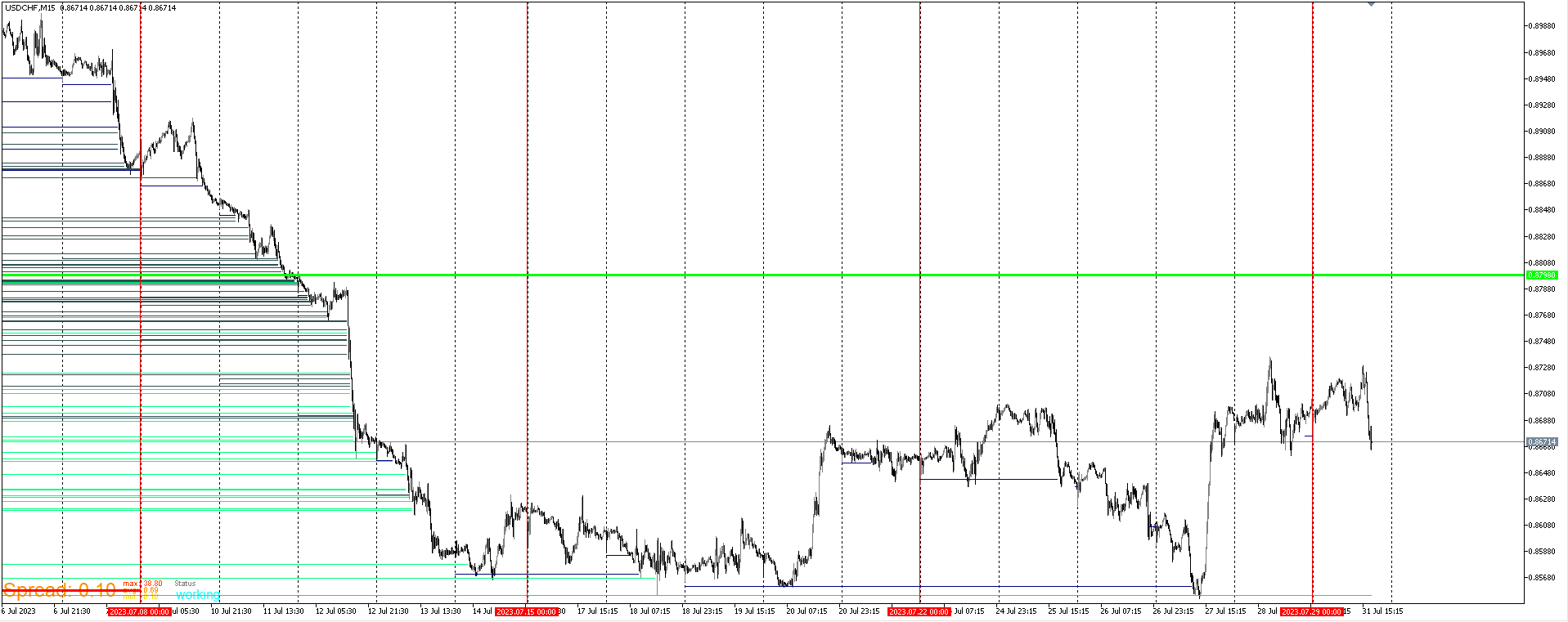
      Here is the USD/CHF example from earlier. Here's an example of multiple Templates lining up. This type of setup is the power of this strategy. Template 4 is there too but I'll cover it later. Once you see enough of these setups, you can't unsee them as they set up.

      USDCHF_EXAMPLE.png

      USDCHF_PROFIT.png

      posted in General Discussions
      J
      JayPhillbrooks
    • RE: My EA update

      I will explain the orange lines at the top and green on the bottom. When price reaches the 1k levels, these lines are generated a certain number of pips away. They aren't used for entries or anything, It's there to illustrate price action in positions whose stops are wide from the 1k levels. When price is in these zones especially deep and over a period of time, I see that as large timeframe positions panicking. Or if price consolidates there for a while, they are impatient. I like to see these levels get crushed. Any time price crushes deep through these guys, this is where to enter positional positions. When it looks the scariest for buyers in the green, that's the fear you'd want to buy. Vice versa for selling in the orange.

      posted in General Discussions
      J
      JayPhillbrooks
    • RE: My EA update

      I will first go over the concept and construction of Template 7. This is actually the EA that took the longest. At first it solely placed positions everyday at a specified time under specified conditions. I then noticed a pattern. These levels started to serve as either reversals or letting me know that one is coming. Of course as I mentioned in the other templates, I don't use these signals on their own. Combined with confirmation of other templates, These levels increase the likelihood of a reversal. It didn't make sense to put the EA on a live chart given that it gave data based on orders taken. So what I did was replicate it visually.The left side top blue is the 500 level. Underneath it is the purple 1k level. I look at these in a downtrend. The right side Powder Blue is 500 level and above is is the Slate blue 1k level. These are uptrend. The middle Red is when price substantially surpasses the 1k levels for both downtrend and uptrend. I refer to this level as Gold. The EA's are built to notice rare occurrences. The gold level gets my attention especially when it's the first time price reaches it. I will touch on the pink levels later. The overall idea is that the levels represent the stops getting hit of the virtual orders placed. As I mentioned earlier, this system is based on trades failing and getting crushed.

      Here's how it started. I created a strategy that replicates and upward curve. This doesn't mean it's profitable. Obviously there will be a lot of drawdown but that's what I look for. When the curve is smooth, That's a market I'm not interested in entering.

      EquityCurve.png

      Here is what I look for. These breaks in the curve are what the levels represent.

      ECURVE_BREAK.png

      https://app.gemoo.com/share/image-annotation/593331841087393792?codeId=Pa1WzgxoWY1VG&origin=imageurlgenerator&card=593331840282079232

      posted in General Discussions
      J
      JayPhillbrooks
    • RE: My EA update

      Template 7 is what I refer to as my Levels Template. This Template has a handful of nuances to it. I use it to get overall context as well as entries. I use it strategically with my other Templates. There are a couple key features in it that solidifies my conviction. This Template will require the most explaining so I will do my best to make it as less confusing as possible.

      TEMP_7.png

      posted in General Discussions
      J
      JayPhillbrooks
    • RE: My EA update

      Here is a clarification of Template 3 which is the green zone I look to go long from. As I mention earlier the green line in these demonstrations were added in the EA to simplify it. There are actually many green lines but I'm only interested in the top most. Bottommost for selling. When price substantially rise from out of the green, I then look to whatever green levels come after. This EA is purely used for backtesting and I just get the price level for the topmost green line and I mark it on a live chart. I will show an image and video.

      GREENLINE_IMAGE.png

      In the video, instead of the Wall lines being black, I changed them to red for visibility purposes.
      https://vimeo.com/892839346?share=copy

      Here is the USD/CHF Signal. I will go over a couple things that made this a powerful setup and could not be detected by looking at the chart naked. That's Template 4 and 7.
      This is a demonstration of Template 6 on this pair. Which is the Interest Zone.
      https://vimeo.com/892838193?share=copy

      posted in General Discussions
      J
      JayPhillbrooks
    • RE: My EA update

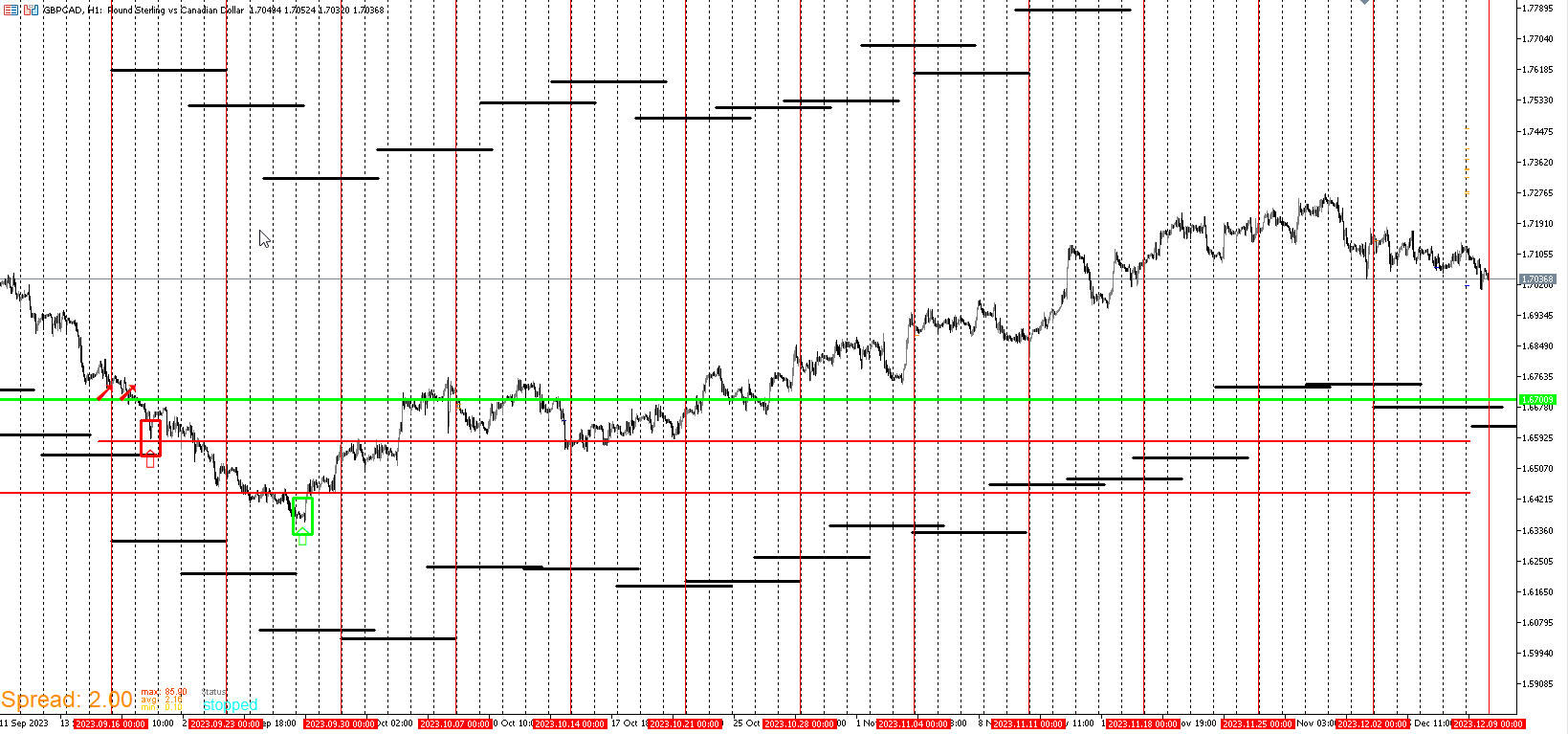
      Here's an example of GBP/CAD this year. I combined 3 Templates in one. There was another Template used to help refine my entry but I'll explain that in depth later. What's important to take from this is what I've already covered. Price hit a wall and grinded beneath it the way I like it to. I also like that price went well below my green line template. Underneath green especially over a few days gives me more confidence. And finally price reached down to and below my buy interest area. Notice that there was an interest area generated above one that has been there for a while. Whenever that happens, my rule is to ignore that level and prioritize the one that's been there longer. If the fresh level generates around or below the old one, I'll target it. Just not when it's well above an old interest level. By design the Green and Interest level rule kept me from entering too early.

      https://vimeo.com/892799153?share=copy

      GBPCAD_SCREENSHOT.png

      Here's a recording of the live position. The broker closed me out due to migration so I didn't experience the ride from catching an entry every trader would kill for. It's only fair to post live examples to prove that this system is implemented live with real money.

      https://vimeo.com/892808256?share=copy

      posted in General Discussions
      J
      JayPhillbrooks
    • RE: My EA update

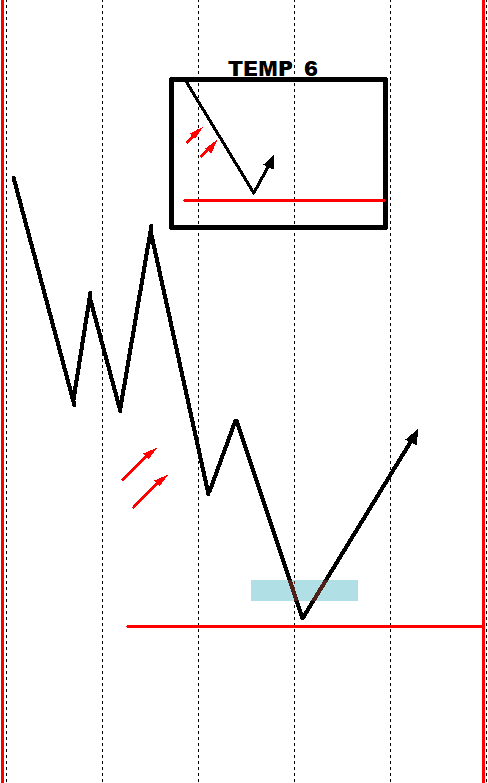
      Let's look at another Template that helped me enter these positions. I refer to this Template as interest template. All it means is that I'm heavily interested at these levels. More or less depending on other templates and certain conditions. Like the Wall, price can be short, on, our under. This Template like the other two, don't predict to the tick. They serve as showing high likelihood reversals. The way the signal work is that when price reaches a specific level based on a specific strategy, it will first print arrows. While the arrows are significant and can serve as solid levels, I'm only interest in the level generated below them and above for selling short. This Template combined with any Templates especially the Wall Template makes these signals more powerful.

      TEMP_6.png

      posted in General Discussions
      J
      JayPhillbrooks
    • RE: My EA update

      @l-andorrà

      So far so good. I hope it holds up.

      posted in General Discussions
      J
      JayPhillbrooks
    • RE: My EA update

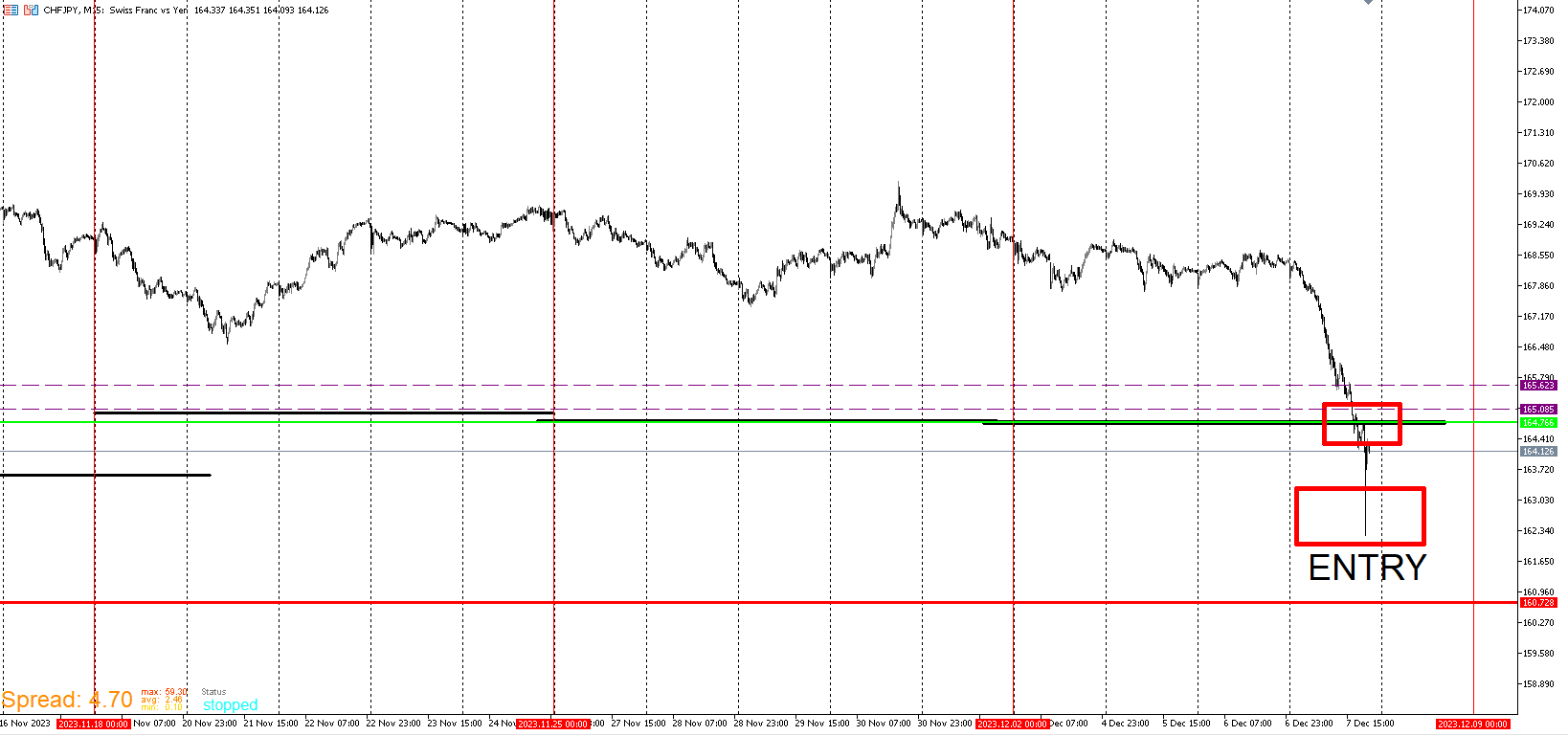
      CHF/JPY
      I entered here for the same reason as AUD/JPY. The purple dash lines which I will explain later.

      CHFJPY_ENTRY.png

      posted in General Discussions
      J
      JayPhillbrooks
    • RE: My EA update

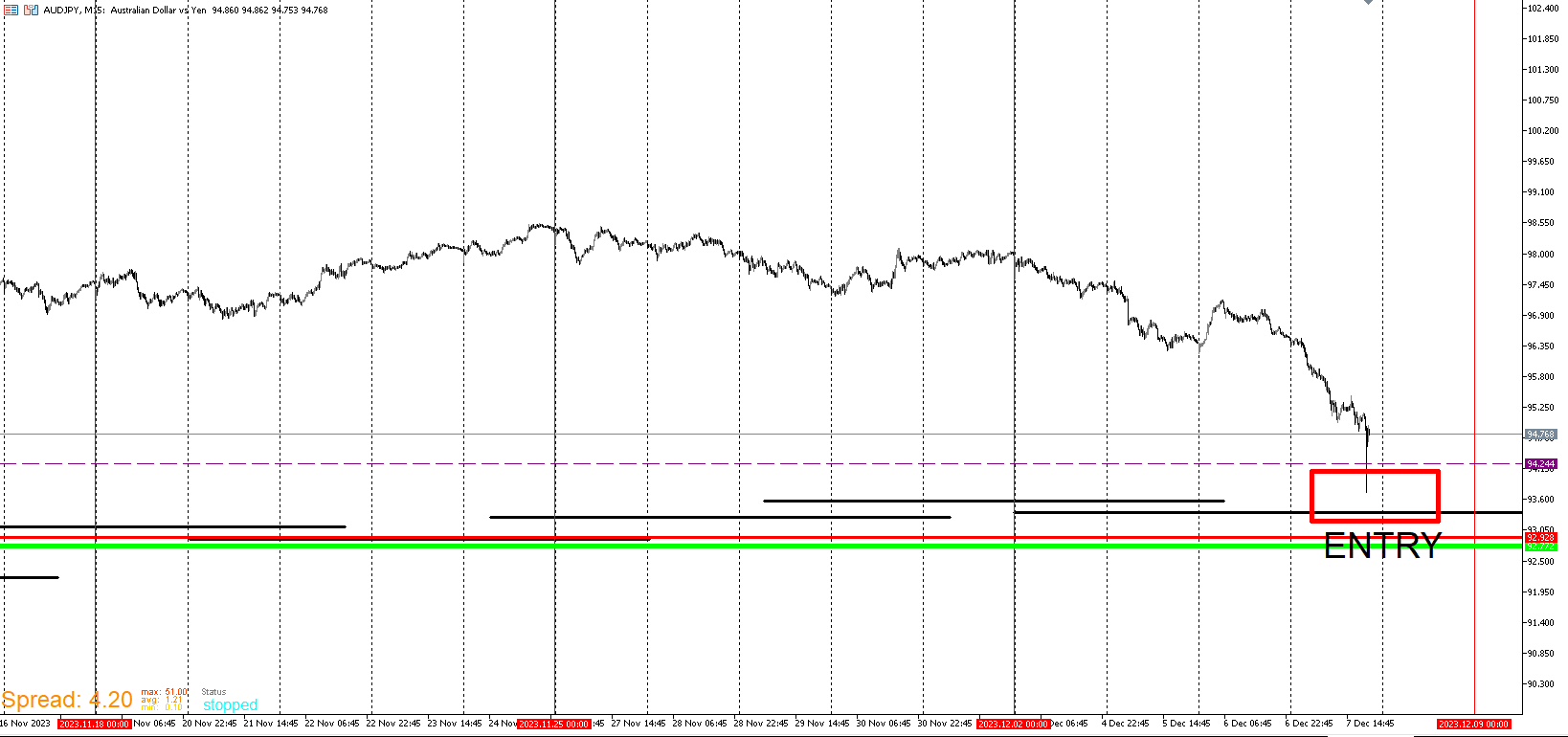
      AUD/JPY
      This is the one that I'm the most confident in. Though it didn't meet my preferred criteria. It did breach a really important level for a Template that I haven't presented yet. That level is represented as the purple dash line.
      AUDJPY_ENTRY.png

      posted in General Discussions
      J
      JayPhillbrooks
    • 1
    • 2
    • 6
    • 7
    • 8
    • 9
    • 10
    • 9 / 10