For some reason I can no longer download the .EX4 files....
.EX5 Files are ok
Years of progress lost!


For some reason I can no longer download the .EX4 files....
.EX5 Files are ok
Years of progress lost!
@ambrogio I figured it out! I right clicked on the template file and copy and pasted the file path instead of the file name and it worked!
Thanks guys!!
@l-andorrà I figured it out! I right clicked on the template file and copy and pasted the file path instead of the file name and it worked!
Thank you to all especially you, even though I use the chat only ever so often I have noticed you have always been very helpful for all of us here on Fxdreema. God Bless!
@l-andorrà I also tried using apply template and simply used the the "apply template" block on the oninit tab. It does not work (I am using MT5)
@ambrogio doesn't work unfortunately. I left just the ADX in the box. Doesn't even load the basic ADX template file unfortunately
How do I get a template to load automatically once the EA is activated?

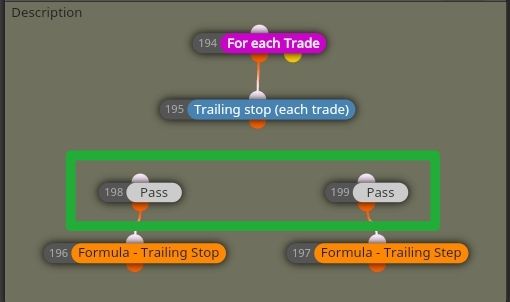
@ehsan1362 I used the pass blocks and connected them to the formula block. The formulated values are now picked (allocated as variables).
Problem solved. Thank you so much for your help!!! 
 ️
️
@ehsan1362 please check your private messages
@ehsan1362 I don't know how to do this but I'm determined, I will look into it after work. I will share better the formula and input blocks later (can't do it from my mobile). Appreciate your help thank you.
@ehsan1362 That's exactly what I've done. The output variable stored should equate to (as per formula which is correct) let's say 30 value (pips) Trailing Stop as per VARIABLE. The value derived from these variables are NOT picked up by the algorithm, the variable NUMBER assigned is picked up instead (as I've highlighted in orange). I don't know what to do to get those produced values as input into the stop and step.
So in other words I've used the formula block and created the output assigned to a variable (trailing stop).
This output variable (trailing stop) is then selected as the trailing stop value (pips).
The algorithm picks up the variable number and not the variable value calculated (let's say 30)
It pics up the values highlighted in orange NOT the values of the Trailing Stop and Trailing Step highlighed Green (These variables produced are the pip values produced/allocated as per formula)
@ehsan1362 But of course, that's what is there by default. The algorithm still picks up the value of the variable number on the menu not the produced formula value.
Hi Team...
I have put a trailing stop and step in my project. I am trying to create a custom value for the Trailing Stop and Trailing Step as input for these values (Not typed in a constant)
I have created a formula and added the value to a variable. The problem is that when I select this variable (as input for the Stop or Step) is produces the variable value allocated not the produced formula value.
Can someone please advise?
@l-andorrà I've managed to sort the issue...
Instead of identifying opened pending orders by group numbers, I've set a variable and defined that particular trade by a variable
(So instead of using a number to define the group, the trade is now defined by the variable)
Works like a charm now. Thanks for your help!