J
Best posts made by josecortesllobat
-
RE: HOW OPEN BUY OR SELL MORE THAN ONE?posted in Questions & Answers
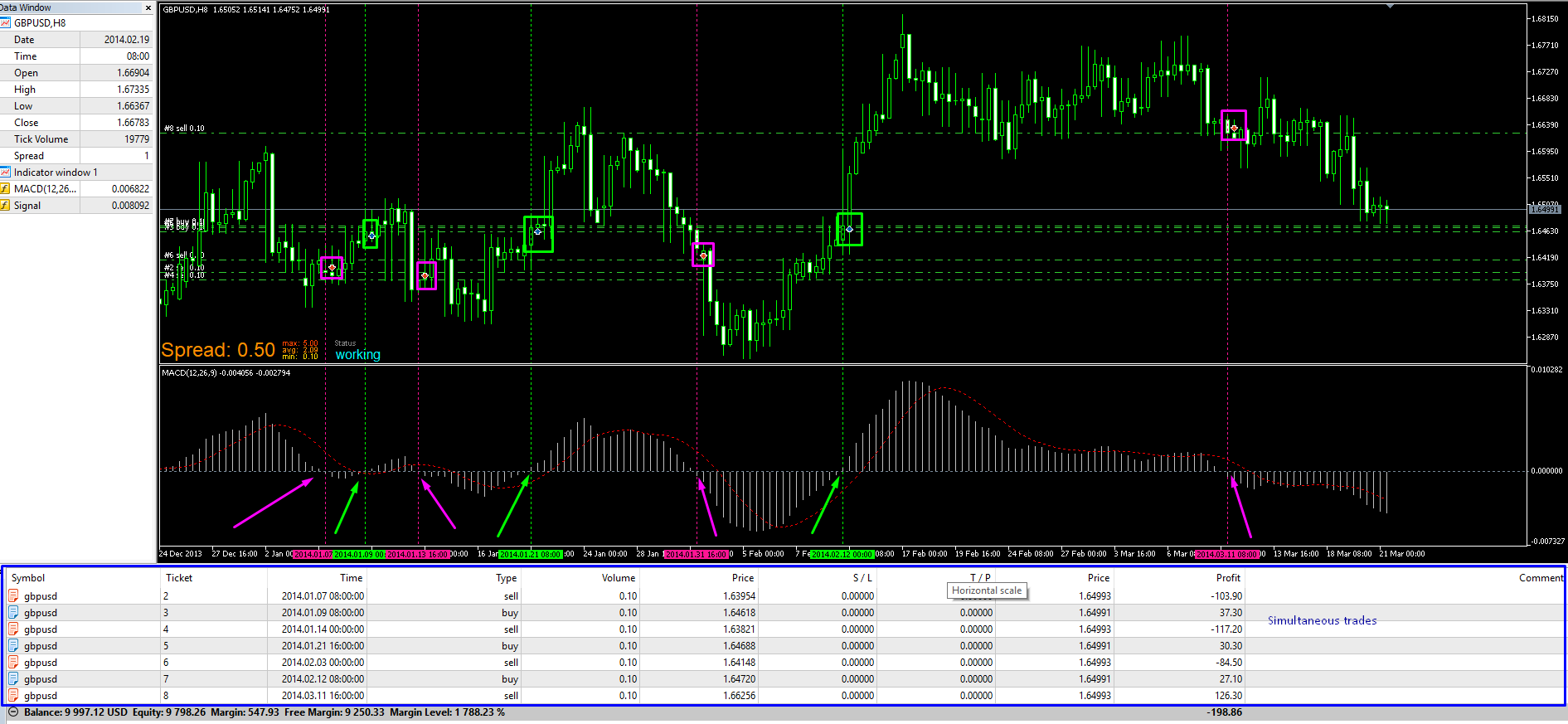
So, looking at your screenshot, I think that what you want is to open buys when MACD crosses above (x>) 0 and sells when MACD crosses below (x<) 0, right?
Your conditions in the builder states to open trades when MACD > 0 (buy) &/or MACD < 0 (sell).
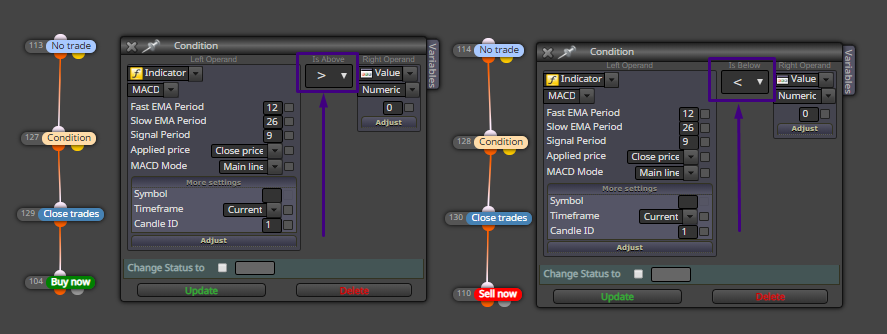

That condition is true while the MACD is above or below 0. So the EA will open trades for each time that the conditions are true.
This could work if it is what you are trying to get
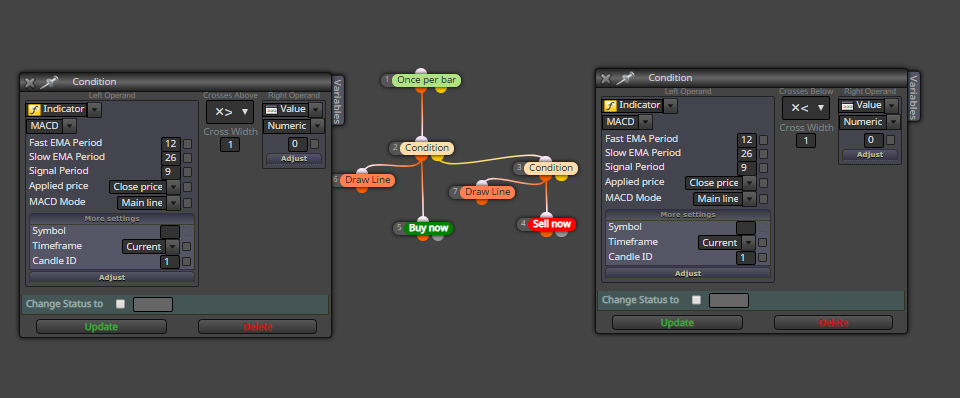
-
RE: ID 1 = 50% of ID 2posted in Questions & Answers
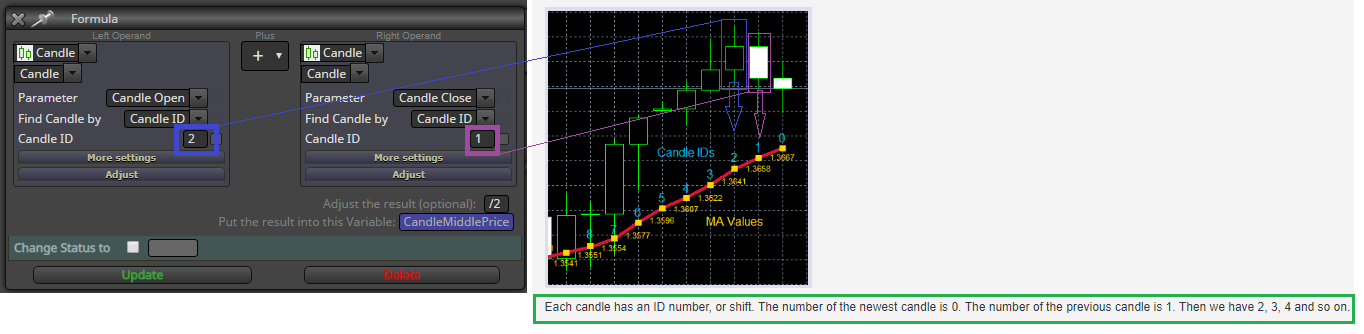
Previous Candle is ID = 1
You're taking the CandleOpen[2] and CandleClose[1]. It is not the CandleMiddleValue of the previous candle [1].
-
RE: How do engulfing ea?posted in Questions & Answers
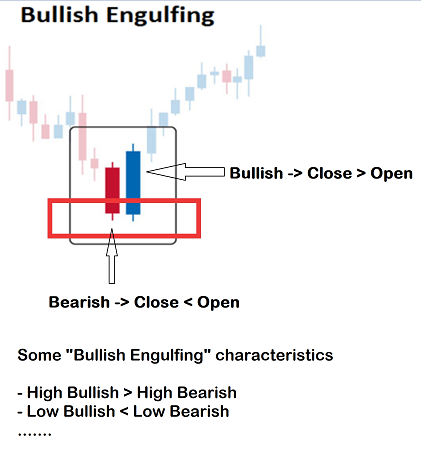
It is just a starting point guide. You can add or adjust blocks as you need.
-
RE: Check age based on candlesposted in Questions & Answers
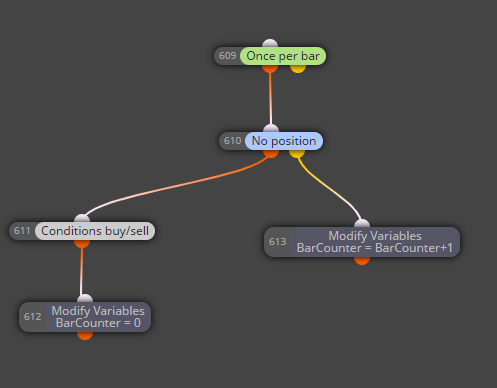
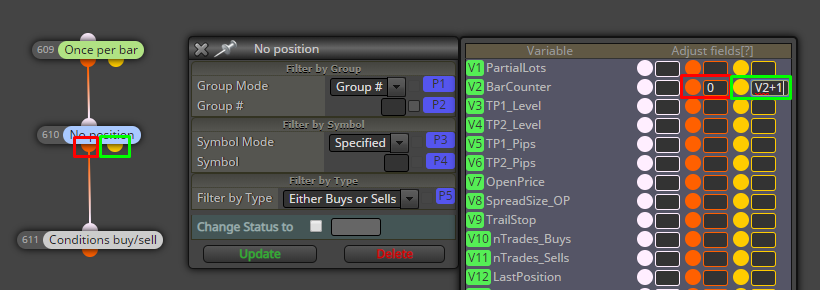
The easiest way is to define a variable that increases by 1 when a new candle opens if there is a trade running.
int BarCounter = 0
Once per bar - If trade -> BarCounter = BarCounter+1
You have to reset that variable when there is no trade. My suggestion is to reset it when a new trade opens.
This is just an example
-
RE: Block "formula" with more operandsposted in Questions & Answers
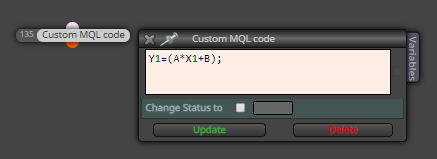
You can use a "Custom MQL code" block like this
-
RE: Block "formula" with more operandsposted in Questions & Answers
Here you are defining a variable "Y1" as a result of an math operation. Then, "Y1" value will change in function of the variables "A", "X1" and "B".
I am not sure what you mean with "Y1, A, X1 and B are changeable variables from other formulas blocks." "A", "X1" and "B" don't matter of where come. They might be a predefined variables or as a result of a formula block. But if "Y1" had a value before of that "Custom MQL code" block, Y1 value will shift to the result of the math operation.
Y1 = 10
A = 1
X1 = 2
B = 3
Y1 = 1*2+3 = 5Before "Custom MQL code" block -> Y1 = 10
After "Custom MQL code" block -> Y1 = 5Hope this helps.
-
RE: Block "formula" with more operandsposted in Questions & Answers
"Custom MQL code" should work with any math operation if it is well defined.
Did you try it with an extra parenthesis?
A=((Y1l-Y2l)/(X2l-X1l))
((A1+A2)/(A3+A4))
I have used that block with equations more complicated than the one you are defining and it worked correctly.
-
RE: Block "formula" with more operandsposted in Questions & Answers
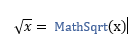
You can code what you need but you have to know how to use the math functions.
https://www.mql5.com/en/docs/math
Like
-
RE: Block "formula" with more operandsposted in Questions & Answers
Yes, you can.
I would say that is this
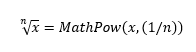
But I have not tried it.
-
RE: 2 lost per dayposted in Questions & Answers
I would say that you need some project branches to get what you are looking for.
bool StopTrade (variable to be modified depending on the conditions)
Branch - 1 -> Conditions to trade will be checked out if StopTrade == false
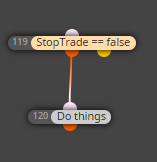
Branch - 2 -> If a closed trade is a lose, then StopTrade == true
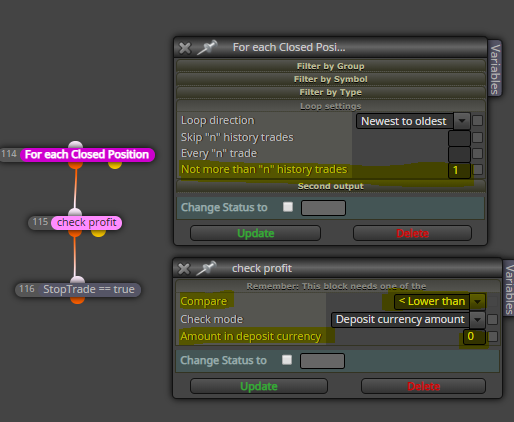
"For each closed trade" with n = 1 (newest to oldest) will load only the last trade closed. If the profit of that last trade is < 0 (lose), then StopTrade == true. With that, the conditions to trade will not be checked out anymore until the variable StopTrade become false.
Branch - 3 -> Reset StopTrade for each new day
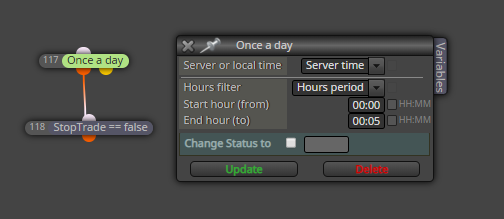
That could be an approach. NOT TESTED
-
RE: candle wick calculationposted in Questions & Answers
You have all what is needed in some block like "Formula" one
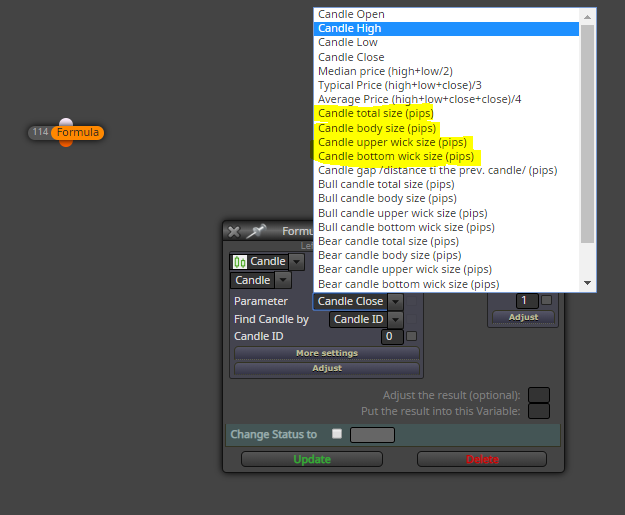
If you want to calculate the UpperWickPercent in respect of the Candle Total size, you just need to use the "Formula" block
double UpperWickPercent
UpperWickPercent = (Candle upper wick size / Candle total size) * 100 -
RE: en que estoy mal?posted in Questions & Answers
https://fxdreema.com/instructions/builder/things-not-to-do
Es preferible usar la apertura de vela en lugar del cierre de vela. Ten en cuenta que una vela nueva empieza justo después que cierra la anterior. Por tanto, se puede decir que la apertura de vela nueva el lo mismo que el cierre de vela anterior.
Entonces, del último proyecto que has compartido, prueba esto
Bloque 1 (superior) -> "Once per bar" (el proyecto se ejecutará cuando abre una vela o, si prefieres considerarlo de esta forma, cuando ha cerrado la vela anterior)
Añade los bloques de acuerdo a tu proyecto.
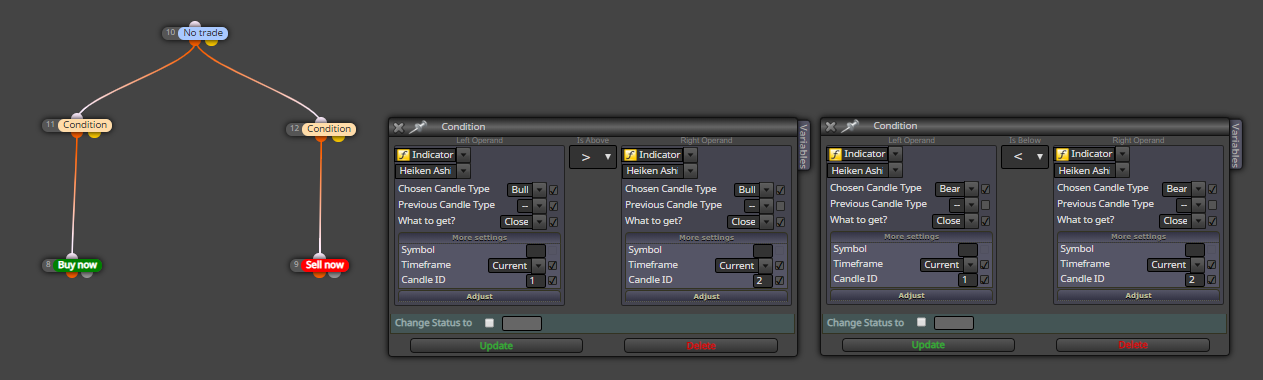
De acuerdo a tus condiciones, estás comparando valores del indicador en la vela 1 (última) con la vela 2 (penúltima). Si son ciertas, se ejecutan los bloques siguientes.
-
RE: en que estoy mal?posted in Questions & Answers
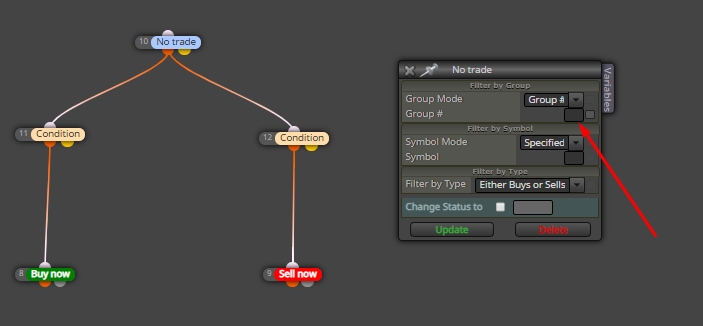
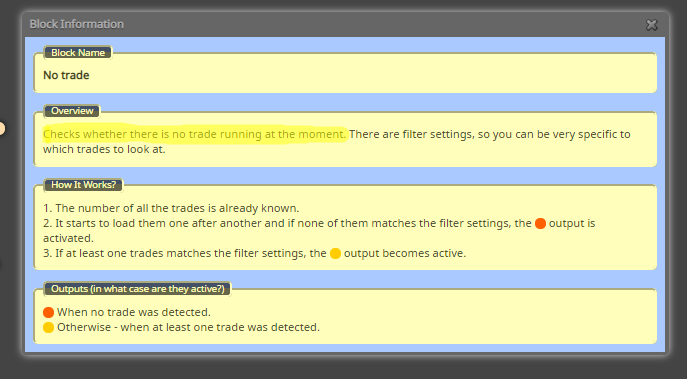
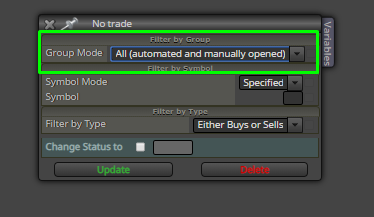
El bloque "No Trade" busca operaciones que cumplan los criterios seleccionados en él. En "Group Mode" tienes seleccionado "Group #". Sin embargo, no indicas qué Group # tiene que buscar el bloque y, por tanto, no encuentra nada que cumpla tus criterios.
Prueba con
-
RE: Profit Mathposted in Questions & Answers
Hello @roar @AlphaOmega Happy to know that you were working on this and found a solution. Well done!!!
Keep pushing on learning fxDreema and building your projects. -
RE: Profit Mathposted in Questions & Answers
@AlphaOmega I have to say again that you must simplify the project as much as you can or we can try to help you step by step to build what you are trying to get from a simple starting point. Maybe this way is not quick but we can get a more understandable project behavior instead of trying to look at your code to see the trouble. I am sure that other forum members are smart enough to find the problem but the way that fxDreema explained to me is as I said above.
Let's get started by doing a simple project. For example, I want that the EA opens a position every new bar after a bull crossover happened on the previous candle. There is no need to share your conditions to trade. After that simple project we will increase the complexity with what you want to obtain. What is important is to avoid adding more than 2 new features on each step of the project to be sure that what we added behaves as expects.
-
RE: Profit Mathposted in Questions & Answers
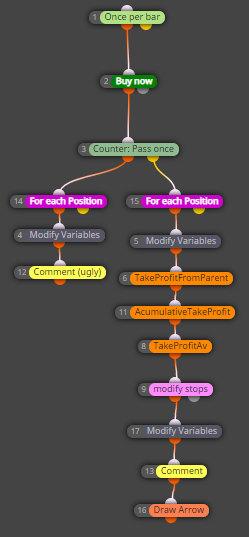
As I mentioned earlier, there are several ways to achieve the same result with fxDreema. This is just an option and, of course, the project can be optimized to get a more efficient code. Here it is the long trading side:
https://fxdreema.com/shared/xblYjK0uc
0_1598858539003_Profit Math.mq5
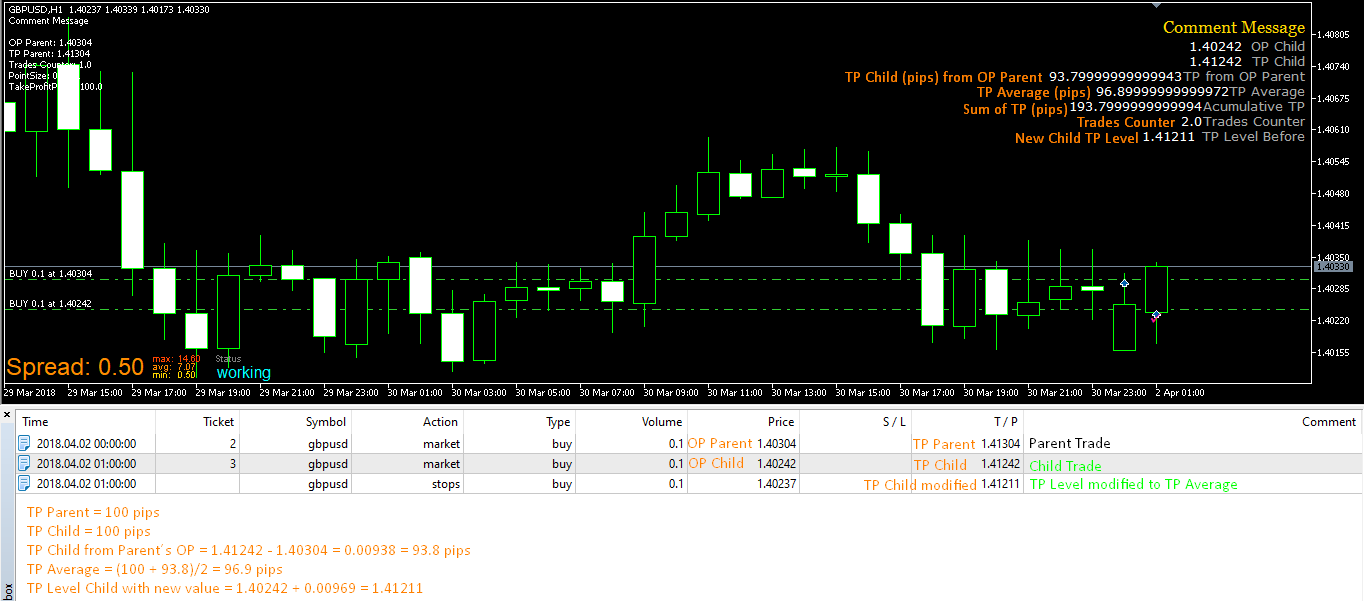
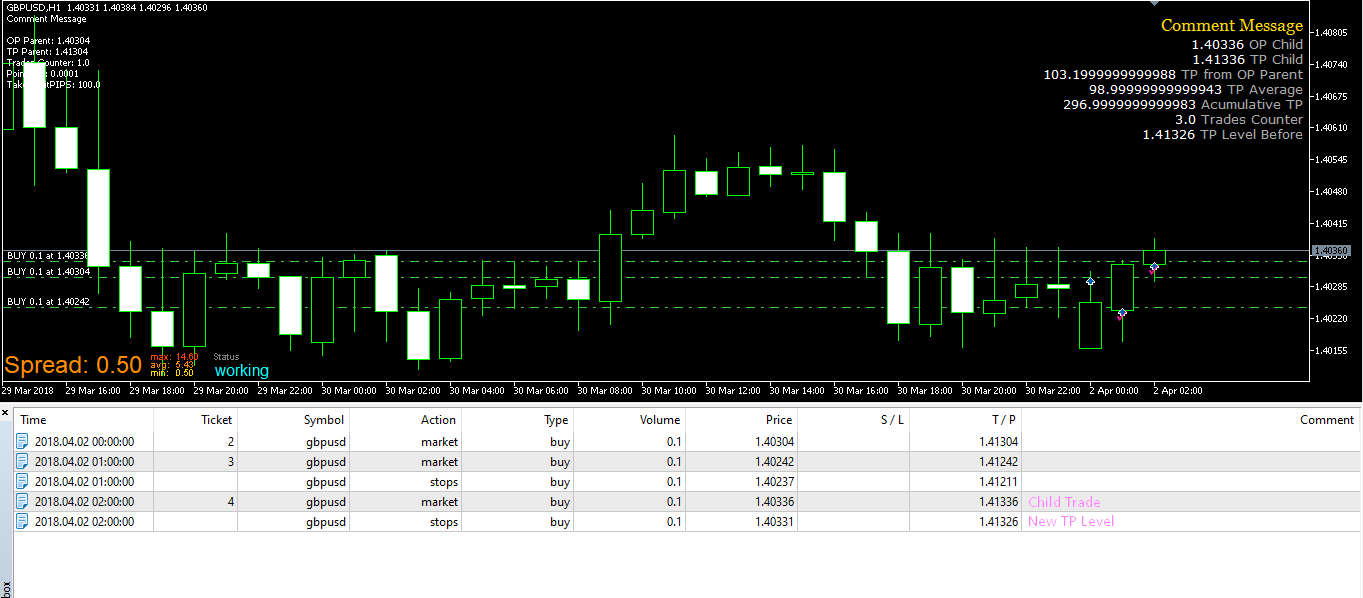
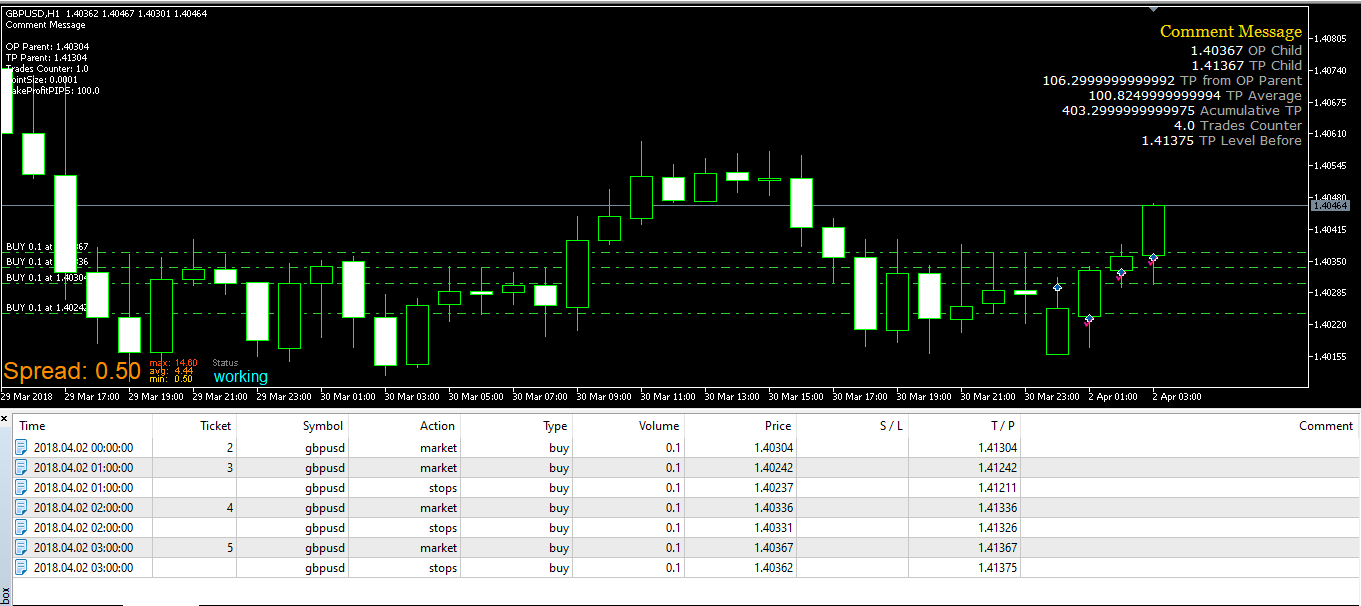
Whatever the condition is true to enter at market, that piece of code will open a trade for every new bar with the original take profit value (100 pips in the exxample). When a child trade opens, it calculates the take profit average by getting which is the take profit in pips of the child trade using the parent open price as the reference following this formula structure:
TakeProfitAv == (TakeProfitPips + (TPLevel_ChildTrade1 - OpenPrice_ParentTrade) "as pips")) / nTrades
After that, the code will modify the child´s TP to TakeProfitAverage.
That logic will repeat until you break the loop when your condition to do not enter long at market is met (maybe when start to go short).
Keep in mind:
-
I defined the Pointsize with a number but it can be set with 'Market Properties'. This parameter is used to convert from points to pips or vice versa.
-
I have used a "Counter: Pass once' (Id=3) block to split the parent trade from the child trades. This block will need to reset at some point along your code. For example, when you break the go long loop. If it is not reset, when the EA starts with a new go long loop, it will not activate the true output of the block.
One of the best suggestion that I got from fxDreema support & other forum members is to add blocks that makes me to see if the code is going as I expect:
"Draw Arrow" allows me to see that the execution passed through the "modify stops" block
"Comment (ugly)" allows me to see the parent trade values
"Comment" allows me to see that the calulations are correctHoping that this example provides you some starting point.
-
-
RE: Negative numbersposted in Questions & Answers
Hi martin 1
I guess that you use the "Search" tool of the forum to find interesting post that probably will answer your questions. For example, here you have a post explaining the "Adjust" field that is available in almost all the blocks
https://fxdreema.com/forum/topic/4247/question-regarding-the-adjust-field
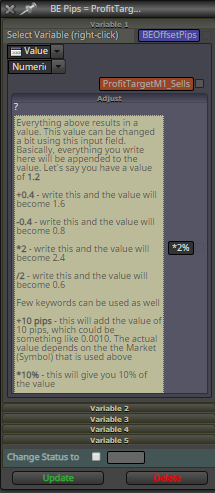
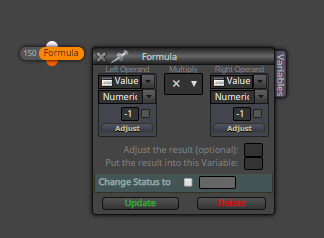
In addition to this, the adjust field has a "?" character. When you click over it, you will get some examples of what you can do with this field. For what you are requesting, you just write "*(-1)" without quotes in that field to get the positive number you need. In the example above, the ajust field calculates the 2% of the value of the constant "ProfitTargetM1_Sells" and the result is stored in the variable called "BEOffsetPips".
You also can use the "Formula" block that allows to code from the basis of the math functions to more complex ones.
-
RE: engulfing candlestrategy EAposted in Questions & Answers
This is a pretty good starting point given by @miro1360
https://fxdreema.com/forum/topic/4321/tutorial-08-candle-formations