fxDreema

    • Register
    • Login
    • Search
    • Back to the main page
    • Categories
    • Recent
    • Tags
    • Popular
    • Search
    1. Home
    2. josecortesllobat
    3. Posts
    J
    • Profile
    • Following 2
    • Followers 20
    • Topics 34
    • Posts 507
    • Best 41
    • Controversial 1
    • Groups 0

    Posts made by josecortesllobat

    • RE: Profit Math

      @AlphaOmega Sorry, I cannot still understand your project because you are giving the whole puzzle but we need to build it piece by piece.

      Let´s make it simple and then if you have a good EA's behavior, we can try to add the suggestions given by other forum members.

      What do you need to happen when the codition/s to open trade/s takes place? I remember from the begining of this topic that you wanted to open a trade when a new bar opens and the condition is still true. Is that correct?

      posted in Questions & Answers
      J
      josecortesllobat
    • RE: Profit Math

      @AlphaOmega I have to say again that you must simplify the project as much as you can or we can try to help you step by step to build what you are trying to get from a simple starting point. Maybe this way is not quick but we can get a more understandable project behavior instead of trying to look at your code to see the trouble. I am sure that other forum members are smart enough to find the problem but the way that fxDreema explained to me is as I said above.

      Let's get started by doing a simple project. For example, I want that the EA opens a position every new bar after a bull crossover happened on the previous candle. There is no need to share your conditions to trade. After that simple project we will increase the complexity with what you want to obtain. What is important is to avoid adding more than 2 new features on each step of the project to be sure that what we added behaves as expects.

      posted in Questions & Answers
      J
      josecortesllobat
    • RE: Profit Math

      @AlphaOmega

      0_1606056598441_f7a21083-6044-4fe0-a81d-0d445bbe9892-image.png

      That piece of code is placed on the 'OnTrade' tab that is intended to do things with trades. I would say that you have to place 'Position created' block on top what would mean that when a trade is created, some things will happen. As it is right now, I would say that the code does not execute anything.

      Give it a try and let us know.

      posted in Questions & Answers
      J
      josecortesllobat
    • RE: Profit Math

      Hello @roar @AlphaOmega Happy to know that you were working on this and found a solution. Well done!!!
      Keep pushing on learning fxDreema and building your projects.

      posted in Questions & Answers
      J
      josecortesllobat
    • RE: Profit Math

      @AlphaOmega It´s tough to understand what are you trying to reach if we don´t know what you would like to achieve. Said that, I will try to do my best in order to help you.

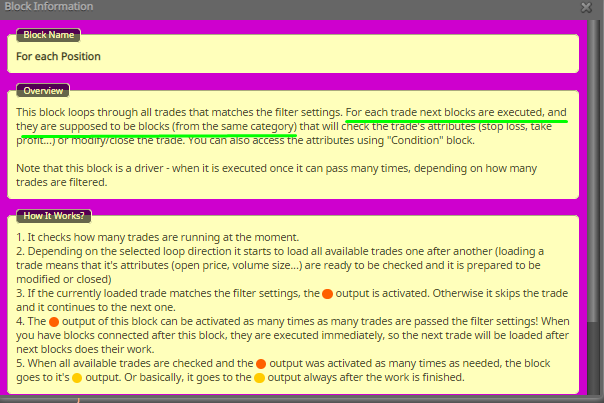
      First of all, I would suggest you to read the information for the "For each position" block

      0_1600813403381_f2391827-0ff0-4c55-b12f-70949c528f57-image.png

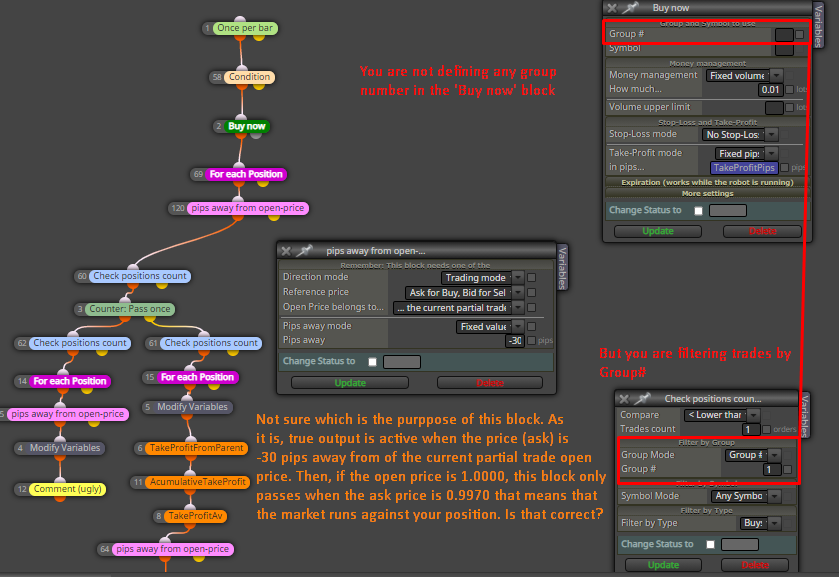
      We will focus on the main branch of your project because I would say that the reset branch looks correct at least in respect of the project´s logic.

      0_1600813075135_64263941-3461-4678-961b-8bb027cca453-image.png

      If we assume that block with ID = 120 is true, next block is evaluated

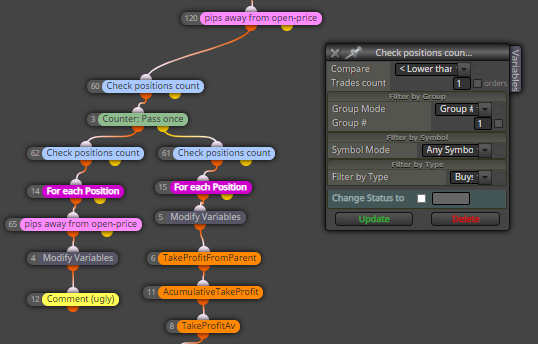
      0_1600813473863_2e74e88c-fcc4-4b13-86d0-a3bc64accecc-image.png

      We have that if the postions count is less than 1 (=0) for positions that match filters Group#=1 and Type=Buys, block passes. Then, do you want that the project´s execution passes if there is no buy position?

      If we assue that there is no buy postion and block ID = 60 passes, it will not be true anymore and the false output will be active but there is nothing attached to the false output so I suppose that the project stops at this point.

      As I said earlier, there are many questions to answer before reaching what you want.

      posted in Questions & Answers
      J
      josecortesllobat
    • RE: Profit Math

      @AlphaOmega Forum members will be glad to help in your growth using fxDreema. We all learnt like that.
      Believe me. I was also concerned in sharing some aspects of my strategies in the past but it was needed to move forward. I am not saying that you share all details of your strategy but if you ask for some help, you will need to provide what you are trying to achieve. Keep on trying and learning with fxDreema.

      posted in Questions & Answers
      J
      josecortesllobat
    • RE: Profit Math

      @AlphaOmega

      If you add a "No position" block, that will only open the parent trade and none child trades because on the second excution of the code, the "No position" block false output will active and will not pass through the open trade block. You said that you wanted to open a child trade for each new bar once the parent trade was opened.

      If there is no child trade, Take profit average is not calculated because it only exists one trade that is the parent one.

      If you want to limit the number of trades after opening the parent trade, you will have to use a variable like TradesLimit that will be increased each time that a new trade opens. Then, add a condition block to let pass the project execution while the limit of trades is not reached.

      My suggestion is that you should write down your strategy´s rules and then we will try to help you to get what you want. Begin with a basic rule like when this condition is true, do this. When that step is correct, add a new step to the project and check it out.

      But remember that the forum members are helping to make the people be more comfortable using fxDreema. They are not EA's coders for free.

      posted in Questions & Answers
      J
      josecortesllobat
    • RE: Profit Math

      @AlphaOmega

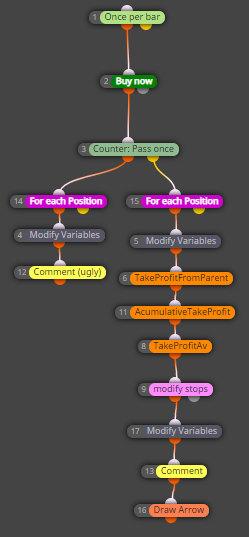
      As I mentioned earlier, there are several ways to achieve the same result with fxDreema. This is just an option and, of course, the project can be optimized to get a more efficient code. Here it is the long trading side:

      0_1598856115194_309d9595-0ffe-4a5c-a22f-083ff1be7c8f-image.png

      https://fxdreema.com/shared/xblYjK0uc

      0_1598858539003_Profit Math.mq5

      0_1598857063028_095420a4-f777-4e71-a3b5-88fc8c9593e4-image.png

      0_1598857159633_91e6def0-2b3d-420d-b53f-af36d1c7457a-image.png

      0_1598857195997_16163e37-c5dc-4406-b3d7-def597666ac9-image.png

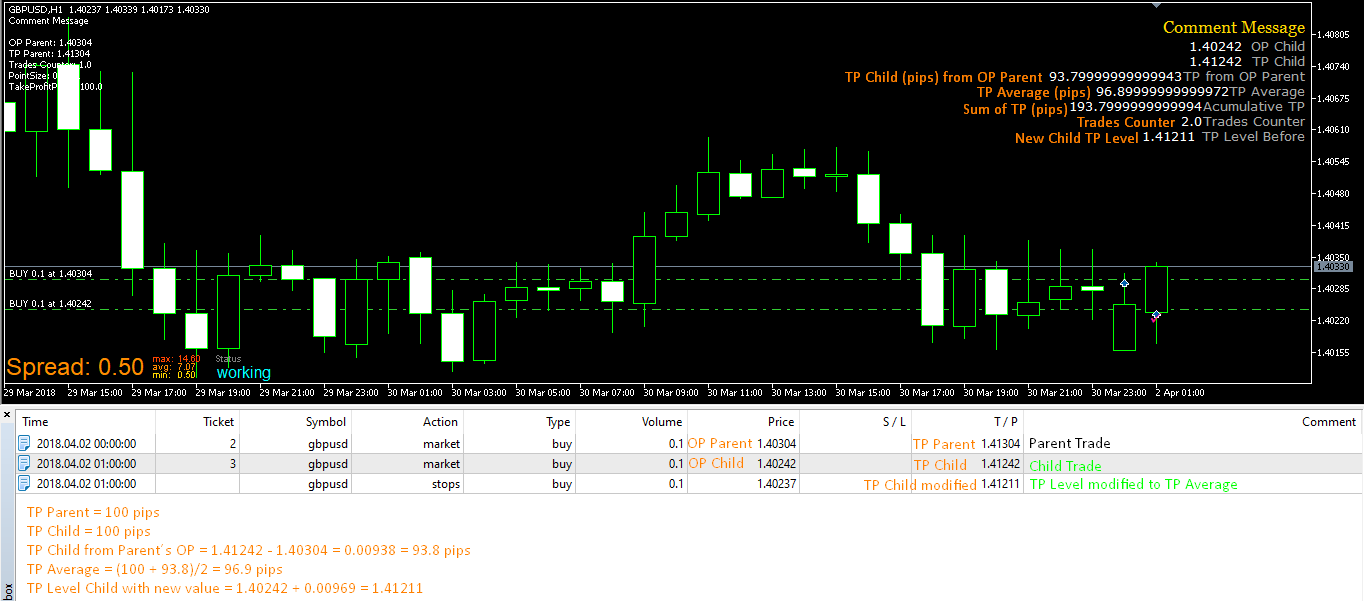
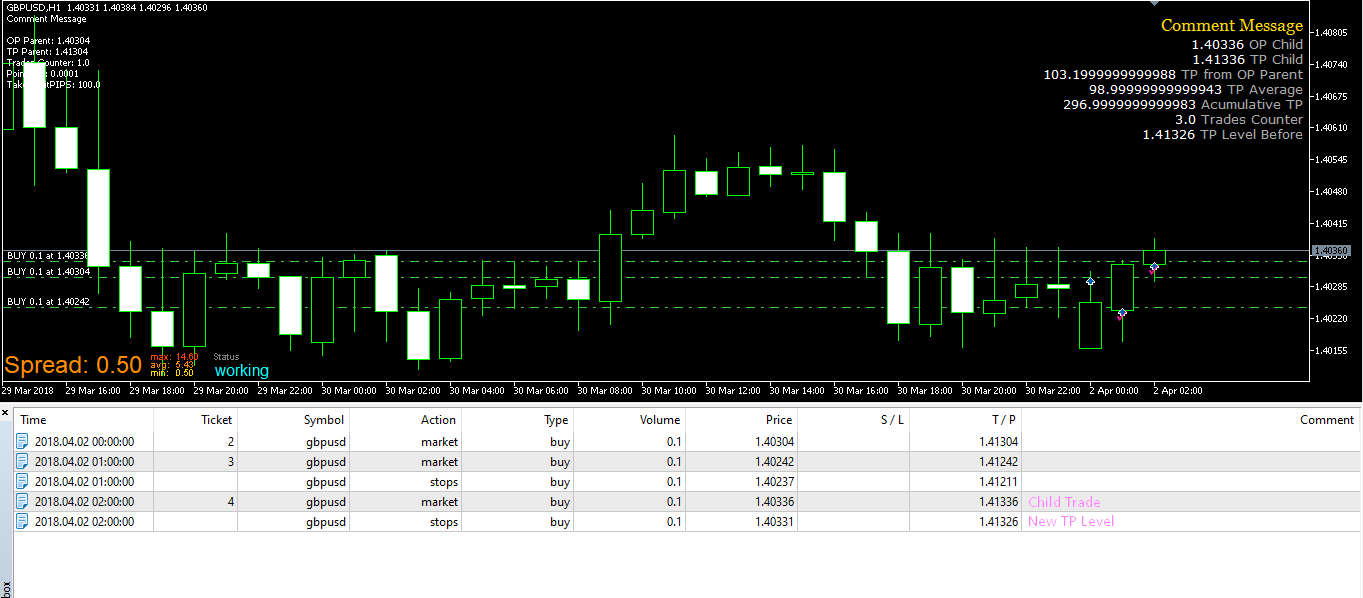
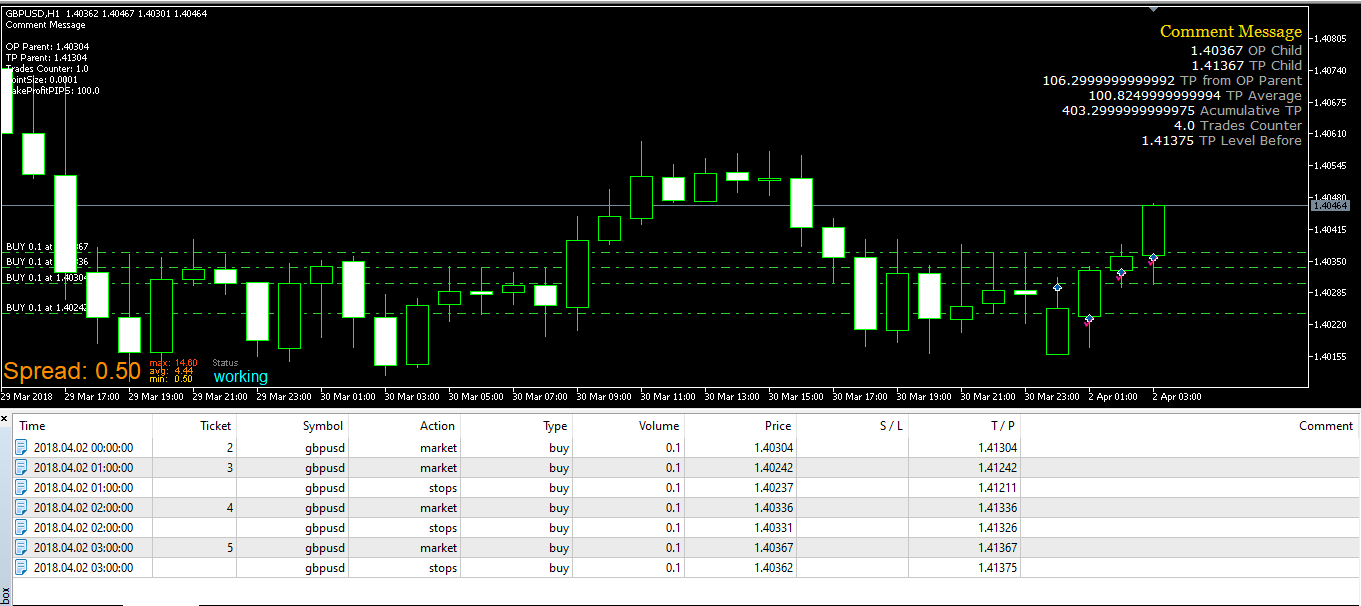
      Whatever the condition is true to enter at market, that piece of code will open a trade for every new bar with the original take profit value (100 pips in the exxample). When a child trade opens, it calculates the take profit average by getting which is the take profit in pips of the child trade using the parent open price as the reference following this formula structure:

      TakeProfitAv == (TakeProfitPips + (TPLevel_ChildTrade1 - OpenPrice_ParentTrade) "as pips")) / nTrades

      After that, the code will modify the child´s TP to TakeProfitAverage.

      That logic will repeat until you break the loop when your condition to do not enter long at market is met (maybe when start to go short).

      Keep in mind:

      • I defined the Pointsize with a number but it can be set with 'Market Properties'. This parameter is used to convert from points to pips or vice versa.

      • I have used a "Counter: Pass once' (Id=3) block to split the parent trade from the child trades. This block will need to reset at some point along your code. For example, when you break the go long loop. If it is not reset, when the EA starts with a new go long loop, it will not activate the true output of the block.

      One of the best suggestion that I got from fxDreema support & other forum members is to add blocks that makes me to see if the code is going as I expect:

      "Draw Arrow" allows me to see that the execution passed through the "modify stops" block
      "Comment (ugly)" allows me to see the parent trade values
      "Comment" allows me to see that the calulations are correct

      Hoping that this example provides you some starting point.

      posted in Questions & Answers
      J
      josecortesllobat
    • RE: Crossing Moving Average

      @ramimoujaes Your project has some blocks fields empty that are important for the project´s logic.

      My suggestion is always to try to understand the logic of what you are building. The "How To" examples are just a guide to help you to begin from something. Same applies for the suggestions provided on the forum.

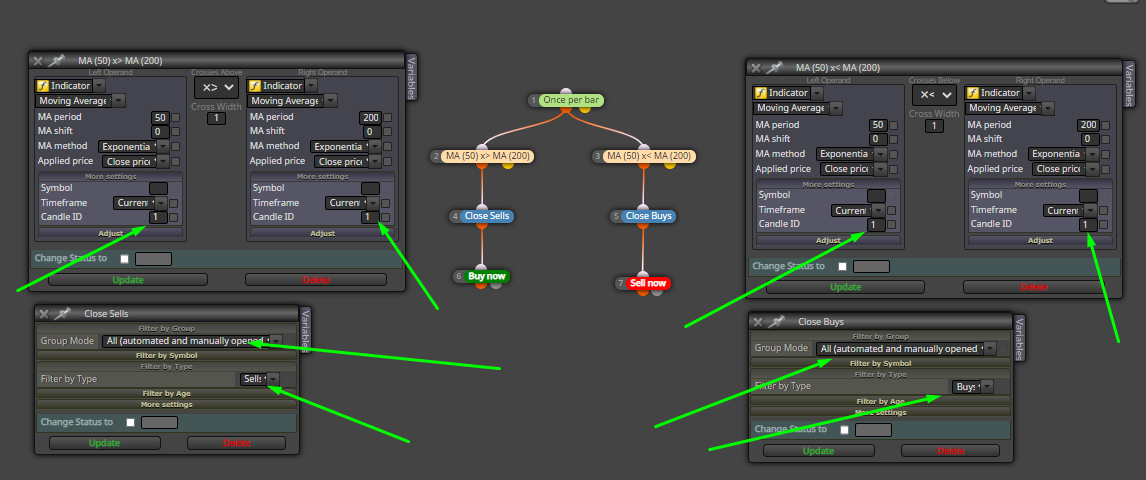
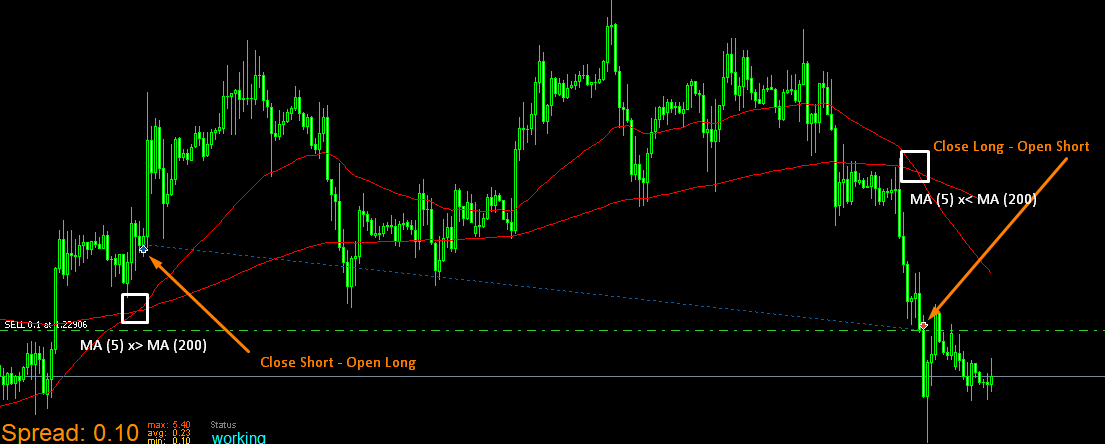
      Said that, what you want is to open - close trades on opposite conditions of a MAs crossover. Here you have an approach

      0_1598281718830_edd77986-07e9-4ac3-962f-7c66a6cfc198-image.png

      0_1598282153293_07431abd-7a73-406a-bc97-8bdd622b1290-image.png

      0_1598282258613_6bee5b65-8140-4a54-8528-3300512cd424-image.png

      As you can see above,

      when MA (5) x> MA (200), EA closes Sells (no sells were running, no Buy - Out) and opens Buys (Buy - In)
      when MA (5) x< MA (200), EA closes Buys (Sell - Out) and opens Sells (Sell - In)

      As I mentioned earlier, that example is just an approach to what you want but it does not mean that is the only one because fxDreema allows to do the same through different ways.

      posted in Questions & Answers
      J
      josecortesllobat
    • RE: Some logic error

      if you share the project, it is easier for any forum member to suggest something to try

      posted in Questions & Answers
      J
      josecortesllobat
    • RE: Profit Math

      Hi @biztet

      @roar built that amazing profit checker code. I can say that works greatfully and it was built using variables.
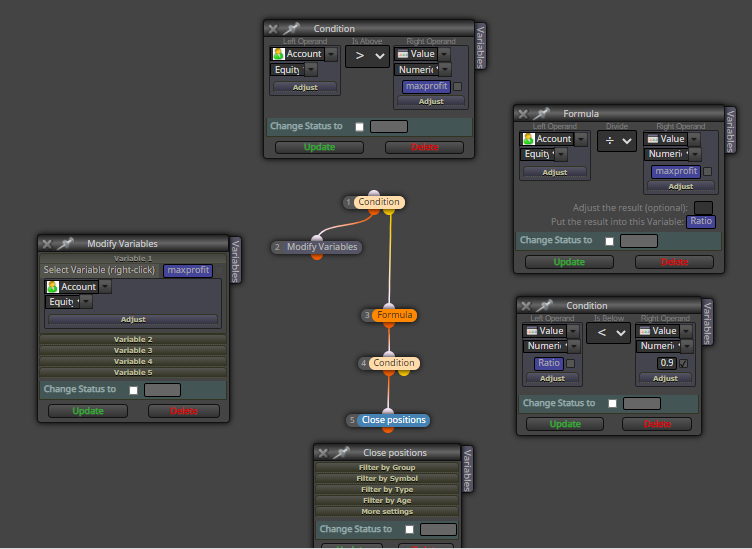
      0_1598249148403_dfee3e67-4854-46d2-84e7-faab3af743cd-image.png

      "the ea will record the highest total current profit achieved. As the picture show its 2200."

      'maxprofit' == 0 (reset it as per you need)
      If 'Equity' > 'maxprofit' -> 'maxprofit' == "Equity'

      "When the number decrease more than certain % from the highest current profit, e.g 60%, the ea will close all trade, and we secure the 40% profit0."

      If 'Equity' <= 'maxprofit' -> calculate 'Ratio' as 'Equity' / 'maxprofit'
      If 'Ratio' < MinRatio (0.6 for you) -> Close positions

      "Also to set the minimum current profit, lets say 1000. The rule applies when the current profit reach minimum 1000."

      You just need to add condition blocks somewhere within your code to activate the 'profit checker'. This might be an approach:

      Define -> bool ProfitCheckerON false (reset it as per your need)
      Condition block -> If 'Equity' > 1000 -> ProfitCheckerON == true
      Condition block -> If ProfitCheckerON == true -> true output is activated and the profit checker starts to work

      Hi @AlphaOmega

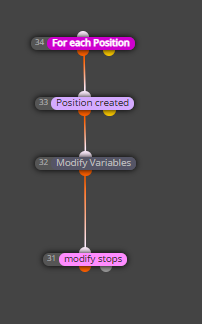
      Regarding to your question: TP average. Probably there is a much efficient way to code it because fxDreema allows to reach the same goal with multiple ways. I assume that each child trade has a fixed TP that probably will be the same as for the parent trade. Let´s call it 'TakeProfitPips'. Using your example,

      nTrades == 0 (reset it as per your need)
      TakeProfitPips == 100

      OpenPrice_ParentTrade == 1.00000
      nTrades == 1

      TPLevel_ParentTrade == OpenPrice_ParentTrade + TakeProfitPips (as price fraction) = 1.00000 + 0.00100 = 1.00100

      OpenPrice_ChildTrade1 == 1.00010
      nTrades == 2

      TPLevel_ChildTrade1 == OpenPrice_ChildTrade1 + TakeProfitPips (as price fraction) = 1.00010 + 0.00100 = 1.00110

      TakeProfitAv == (TakeProfitPips + (TPLevel_ChildTrade1 - OpenPrice_ParentTrade) "as pips")) / nTrades
      = (100 + (1.00110 - 1.00000) "as pips" ) / 2
      = (100 + 110) / 2 = 210 / 2 = 105

      Modify ChildTrade1 TP to 105 pips -> TP_ChildTrade == 105

      OpenPrice_ChildTrade2 == 1.00020
      nTrades == 3

      TPLevel_ChildTrade3 == OpenPrice_ChildTrade3 + TakeProfitPips (as price fraction) = 1.00020 + 0.00100 = 1.00120

      TakeProfitAv == (TakeProfitPips + [(TP_ChildTrade ) + (TPLevel_ChildTrade2 - OpenPrice_ParentTrade) "as pips"]) / nTrades
      = (100 + [(105) + (1.000120 - 1.00000) "as pips" ] )/ 3
      = (100 + [(105) + (120)] )/ 3 = 325 / 3 = 108.3

      Modify ChildTrade2 TP to 108 pips -> TP_ChildTrade == 108

      .... and so on

      Not sure if that is what you are looking for strictily but might be a starting point.
      posted in Questions & Answers
      J
      josecortesllobat
    • RE: Crossing Moving Average

      https://fxdreema.com/howto#Simple-Programs

      posted in Questions & Answers
      J
      josecortesllobat
    • RE: Profit Math

      https://fxdreema.com/forum/topic/4858/total-profit-reduces-by-x-then-close-everything

      posted in Questions & Answers
      J
      josecortesllobat
    • RE: Price action pattern

      https://fxdreema.com/forum/topic/4321/tutorial-08-candle-formations/9

      Thanks @miro1360

      posted in Questions & Answers
      J
      josecortesllobat
    • RE: Help with loop module

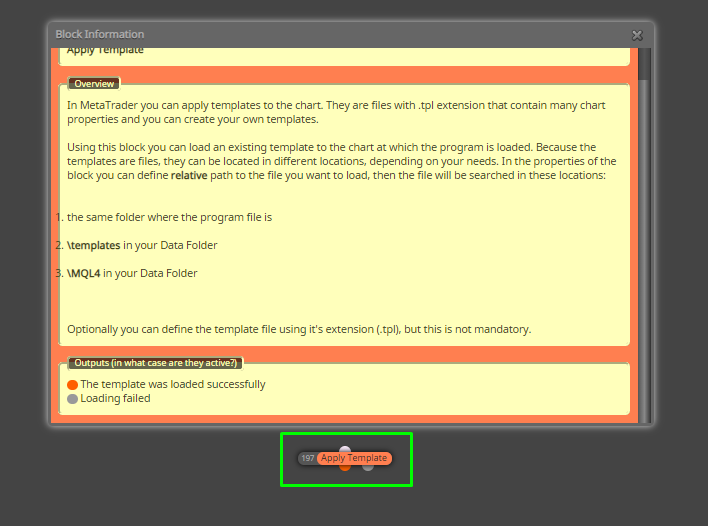
      My example was cretaed in MQL5. There are blocks with different name between MQL4 and MQL5.

      Yes, you can use both tabs. "OnTick" code is executed when a tick arrives while "OnTrade" regards to position/trade.

      Not sure. You will have to check it out by running a backtest in Tick mode to be sure that works as you expect.

      posted in Questions & Answers
      J
      josecortesllobat
    • RE: Help with loop module

      If you don´t mind how many pending orders are placed or how many trades are live, your logic regarding to blocks "Once per bar" and "Buy pending order" looks correct. When a new bar opens, a "Pending order" is placed.

      In relation to what happens with running trades, I would suggest that you give a try this

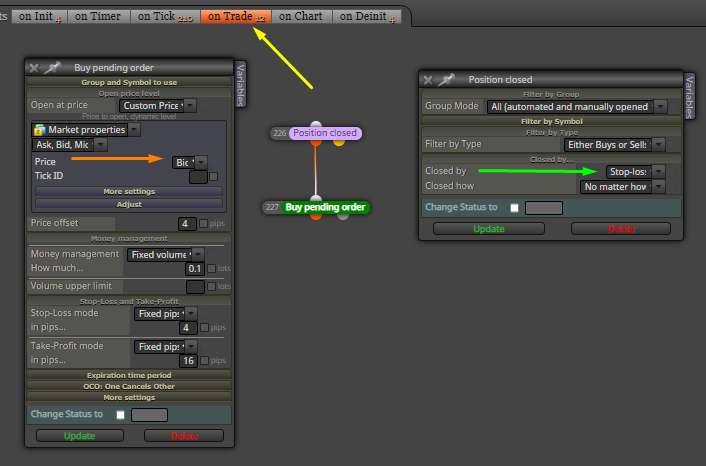
      0_1598082530057_2db6e637-9c44-43a8-aa13-4152b720791c-image.png

      The logic would be: if a trade is closed by "Stop Loss", a new perding order will open at "Ask" price. In other case (TP hit), nothing will happen. This part of the project is placed in "OnTrade" tab.

      posted in Questions & Answers
      J
      josecortesllobat
    • RE: Help with loop module

      It´s always worthy to share the project (mqX file or, at least, one screenshot) in order to look at the project´s logic instead of the compiled file.

      Questions:

      • EA opens a pending order on Candle ID = 0 but the trade does not open because the trigger level is not reached. What do you want to do when a new bar opens: place a new pending order (you will have 2 and so on) or remove the previous one and open a new one (you will have just one)?

      • EA opens a pending order on Candle ID = 0 and trade opens. What do you want to do on when next bar opens: open a new pending order or do nothing while a trade is live?

      Those questions are important for the EA´s logic.

      posted in Questions & Answers
      J
      josecortesllobat
    • RE: HOW OPEN BUY OR SELL MORE THAN ONE?

      0_1597469974229_e35cf739-e8ac-487c-80a2-08536b6cab24-image.png

      posted in Questions & Answers
      J
      josecortesllobat
    • RE: Apply template on chart ?

      0_1592842009414_1a9da660-bb3c-4eac-a283-9d5235fca10d-image.png

      posted in Questions & Answers
      J
      josecortesllobat
    • RE: en que estoy mal?

      @maty

      0_1590428013785_118c0562-198d-4f64-b33f-5a32d73b0123-image.png

      0_1590428200857_7e8248d4-7e26-437c-b3b4-bad862ed99c6-image.png

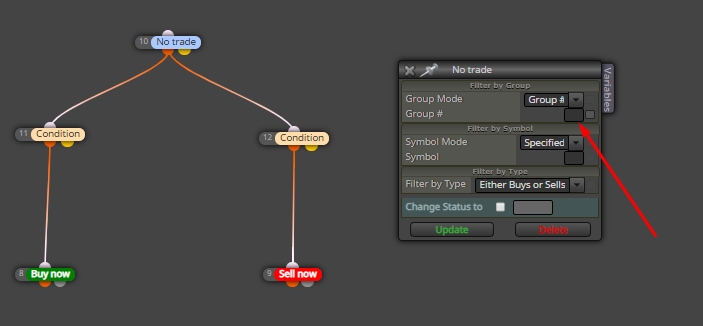
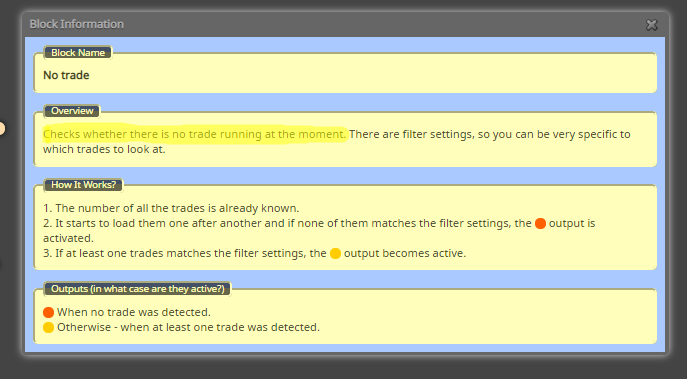
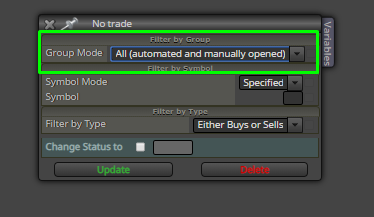
      El bloque "No Trade" busca operaciones que cumplan los criterios seleccionados en él. En "Group Mode" tienes seleccionado "Group #". Sin embargo, no indicas qué Group # tiene que buscar el bloque y, por tanto, no encuentra nada que cumpla tus criterios.

      Prueba con

      0_1590428291676_5045b3d1-e87d-4c86-a786-297492d614c4-image.png

      posted in Questions & Answers
      J
      josecortesllobat
    • 1
    • 2
    • 3
    • 4
    • 5
    • 25
    • 26
    • 1 / 26