fxDreema

    • Register
    • Login
    • Search
    • Back to the main page
    • Categories
    • Recent
    • Tags
    • Popular
    • Search
    1. Home
    2. josecortesllobat
    3. Posts
    J
    • Profile
    • Following 2
    • Followers 20
    • Topics 34
    • Posts 507
    • Best 41
    • Controversial 1
    • Groups 0

    Posts made by josecortesllobat

    • RE: What values ​​should you put in the SL and TP to optimize in MT5?

      By an iterative process:

      1. run an all parameters optimization with long steps for each one (SL-> Init = 10, End = 100, Step = 10)
      2. when you get a good strategy´s performance parameters set, start with a single parameter optimization with a short step
      3. when you get that the reult for the single optimization parameter is better than before, keep that parameter fixed and run again a multi parameters optimization as for the first step
      4. go forward with a new single parameter optimization
      5. repeat the iterative method until you get what you think is the best parametrization

      Keep in mind that the best optimized parameters set (one giving the highest profit, for example) does not mean that it is the best option to trade.
      posted in Questions & Answers
      J
      josecortesllobat
    • RE: candle wick calculation

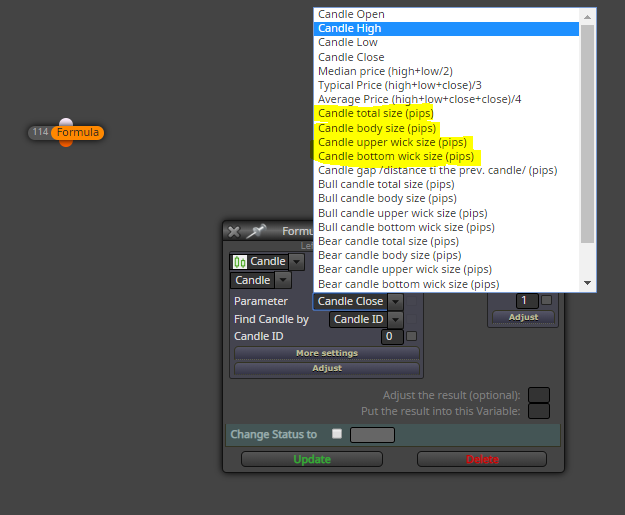
      You have all what is needed in some block like "Formula" one

      0_1576002332672_84cc73cf-19cc-45a5-88ea-ce38f692d124-image.png

      If you want to calculate the UpperWickPercent in respect of the Candle Total size, you just need to use the "Formula" block

      double UpperWickPercent
      UpperWickPercent = (Candle upper wick size / Candle total size) * 100

      posted in Questions & Answers
      J
      josecortesllobat
    • RE: 2 lost per day

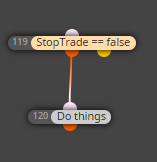
      I would say that you need some project branches to get what you are looking for.

      bool StopTrade (variable to be modified depending on the conditions)

      Branch - 1 -> Conditions to trade will be checked out if StopTrade == false

      0_1575997686159_5cbd2318-73e7-47a4-93dd-7e835a0bf951-image.png

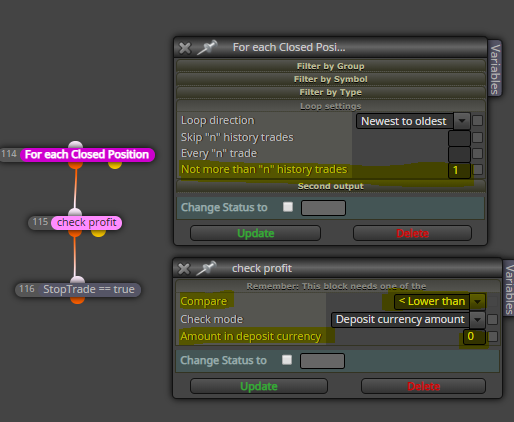
      Branch - 2 -> If a closed trade is a lose, then StopTrade == true

      0_1575997800811_f63ae771-c678-4cfc-a705-b6d2f5df16e9-image.png

      "For each closed trade" with n = 1 (newest to oldest) will load only the last trade closed. If the profit of that last trade is < 0 (lose), then StopTrade == true. With that, the conditions to trade will not be checked out anymore until the variable StopTrade become false.

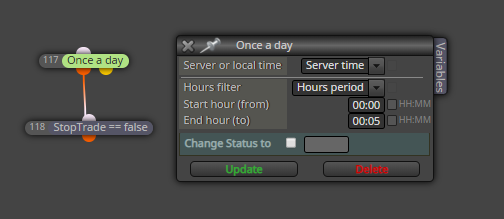
      Branch - 3 -> Reset StopTrade for each new day

      0_1575998104573_a3db728b-6a2a-4c49-a129-38cf6069d5f5-image.png

      That could be an approach. NOT TESTED

      posted in Questions & Answers
      J
      josecortesllobat
    • RE: Esta opcion no me esta funcionando, please help

      0_1575996664918_4c28e002-aac0-472e-9530-bd4647632392-image.png

      Try +2pips instead of 0.2pips

      posted in Questions & Answers
      J
      josecortesllobat
    • RE: aprender usar fxDreema

      0_1573404988379_fc98dc33-9be0-4fcd-85f0-fa7cc7a58da3-image.png

      0_1573405055172_946ec2bf-4148-4dcc-8ae9-4bca07b2953d-image.png

      posted in Questions & Answers
      J
      josecortesllobat
    • RE: Average price stop-loss order for a group of trades.

      @ambrogio You are correct but it depends on what @Dan-2 wants to get.

      From the project shared by @Dan-2,

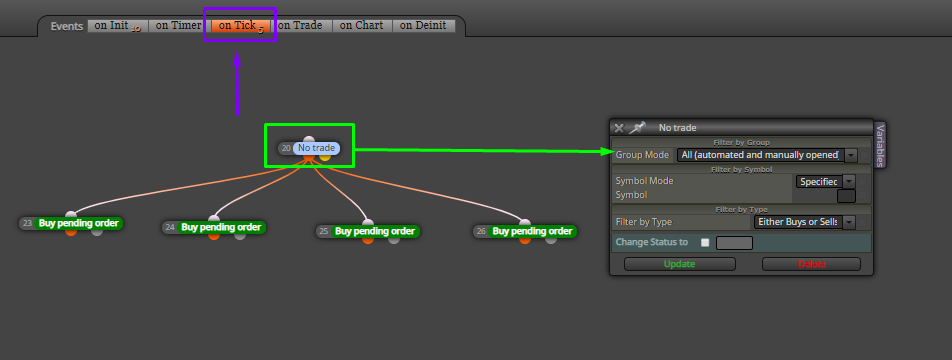
      If "No trade" is running, run true output and place 4 buy pending orders

      But if it wants to look at the pending orders as well, it is required an additional block like as follows

      If "No pending order" & "No trade" is running, run true output and place 4 buy pending orders

      So, it depends on what needs to be met.

      posted in Questions & Answers
      J
      josecortesllobat
    • RE: Average price stop-loss order for a group of trades.

      @Dan-2

      Try this out

      0_1572979842091_ab59e5fb-34d3-4d88-a300-b86ad9b67dbe-image.png

      posted in Questions & Answers
      J
      josecortesllobat
    • RE: Average price stop-loss order for a group of trades.

      @Dan-2

      Follow the suggestion given by @l-andorrà.

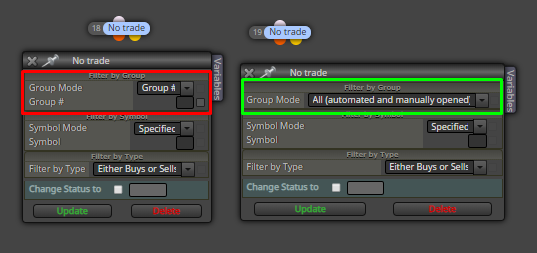
      To avoid opening more trades of that you want, you have to set which trades do you want to look at with the "No position" block

      0_1572899484551_4a5f9136-3bf0-440f-b3f4-08db5d088526-image.png

      "Group Mode = Group #" looks for the the trades that match with the group number specified. If the field Group # is not filled, there is no trade to look at.

      "Group Mode = All" looks for any trade that is currently running.

      posted in Questions & Answers
      J
      josecortesllobat
    • RE: how many candles?

      Not sure if this is what you are looking for but it´s my way

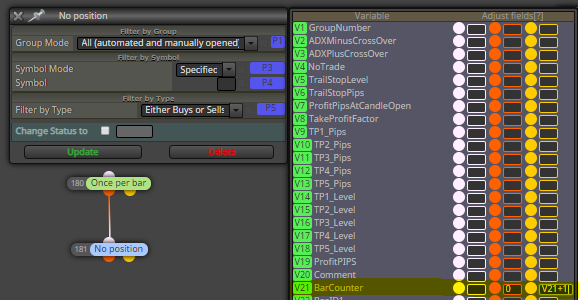
      0_1570962435944_e1eb9d58-ca92-45a9-9223-d428070ca258-image.png

      When there is no position running, BarCounter is set to 0 each time a new bar opens.

      When there is a position running, BarCounter is set to BarCounter+1 each time a new bar opens.

      posted in Questions & Answers
      J
      josecortesllobat
    • RE: Cant attach blocks

      It works well for me. As usual.

      posted in General Discussions
      J
      josecortesllobat
    • RE: Need help bolinger strategy

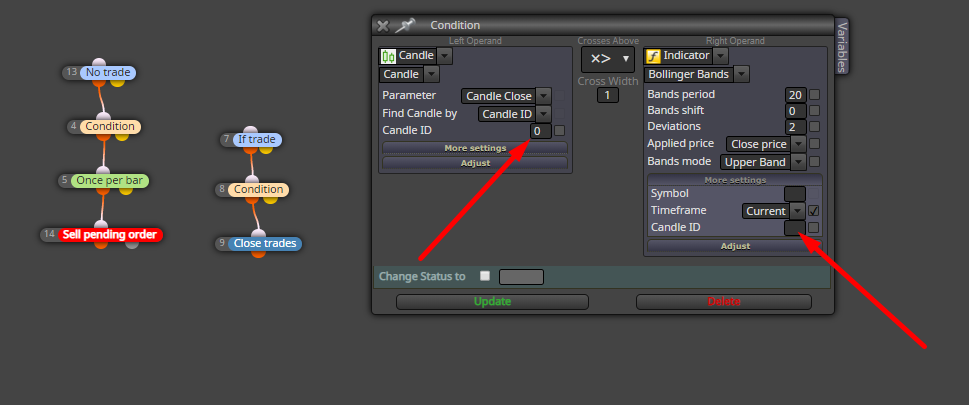
      0_1564412334487_c728428c-2605-4692-87c2-ff8bf7d25a62-image.png

      Candle Close (ID = 0) belongs to the bar being formed so that level changes as long as the bar is being formed. It's better to work with closed candles:

      If Candle Close (ID = 1) x> BB -> Do something

      The indicators also need a candle ID to evaluate the condition.

      posted in Questions & Answers
      J
      josecortesllobat
    • RE: Bug in help for "Draw Arrow"

      https://www.mql5.com/es/docs/constants/objectconstants/wingdings

      posted in Bug Reports
      J
      josecortesllobat
    • RE: EMA OF ATR

      La mejor opción es tener un indicador técnico que te haga el trabajo.

      https://www.mql5.com/es/code/12690

      posted in Questions & Answers
      J
      josecortesllobat
    • UninitializeReason()

      Hello @fxDreema

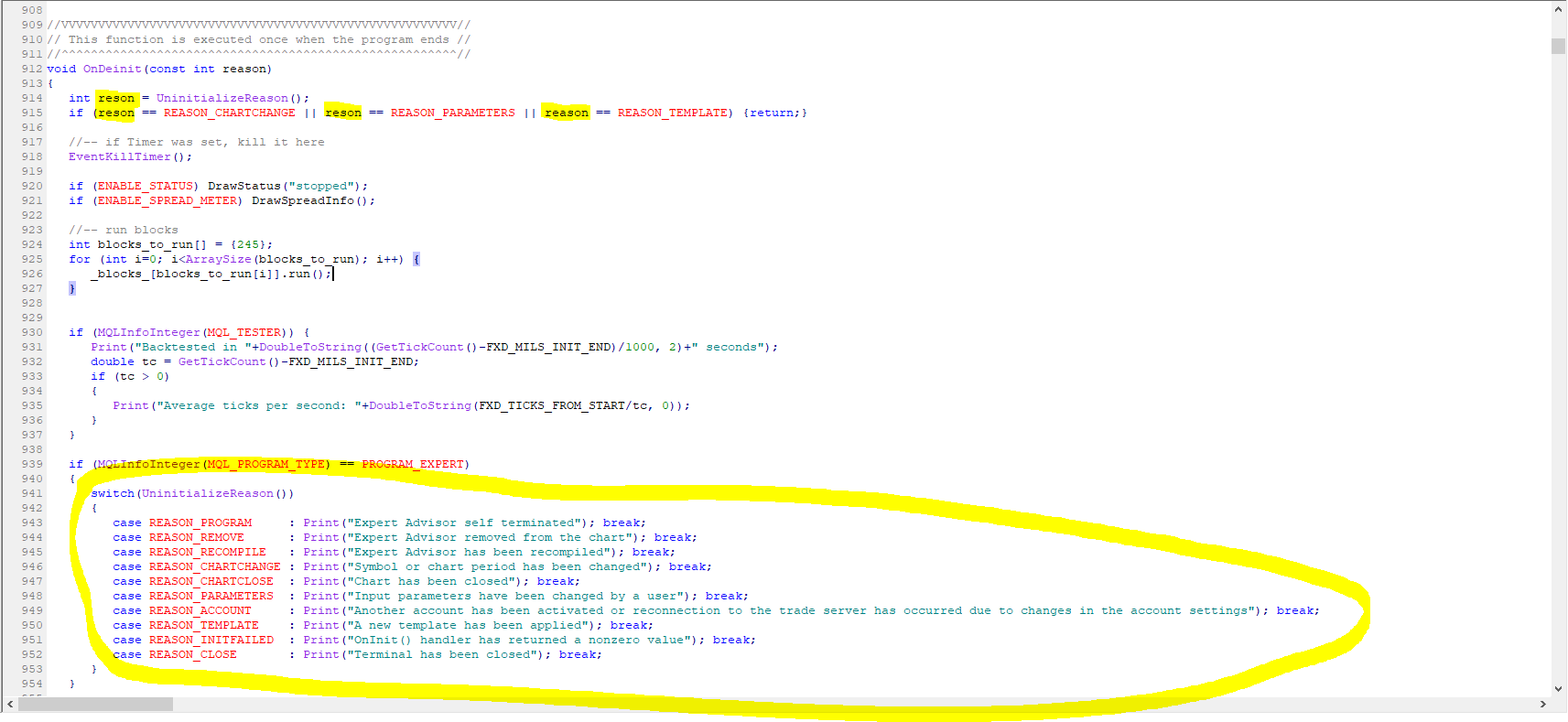
      I would like to request if you could be so kind to check the OnDeinit section of the compiled code.

      I realize that some expert advisors were removed from the chart where they were running on my broker´s demo account without apparently reason. I looked a the Journal tab and I saw some logs about the EAs removal

      http://prntscr.com/ohd0r0

      But nothing about the reason why they were removed.

      I was looking to implement a way to log the reason for the EAs removal and I found this function

      https://docs.mql4.com/constants/namedconstants/uninit

      So, I wanted to implement that function to my EAs code but I saw that you have already added it to the compiled projects.

      0_1563689224779_136e510a-7539-4664-a345-ad3c329c9f20-image.png

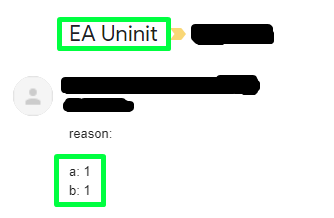
      I would say that might be there is a bug because when I removed an EA from its chart, I did not see any log about the reason why it was removed.

      0_1563690023538_af049c3f-8351-48cf-a283-ad761f033085-image.png

      Thanks to a suggestion from @miro1360,

      https://ctrlv.cz/shots/2019/07/19/Wmr9.png

      When an EA is removed from the chart, the terminal sends me an email with the reason code which is very useful as well.

      0_1563689464120_2ae6959f-157b-49d4-b46b-ea3f86b5aee0-image.png

      But, please, could you take a look at that part of the code to check if there was a bug for that function?

      Thanks

      posted in Bug Reports
      J
      josecortesllobat
    • RE: Compilation errors

      Hi @fxDreema

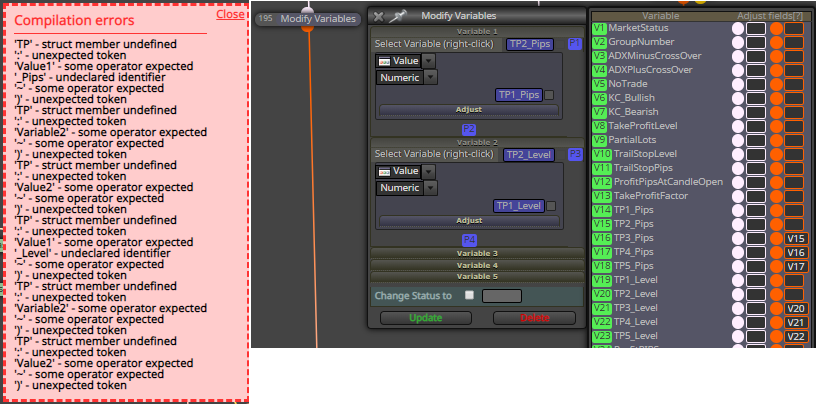
      It looks like that the issue is also reproducible with the "Modify Variables" block with the Variables pane

      0_1562860560365_a868afc9-e932-4297-a5ad-8810351c6352-image.png

      0_1562860935003_f165cf98-32bb-43e9-98f7-40700166896a-image.png

      Thanks

      posted in Bug Reports
      J
      josecortesllobat
    • Compilation errors

      Hello @fxDreema

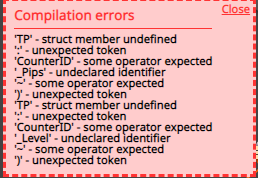
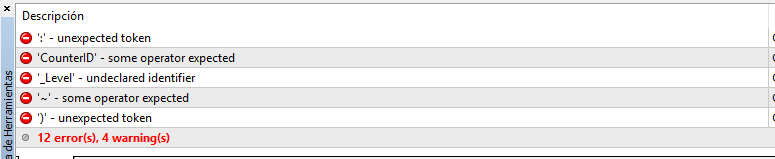
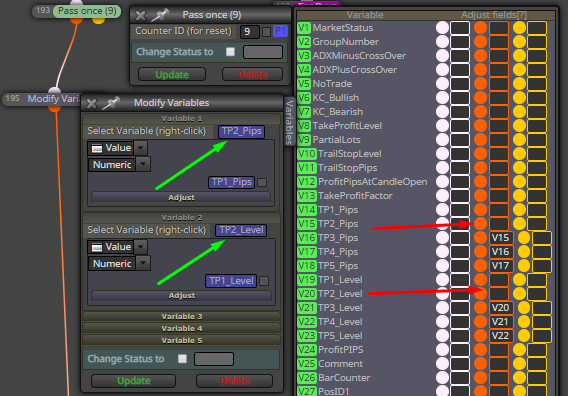
      I have got some compilation error when I fill in some fields on the Variables pane attached to the blocks

      0_1562834475240_02d3f9ce-a466-49a4-b668-86fe5ec212e8-image.png

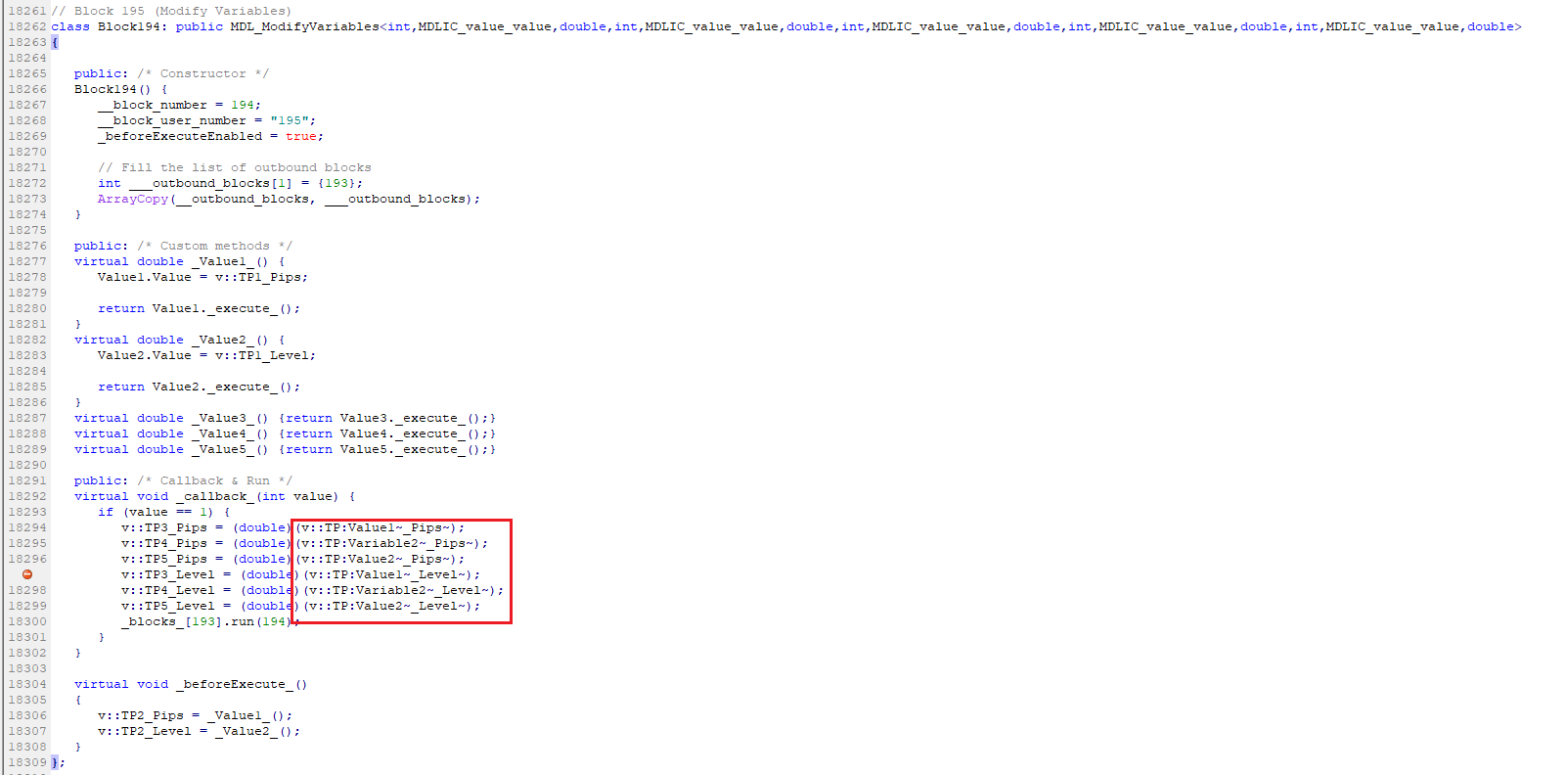
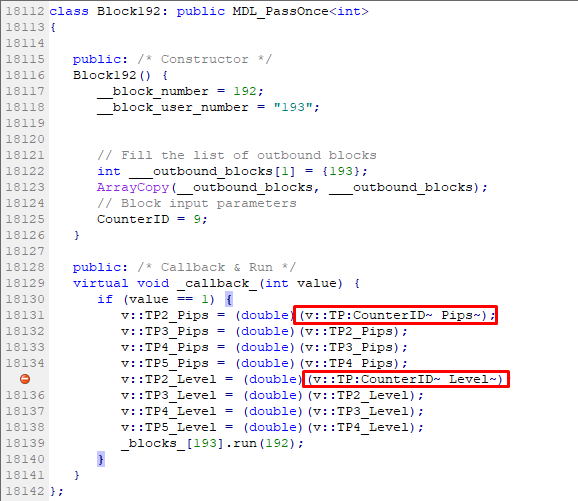
      When I open up the project with Metaeditor and I compile it, I see which is the problem

      0_1562834624480_e87979be-1f09-49e3-8fd1-875cb434adbb-image.png

      0_1562834749885_76c137c3-dfee-4555-b975-5789c57999f1-image.png

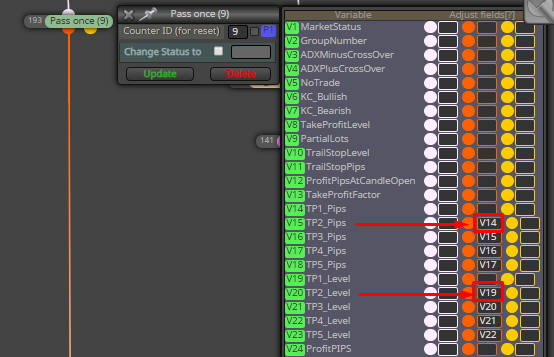
      What belongs to this block

      0_1562834870770_f8f61666-bc18-4d2a-9a6c-f47e511891e4-image.png

      So, V20 = V19 and V15 = V14 when the block is true. It works as expects for the rest of the variables.

      If I use a "Modify Variables" block to shift the valu of those variables, the project compiles without issues.

      0_1562835159468_ed412217-46e5-450f-bc3a-ab97555b8639-image.png

      I can't say that this defect is specifically of the "Counter: Pass once" block because I saw it for other kind of blocks but I am not sure for which ones.

      Please, could you be so kind to take a look at the issue?

      Thanks

      posted in Bug Reports
      J
      josecortesllobat
    • RE: Variables

      This might be a starting point

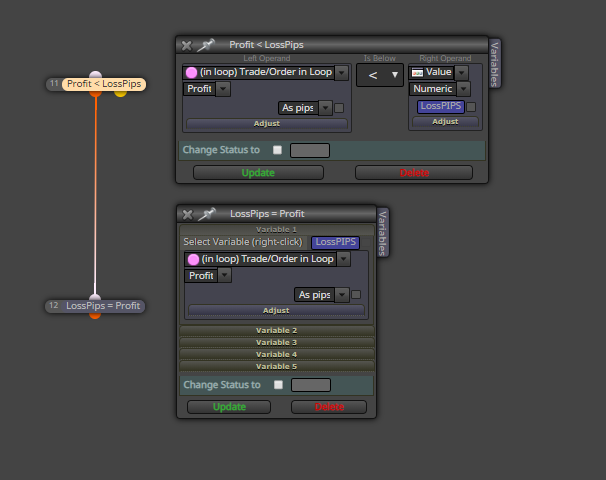
      0_1561475779289_aa8e4747-a9e6-4de6-9117-8a4fd6a1984b-image.png

      Each time P/L is below LossPips, LossPips will be updated to the new value.

      posted in Questions & Answers
      J
      josecortesllobat
    • RE: Variables

      Hi @Zackry

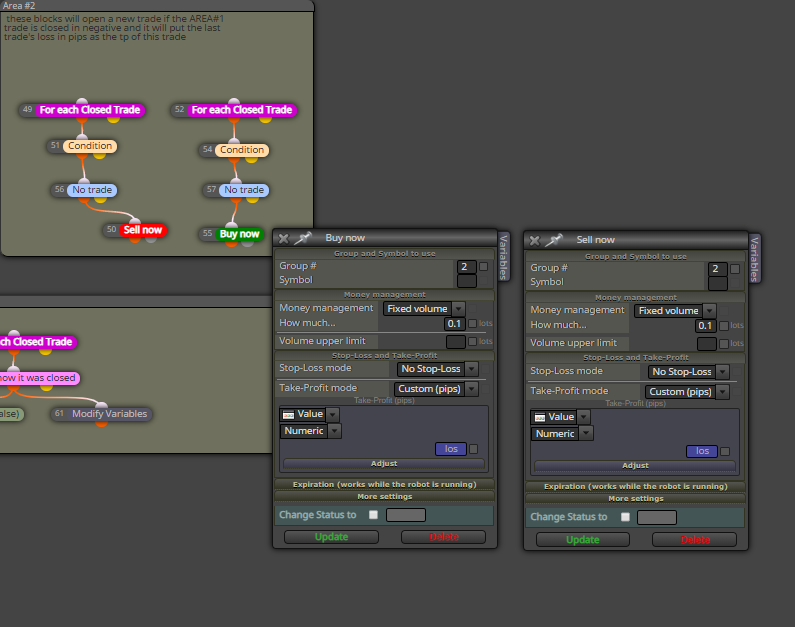
      As you mentioned, what I suggested works so I guess the variable "los" should be a negative value.

      0_1561378971405_f0c0d611-0050-407e-bc67-c64e93deae12-image.png

      Could you confirm that?

      If it is a negative value, I would say that you can´t set a negative value as a Take Profit. It does not make sense. But, if this is the case (trying to set a negative value for TP), you just need to convert the negative value into positive. You can do it by using:

      • a MQL code block with MathAbs function

      • the adjust field with "*(-1)" [without quotes] in the Take Profit pane on the Sell/Buy blocks

      • storing the pips lost directly in positive

      ....

      posted in Questions & Answers
      J
      josecortesllobat
    • RE: Variables

      Not tested

      0_1561355965604_fad24c9a-ea70-419d-b43b-d223dca6cf9e-image.png

      posted in Questions & Answers
      J
      josecortesllobat
    • RE: Numbers and letters.

      A distance between two levels comes in points or "pips as a price fraction".

      This could be an approach

      Storage the distance in a variable -> dist_points = (Upper Level - Lower Level)
      Convert to pips -> dist_pips = (dist_points / pointsize)

      Example:

      EURUSD, (pointsize customized) = 0.0001

      0_1560279106324_969a34b3-86ea-4722-b46c-22d21952503b-image.png

      dist_points = (1.25651 - 1.25632) = 0.00019 points
      dist_pips = (0.00019 / 0.0001) = 1.9 pips

      You can get the PointSize of the forex pair in the Market Properties menu

      0_1560278837419_54fa6d0d-9872-48eb-83a8-ff238bc75f45-image.png

      posted in Questions & Answers
      J
      josecortesllobat
    • 1
    • 2
    • 3
    • 4
    • 5
    • 25
    • 26
    • 3 / 26