fxDreema

    • Register
    • Login
    • Search
    • Back to the main page
    • Categories
    • Recent
    • Tags
    • Popular
    • Search
    1. Home
    2. josecortesllobat
    3. Posts
    J
    • Profile
    • Following 2
    • Followers 20
    • Topics 34
    • Posts 507
    • Best 41
    • Controversial 1
    • Groups 0

    Posts made by josecortesllobat

    • How to copy constants/variables from one project to other one?

      Hello

      Is there any way to copy all the constants and variables from one Project and paste them in other one?

      I have my projects in MQL5 language and I want to transform some of them to MQL4. I know that it is posible to copy all the blocks from the source to the destination. But, what about the constants and variables? Is there any way to do it as well?

      Thanks

      posted in Questions & Answers
      J
      josecortesllobat
    • RE: Multiple Breakeven points (Not need trailing)

      Hi

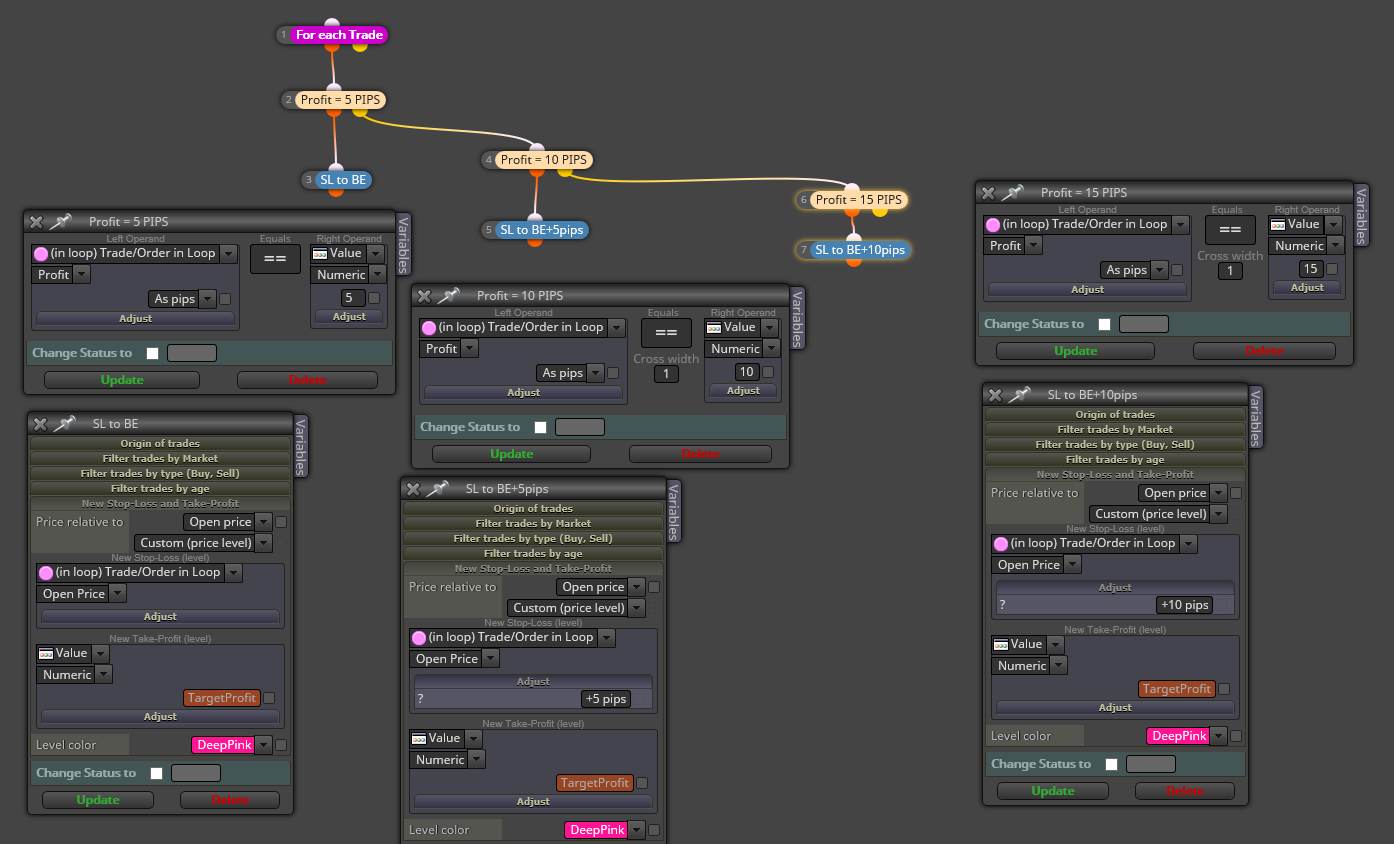
      I think you can use a pseudo-trailing stop to get what you want:

      PROFIT = 5 PIPS -> ModifySL to OpenPrice
      PROFIT = 10 PIPS -> Modify SL to OpenPrice+5pips
      PROFIT = 15 PIPS -> Modify SL to OpenPrice+10pips

      And so on.

      For sure there will be a simplest way to do it but this could be a way of doing it

      0_1515854974355_5edd85f1-44f7-46fb-94b9-2657904beb8c-image.png

      Bye

      posted in Questions & Answers
      J
      josecortesllobat
    • RE: Try MT5 version?

      Hello @gio24

      I was being using another builder for MT4 but just for MT4. When I was looking one for MT5, I knew fxDreema builder. I can say that fxDreema is easier to use and it can compile projects in both programming languages. The project compiled has also a faster performance when you backtest or optimize and I think this is related to the quality of the compiling. Besides of this, the forum is very active, useful and there are forum users like @miro1360 helping a lot with your questions.

      If you want a MT5/MT4 builder with a low Price, fxDreema is the one. There is no doubt.

      posted in Questions & Answers
      J
      josecortesllobat
    • RE: Builder don't work

      @fxDreema It is happening the same to me. I have checked it using CHROME and EDGE and the modifies are not saved.

      Is it possible to use the desktop version in the meanwhile until the online builder is fixed?

      Thanks

      posted in Bug Reports
      J
      josecortesllobat
    • RE: How to get position size before open a trade?

      Hi @fxDreema

      Thanks for your response.

      What I want is to build a system with a method similar to close a full position partially but avoiding the issues related to close partially orders in MT4/5. Well, maybe they are not big issues but are confusing for me. As an example, the one that if you close partially a position, a new trade is opened.

      link text

      I have tested using the pink block "close (partially)" in my projects but I don't like (personal opinion) how it works in MT4/5.

      The target is: if my project has multiple profit targets, I want multiple positions with a fraction volume of the lot size given by the MM method. One position for each profit level. In this way, I will be able to manage each position independently. Of course, it will be required more work for building the project but I am getting more familiar with the builder's logic and it is easy to build the condition for each position.

      I am testing dividing the Risk% by the number of positions to be opened:

      Risk(%) -> PartialRisk(%) = Risk(%)/positions

      Each position will have a PartialRisk(%) inside its own block. Maybe it is not a polite way but it could be work.

      I appreciate a lot your comments.

      Regards

      Jose
      posted in Questions & Answers
      J
      josecortesllobat
    • How to get position size before open a trade?

      Hello

      I would like to get the position (lots) size before a trade is opened when the EA is using any money management method.

      If my EA is using a Money Manegement method, how can I get the volumen size calculated for the trade? Because I would like to use this value in some formula calculation. As an example, I want to risk a % of Free Margin Account to calculate the lots for the trade based on the SL (PIPS) but I prefer to have differents positions for the trade. So If the volumen size is 1.5 lots, I prefer 3 positions of 0.5 lots instead of just one in order to manage each one independently.

      Is it possible? I just found this to get the volumen size of a position but when the trade is running.

      0_1514925665666_1d43a32d-a2f2-4c3f-a5df-6d42b503a21a-image.png

      Thanks

      posted in Questions & Answers
      J
      josecortesllobat
    • RE: Why does the description field appear as the variable name?

      OK @miro1360

      THANK YOU SO MUCH for helping us to solve our issues with your knowledge about the builder.

      posted in Questions & Answers
      J
      josecortesllobat
    • RE: Why does the description field appear as the variable name?

      Understood @miro1360

      Thanks for your answer.

      I would like to have the name of the constants as the VARIABLE column and the description of the parameter in a different column at the EA settings. Is it posible? I don't know if this is related to fxDreema.

      I appreciate a lot your help.

      Regards

      Jose

      posted in Questions & Answers
      J
      josecortesllobat
    • RE: Why does the description field appear as the variable name?

      Hi @miro1360

      Thanks for your response.

      I have other previous projects and it does not work like this. Take a look

      0_1514645692393_c6b7175f-df17-4829-a6e3-c1875b99e9e7-image.png

      0_1514645903551_0dc94b86-f817-4eb0-becb-8d24d5eed054-image.png

      0_1514645818665_3b77d9a2-5955-4a48-adb0-f04c4dff9b2d-image.png

      For this case the name written in the NAME field at the constants/variables menú is the same in the "Variable" column after compiling the project. However, in the first case, the names for the variables after the project has been compiled is the one given in the description field at the constants/variables menu.

      So, why is it different now than before? As I explained, maybe I have changed any option on fxDreema or MT5 that is taking the description as the name for each input.

      Any idea?

      Thanks

      Jose

      posted in Questions & Answers
      J
      josecortesllobat
    • RE: Why does the description field appear as the variable name?

      @josecortesllobat

      Adding @fxDreema

      posted in Questions & Answers
      J
      josecortesllobat
    • Why does the description field appear as the variable name?

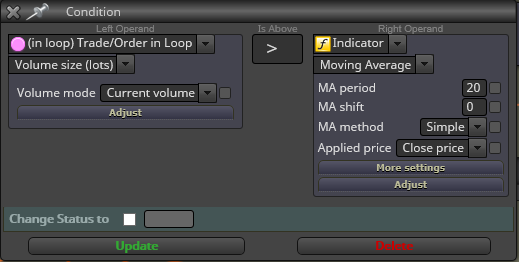
      Hello

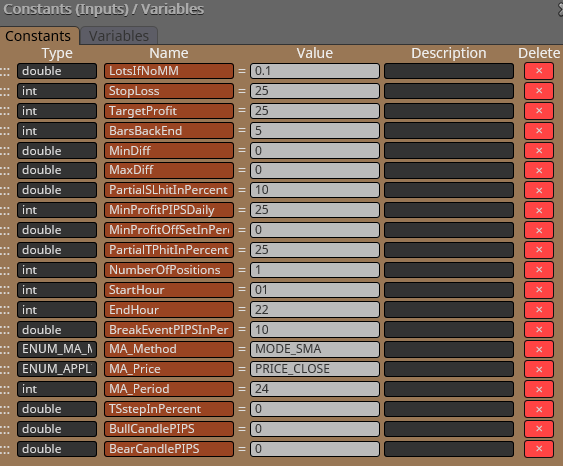
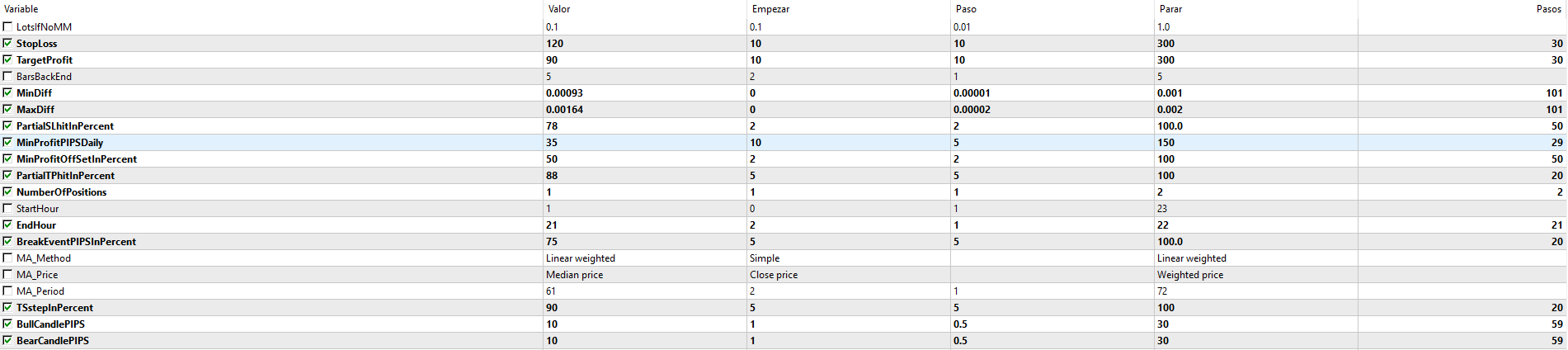
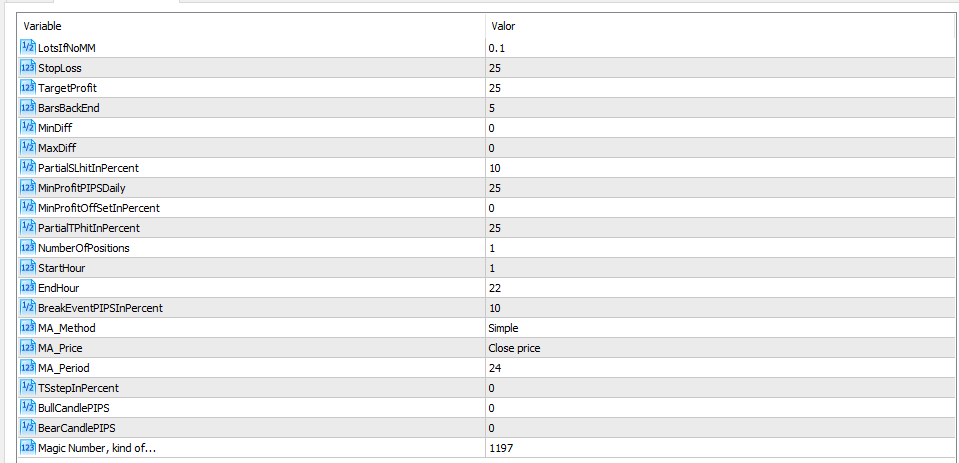
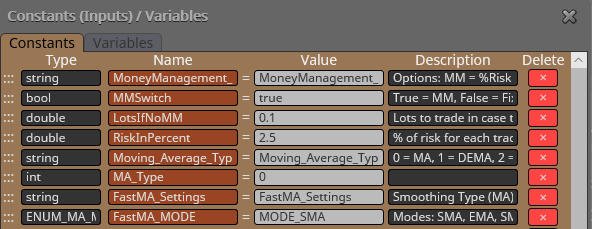
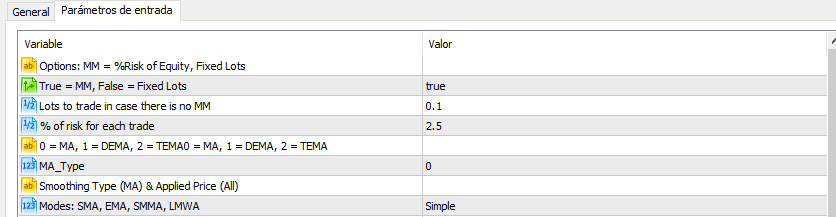
      Please, why does the description field of the constants/variables menu appear as the variable after compiling the Project?

      0_1514619977437_14ae9fd0-d4bd-4d38-9948-f858269800b3-image.png

      0_1514620031022_d8fc5a0e-2c72-4a7d-afda-64c690bf100d-image.png

      0_1514620075804_6da02045-6232-4694-bca4-cb4c9d1ce701-image.png

      This is something that does not happen with other projects. So, I am sure that is something I have changed in the project but I don't know where it is the option.

      @miro1360
      @fxdreema143

      Thanks

      Kind Regards

      Jose

      posted in Questions & Answers
      J
      josecortesllobat
    • My EA with custom indicator is lowering the optimization

      Hello

      I have added a custom indicator (Keltner Channel) to my fxDreema project. When I want to optimize the expert advisor (MT5, 12 cores), the optimization is not going as fast as usual with other robots I have built with fxDreema. With my workstation, the optimization of the expert advisors that have usual indicators goes very fast but, for that EA, the MT5 client is going like a slow motion and the computer is slowed down.

      https://fxdreema.com/shared/6TOcJyDce

      I think the problem is the custom indicator but I don't know how to solve it.

      The custom indicator is this

      https://1drv.ms/u/s!AmTIb6O8HVMzgdQWUrFbH80aVfvcuQ

      I have no issues compiling the project at fxDreema website buider or by compiling the indicator on the MT5 Editor.

      Any help will be welcome.

      Thanks

      posted in Questions & Answers
      J
      josecortesllobat
    • RE: Magic Numbers confusion

      Hi fxDreema

      I am not sure if the problem is something related to fxDreema. I will keep you in touch if I find anything that could clarify this issue.

      Thanks

      posted in Questions & Answers
      J
      josecortesllobat
    • RE: Why my backtest result using the same EA for 2 brokers is totally different?

      Hello

      Thanks for your answers.

      @casper Both Metaquotes and my broker have 5 digits. I have also built the EA using 5 digits by setting 0.00001 on "Project Options" for most of the pairs that are using 5 digits.

      @miro1360 As I know, MT5 downloads historic data from its servers not from the broker's server. But probably I am wrong. The EA is working with the same result in my broker's demo account and also in MetaQuotes demo account.

      I appreciate the help.

      Regards

      Jose

      posted in Questions & Answers
      J
      josecortesllobat
    • Magic Numbers confusion

      Hello

      I have placed the same EA built with fxDreema on different charts with a unique Magic Number for each one:

      4863 EURUSD
      4864 GBPUSD
      4865 USDCHF
      4866 USDJPY
      4867 USDCAD
      4868 AUDUSD

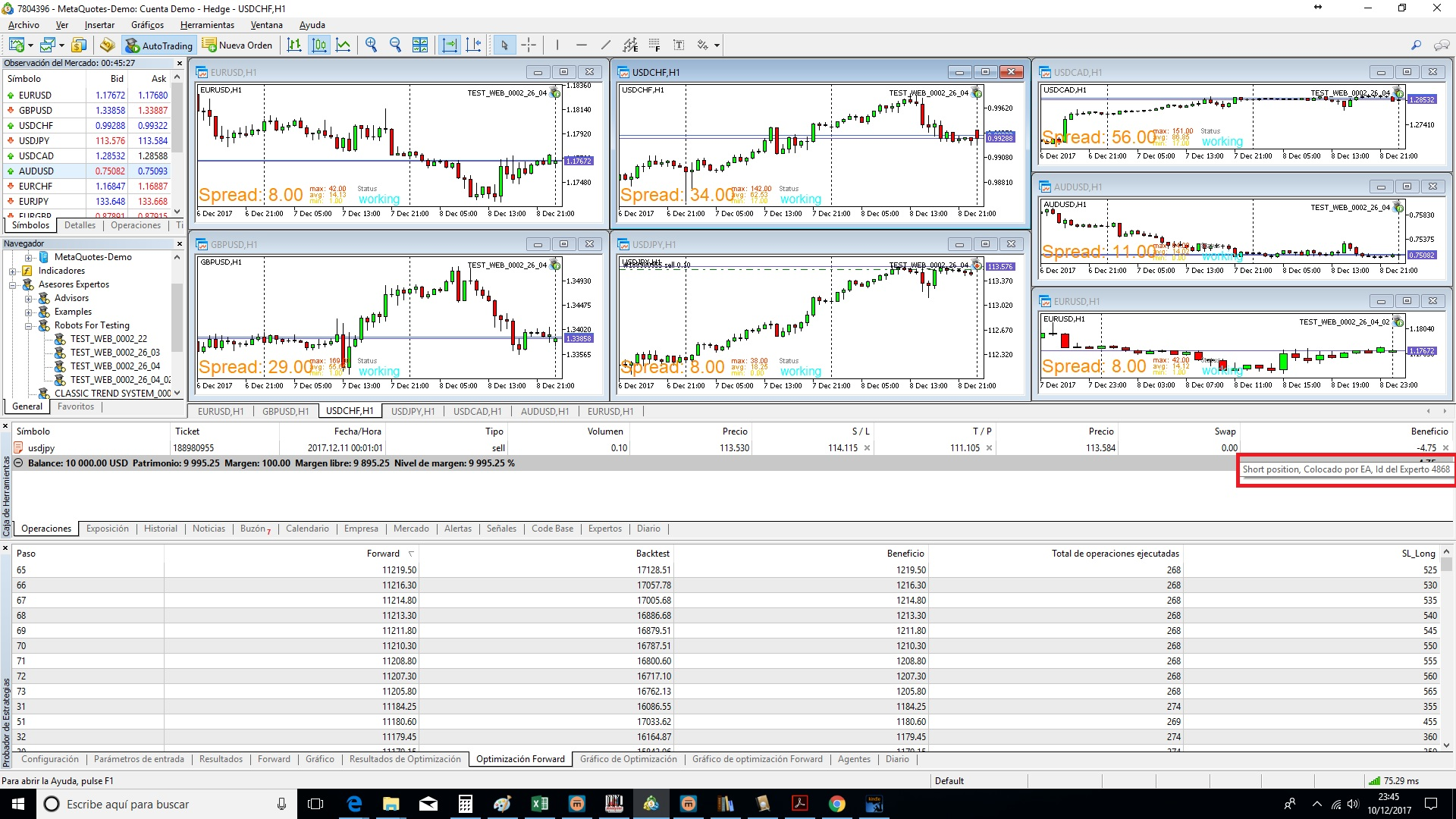
      When a trade is opened by the EA on a specific graph, the Magic Number given on the trade box is not right. For example, the current USDJPY trade was opened by the EA 4868

      0_1513005893373_ea9b8920-70e8-4d4f-af58-dcc8c019714f-image.png

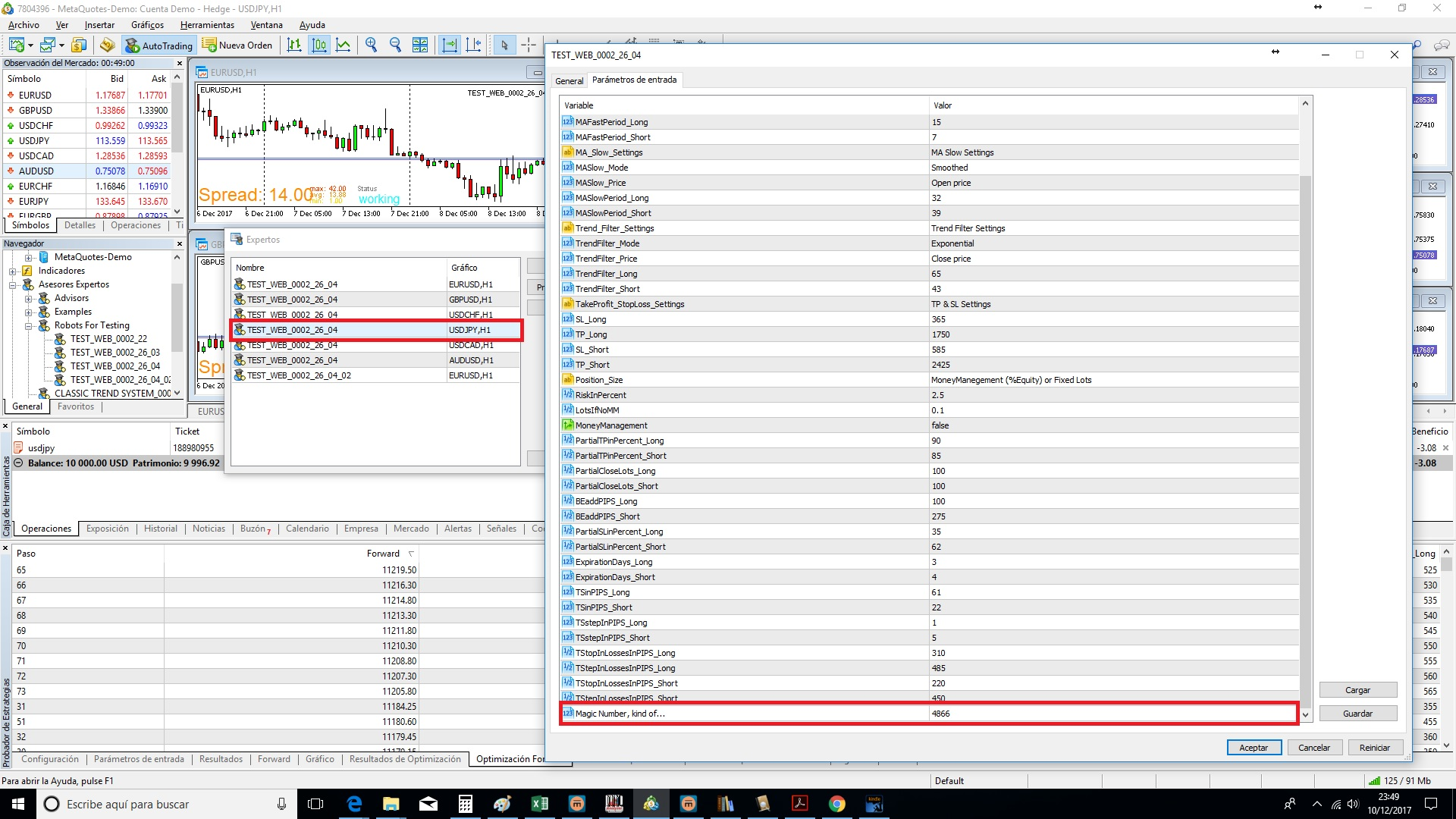
      But the EA's Magic Number that is working on the USDJPY graph is 4866

      0_1513005920215_d56f7352-ce43-434b-ad95-d51698d019c4-image.png

      So, I am not sure if the trade was opened or not by the right EA. As each forex pair has its own parameters set, it would be the worst thing if one EA is trading on the wrong pair due to a Magic Number confusion.

      Anyone know anything about this issue? I will appreciate any help.

      Thanks

      Regards

      posted in Questions & Answers
      J
      josecortesllobat
    • Why my backtest result using the same EA for 2 brokers is totally different?

      Hello

      Please, I need some help to understand what is going wrong with my EA built with fxDreema when I backtest or optimize in different accounts (MT5). Because the results are different from one account to another.

      I have optimized the EA in a MetaQuotes account. I have chosen the paremeter set that is giving a good consistency through 10 years (in sample) of backtesting and 1 year (out ofsample) of forward testing. The result is this

      0_1512888983149_b2ece70c-9429-4e6e-bef3-72b3d6a1d9bf-image.png

      0_1512889034488_1e313f05-d6d8-434f-bff2-b54801be50ee-image.png

      0_1512889065762_75997ef4-ea4c-49bc-9b19-1e07fe75b01a-image.png

      It seems a good EA. But, when I shift to my broker's demo account using the same paremeter set, the results are totally different

      0_1512889268172_5e5e51b3-2ffc-4379-8a01-8e33be95ae22-image.png

      0_1512889324246_de45c692-9333-4efe-b6eb-3b9f729a3469-image.png

      0_1512889387454_e7520949-2182-4667-9d86-5cc68c100dda-image.png

      It seems that the EA's behavior in out of sample period is close for both accounts. But for me, if the EA does not have the same behavior as much as possible for both time periods (backward & forward), it is not a consistent system and I will discard it.

      Could be anything related to the historical data quality?

      Thanks for the help

      posted in Questions & Answers
      J
      josecortesllobat
    • RE: Double Trailing Stop

      Hello fxDreema

      Thanks for your answer. Now I understand better the behavior of the "Trailing Stop" block.

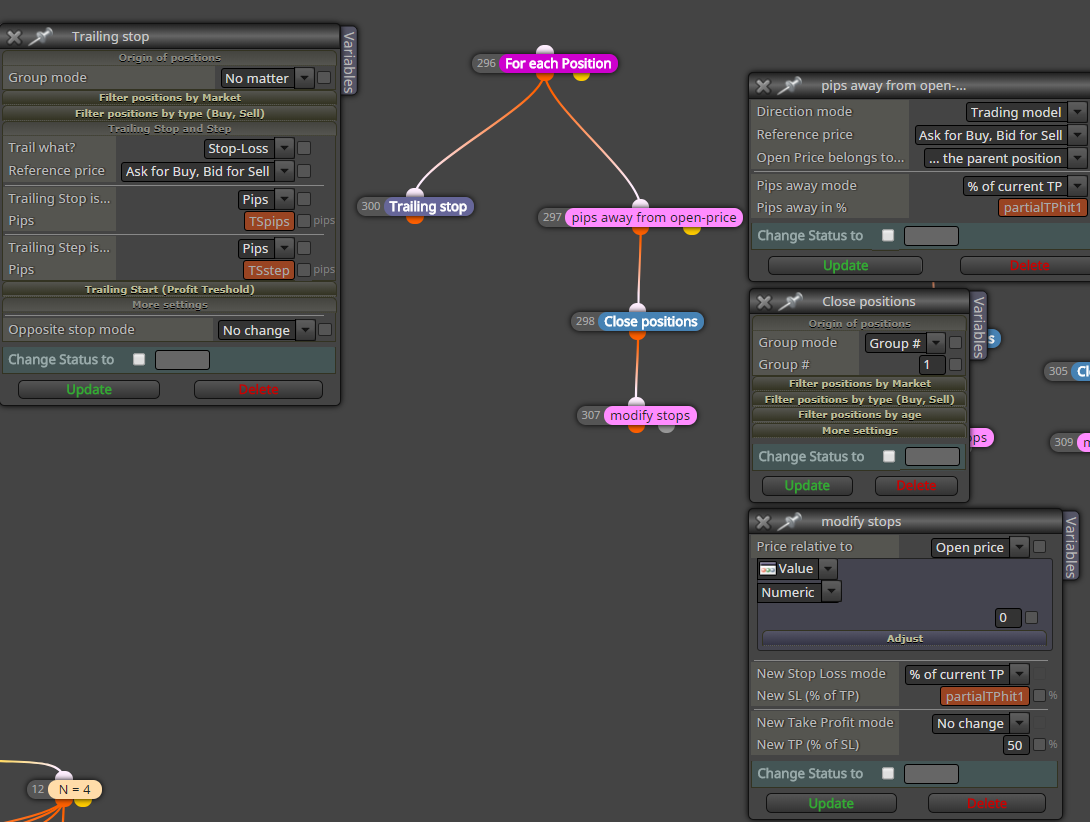
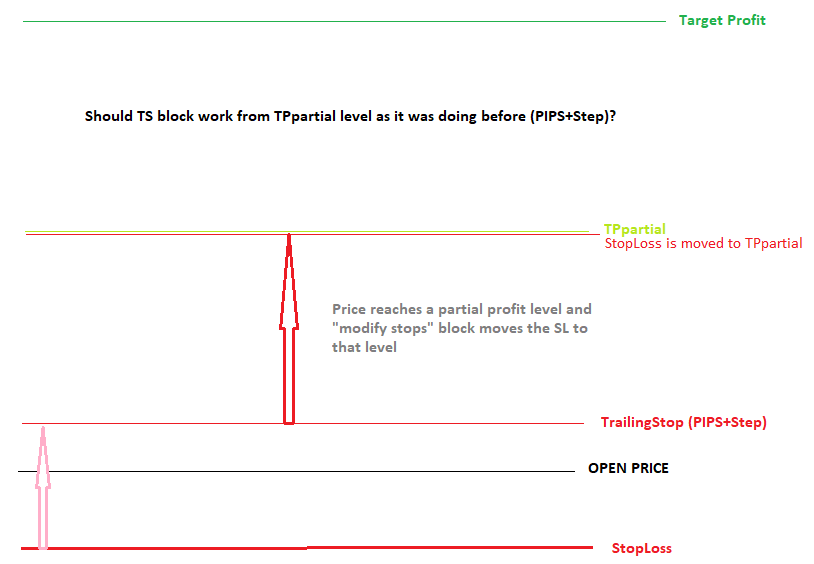
      So, if I have a TS block which is working properly and I have a condition that states: if the price reaches one level, the "modify stops" block move the SL to this level. Should the TS work as it was doing before but from that level?

      Like this

      0_1512822677523_8d760292-7c7b-44b7-bfb1-edb14c2e3af7-image.png

      0_1512823339410_0bac5b77-5cd0-4ee6-afbc-1b75328b374b-image.png

      Thanks

      posted in Questions & Answers
      J
      josecortesllobat
    • RE: DEMA & TEMA as an option to choose

      Hi mikeo123

      Here you have an example. I hope it helps you.

      https://fxdreema.com/shared/98isCajHd

      Regards

      posted in Questions & Answers
      J
      josecortesllobat
    • Double Trailing Stop

      Hello

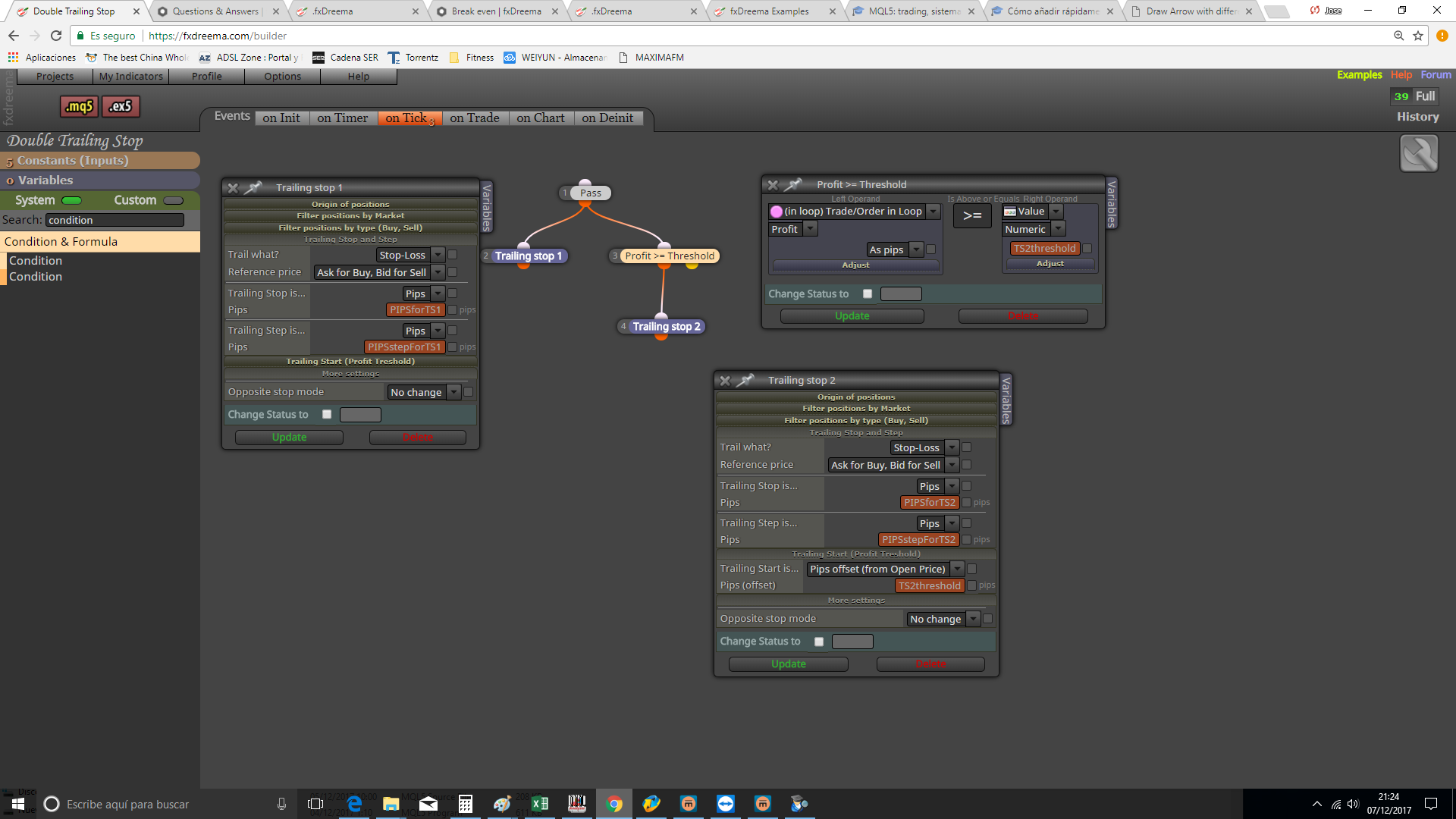
      I am building an EA and I would want to use two trailing stops depending on the price level and the position profit.

      The first TS should work as it is. It means that the SL level is only modified according to its settings (pips and step). For this TS I would like to stop its job when a price level is reached (for example, open price) or the block "Break Event Point" has worked.

      The second TS should work over a threshold.

      I have built an example and I appreciate if somebody can take a look to give me opinion and suggestions because I am not sure this is correct as there are 2 TS blocks.

      0_1512678310401_8f2bec65-3445-4dd9-99fb-f809adf50840-image.png

      Thanks

      posted in Questions & Answers
      J
      josecortesllobat
    • RE: Why my backtest graph shows D1 candles if I tested the EA with H1?

      Hello fxDreema

      Your help is very useful.

      I don't know what it happens but after an update released some days ago, now it is working as expected.

      The MT5 update was the build 1687.

      0_1512462308723_9c2a6b99-8965-43e9-bbae-98cf1d9c4f15-image.png

      I appreciate a lot your help.

      Kind Regards

      🙂

      posted in Questions & Answers
      J
      josecortesllobat
    • 1
    • 2
    • 22
    • 23
    • 24
    • 25
    • 26
    • 25 / 26