fxDreema

    • Register
    • Login
    • Search
    • Back to the main page
    • Categories
    • Recent
    • Tags
    • Popular
    • Search
    1. Home
    2. josecortesllobat
    3. Posts
    J
    • Profile
    • Following 2
    • Followers 20
    • Topics 34
    • Posts 507
    • Best 41
    • Controversial 1
    • Groups 0

    Posts made by josecortesllobat

    • RE: Builder is not working

      Hi @fxDreema

      It seems that something happened while I was working with that specific Project because I am able to load anyone but that one is always empty. I have remembered that the issue happened when I was copying some blocks from "On Tick" to "On Trade" section.
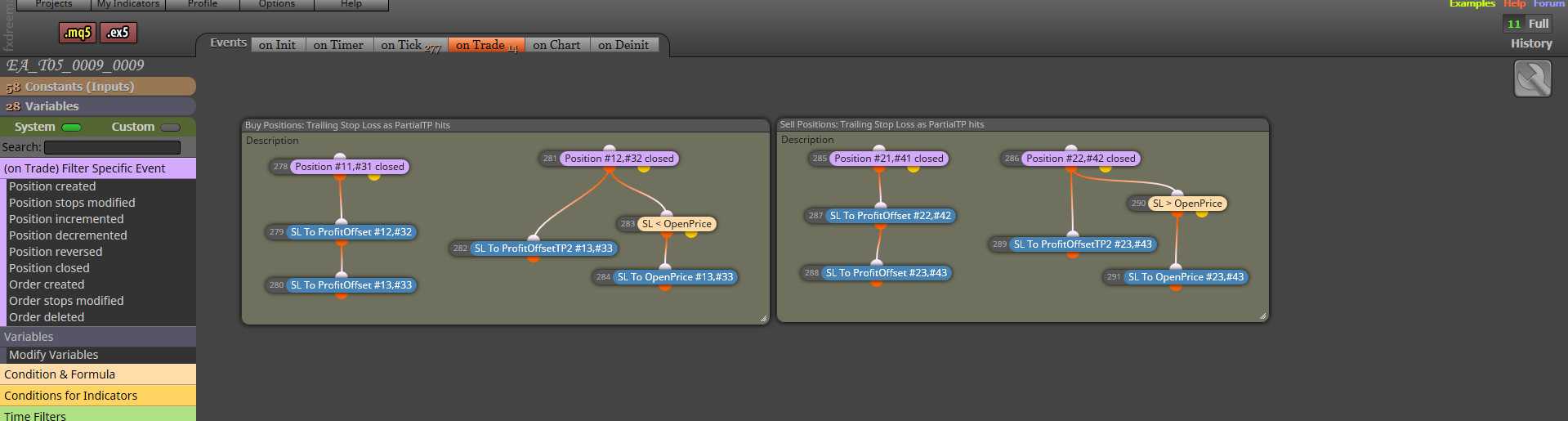
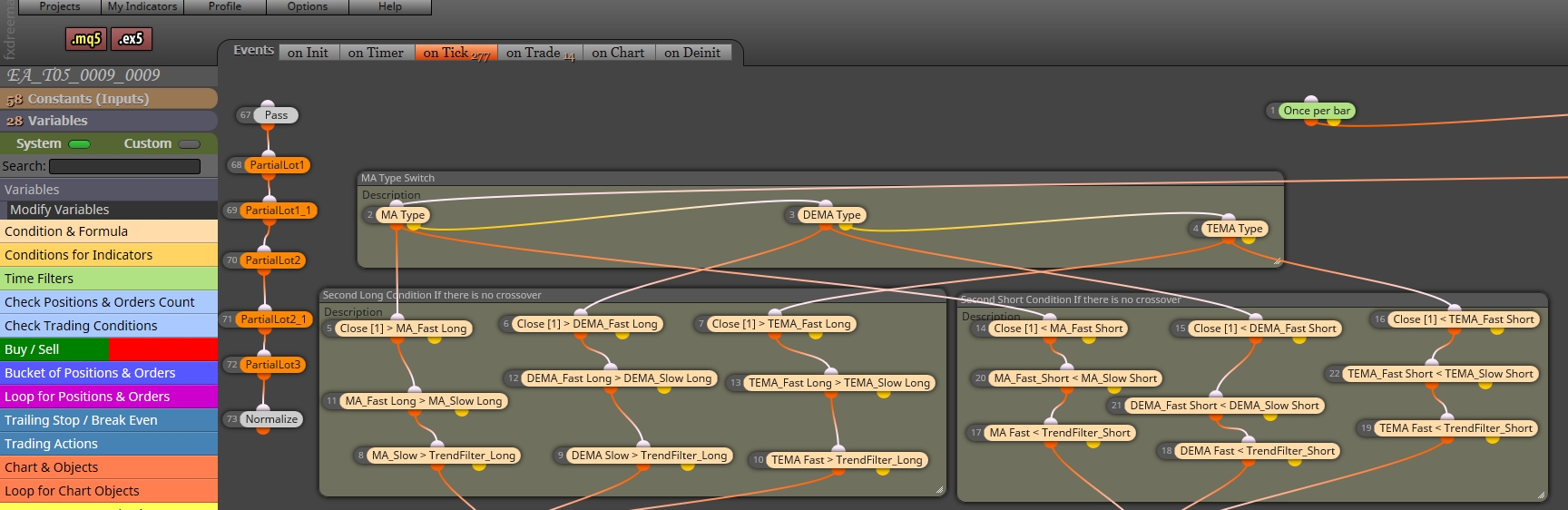
      0_1523252865406_6145567e-faf8-45a1-8481-c7276c2ff9d3-image.png

      0_1523252893454_4a0f60db-9cd1-4b0b-97a4-8265ee6378a6-image.png

      I will work from the previous version of the Project I have on my desktop by importing it to the builder.

      Thanks

      Regards
      posted in Bug Reports
      J
      josecortesllobat
    • Builder is not working

      Hi @fxDreema

      I was working with my MQL5 Project when suddenly the builder seems to be off.

      0_1523207151369_b01bb3ba-c02c-4852-b006-9bcb8e935823-image.png

      There is nothing inside the Project regardless I tried to reload the page several times.

      Please, could you be so kind to check what is going on?

      Thanks

      posted in Bug Reports
      J
      josecortesllobat
    • RE: Compilation errors

      Hi @fxDreema

      WORKING PERFECT!!!

      Thanks for your quick support.

      posted in Bug Reports
      J
      josecortesllobat
    • RE: Compilation errors

      I am working in MQL5.

      Thanks

      posted in Bug Reports
      J
      josecortesllobat
    • Compilation errors

      Hi @fxDreema

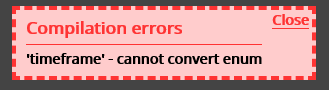
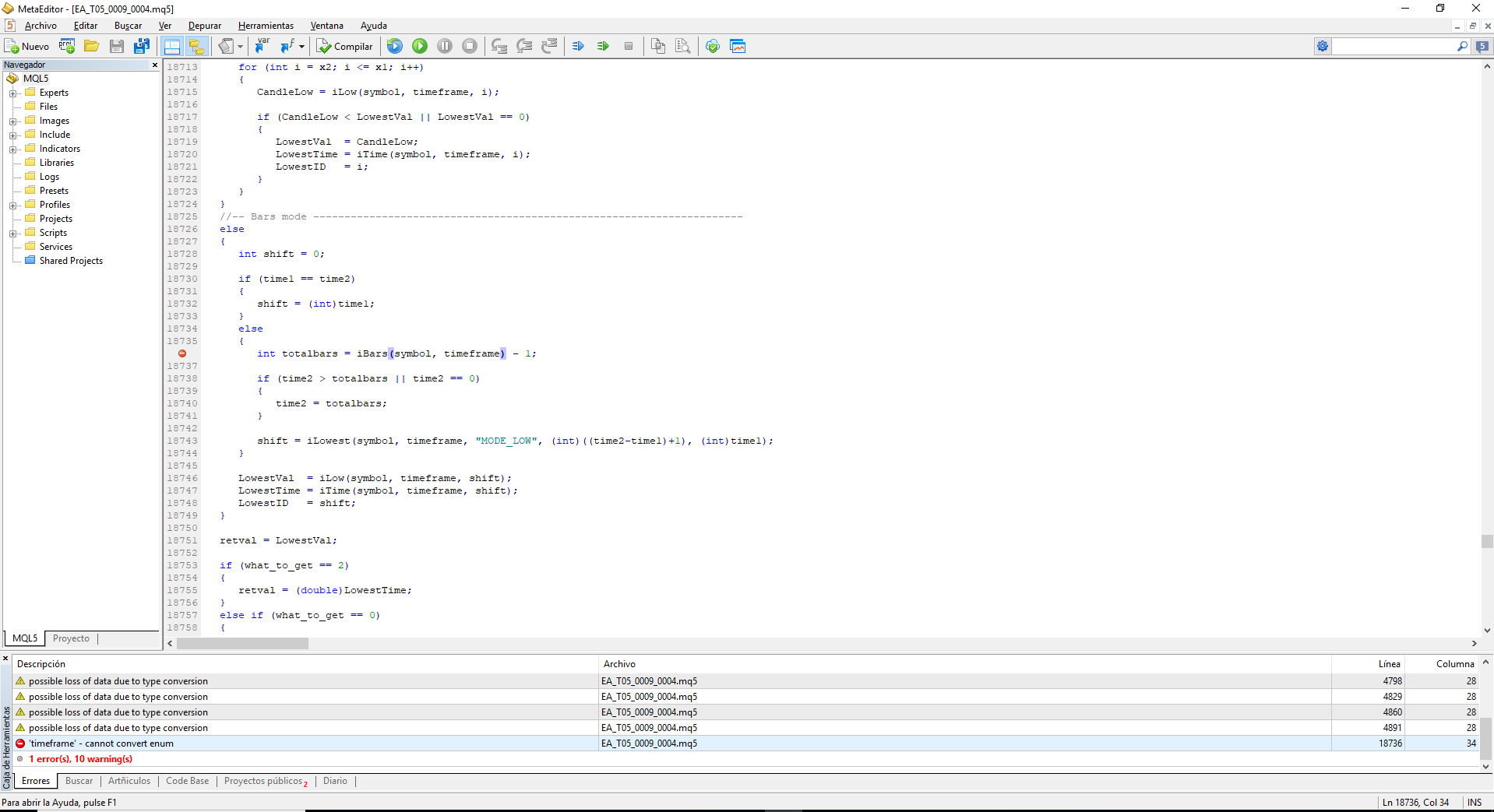
      I am getting this Compilation error

      0_1523115085376_295c60ef-eaf9-4243-aff9-fc610e1c21f6-image.png

      For the same EA I have yet compiled without adding any new block. The error is happening in any EA built right now.

      Please, could you check if it could be anything related to the blocks update you have done?

      0_1523115179801_0041cb6c-b1ff-4b1b-adee-a376e8c320e3-image.png

      Thanks

      posted in Bug Reports
      J
      josecortesllobat
    • RE: How can we define a hammer candle??????????????

      This worked pretty good for me

      https://fxdreema.com/forum/topic/4657/how-to-search-hammer-candles

      Thanks @extrabroker

      posted in Questions & Answers
      J
      josecortesllobat
    • RE: EA Optimization pass result is different when I backtest it

      I shifted to MT5 to take advantage of my Workstation computation power but I am finding some issues and the MetaQuotes support says that the problem is the EA.

      Anyway I appreciate your help.

      Regards

      posted in Questions & Answers
      J
      josecortesllobat
    • RE: EA Optimization pass result is different when I backtest it

      Hi @L333z

      Thanks for your guides. I will try to get the same history for all the accounts and check it again.

      I wrote to MetaQuotes support and they said almost nothing about why the backtest result is different than the same get from the optimization.

      Do you know if there is a way to import the history to MT5 as MT4? Such as by changing the downloaded files.

      Thanks

      Regards

      posted in Questions & Answers
      J
      josecortesllobat
    • RE: EA Optimization pass result is different when I backtest it

      Hi miro1360

      I was thinking something like that. But there is no way to download or choose any other history on MT5, I think. The history is downloaded from MetaQuotes server. So why is the result different from the optimization pass to the backtest if the history is the same? Could be a bug?

      Thanks for your help.

      posted in Questions & Answers
      J
      josecortesllobat
    • Builder issue

      Hi @fxDreema

      Please, could you be so kind to check what is happening with the website builder?

      In my case I was working with a MQL5 Project but when I reloaded the page, it shifted to MQL4 but there is nothing inside. In addition to this, I am not able to load the Project as it was.

      0_1521449366138_bf72155b-78c0-4b2a-8173-ad186074d0fc-image.png

      Thanks

      posted in Bug Reports
      J
      josecortesllobat
    • RE: Builder slow to respons

      Hi

      Yes, it seems something is happening with the website builder. I was making some changes on my EA and the list of the contants and variables have gone. In addittion to this, I was working with a MQL5 Project but after I have reloaded the page (F4) it was shifted to MQL4.

      I hope to don´t loose my work.

      posted in Questions & Answers
      J
      josecortesllobat
    • EA Optimization pass result is different when I backtest it

      Hello

      This is something strange and I have not found the root of what can be happening. I am using MT5 with the EAs I have built with fsDreema.

      When I have the EA optimization results, I sort the passes with my own criteria to choose the good ones to evaluate them. Once I have decided to check the EA performance for one optimization pass, I double click on it and the backtest runs. I have seen that the Total Net Profit for the in-sample backtest is different than the one given by the optimization pass. For the out-of-sample period is right.

      0_1521413760232_Bug_MT5_Opt-Back.jpg

      Has anybody seen the same behavior?

      Thanks

      posted in Questions & Answers
      J
      josecortesllobat
    • RE: Draw horizontal line from trade for SL & TP

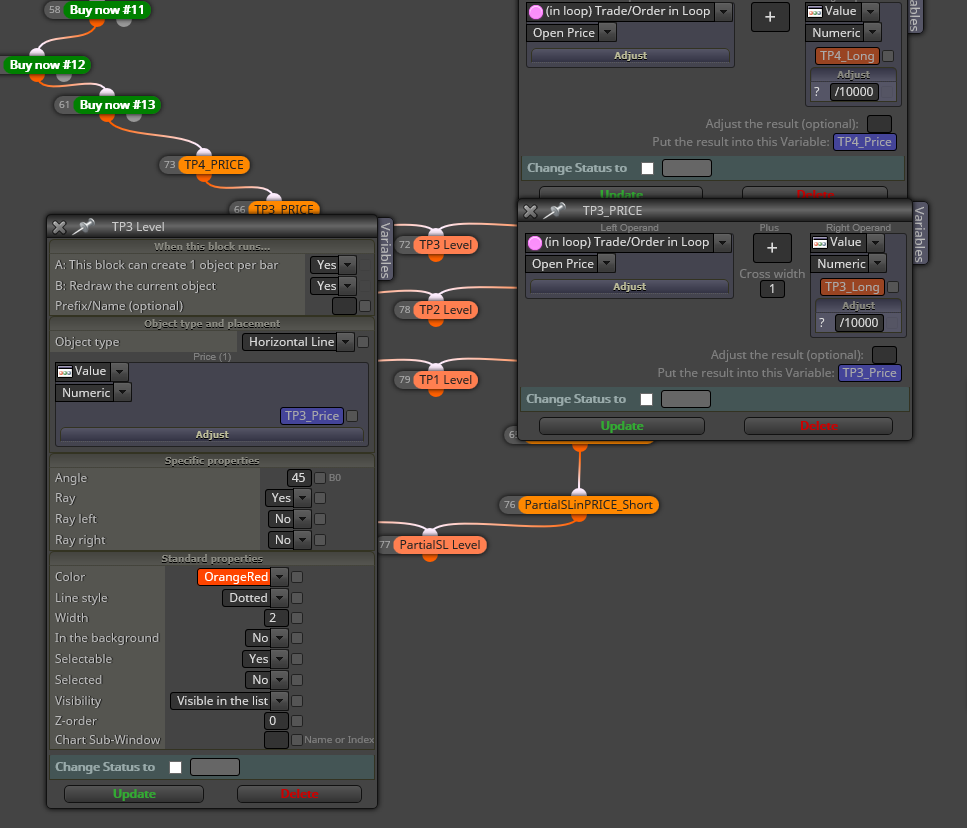
      I am using this way to do some things. Might be good for you:

      0_1521150928103_72a92083-0fc5-4b8f-ac4f-0c19f7903e1d-image.png

      When some condition price crosses any of the TPi_Price (drawn by H line) -> Do this (close position, open order, move SL, etc.). I am not sure if you can use a H Line as a Price Level but you can set a variable with the Price level to draw the H line.

      I hope it gives you an idea

      posted in Questions & Answers
      J
      josecortesllobat
    • RE: How to add a custom optimization criteria to the fxDreema code?

      No worries.

      Thanks.

      posted in Questions & Answers
      J
      josecortesllobat
    • RE: How to add a custom optimization criteria to the fxDreema code?

      Hi fxDreema

      Thanks for your answer.

      Adding the code using Meta Editor? I am not a programmer for this reason your builder is very very useful for me. In what place of the EA's source code have that extra code be placed? At the begining, at the end?

      Please, could you be so kind to give me any simple example?

      Thanks

      posted in Questions & Answers
      J
      josecortesllobat
    • How to add a custom optimization criteria to the fxDreema code?

      Hello

      Is it posible to add a custom optimization criteria for MT5 to the fxDreema code? As it is explained in the next article:

      https://www.mql5.com/en/articles/286

      Thanks

      posted in Questions & Answers
      J
      josecortesllobat
    • RE: Quick question about this trailing stop

      Glad to help you!!!

      posted in Questions & Answers
      J
      josecortesllobat
    • RE: Quick question about this trailing stop

      Hi

      I think the Trailing Stop block should not be connected after the Break Event block because the Break Event condition takes place only one time per trade or position. So the Trailing Stop condition will be true just one time after the Break Event's condition had been triggered.

      Try to connect both blocks to the true output of the pink block or you can try what is explained here

      https://fxdreema.com/help/working-with/trailing-stop

      Good luck

      posted in Questions & Answers
      J
      josecortesllobat
    • RE: How can I specify a distance between indicators?

      Hi

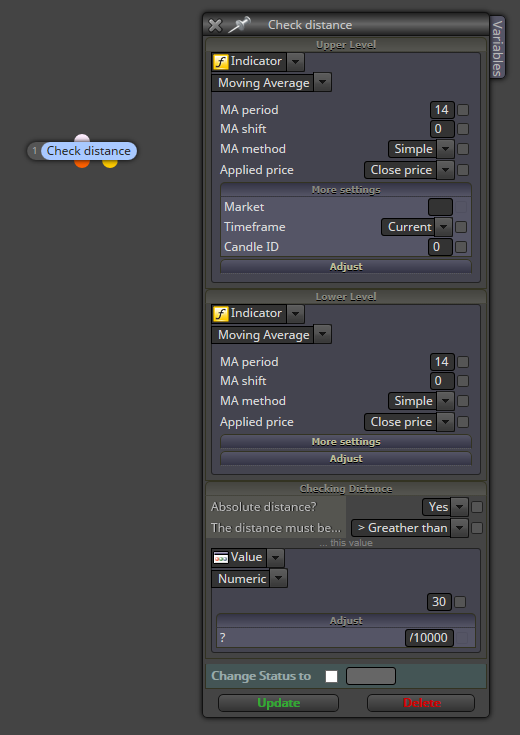
      This could be work for your purpose

      0_1517954827318_a9979879-b4ab-4b9f-a9b4-9769309acfcf-image.png

      Regards

      posted in Questions & Answers
      J
      josecortesllobat
    • Money Management Formula

      Re: Help with money management formula

      Hi @fxDreema

      I am very interested on the formula you gave in the link above.

      Please, could you be so kind helping me to get the values for each variable in the formula?

      value -> Risk In Percent (as a constant/variable)

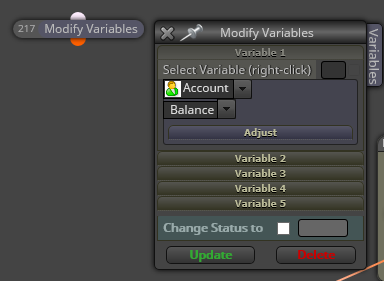
      AccountBalance -> Account Balance
      0_1516216424809_fa4cea81-461d-4b75-a92f-381bce73b8c0-image.png

      sl -> StopLoss in PIPS (as a constant/variable)

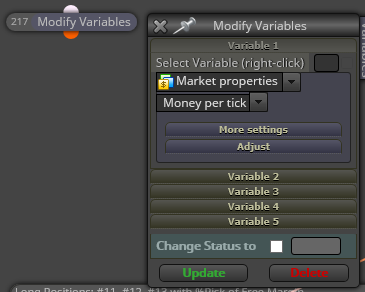
      TickValue -> Market Properties -> Money per Tick

      0_1516216571928_8502f987-c83d-4267-9a25-510802df62b7-image.png

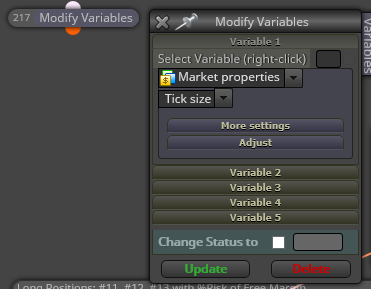
      Ticksize -> Market Properties -> Tick Size

      0_1516216657466_8854b83d-9365-4c39-a418-c8dcf78f3775-image.png

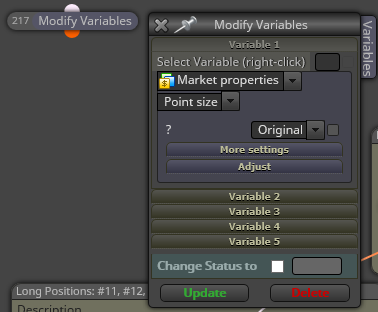
      Point -> Market Properties -> Point Size

      0_1516216878748_6ef3f9d8-021e-41ca-8711-b2c60eb61efb-image.png

      PipValue, from where I can get this value?

      Thanks a lot for your help.

      posted in Questions & Answers
      J
      josecortesllobat
    • 1
    • 2
    • 22
    • 23
    • 24
    • 25
    • 26
    • 24 / 26