fxDreema

    • Register
    • Login
    • Search
    • Back to the main page
    • Categories
    • Recent
    • Tags
    • Popular
    • Search
    1. Home
    2. josecortesllobat
    3. Posts
    J
    • Profile
    • Following 2
    • Followers 20
    • Topics 34
    • Posts 507
    • Best 41
    • Controversial 1
    • Groups 0

    Posts made by josecortesllobat

    • RE: On Trade issue

      Hi @fxDreema

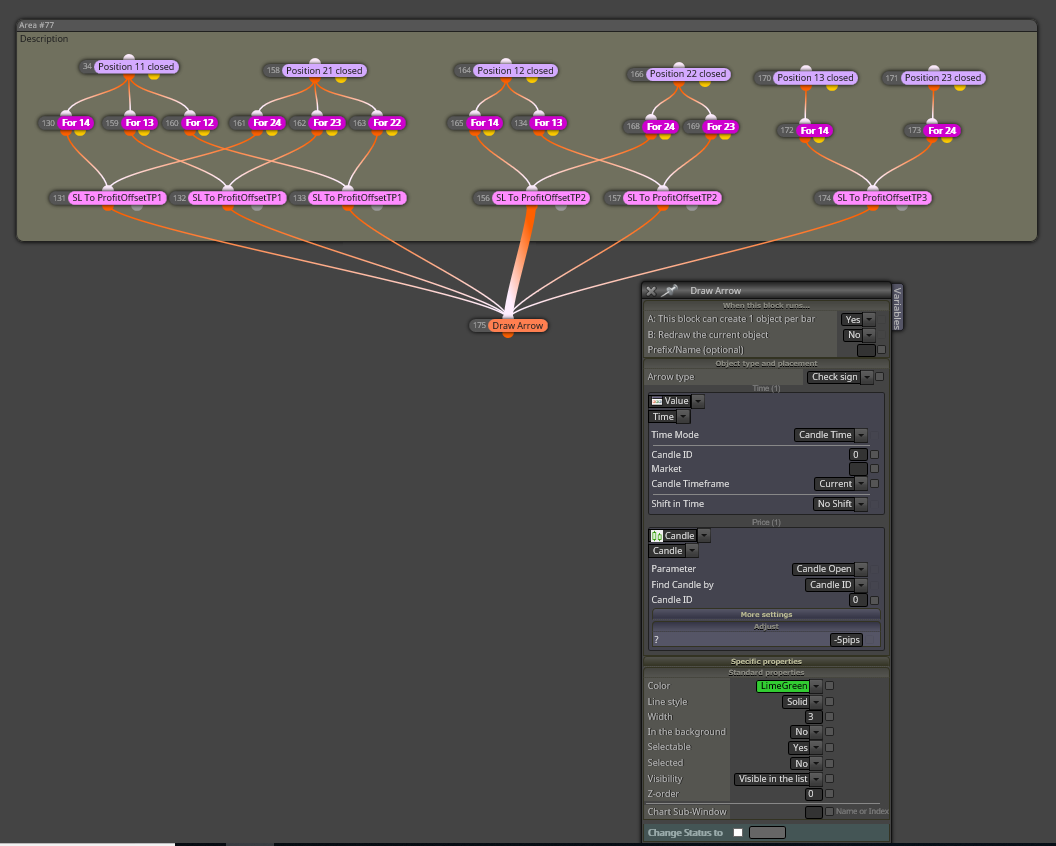
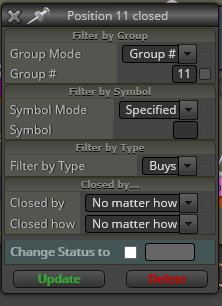
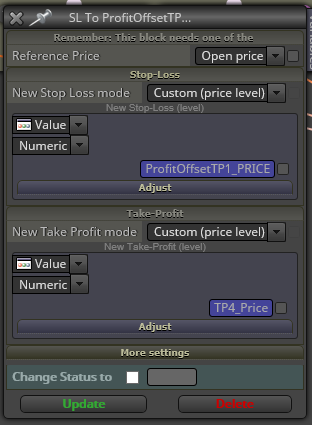
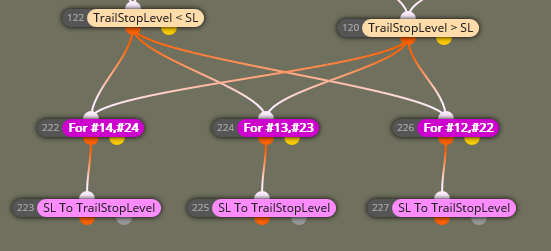
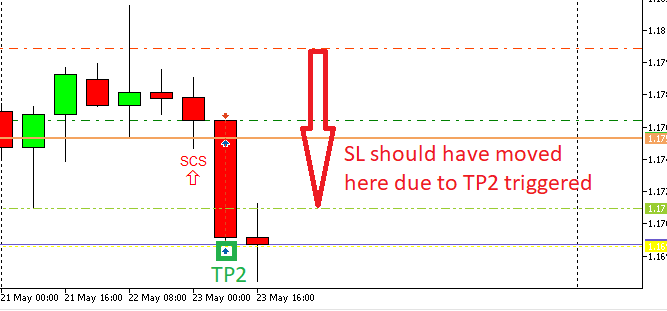
      I am running the EA with the modifications that you suggested but it does not work. SL is not moved by closing position dectection following the rules given at the "OnTrade" section of the EA and I don't get any arrow drawn:

      0_1527103775550_9a8f02ac-a7f3-420c-a5ed-05e8287fac3e-image.png

      At that point, do you think might be an issue with the "Position Closed" block in the "OnTrade" section? Is there anybody using the "OnTrade" section with the "Position Closed" block having any kind of issue (MT5/Demo account)?

      Thanks for helping

      posted in Questions & Answers
      J
      josecortesllobat
    • RE: Multi-Candle patterns

      Take a look at this tutorial made by @miro1360

      https://fxdreema.com/forum/topic/4321/tutorial-08-candle-formations

      It has been really useful for me.

      posted in Questions & Answers
      J
      josecortesllobat
    • RE: On Trade issue

      Hi @fxDreema

      I added a "Draw Arrow" block at the end of the "OnTrade" conditions.

      0_1526935269151_afd77d27-8121-4ff9-ba36-ff6a2c5bc5b9-image.png

      I did a backtest but I don't get any arrow signal even though the conditions over that block run well

      0_1526935443596_e0bd788e-ec31-4061-a970-db67ddae2bab-image.png

      0_1526938540773_fc556967-6d5b-468e-a73e-877b2c64c770-image.png

      0_1526935591481_1203667c-7fe6-4c0b-b4d1-226c1d14794a-image.png

      0_1526938591054_506c3d4f-05b0-4c20-a4c4-9fc69eade89a-image.png

      0_1526938148132_5c432c34-48db-491b-a90a-796ff469a6af-image.png

      0_1526938679856_dab4314b-3941-468e-8759-1458e3e1d3b5-image.png

      0_1526938272093_f9ea174d-21d7-4575-9a40-09936c972231-image.png

      0_1526938737720_d80accff-7813-4993-9abb-0d8b9edad616-image.png

      0_1526938383833_87904dda-b768-4c28-9dd3-9329528f6740-image.png

      Please, could you be so kind to take a look at this?

      0_1526940811202_d3016ef6-538e-41b4-9523-d56b0d30d63d-image.png

      0_1526940918163_dcea1643-16c7-4660-9384-eb500fd88973-image.png

      Might be there is anything wrong on those blocks that make the conditions in the "OnTrade" section do not work in a demo account.

      Thanks

      posted in Questions & Answers
      J
      josecortesllobat
    • RE: How to get the values sent to the broker server?

      Hi @fxDreema

      I am asking this because of what I explain in the next post

      https://fxdreema.com/forum/topic/5845/eas-working-together-could-there-be-confusion-in-the-price-values-sent-or-received/13

      When 2 EAs open a trade at the same time, it seems that the TP values are confused in one of them.

      Please, take a look at that post.

      Thanks for your help.

      posted in Questions & Answers
      J
      josecortesllobat
    • RE: On Trade issue

      Hi @fxDreema

      Thanks for your reply. No worries. Any help at any time is very welcome.

      I will follow your guides and I will place a "Draw arrow" block below the "Modify stops" pink blocks to check if it runs or not.

      I have been working to reduce the blocks in the project to get it simplier. But your suggestion is pretty good.

      I will let you know how it goes.

      posted in Questions & Answers
      J
      josecortesllobat
    • RE: EAs working together. Could there be confusion in the price values sent or received?

      Hi @miro1360

      As you suggested, I shifted the blue blocks by the pink ones (modify stops) to see the result of this shift. Right now I have the one EA working in 4 different pairs at the same time.

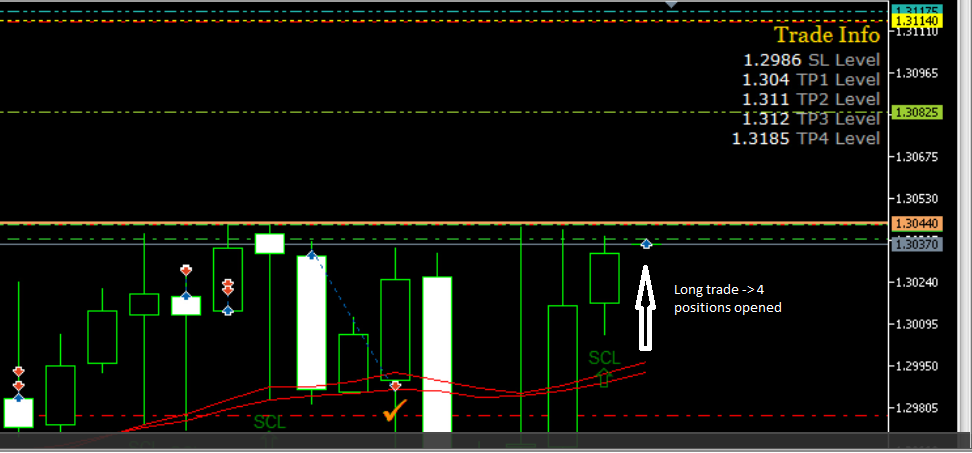
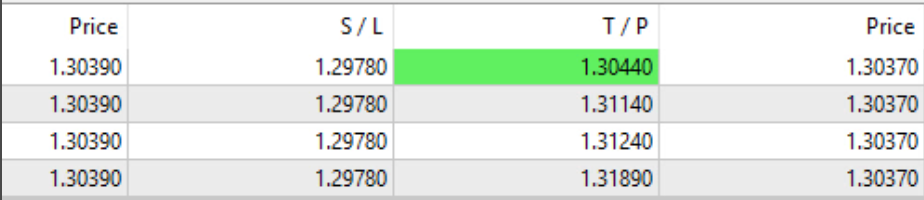
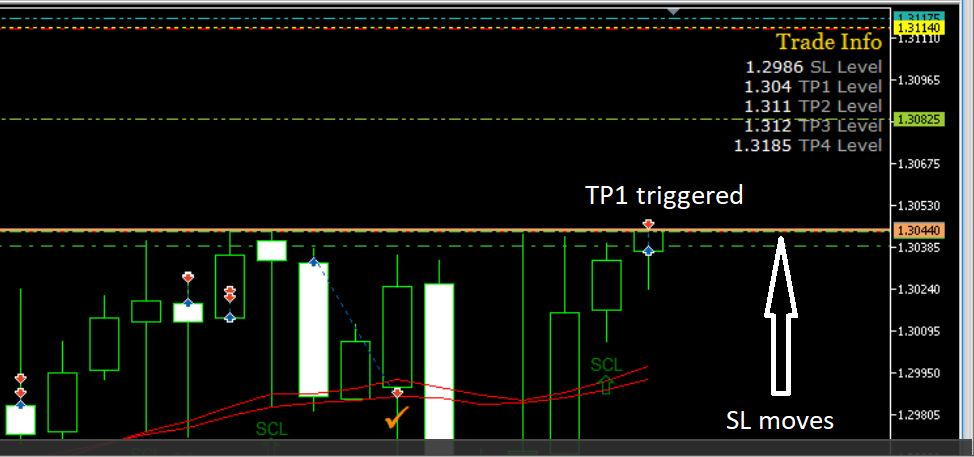
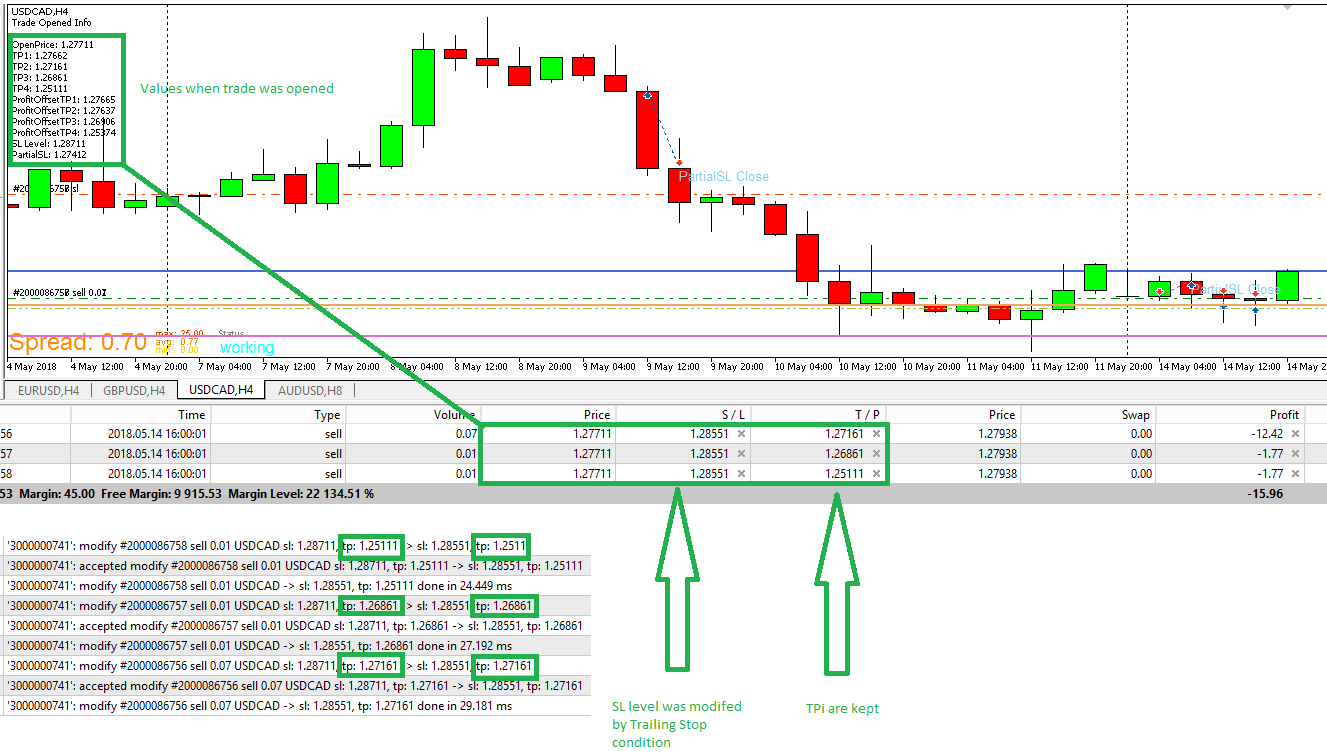
      There is one trade opened (4 postions at the beginning, 1 reached its TP1) in one pair and nothing on the rest. It seems that the OrderModify by trailing stop is working correctly and the SL level are modified but not the TP that keeps the original value as happened when more than one trade was opened at the same time in by different EAs.

      0_1526321750386_ffd13b3b-5548-42c2-9937-150d07321067-image.png

      But I cannot be sure if that is due to

      • Shift to pink blocks
      • No other trades were opened at the same time

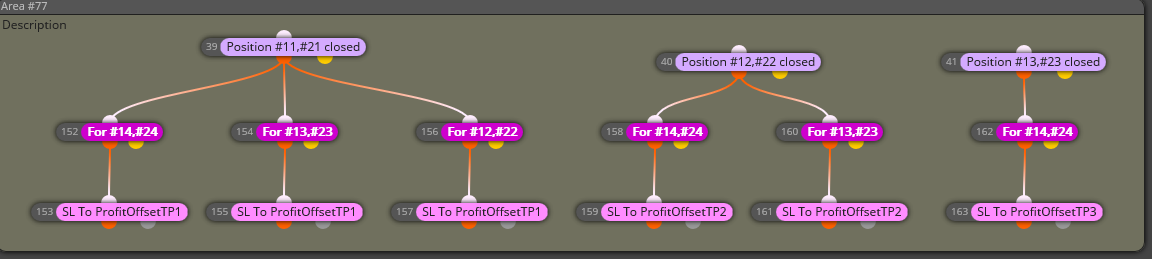
      The section that seems it is not working both now and before is the conditions set in the "On trade" section

      0_1526321912992_05df6b98-532f-462f-ab05-6da9ca24ed9c-image.png

      Stops levels are not modified by a closing trade detection and I don't know how to figure this out. This conditions are very necessary for the EA's behavior.

      Any help Will be very appreciate.

      Thanks

      posted in Questions & Answers
      J
      josecortesllobat
    • RE: EAs working together. Could there be confusion in the price values sent or received?

      Hi @miro1360

      Thanks for your example.

      I was looking for a way to get the Take Profit level for each opened position and you have given it to me. Because when each position is opened the TPi_Price is calculated by the sell/buy block and I can get it by using your example avoiding its calculation and reducing the project blocks number.

      MANY THANKS!!!

      I will update the post with the test results.

      posted in Questions & Answers
      J
      josecortesllobat
    • RE: EAs working together. Could there be confusion in the price values sent or received?

      Hi @miro1360

      I really apreciate your help.

      What I am not able to understand is why one EA with its own MagicNumber can take any value of other EA with a different MagicNumber. I don´t know how the workflow of sending commands to the server Works but I used to think that the commands sent by one EA is exclusively of that EA.

      I have modified the "Modify Stops" block using the pink ones for the Trailing Stop Condition

      0_1526035066308_5c2ea79f-4f77-4224-9157-77fd52b9bc00-image.png

      But it was required to add a value in the Take Profit because with No Change option and "For each trade" I got that the TP was modified to 0.00000. There is something in the forum about it.

      posted in Questions & Answers
      J
      josecortesllobat
    • RE: EAs working together. Could there be confusion in the price values sent or received?

      Hi @miro1360

      When the position is modified by the trailing stop condition, there seems to be a confusion in the TP values between different EAs.

      0_1526023670565_7e37eff0-8836-4a7d-bb0b-3662d2a8ce39-image.png

      I think this confusion in the TP prices calculation is happening when trades are opened at the same time by different EAs in the same terminal. Because initially the TPs are set correctly but incorrectly when the position has to be modified TPi calculation takes place when the positions are opened and it is not updated or recalculated.

      I would like to check if this happens if I split the portfolio in many terminals but most probably will be that my VPS hangs.

      Thanks

      posted in Questions & Answers
      J
      josecortesllobat
    • RE: EAs working together. Could there be confusion in the price values sent or received?

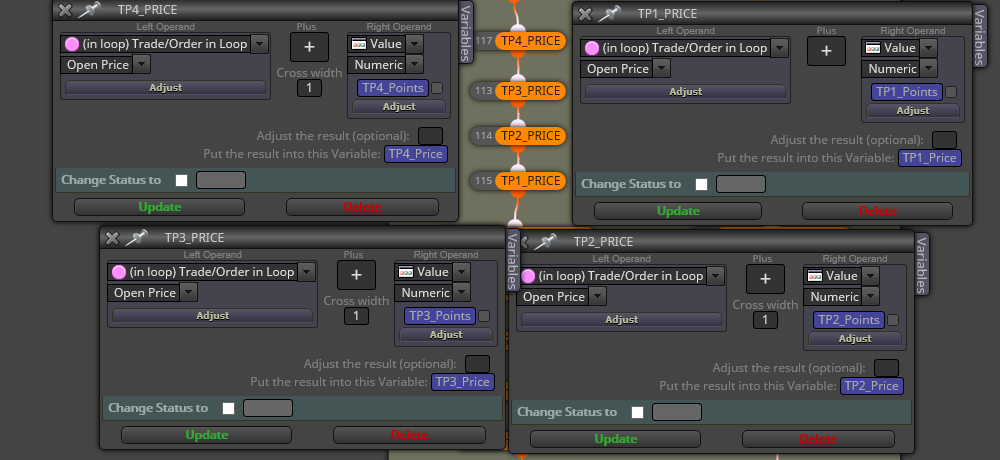
      It is not a pink block, it is a formula block where the TPi_Price variable is set.

      0_1525990636826_2433fa95-11cc-4dc3-b051-ef0d9c161c23-image.png

      posted in Questions & Answers
      J
      josecortesllobat
    • RE: EAs working together. Could there be confusion in the price values sent or received?

      Hi @miro1360

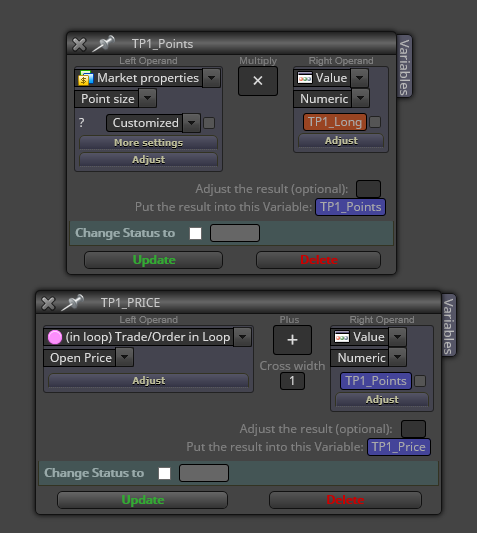
      Here you have how the TakeProfit levels are calculated:

      TPi_Price = OpenPrice +/- TPi (points)

      TP1 (PIPS) = 5
      TP1 (Points) = TP1 (PIPS) x Point Size (5 digits -> 0.0001) = 5 x 0.0001 = 0.0005 points
      OP (PRICE) = 1.00000

      TP1_Price (buy position) = 1.00000 + 0.0005 = 1.00050
      TP1_Price (sell position) = 1.00000 - 0.0005 = 0.99950

      and so on.

      0_1525984531389_99c3858d-f022-4d5d-ad4a-852263a0b2b2-image.png

      The TP levels are placed correctly when the positions are opened even though there are other positions opened at the same time in different pairs. But, the issue takes place when the position has to be modified when a condition to move it is triggered. In this case, it seems that the TPi levels are taken from the values of other EA. Is this posible? Because it should not be possible if everything Works correctly.

      posted in Questions & Answers
      J
      josecortesllobat
    • RE: EAs working together. Could there be confusion in the price values sent or received?

      Hi @miro1360

      Thanks for your answer.

      I know it how it works and I am pretty sure that each EA opens the postions with the right real magic number such as:

      Group #11 (EA magic number on settings is 200) --> 211
      Group #11 (EA magic number on settings is 201) --> 212

      That is fine for each EA working and for each position opened.

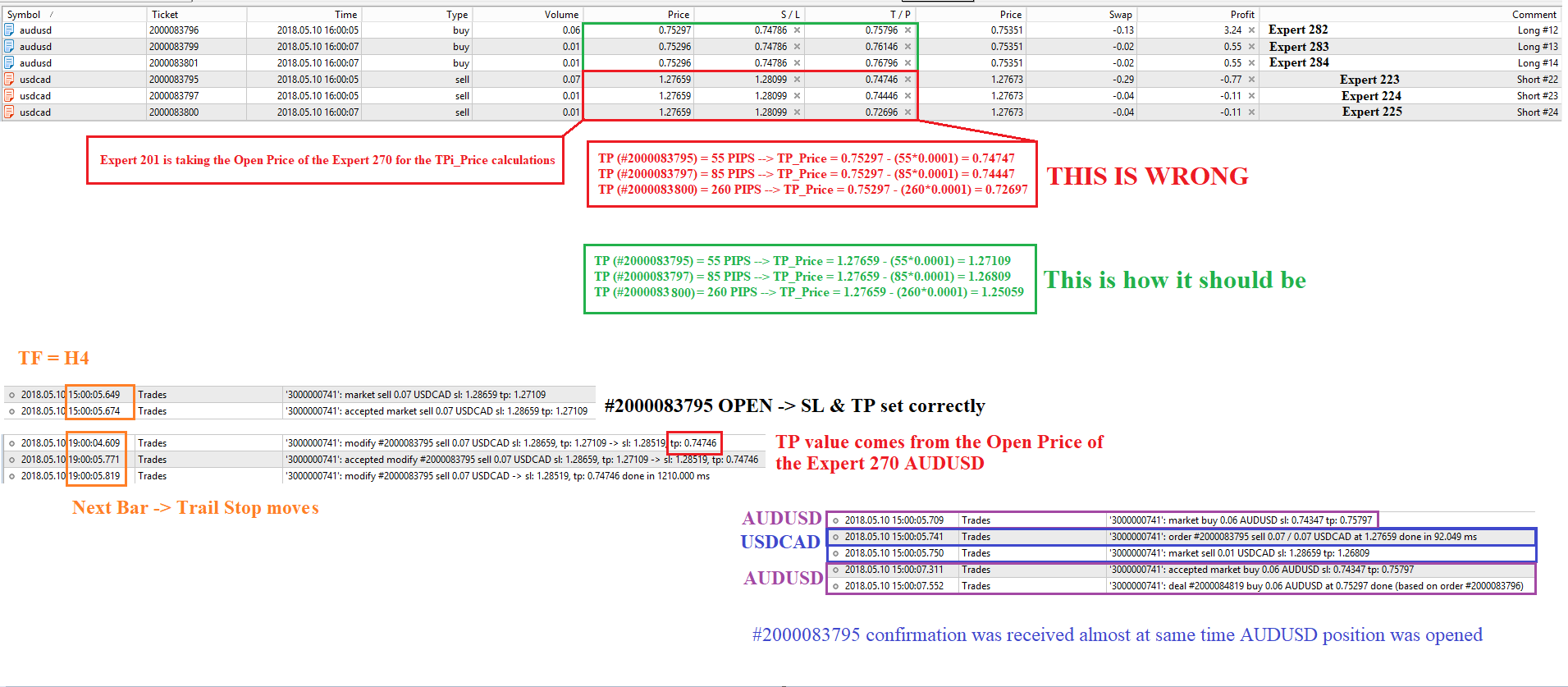
      What I am not able to understand is why the EA attached to the EURUSD pair is taking the TP values from the EA attached to the AUDUSD pair when the position is being modified. It is very sure that both EA have different magic number set in the input parameters.

      What I have found is that the EURUSD and AUDUSD positions were opened at the same time:

      0_1525946630990_54aa4d12-c652-4774-8728-ae3e31354f09-image.png

      So I don't know why the TP level of the EA working on the EURUSD chart is modified with the values of the AUDUSD.

      posted in Questions & Answers
      J
      josecortesllobat
    • EAs working together. Could there be confusion in the price values sent or received?

      Hi

      I have an EA portfolio working on the same demo account in the same MT5 terminal. The configuration is such as

      EA1 EURUSD H8 MagicNumber = 200
      EA1 GBPUSD H8 MagicNumber = 210
      EA1 USDCHF H8 MagicNumber = 220
      EA2 AUDUSD H8 MagicNumber = 230
      EA2 EURUSD H8 MagicNumber = 240
      EA2 USDCAD H8 MagicNumber = 250
      EA2 USDCHF H8 MagicNumber = 260
      EA3 AUDUSD H8 MagicNumber = 270
      EA3 EURUSD H4 MagicNumber = 280
      EA3 GBPUSD H4 MagicNumber = 290
      EA3 USDCAD H4 MagicNumber = 201
      EA4 GBPUSD H8 MagicNumber = 211
      EA4 USDCHF H4 MagicNumber = 221

      Each EA writes some data (OpenPrice, TPs, SL, etc.) in a Comment when the position is opened using the "Comment (ugly)" block.

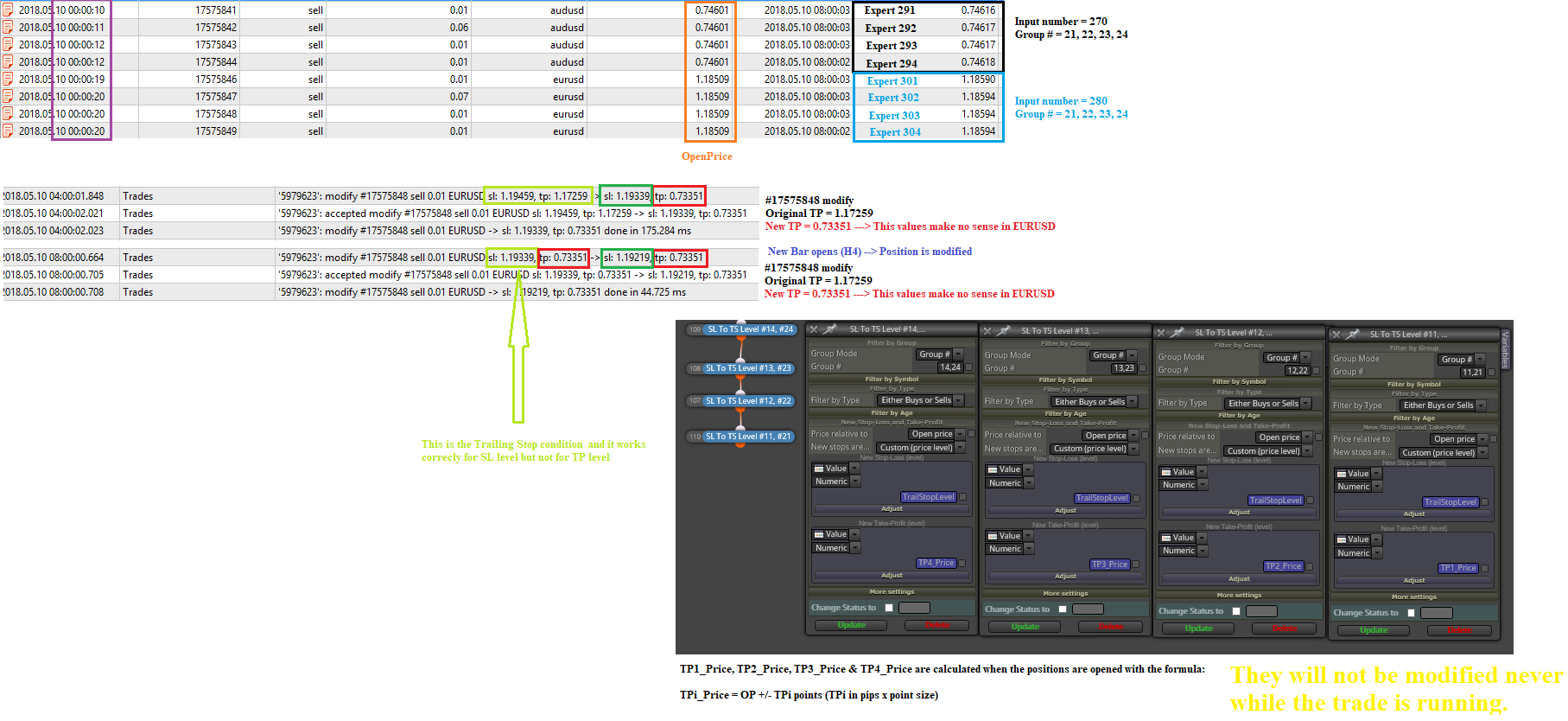
      The EAs open positions per their logic and set up the postion magic number as MagicNumber+Group#. Everything seems to be right. But I have noticed that the values written in the "Comment (ugly)" block does not make sense in some cases.
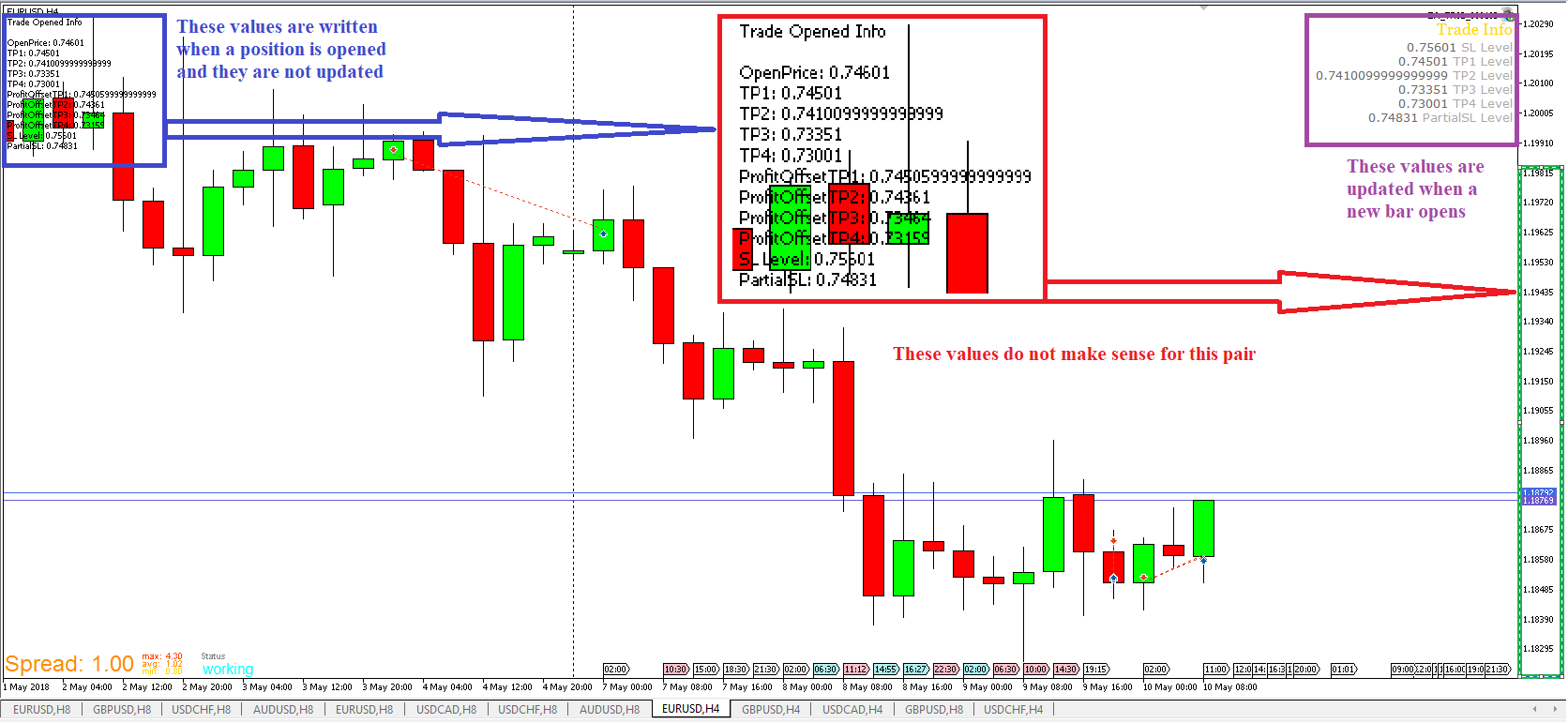
      0_1525934635565_7fd31bae-92cb-492b-bf8a-721e55f26732-image.png

      At the same time, there was a position opened in the AUDUSD pair:
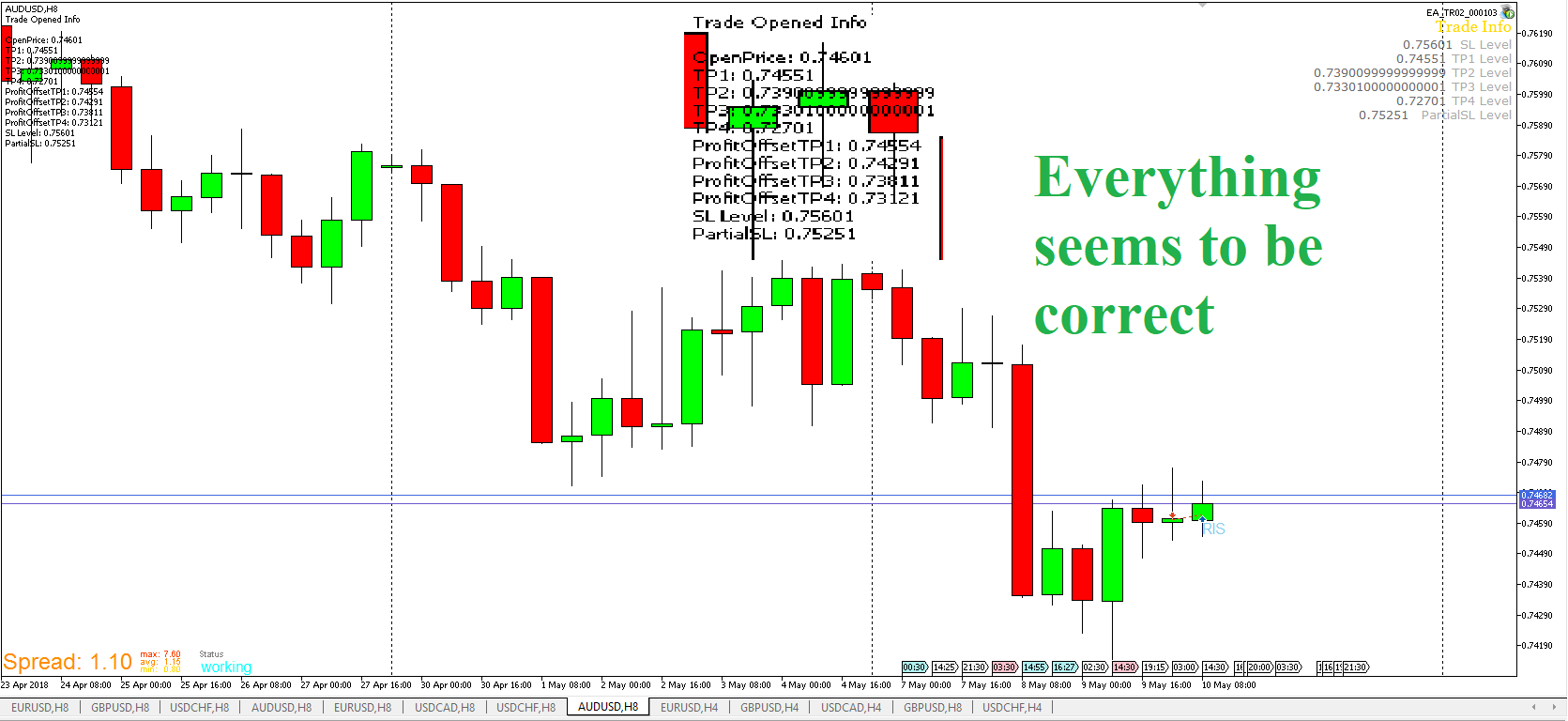
      0_1525934841274_adec80e6-531b-41bb-a14b-6de397278fab-image.png

      The EAs move the SL level at the beginning of a new bar and Modify the position of the trade. But the position in the EURUSD is modified wrongly
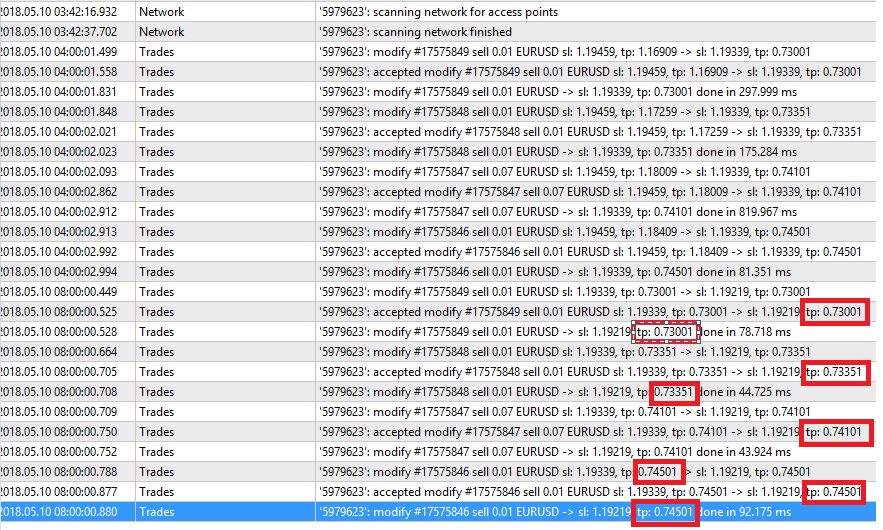
      0_1525935441953_377d5b83-4e12-4700-a05e-a3f5d9e577bd-image.png

      It seems as it took the TP values from the AUDUSD pair.

      That happened after this event

      0_1525935524703_9c836dff-7534-4acc-aa3f-7dcb22f6cd01-image.png

      Something strane took place with the modify of the SL/TP when they were set to 0.0000
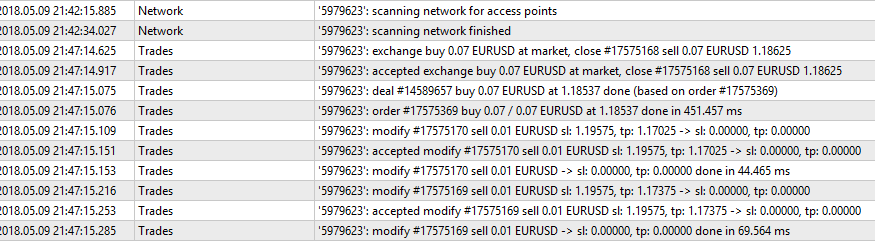
      0_1525935650140_9e225304-483d-47ba-86c3-10ae7fca34a8-image.png

      I am not sure if this behavior are provoked by the EAs but it happened in different broker´s demo account using the same portfolio.

      Any idea on that?

      Thanks
      posted in Questions & Answers
      J
      josecortesllobat
    • RE: How to open next order after 5 bars if there is already open order and conditions are met, so there won't be a lot of open trades???

      @nanana

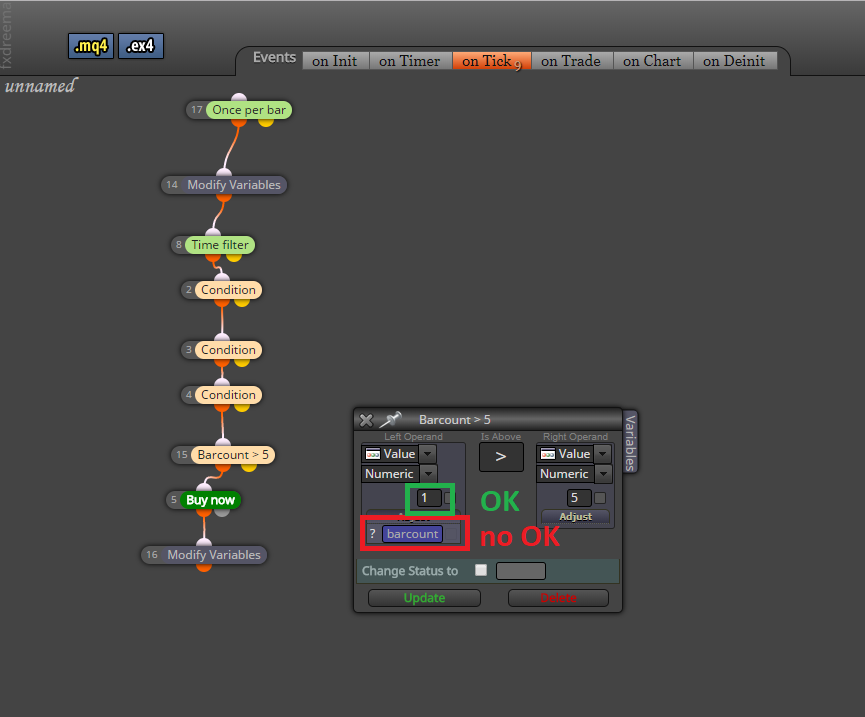
      Take a look at the @roar project. The variable "barcount" has been placed in a wrong place (adjust field) in your project. This is not correct.

      0_1525877950298_d6a22c01-3eaf-4905-8af1-ec4a23f20caa-image.png

      posted in Questions & Answers
      J
      josecortesllobat
    • RE: How to get the values sent to the broker server?

      Hi @roar

      Thanks for your answer.

      I don't know which is the problem. If the stop level modify request is not allowed, it should be logged in the journal as it did in the backtesting saying "Invalid SL/TP requested".

      0_1525856976924_4f74630d-14da-4e0d-874e-f552d3f2d37b-image.png

      Per my fxDreema's code, the modify request is sent over and over again in each new bar if the first condition to move the SL is not allowed. If each request returns an error a new log is written in the trading journal. But in the demo account, nothing is logged not even the order's modify request.

      Service desk of my broker suggested to use the Print() function to get the values sent. But I am not a coder and I don't know how to use it or code it and to get what values are sent with the OrderModify command.

      I will try the workaround you suggested to see what happens.

      Thanks

      posted in Questions & Answers
      J
      josecortesllobat
    • How to get the values sent to the broker server?

      Hi

      Please, could anyone help me to get the values sent by the EAs to the trading server?

      I would need a way to get the values sent by the EAs to the trading server and its response to be stored in a file or logged in the journal. Particularly the ones related to the OrderModify() command that is involved in blocks such as "Modify Stops".

      The issue is that I am having some problems with the SL/TP shift in a demo account that is not happening in the backtest. The SL/TP are not shifted when the conditions to do it are met and there is no error logged in the journal. So, what I would like to know is when a condition to move the positions' SL is triggered what values are sent to the server and its response if the order has been done correctly or if there is an error.

      Condition block triggered -> Send Order to modify SL & Log values sent -> Get the server's response and Log (or save) it

      Is that posible using a block or a MQL custome code?

      Any help on this issue will be very welcome.

      Thanks

      posted in Questions & Answers
      J
      josecortesllobat
    • RE: On Trade issue

      Hi @fxDreema

      I have been talking with the service desk of my broker's demo account regarding to the problems with the stop loss moves. They said that I have to take into account this

      https://www.mql5.com/en/docs/standardlibrary/tradeclasses/ctrade/ctradeordermodify

      "Successful completion of the OrderModify(...) method does not always mean successful execution of the trade operation. It is necessary to check the result of trade request (trade server return code) using ResultRetcode()."

      https://www.mql5.com/en/docs/standardlibrary/tradeclasses/ctrade/ctraderesultretcode

      So I need your help to understand what is going wrong with the code to get what I expect when the EA has to move the SL to the right place.

      I have been reviewing the code of the EA and I have seen that you have added some messages if there is any issue with the SL move request. But I have not seen any error logged in the terminal journal to know why the SL are not moved when the OnTrade or OnTick conditions are met.

      Please, could you be so kind to help me to figure this issue out? What I can say is that this issue does not seem to be happening on the MetaQuotes demo server but I have to double check it.

      Thanks

      Best regards

      posted in Questions & Answers
      J
      josecortesllobat
    • RE: On Trade issue

      Hi @fxDreema

      I can say that the issue with the "On Trade" section seems to be broker related. I am testing the same EAs (MQL5) on a MetaQuotes demo account and the conditions in the "On Trade" section work correctly.

      FYI

      posted in Questions & Answers
      J
      josecortesllobat
    • RE: Adjusting S/L and T/P for more profit opportunity

      Hi @hugo08642

      If your broker has 5 digits prices

      50 points = 5 pips
      10 points = 1 pip

      So 50 points of SL is 0.99950 and 10 points of TP is 1.00010 in a five digits pair.

      Don't you think they are a very tight stop levels?

      As per your logic

      Eg;
      Bought at 1.00000, S/L 50 points, T/P 10 points. Spread 1 pip
      Moves to 1.00500 (5 pips up?)
      S/L adjusted to breakeven at 1.00400
      Moves to 1.01000 (Reaches T/P point). --> If the Price reaches your TP level, the trade will be closed and there will not be a chance to extend the TP level
      S/L is moved to 1.01000 and T/P moved a further 10 points.

      Might be what you want is something like

      • Open Trade -> SL at SL_level0 + TP at TP_level0

      If Price is at Price1_level --> move SL to BE
      If Price is at Price2_level --> move TP to TP_level1 and SL to TP_level0
      If Price is at Price3_level --> move TP to TP_level2 and SL to TP_level1

      .... and so on

      posted in Questions & Answers
      J
      josecortesllobat
    • RE: How to set a break even at?

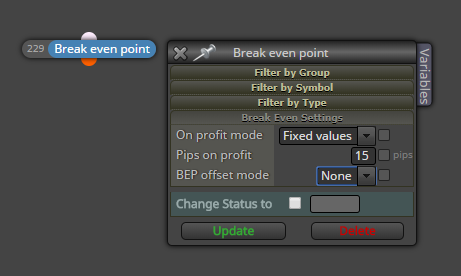
      You can use "BreakEvent" block.

      0_1525450507101_a3ae7375-82c1-4a3a-8ba9-51d870d72ab0-image.png

      Or you can get ideas from the examples given at

      https://fxdreema.com/examples

      posted in Questions & Answers
      J
      josecortesllobat
    • 1
    • 2
    • 20
    • 21
    • 22
    • 23
    • 24
    • 25
    • 26
    • 22 / 26