fxDreema

    • Register
    • Login
    • Search
    • Back to the main page
    • Categories
    • Recent
    • Tags
    • Popular
    • Search
    1. Home
    2. josecortesllobat
    3. Posts
    J
    • Profile
    • Following 2
    • Followers 20
    • Topics 34
    • Posts 507
    • Best 41
    • Controversial 1
    • Groups 0

    Posts made by josecortesllobat

    • RE: importar mql4 desarrollado con alphadvisor

      @jackpalance He utilizado alphadvisor para crear EAs. Es un builder bueno para hacer EAs básicos pero fxDreema te permite muchas más posibilidades. Además, tienes la opción de crear EAs en MQL5 y pasarlos a MQL4 o viceversa.

      Si tienes EAs construidos con alphadvisor, no creo que te resulte muy difícil reproducirlos con fxDreema.

      posted in Questions & Answers
      J
      josecortesllobat
    • RE: On Trade issue

      Hi @fxDreema

      I really appreciate your time to figure this issue out. I am sorry if I am not able to simplify the project as you required but I started using fxDreema builder some months ago and I am always learning from you and from other guys in the forum in order to improve my projects. Believe me. I don't want you waste your time.

      When I set the TP to "No change", when the SL is modified the TP level was shifted to 0.00000. But I have checked right now with the original Project and it seems to be fine. Might be I did a mistake.

      As I said, I was using variables and some Project complexity because I am learning how to do the same with less blocks thanks to your guides and the help of people like @miro1360. The original project has been meaningfully reduced but it is still happening the issue with the OnTrade position close detection when the EA is ran in a demo account. I hope with your test in a demo account we will get more info. I will take advantage of your simple project and I Will run it in my demo accounts. In the tester, the project works as expected. Like you got with your backtest. But not in a demo account.

      I got "Invalid SL request…" messages in the tester when the SL has to be modified to a more profitable level. If the SL is triggered, all the trades (positions in the MT5 builder) are closed. I never got kind of messages in a demo account when the SL level was not shifted from the conditions in OnTrade section and no error or message is logged.

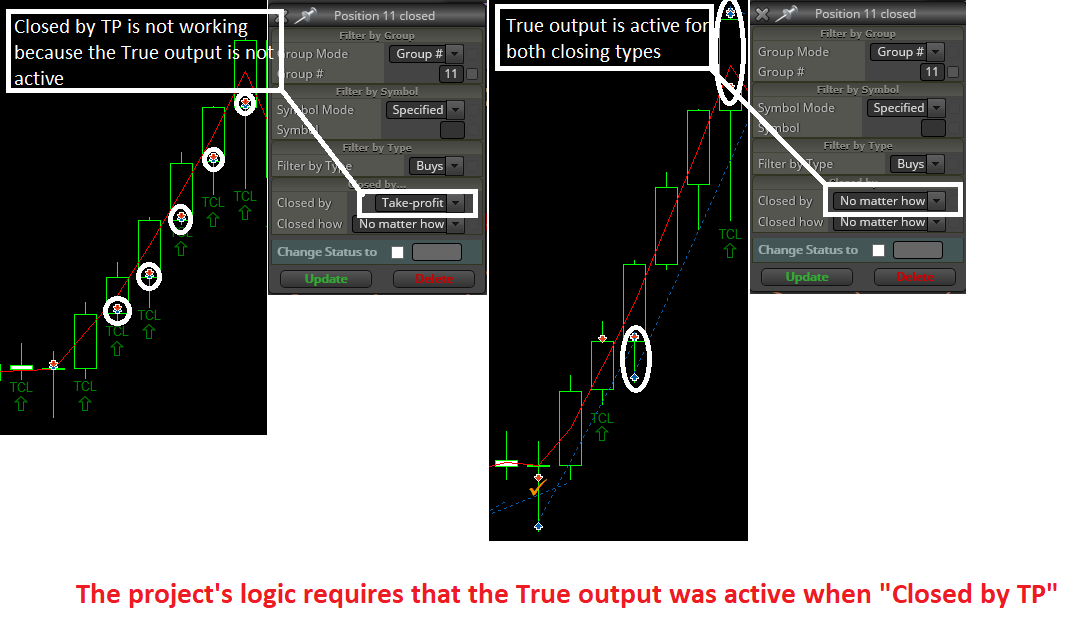
      If I set the Closed by Take-profit option, I have a non-expected behavior as I log in the next post:

      https://fxdreema.com/forum/topic/5933/ontrade-section-close-detection-by-tp-does-not-work-correctly

      Thanks a lot for your support
      posted in Questions & Answers
      J
      josecortesllobat
    • RE: importar mql4 desarrollado con alphadvisor

      Creo que sólo puedes importar aquellos EAs construidos con fxDreema.
      I think only fxDreema projects can be imported into the builder.

      posted in Questions & Answers
      J
      josecortesllobat
    • OnTrade section: Close detection by TP does not work correctly

      Hello

      It seems that the "Position closed" block in OnTrade section does not work as expected when it is choose "Closed by Take-Profit"

      0_1528142156281_35505c52-e25e-4941-b771-f89298fce7ce-image.png

      Might be a bug?

      Thanks

      posted in Bug Reports
      J
      josecortesllobat
    • RE: MARTINGALE

      Do you mean with a lot size depending on Risk% or anything like that?

      posted in Questions & Answers
      J
      josecortesllobat
    • RE: On Trade issue

      Hi @fxDreema

      Here you have the simpliest project I can built respecting the logic of the whole Project.

      https://fxdreema.com/shared/TmBsxyCze

      But I just need that you check if the pink "modify stops" block &/or the blue "Modify stops of the positions" block work when they are placed in the "OnTrade" section of the project when the EA is running in a demo account. In the Tester there is not any issue and both work well.

      Thanks

      posted in Questions & Answers
      J
      josecortesllobat
    • RE: On Trade issue

      Hi @fxDreema

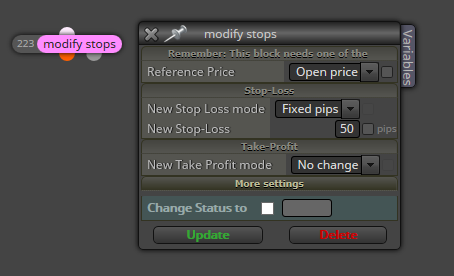
      Might be there is another option but I am using so many "For…" blocks because I wanted to use the pink block called "modify stops" for all the trades with No change in TP (i just want to move the SL) but when the modify was sent, the TP of each trade was modified to 0.00000.

      0_1527880977756_c6448c3d-1975-4344-8a8a-626653fbb2a6-image.png

      posted in Questions & Answers
      J
      josecortesllobat
    • RE: On Trade issue

      Hi @fxDreema

      For me, a "position" is one order opened and a "trade" is all the exposure to the market. So, you are right and I am wrong with the meaning of those words.

      The idea is:

      • if the conditions to open orders are met, I am opening 4 orders each time. Let's called 11,12,13,14 and each one has its own lot size (i.e. 0.01, 0.07, 0.01, 0.01, LotSize = 0.1) .

      I understand that you are suggesting to use "close (partially)" block and I think I used it but it did not work as I expected. I can work on this idea and see what is happening with this way.

      Anyway, what I am trying to figure out is why the SL level are not modified when I am running the EA in a demo account. This is what I would like you be so kind to take a look. Because it works pretty well in the Tester but not in a demo account. I have been testing the EA in 4 different brokers and in none works as in the tester. The logic is: Order closed (OnTrade) -> move SL (% of TP).

      Thanks for your help and suggestions

      posted in Questions & Answers
      J
      josecortesllobat
    • RE: On Trade issue

      Hi @fxDreema

      I will write a simpliest one.

      The idea is: 4 positions opened per trade (same SL, each position has its own TPi)

      • when TP1 is reached and Pos1 is closed, move SL (Pos2, Pos3, Pos4) by closing detection in "OnTrade" section. TP2, TP3 and TP4 are kept.

      • when TP2 is reached and Pos2 is closed, move SL (Pos3, Pos4) by closing detection in "OnTrade" section. TP3 and TP4 are kept.

      • when TP3 is reached and Pos3 is closed, move SL (Pos4) by closing detection in "OnTrade" section. TP4 is kept.

      That is the main idea about the position management.

      Thanks for helping

      posted in Questions & Answers
      J
      josecortesllobat
    • RE: Warning from condition block

      Could you share a screenshot showing the content of that block?

      posted in Questions & Answers
      J
      josecortesllobat
    • RE: Hello to everyone,help please

      @eray-dursun

      That block called "Account Profit >= 10$" is a "Condition" block that is checking out the account's profit.

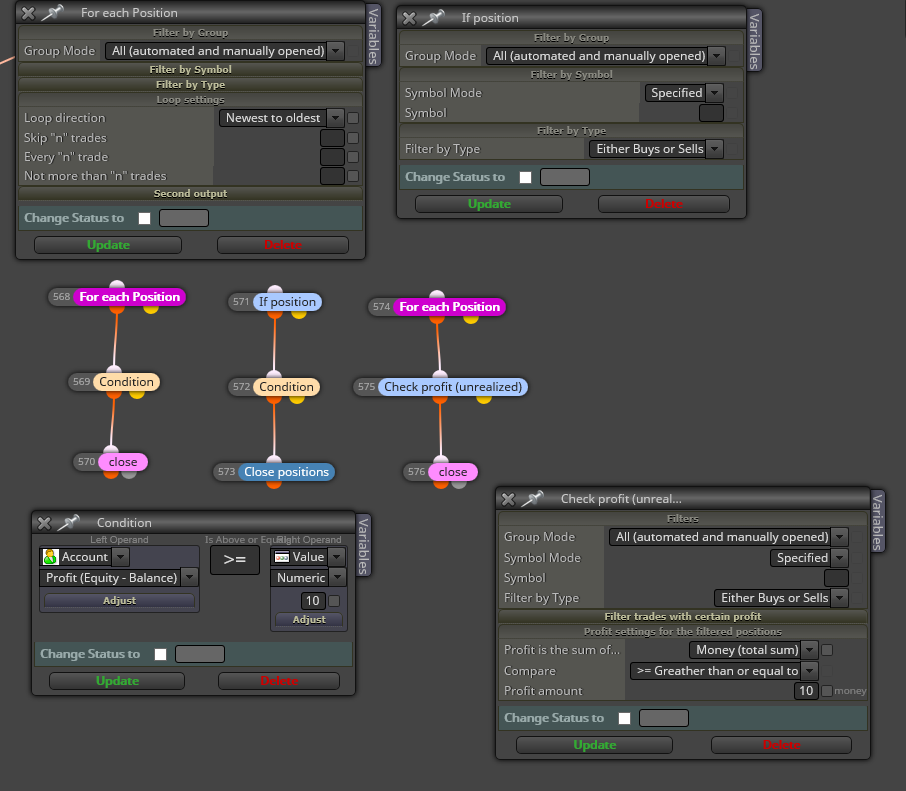
      You can not use the examples as I showed to you because I don´t know the logic of your Project. As @roar said, you should start the closing condition Branch using a "For each postion" or "If position" block. Like this

      0_1527778134055_167a4d3e-3a0f-4345-af44-71d2ad930913-image.png

      At least one of them should work. Their logic are: if profit (account or unrealized) is >=10$ -> Close all the positions

      posted in Questions & Answers
      J
      josecortesllobat
    • RE: Hello to everyone,help please

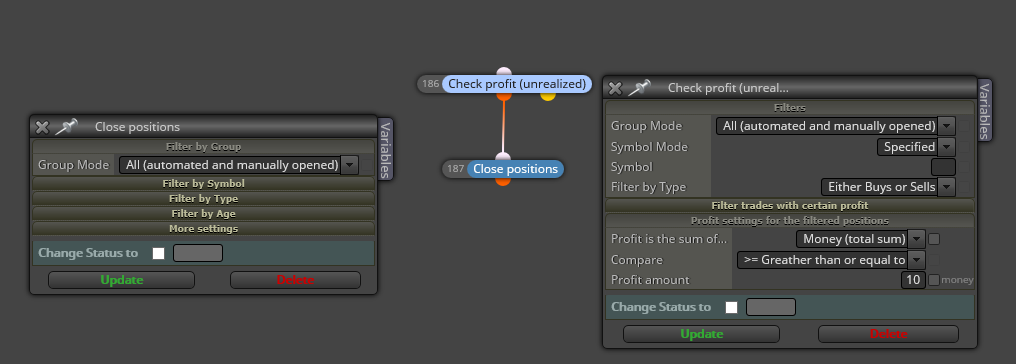
      This is other option that you could check up

      0_1527702224246_7088d595-6424-4707-8562-71f7f94d90b1-image.png

      posted in Questions & Answers
      J
      josecortesllobat
    • RE: Hello to everyone,help please

      Sorry @Eray-Dursun

      I don't understand what you want to say. Can you clarify your question?

      posted in Questions & Answers
      J
      josecortesllobat
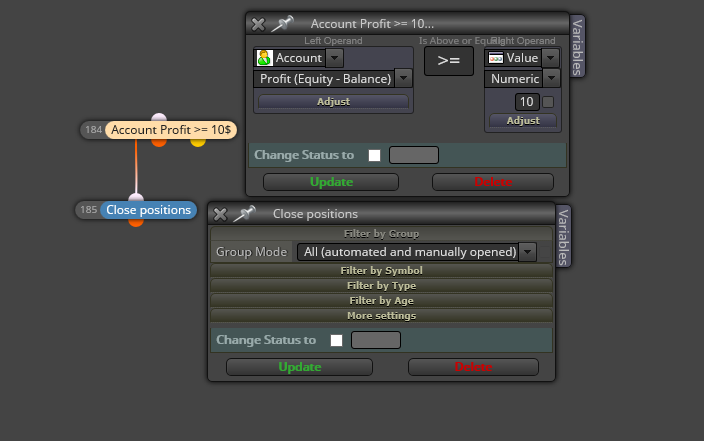
    • RE: Hello to everyone,help please

      Check this out

      0_1527697399671_729d8b2b-53f7-4be1-a09f-48726885ab30-image.png

      Might be work

      posted in Questions & Answers
      J
      josecortesllobat
    • RE: Buy Limit & Stop

      Hi

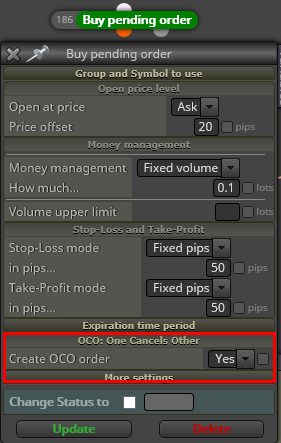
      You can use "OCO: One Cancels Other" option that is available in the Buy/Sell pending order block:

      0_1527565075907_69b1a22e-15ab-4968-9aa2-c41e670d427a-image.png

      posted in Questions & Answers
      J
      josecortesllobat
    • RE: On Trade issue

      Hi @fxDreema

      Thanks a lot for your support.

      Here you have the simple Project to check it out.

      https://fxdreema.com/shared/n9ha6SuXd

      posted in Questions & Answers
      J
      josecortesllobat
    • RE: EAs removed by themselves

      Hi @fxDreema

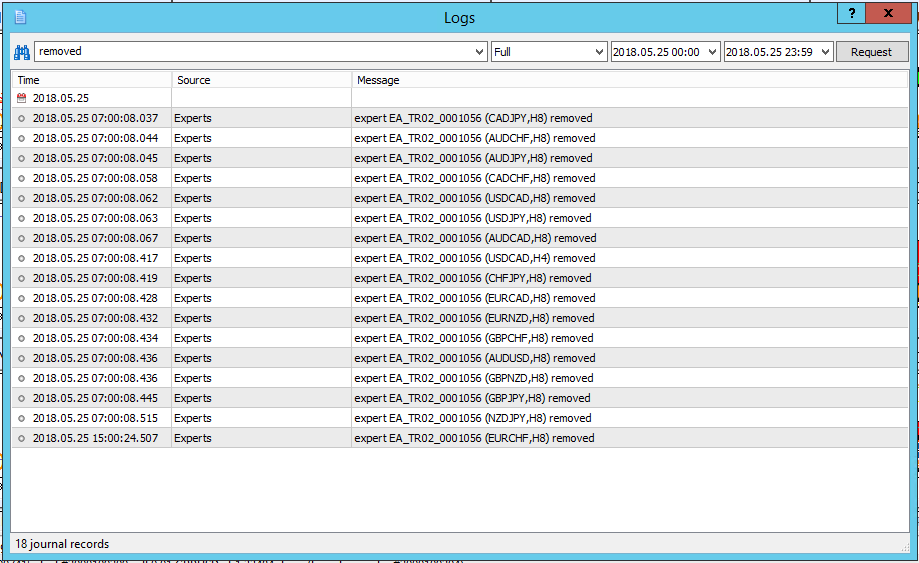
      About this topic, there is no error logged at the terminal journal. What I found is just what you can see in the picture above. There is no reason apparently for the EAs removing. So, I don't know why is happening that. But I don't think it is related to the code. It is not happening when there is only one EA in one chart not a portfolio.

      What I am doing right now is to copy the EA to MQL4 and check it out with a MT4 demo account with the same broker where I have the MT5 demo accounts. It is easy with fxDreema.

      The other issue that I am trying to figure it out is one that you are aware of.

      Thanks

      posted in Questions & Answers
      J
      josecortesllobat
    • RE: EAs removed by themselves

      Thanks @roar for helping.

      But I am not able to understand it. If an EA is removed by itself from a chart due to an error in the code, why is not doing that in all charts? Because the same EA is attached to 23 charts (same MT5 terminal, same demo account) but not in all of them is removed. If it was a code's error, should not it be removed in everyone?

      That EAs portfolio is loaded by selecting a profile. In order to check the EAs performance in diferent conditions, I loaded the same profile in two more demo accounts. But the EAs removed in one demo account are not the same in the other accounts.

      I am having some different issues using MT5 and MT5 demo accounts and I think that not all of them are related to the EA's code.

      posted in Questions & Answers
      J
      josecortesllobat
    • RE: EAs removed by themselves

      Hi @roar

      Do you mean an operation/calculation where the formula like this /0?

      Thanks

      posted in Questions & Answers
      J
      josecortesllobat
    • EAs removed by themselves

      Hello

      I don't know why some of the EAs attached to different charts (same EA, different MagicNumbers) are themselves removed.

      0_1527260735939_fdeba180-330d-4a21-a7bf-b846437f51fd-image.png

      They are working together in a demo account at the same terminal.

      Any idea about which is the reason of that?

      Thanks

      posted in Questions & Answers
      J
      josecortesllobat
    • 1
    • 2
    • 19
    • 20
    • 21
    • 22
    • 23
    • 24
    • 25
    • 26
    • 21 / 26