fxDreema

    • Register
    • Login
    • Search
    • Back to the main page
    • Categories
    • Recent
    • Tags
    • Popular
    • Search
    1. Home
    2. josecortesllobat
    3. Posts
    J
    • Profile
    • Following 2
    • Followers 20
    • Topics 34
    • Posts 507
    • Best 41
    • Controversial 1
    • Groups 0

    Posts made by josecortesllobat

    • RE: Numbers and letters.

      Hello @Juan-Manuel-Quiñonero

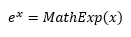
      It is a number as floating-point arithmetic

      1.13477e-05 = 1.13477x10(exp -05) = 1.13477/100000 = 0.0000113477

      https://en.wikipedia.org/wiki/Floating-point_arithmetic

      posted in Questions & Answers
      J
      josecortesllobat
    • RE: Como hacer un ae con la segundo condicion de creacion

      Aquí tienes un ejemplo simple que te puede inspirar

      0_1559832710254_30168eda-9682-4c41-afb7-f5180d46d1cc-image.png

      En lugar de usar 3 bloques de condición.

      Si ((NoTrade == false) && (OneTradeLimit == false) && (ADXPlusCrossOver == true)) -> true output, else -> false output

      0_1559832903045_5c688b15-784a-4ec2-aa94-e186acceb928-image.png

      posted in Questions & Answers
      J
      josecortesllobat
    • RE: Simple EA ... why not working ?

      0_1559832610275_ed41d050-d5ea-431b-980f-41119064ef07-image.png

      posted in Questions & Answers
      J
      josecortesllobat
    • RE: Block "formula" with more operands

      I would say that is like this

      0_1559324419040_098453a3-1e99-408c-b297-43e20d14542e-image.png

      But I don´t test it.

      posted in Questions & Answers
      J
      josecortesllobat
    • RE: Block "formula" with more operands

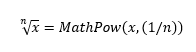
      Yes, you can.

      I would say that is this
      0_1559060155820_a252455a-4e10-4cfe-9db4-af5670a68a66-image.png

      But I have not tried it.

      posted in Questions & Answers
      J
      josecortesllobat
    • RE: Block "formula" with more operands

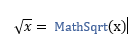
      You can code what you need but you have to know how to use the math functions.

      https://www.mql5.com/en/docs/math

      Like
      0_1559054335100_11f4d42b-7280-4461-affa-933b448c0500-image.png

      posted in Questions & Answers
      J
      josecortesllobat
    • RE: Block "formula" with more operands

      "Custom MQL code" should work with any math operation if it is well defined.

      Did you try it with an extra parenthesis?

      A=((Y1l-Y2l)/(X2l-X1l))

      ((A1+A2)/(A3+A4))

      I have used that block with equations more complicated than the one you are defining and it worked correctly.

      posted in Questions & Answers
      J
      josecortesllobat
    • RE: Block "formula" with more operands

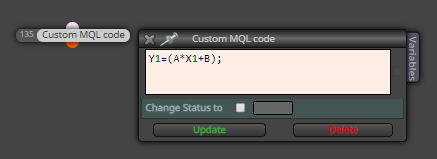
      Here you are defining a variable "Y1" as a result of an math operation. Then, "Y1" value will change in function of the variables "A", "X1" and "B".

      I am not sure what you mean with "Y1, A, X1 and B are changeable variables from other formulas blocks." "A", "X1" and "B" don't matter of where come. They might be a predefined variables or as a result of a formula block. But if "Y1" had a value before of that "Custom MQL code" block, Y1 value will shift to the result of the math operation.

      Y1 = 10
      A = 1
      X1 = 2
      B = 3
      Y1 = 1*2+3 = 5

      Before "Custom MQL code" block -> Y1 = 10
      After "Custom MQL code" block -> Y1 = 5

      Hope this helps.

      posted in Questions & Answers
      J
      josecortesllobat
    • RE: Condition than buy, keep the position till something happen

      Try this out

      0_1558848264199_684a7d19-ca49-4d12-ab00-6282325da22b-image.png

      posted in Questions & Answers
      J
      josecortesllobat
    • RE: how to close all loaded trades

      0_1558848051650_b4c6b4c0-a709-4d78-a2e4-9071ecf3ab98-image.png

      posted in Questions & Answers
      J
      josecortesllobat
    • RE: Open price only

      Place "Once per bar" block on top of the project

      0_1558549582101_2cf01a8e-993f-46b0-a27e-f167aea83695-image.png

      posted in Questions & Answers
      J
      josecortesllobat
    • RE: Why I dont get the open price here?

      Try this out

      0_1558549310566_2af587b8-5186-47eb-a117-7249a1aeed01-image.png

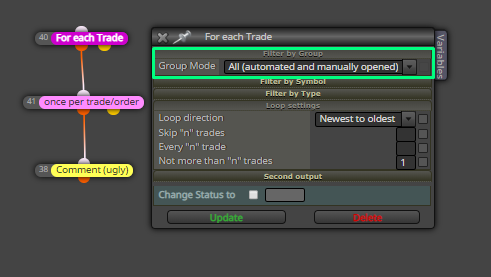
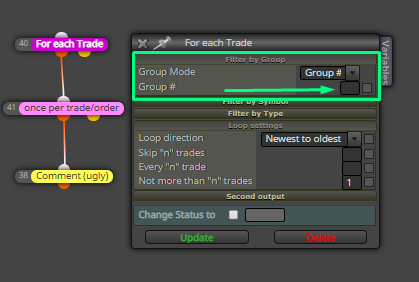
      Or, if you are using Group numbers,

      0_1558549471796_b9e66c41-6175-40a1-8a17-ccfa45ead0a8-image.png

      posted in Questions & Answers
      J
      josecortesllobat
    • RE: Block "formula" with more operands

      You can use a "Custom MQL code" block like this
      0_1558547614237_028dd055-38a3-4a96-8b71-5edac0092712-image.png

      posted in Questions & Answers
      J
      josecortesllobat
    • RE: modify in percentage

      For "Modify Variables" you can use the "Adjust" field

      0_1558461501951_58815658-ad62-4526-b82b-5200d7a7980d-image.png

      For TP, you can try it by using the "modify stops" pink block

      0_1558461611588_763b8fdf-c1e6-41b7-901b-a946cb57d378-image.png

      But remember that will need to use a "For each trade" block before the "modify stops" one.

      posted in Questions & Answers
      J
      josecortesllobat
    • RE: How to get automatically the MAX Volume for a symbol

      You can try it by using the "Custom MQL code" block with

      https://www.mql5.com/en/docs/marketinformation/symbolinfodouble

      https://www.mql5.com/en/docs/constants/environment_state/marketinfoconstants#enum_symbol_info_double

      posted in Questions & Answers
      J
      josecortesllobat
    • RE: wait block

      0_1556948319170_e20f2bbe-9523-4aed-90d8-6155be77f3c8-image.png

      This setup will check the age (>= 24[h]) and will pass when it is true. "Once per position/order" is required to run the blocks attached to its true output just once. If this block is not here, the EA will run the blocks connected to the "check age" true output each time/bar/tick (depending on your setup) that the "check age" block is true for each trade. So the EA would open a lot of trades.

      You can use the "Run blocks" block to point to the "Buy now" block using its ID or place a new "Buy now" block.

      posted in Questions & Answers
      J
      josecortesllobat
    • RE: Need help with constants

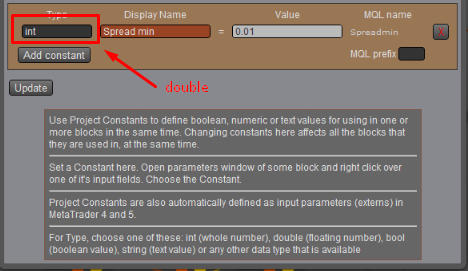
      int -> integers like 0, 1, 2, 3, ...
      double -> floating-point numbers like 0.01, 0.02, 0.03

      Change "Constant Type" to double and check it out.
      0_1555169879022_2226a5be-3b56-45a4-b66c-6df09c4b1c9b-image.png

      posted in Questions & Answers
      J
      josecortesllobat
    • RE: DEMA Not in t Dropdown Indicator List

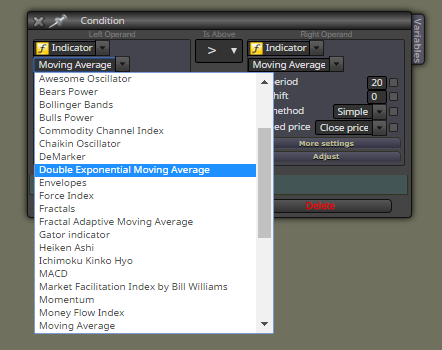
      I would say that DEMA is only available for MT5 projects
      0_1554919139769_930d8d20-5818-4529-bd73-8ebde6016171-image.png

      For MT4, I think that you will have to upload it as a "Custom Indicator"

      https://www.mql5.com/es/code/8355

      posted in Questions & Answers
      J
      josecortesllobat
    • RE: Two conditions are met.

      @cristobaljosemt5

      Take a look at the example. The first condition is only checked when "No Position" block is true. So, if there is a trade running, it is not allowed to open a new trade.

      posted in Questions & Answers
      J
      josecortesllobat
    • RE: trailing stop for two trades

      Follow this tutorial

      https://fxdreema.com/tutorial/builder/trailing-stop

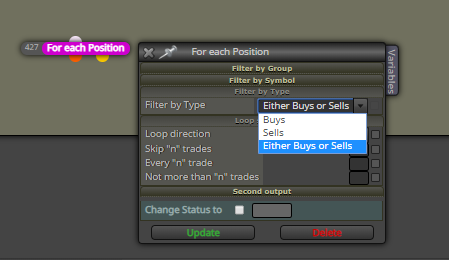
      In "For each Trade/Position" block, choose sells or buys. You will need two blocks.
      0_1554387492265_cdcab56f-2438-4e3e-a82b-4b21d1d0aedf-image.png

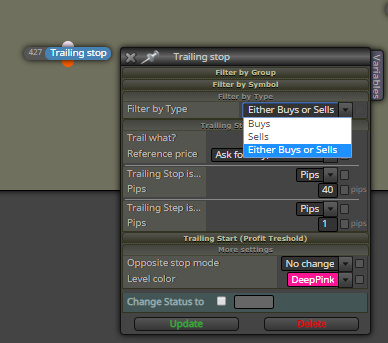
      In "Trailing stop" block, filter by sells or buys. You will need two blocks.
      0_1554387550746_67315ee3-a131-4f30-8d72-54f65570c471-image.png

      posted in Questions & Answers
      J
      josecortesllobat
    • 1
    • 2
    • 3
    • 4
    • 5
    • 6
    • 25
    • 26
    • 4 / 26