why you use this false output on cross?
it is not possible to fix because your indicator "repaints", that means it recalculates few history candles and is holding own peak to lowest/highest point (something like zigzag) ...
now you have in tutorials small answer for doji, you can improve it in your project 
Here I provide few ways (not all  because here is a lot of ways) how to create something called "pattern formations".
Lets say we need identify Doji candle. Doji is candle with really small body, so our Doji have body smaller than 1.5 pips, we need it on H4 TF and we need alert + symbol on that candle, here is how to do it:

With similar way we can identify engulfing bar, this is how to find Bullish and Bearish Engulfing:

When we need 2 or x bulls/bears in row, when each have some amount of body pips, this can be way:

Or something more complicated called 3 White Soldiers / Black Crows, which are 3 consecutive bull/bear candles in row when each of candles is greater than 10 pips, and for Soldiers/Crows is each new High/Low/Open/Close higher/lower than previous this is how to do it
(identify 3 bulls, identify if new High is higher than previous, the same for Low, Open, Close and opposite for sell):

More complicated is to find Hammer based on % size, or any other Candle type based on some math calculation, this is one of ways how it can be done (other way can be using formula block + more variables, I did it with Custom code block as example)
(firstly read into variables prices for calculation - Open, Close, High, Low ,,, next make variable which hold state when condition is meet in custom code, next do custom code with calculation and comparison, result save into our variable for state (conditionPass=true or false) and last is Condition for alert)

This is result from visual tester:

shared link for this tutorial:
https://fxdreema.com/shared/VrzXQhufc
or import code into your projects to see all variables/inputs:
0_1484370393489_Formations1.mq5
Wish you green pips!
just use Condition block for your conditions, connect more blocks togethed and it is learn it on something easier and step after step, combination after combination you can do your work ... dont forget test in tester all changes you did
yes they can be, just your constant is:
int maMethod 0
values can be from 0 as SMA, 1 as EMA, 2 ssma, 3 lwma (I think this is order for methods) ...
the same you can do for Timeframes, but note that they values are 1 for M1, 5 for M5, 60 for H1, 1440 for D1, 10080 for W1 ...
for candle touch use something like cross condition
and for identify pinbar, well this is not easiest .... but probably I made tutorial for candle formations (or how to work with candles), maybe this weekend ...
two buffers, follow my tutorial for it or look in help section, both are custom indicators explained how to work with them
"missing" numbers are not important, important are only top blocks numbers, this is how is connections order working:
blue is order, and next colors are blocks runned in each blue order:

somewhere in help you can find next explanation for this ...
and the blocks what you mean as "hidden" are not hidden, it are normal blocks in fxdreema, but they are only renamed (right click - rename) (I left original name in begin of this block) .... only "Custom MQL4 block" is little special, because here you can type own "math" or some functions, working with variables in text, etc. ...
in fxdreema are these parameters as "string" ...
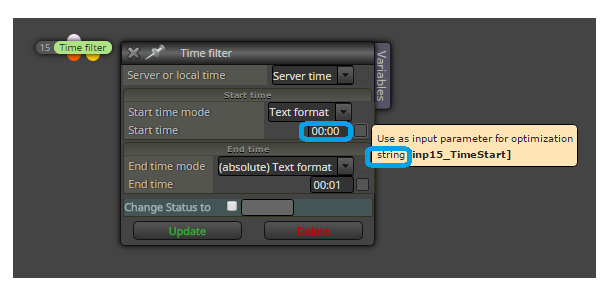
but some can be datetime, if you go through check box by input, popup window tells you what type is used ...
expiration parameter in block Buy/Sell (EA must be running) .... for pendings must not be running because it depends on brokers side ...
as I have not found bugs in fxdreema integrated pivots, here is solution for you how to calculate pivots based on formula which you posted in post above ...
calculate it like this:
https://fxdreema.com/shared/mJqHifx5d
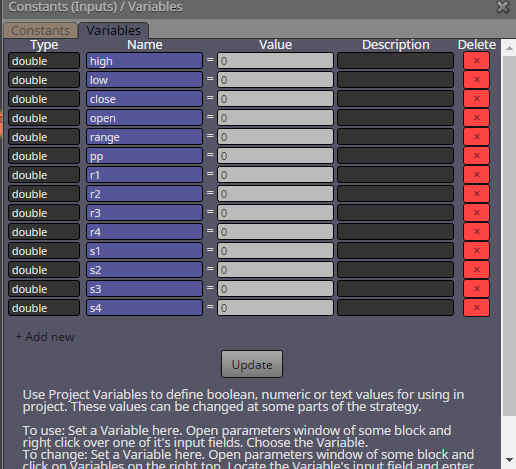
dont forget define variables:
and make sure that calculation of pivots is made first (first block number of pivot calculation is 1 or lowest, as in example project) ...
pivots are than stored in variables pp, r1-4, s1-4 and you can work with these variables in your next blocks, like open prices etc ....
I come here later, now I need to go offline (I must just before but :D)
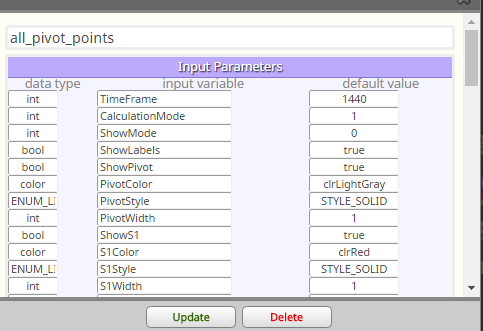
... and here is how you can resolve your problem with "errors", change first few parameters in your imported custom indicator in fxdreema MyIndicators manager, exactly to this manually (in data type):
but again, you are working in your project with buffers, which values must not be in your requested time as true values for opening order (when is here at 08:00 not value in buffer, EA can not open order with "EMPTY_VALUE" because empty value can be something weird, like big number) ...
for this you need filter this time, or on top give some condition which compare this value from buffer if exist (like buffer1 < 300 && buffer 1 > 0 to be sure, that price is from this limit)
....
or just wait and I look at pivot points that are in fxdreema, if their are calculated right as you typed here .... but you need wait for this reply few hours (because I am now offline)
send here formula for your calculations I check it ...
and what you sent me project, I can not open it because I dont have your custom indicator ... you need send me this indicator without it I can not open your project ...
add some name into this parameter:
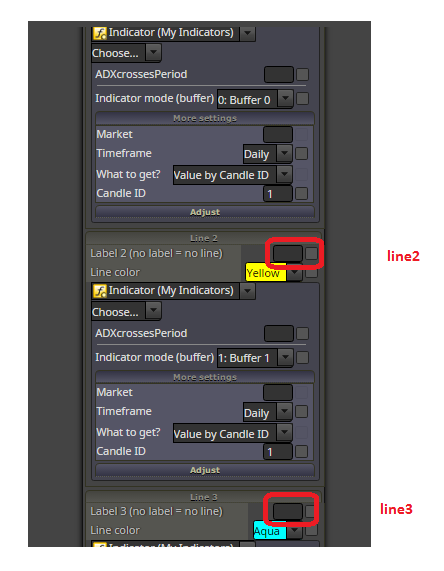
but look, you are hardly trying to do something with bad way, what can be done in another way, easier way without custom indicator ...
what I am thinking, you are trying when ADX cross happens, so try this:
it is hard to explain you what are buffers read about it more on mql5 ...
do you also know, that this renko strategy is not profitable? ... you are wasting time ... there was plenty strategies tested with renko, filtered with all types of indicators and was not profitable ... maybe something manually controlled ...
instead of pending buy block place there Trace block (its name is really Trace) ... and set here your indicator to view, where are values placed (on which price level) - in visual tester .. to see, if you are working with correct values ...
try to work with CandleColor[] buffer ...
it is buffer 6, or if are numbered from null, it is number 5 (0,1,2,3,4,5) ...
or if you will not do that variable, just add this function manually in code exactly on this place above unit reason:
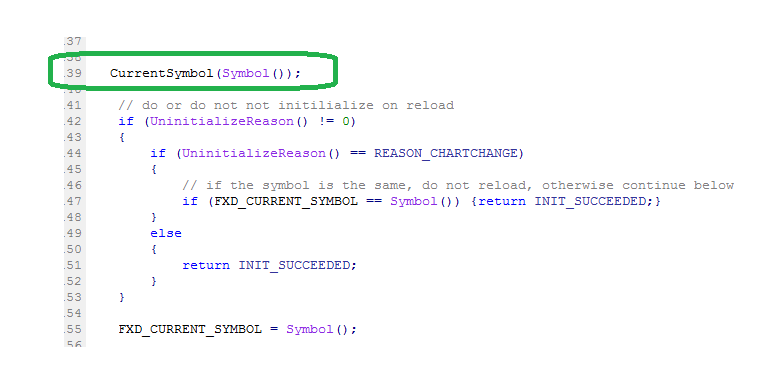
I see now, it is little complicated to do this, but try with blocks, do this:
https://fxdreema.com/shared/KGQdJ0HKd
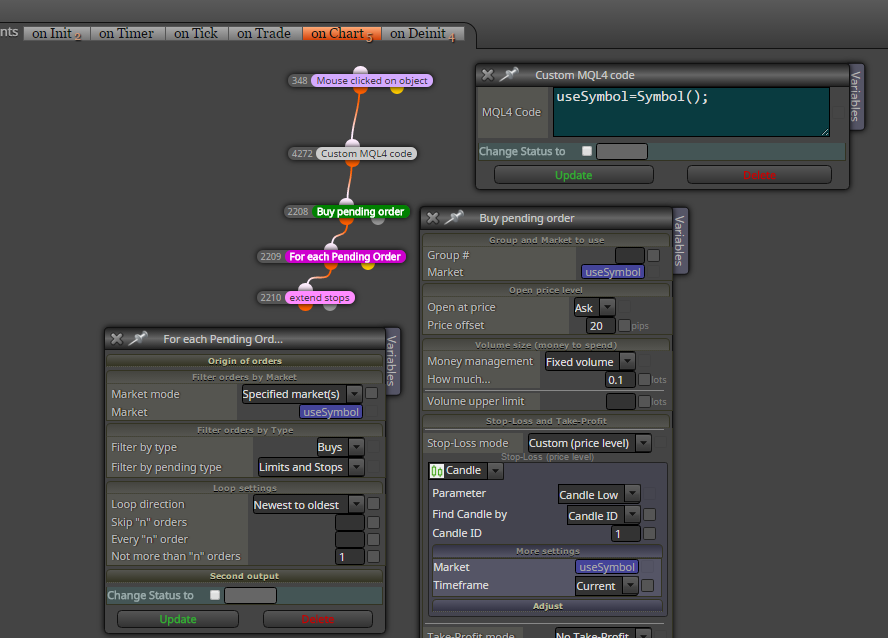
... make string variable where you use custom code function Symbol() - it return actual symbol name, place this variable into all blocks where is parameter Market (dont forget all touched blocks where is this parameter, it is important ... if you use also TP and is here this Market, place that variable into field! )