before buy/sell blocks connect block named: Spread Filter, you can find this block under Time Filters drop-down menu, or just in condition block is this option under Market properties
here you can see 3 examples how to use spread filters:
https://fxdreema.com/shared/63ondNL9e
M
Posts made by miro1360
-
RE: how i can control in the spread ?posted in Questions & Answers
-
RE: new share profitable EAposted in Questions & Answers
you forgot to define variables in this project

-
RE: Pips away from open priceposted in Questions & Answers
if you never used block for each trade, it is time to start trying this block in smaller parts of EA and learn in tester what is your work doing ... go through all examples and tutorials (in my tutorials is also using For each trade as example, there are my replies how to use this block, check my replies on all questions, I am sure you can find here how to use this block :D) ...
-
RE: Draw Custom Indicator automaticallyposted in Questions & Answers
I looked at this indicator and .. what to say ..., one you can try is remake logic from this indicator into blocks, I think it is possible for this indicator, but dont expect something easy, it can be a lot of work, maybe more time consumed as visual mode tester and result testing can be again slow
other you can try to do is make this indicator faster or add into this indicator usefull buffers (do in indicator code logic where you get values what you are expecting into buffers) --- again this can cost you a lot of time ... maybe somebody here find better solution for you
-
RE: example: For each tradeposted in Tutorials by Users
you mean list as array like:
openPrice[0]=1.10
openPrice[1]=1.15
openPrice[2]=1.12
.....
openPrice[x]=y
?
yes you can do this now ...
just define in variables these:
double openPrices[100]
double openPrice=0
int myInc=0take 4 blocks:
- reset variable myInc=0
- For each Trade
- Modify Variable block: save Open price into variable openPrice
- custom code block where you put:
openPrices[myInc]=openPrice;
myInc=myInc+1;
after this you have open price from all trades in array openPrices[] and you can get values from it like:
openPrices[0] ... open price from first loaded trade
openPrices[1] ... open price from second loaded trade
.. etc
or using Loop/for where you use your increment variable myInc and you can get values one after another: openPrices[myInc]
of course you can resize this array using some functions from mql code, or all what you will do, all next is up to you ... -
RE: Pips away from open priceposted in Questions & Answers
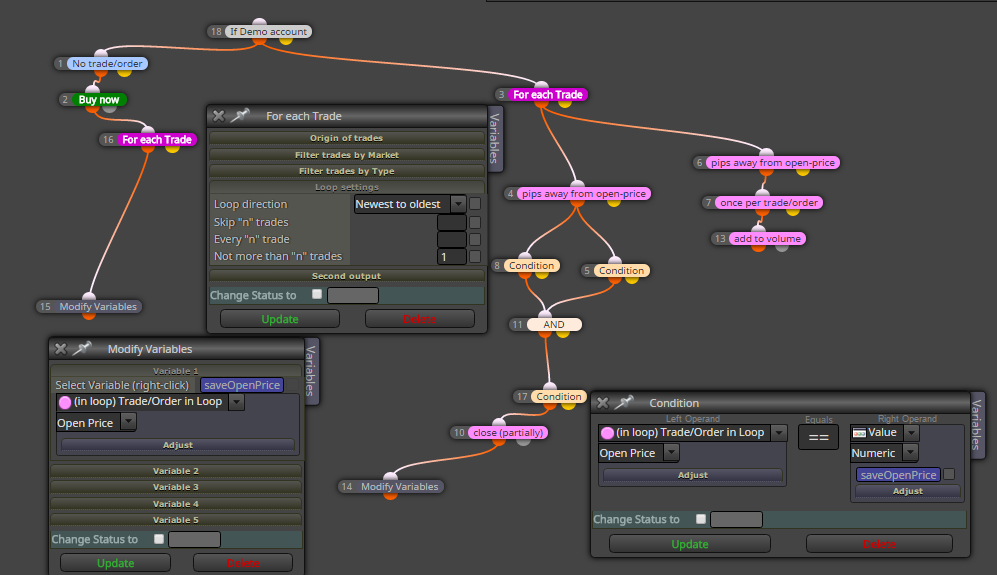
problem can be, that you are using blocks from: Loop for Trades & Orders without previous selecting trades, that means, you are using block "pips away from open price" without block "For each Trade" ....
block For each trade need be used first for pre-selecting/filter trade, from which are calculated pips from open price using block "pips away from open price" ...
without this here can be situation, that you open price is changed ...
the same is with condition or formula block, where you use parameter "in loop trade order in loop" ... before this block you need select trade using block "For each trade" ... it is sometimes not easy ... -
RE: Pips away from open priceposted in Questions & Answers
post here example what you mean - using blocks and shared link
-
RE: I am having problems with renko indicator, help?posted in Questions & Answers
saddly, I have nothing tried for MT5 ... but you can and if you find something, tell us here about
-
RE: I am having problems with renko indicator, help?posted in Questions & Answers
I dont know reply to your question because of way how indicator is made, hard to tell if it can work in real conditions for EA ... but you can stay with offline charts in MT4 and wait when MT5 will support this charts ... metaquotes told last summer they made support for offline charts, summer is over and support is not, so maybe next summer
-
RE: I am having problems with renko indicator, help?posted in Questions & Answers
it is slowly indicator, but I think it is working:
https://fxdreema.com/shared/UW3N1Hcld
... for faster testing you need something else and I dont know if there is something for MT5 -
RE: I am having problems with renko indicator, help?posted in Questions & Answers
there are 5 buffers,
BoxOpenBuffer
BoxHighBuffer;
BoxLowBuffer
BoxCloseBuffer
BoxColorsuse them in fxdreema in condition block like:
BoxOpenBuffer[1] < BoxCloseBuffer[1] .... output is Bull candle1
BoxOpenBuffer[1] > BoxCloseBuffer[1] .... output is Bear candle1but yes, it must not working
-
RE: I am having problems with renko indicator, help?posted in Questions & Answers
it depends how is this indicator made, it create objects or fill buffers for indicating renko candles?
-
RE: Errors in "Custom Mql4 Code" blockposted in Bug Reports
try it now, what I tried is repaired ...
-
RE: New compilation error.posted in Questions & Answers
try it now ... admin made some corrections ...
-
RE: Set stop-loss to be the lowest between a range of candlesposted in Questions & Answers
in adjust field try type "+5pips" or "-5pips" ... (without quotes) maybe it can work ... try it ...
-
RE: Multiple partial closesposted in Questions & Answers
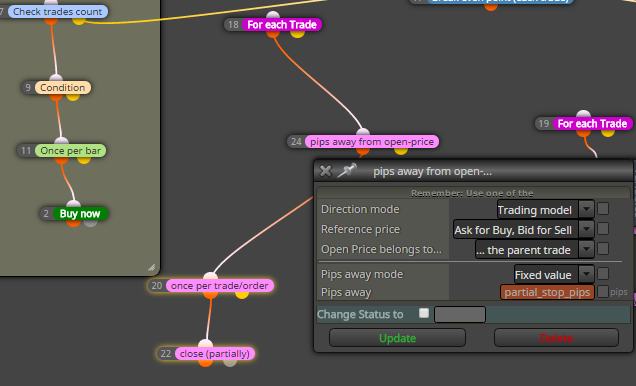
when you give this in block for lossable trade: pips away from open-price (Trading model instead of Double-sided, because double sided is absolute value)? and than in input parameters change value partial_stop_pips to negative, like partial_stop_pips=-5
-
RE: adding to volume 2+posted in Questions & Answers
here you dont need to program ...
the only you need is repeat this experiment: change-test-mistake and repeat it until success
how can you learn without effort? i know, mistakes are painful, but you need resist and not give up
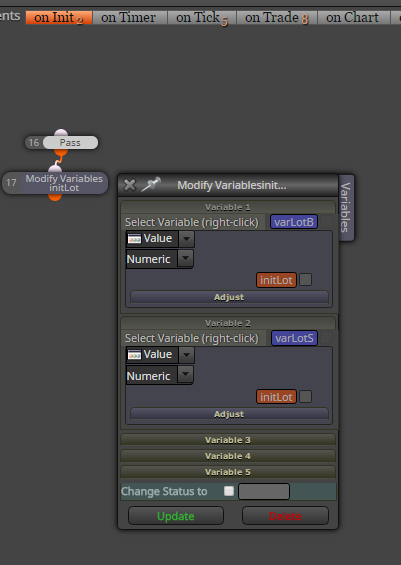
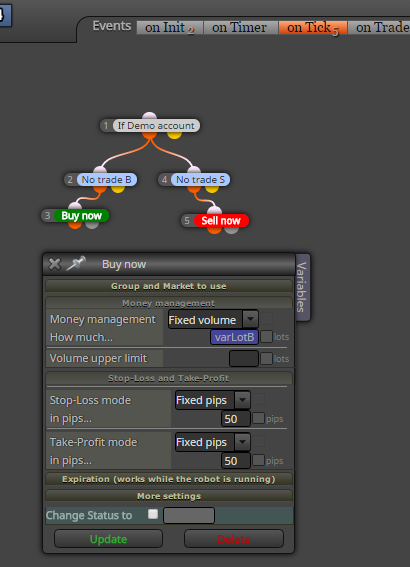
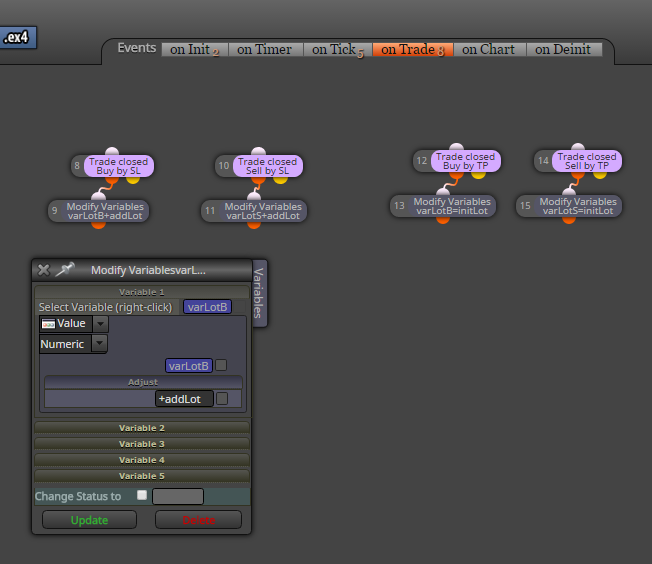
check how easy it is (example for separate buy and sell, if you will not separate, try it make together, it is not hard with fxdreema) ..
https://fxdreema.com/shared/EFv4kOhGb3 sections are used (onInit, onTick, onTrade):
-
RE: adding to volume 2+posted in Questions & Answers
using variables you can do it ... your variable can be edited in custom code block like
myLots=myLots+0.02
and do this in onTrade section