fxDreema

    • Register
    • Login
    • Search
    • Back to the main page
    • Categories
    • Recent
    • Tags
    • Popular
    • Search
    1. Home
    2. roar
    3. Posts
    • Profile
    • Following 0
    • Followers 184
    • Topics 35
    • Posts 2406
    • Best 422
    • Controversial 6
    • Groups 0

    Posts made by roar

    • RE: How do I make 10 seconds stop between 2 blocks?

      delay-block?

      posted in Questions & Answers
      roar
      roar
    • RE: SL is just a previous candle..

      yes, you would have to store that level to a...
      you guessed it....
      variable

      posted in Questions & Answers
      roar
      roar
    • RE: how can i have multi order at same time (same hour and minute and second )

      oh sorry, i used the wrong block...
      well, i think you will anyways have some latency towards your broker - i wouldn't expect any ea to work in milliseconds in order to make profit

      posted in General Discussions
      roar
      roar
    • RE: how can i have multi order at same time (same hour and minute and second )

      ---nevermind---

      posted in General Discussions
      roar
      roar
    • RE: How to code that my candle is between support and resistant?

      @timmyhanke
      Youre right, that works - but if you want to automate the whole process, drawing the lines in right places will be some problem

      posted in Questions & Answers
      roar
      roar
    • RE: How to code that my candle is between support and resistant?

      This is (also) done with variables, but first you have to set up the process finding those lines, thats the hard part and I cannot help with that 😄

      posted in Questions & Answers
      roar
      roar
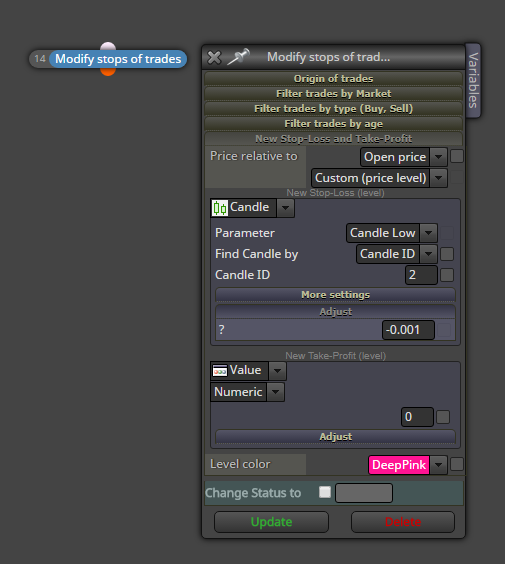
    • RE: SL is just a previous candle..

      This should help
      0_1501762384536_upload-cfb7e07b-72e8-47ee-acf2-e7ed6dfb9bca

      posted in Questions & Answers
      roar
      roar
    • RE: Save information of certain candlestick for future references.

      https://fxdreema.com/help/working-with/constants-and-variables

      Here's some info about constants and variables.
      You can create your variables to the variable list, which is on the left in builder, above the search box.
      Just create some system with "modify variables" block, test it around, you will (eventually) see how they work 😄

      You can replace nearly any value with a variable or constant, by right-clicking the number

      posted in Questions & Answers
      roar
      roar
    • RE: Stop Loss and close all order

      I tested it with live account, works fine for me 😕

      There's surely other ways to do this, but thats the best I came up with

      posted in Questions & Answers
      roar
      roar
    • RE: Save information of certain candlestick for future references.

      All right, so create variables for each piece of info (openprice etc....)
      To use only on special bar, you need condition, like if openprice = 0, only then modify it
      and then reset it back to 0 every day or whatever fits 😄

      posted in Questions & Answers
      roar
      roar
    • RE: Stop Loss and close all order

      https://fxdreema.com/shared/8Ts9mzJ0e

      This example doesn't care if the trades are buy or sell, but
      it checks if there is any stop-loss, and
      when there suddenly isn't any stop-loss anymore (because that position closed)
      -> it closes all remaining trades

      You need couple variables with that setup, StopExisted which is used to "remember" that there was a stop-loss, and StopsNow

      posted in Questions & Answers
      roar
      roar
    • RE: Save information of certain candlestick for future references.

      Use variables to store any information, with the "modify variables" block.
      Although you need some logic to reset the data and restrict its process, you probably dont want replace the data on every bar?

      posted in Questions & Answers
      roar
      roar
    • RE: Martingale on next candle

      I know something even better!
      Go to a roulette table, bet everything in red, there's insane profits! It can turn 400 usd to 4000 usd in 2 hours

      posted in General Discussions
      roar
      roar
    • RE: Triger an order when different between Values confirmed

      The one i sent calculates the difference in 3 bars' time - if the gap between lines was, say, 12 then and now it is 17 -> order is triggered.

      posted in Questions & Answers
      roar
      roar
    • RE: Triger an order when different between Values confirmed

      @Jtex555 said in Triger an order when different between Values confirmed:

      within 3 candle stick.

      What do you mean by this? The value grows by value 5 in time of 3 bars?
      this can be done with formula-block
      stoch mainline - stoch signal line

      like this
      https://fxdreema.com/shared/lNXkAMFle

      posted in Questions & Answers
      roar
      roar
    • RE: builder cant set pending limit order by pips

      atr, by default, shows a price fraction (like 0.003421)

      https://fxdreema.com/shared/LqRr6HOhd
      thats for atr

      posted in Questions & Answers
      roar
      roar
    • RE: builder cant set pending limit order by pips

      https://fxdreema.com/shared/NxMZ0yxob
      Something like this..
      I dont know about your indicator, i assumed the indicator gives its output as pips (usually indicators output price levels or fractions)

      Hope you get the idea

      posted in Questions & Answers
      roar
      roar
    • RE: builder cant set pending limit order by pips

      use Formula block to add the pips to current level, so you get the level you need

      posted in Questions & Answers
      roar
      roar
    • RE: comparing between 2 or more candles

      use condition block

      • there you will find the candle option
      • you can select which part of the candle you compare, high low open close etc..
      • you can select which candle you mean, id 0 is the current candle, id 1 is previous, id 2 is the one before id 1 ...
      posted in Questions & Answers
      roar
      roar
    • 1
    • 2
    • 111
    • 112
    • 113
    • 114
    • 115
    • 120
    • 121
    • 113 / 121