fxDreema

    • Register
    • Login
    • Search
    • Back to the main page
    • Categories
    • Recent
    • Tags
    • Popular
    • Search
    1. Home
    2. roar
    3. Posts
    • Profile
    • Following 0
    • Followers 184
    • Topics 35
    • Posts 2406
    • Best 422
    • Controversial 6
    • Groups 0

    Posts made by roar

    • RE: It Wont Close Trades

      orange = True (when there is no trade, thats where the flow continues in block #6)
      yellow = False (when there is trade, the condition at block #6 is false, so continue to yellow)

      the fxdreema project works on every tick, the whole process is repeated on every tick from top to bottom. if the process stops at the top, bottom blocks will never matter anything

      posted in Questions & Answers
      roar
      roar
    • RE: It Wont Close Trades

      For each Trade -block executes once for each trade, as the name says. So each individual trade needs to be 10 profit.

      Your logic has some mistake in it. Because of the top block (no trade), the system can check the profit only immediately after buy, and never else - there is never 10 profit immediately after opening 😄

      Put the looping block (For each trade) to the "no trade" block's yellow output, so it is active when there is a trade

      posted in Questions & Answers
      roar
      roar
    • RE: Closing 2 trades when they they have cumulative profit

      this shouldn't be that hard, given your information... if you measure the profit by equity-balance, it always combines the profits from all trades

      posted in General Discussions
      roar
      roar
    • forum bug

      when you click some name in the shoutbox, it doesn't go to the user profile - the link is broken, i think

      posted in Bug Reports
      roar
      roar
    • RE: Trailing Money Loss (Group of Trades) block

      I guess the money loss uses entirely different mechanism than chart-based stops. With money loss you don't have to use any charts, but just calculate your equity values around - maybe thats why you cant put a visible line to your chart

      posted in Questions & Answers
      roar
      roar
    • RE: Automatically add lot volume when trade goes wrong..similar to martingale but not exactly.

      Here. It's just a guess, I haven't actually done that..

      0_1502353460659_upload-fb9e9fd7-b749-4606-8813-471e7c2c91a8

      posted in Questions & Answers
      roar
      roar
    • RE: Automatically add lot volume when trade goes wrong..similar to martingale but not exactly.

      sure there is plenty of way to do that. try something like this
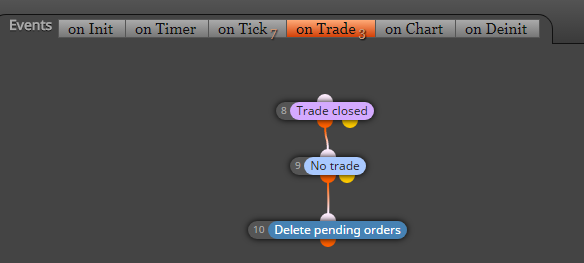
      OnTrade -> position closed -> delete pending orders

      posted in Questions & Answers
      roar
      roar
    • RE: condition for unknown candle!

      https://fxdreema.com/shared/GEUH4hBoe
      Maybe this helps.
      I didn't really understand your example, but I think I know what youre meaning 😄

      In your example, connecting that AND block back to the "once per bar" creates a loop which never changes - thats bad

      posted in Questions & Answers
      roar
      roar
    • RE: condition for unknown candle!

      Create some variable which "remembers" that the first condition passed.
      Example: bear bar -> modify variable bigbear to value 1

      condition: bigbear = 1
      -> proceed to 2nd condition
      (reset bigbear back to 0 so it signals only once per time)

      posted in Questions & Answers
      roar
      roar
    • RE: Set order with out SL and TP and only close with candle close

      How about this
      once per bar (M15) ->
      close all trades ->
      your condition -> buy/sell

      posted in Questions & Answers
      roar
      roar
    • RE: Two money managemeant rules in buy/sell block

      Seems you have set the CustomVolume variable as value 0,1 - use 0.1 instead

      You can troubleshoot the code errors by opening and compiling the .mq4 with metaeditor, it makes it quite easy to guess what's wrong, even if you dont have particular coding knowledge (like I dont)

      posted in Questions & Answers
      roar
      roar
    • RE: Automatically add lot volume when trade goes wrong..similar to martingale but not exactly.

      If your volumes and tp follow some linear, simple logic, the grid block should work.
      Test this
      https://fxdreema.com/shared/S86qs94dd

      posted in Questions & Answers
      roar
      roar
    • RE: Automatically add lot volume when trade goes wrong..similar to martingale but not exactly.

      Youre describing some kind of grid system.. Take a look at those "buy/sell pending orders in grid"
      I think those blocks open stop-type orders by default, so you need to put a negative number somewhere (grid size) to set the block putting limit orders.

      posted in Questions & Answers
      roar
      roar
    • RE: Hello I wanted to know how to close and open two mobile media each time they cross Thank you

      mobile media ?

      posted in Questions & Answers
      roar
      roar
    • RE: I need help

      Sorry, I don't know much about zigzag

      posted in Questions & Answers
      roar
      roar
    • RE: I need help

      So the signals happen at different price?
      You need another variable, and store the price to that variable.
      After the looping process, that variable should contain the last signal and you can continue with that

      posted in Questions & Answers
      roar
      roar
    • RE: I need help

      https://fxdreema.com/shared/bhDHS63Qc

      Here's the principle

      posted in Questions & Answers
      roar
      roar
    • RE: I need help

      you have to set the ID as some variable, and then use loop to check every id.
      loop1: id1 -> check condition ->
      loop2: id (1+1) -> check condition ->
      loop3: id (1+1+1) -> check condition ....

      its pretty complicated shet if you're inexperienced

      posted in Questions & Answers
      roar
      roar
    • RE: Deleting pending order

      set different group numbers for them, and then use "pending order exist" separately for each number
      -> then you can close the other one.

      or simplier, check if theres less than 2 pending orders -> delete pending orders

      posted in Questions & Answers
      roar
      roar
    • RE: Once per bar

      https://fxdreema.com/shared/EmCNQTnbd
      This should help, it counts the bars and condition passes when the count is above 1

      posted in Questions & Answers
      roar
      roar
    • 1
    • 2
    • 110
    • 111
    • 112
    • 113
    • 114
    • 120
    • 121
    • 112 / 121