fxDreema

    • Register
    • Login
    • Search
    • Back to the main page
    • Categories
    • Recent
    • Tags
    • Popular
    • Search
    1. Home
    2. fxDreema
    3. Posts
    • Profile
    • Following 0
    • Followers 693
    • Topics 23
    • Posts 7308
    • Best 258
    • Controversial 18
    • Groups 1

    Posts made by fxDreema

    • RE: MQL4 to MQL5 Converter

      @l-andorrร  It works with indicators, but I noticed that for some of them there are certain differences that I don't know how to manage.

      iBandsOnArray()... I don't remember why I skipped this function. I see that I never wrote any code for it. From all "...OnArray()" functions I only wrote code for "iMAOnArray()". I remember that this one was probably the hardest function for me to write for MQL5 and I can even see that now I have this comment in it for MODE_LWMA:

      // TODO lazy fix - I was too tired and lazy to do this in the best way

      So to be honest, I don't feel that I really want to make these OnArray() functions right now ๐Ÿ™‚ Knowing myself, I will choose to do something else that I consider more important or easier for me to do ๐Ÿ™‚

      posted in Questions & Answers
      fxDreema
      fxDreema
    • RE: Crosses above & below

      You can also try Trace block, to print the same things (Candle Close and Pivot lines) while the EA is running, so you can visually see the values and possibly detect the problem... also any future problem that is similar to this one.

      posted in Questions & Answers
      fxDreema
      fxDreema
    • RE: trades retake

      I imagine two ways of doing this.

      The better way is on the beginning of the candle to check when the last trade was closed, and probably how, and the MA levels. In other words, at the time when a new trade is supposed to be created if the scenario you described happened, you check whether the scenario happened and you create a new trade if needed.

      And the other way is to detect when SL is hit (in "on Trade"), then to write value to some Variable, or even to create some object as a form of temporary memory, and then in the beginning of the next candle (assuming you have "Once per bar" in "on Tick") to check the value of that variable and to create the new trade. In other words, you have 2 events that can happen let's say in 5 minutes apart - when the first event happens, you will write some value in some variable to mark that event and then when the second event happens you will check that variable to see whether the first event happened.

      I prefer the first way, because it would work even if you restart the EA. The second way involves variable, which is just a temporary memory and exists until the EA is working.

      posted in Questions & Answers
      fxDreema
      fxDreema
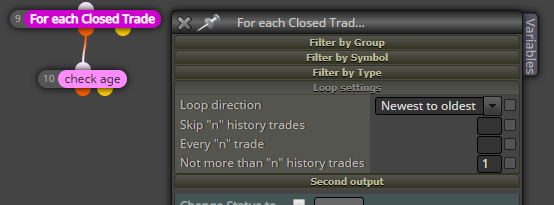
    • RE: How to get USD value of a trade closed at stop loss for use in a variable

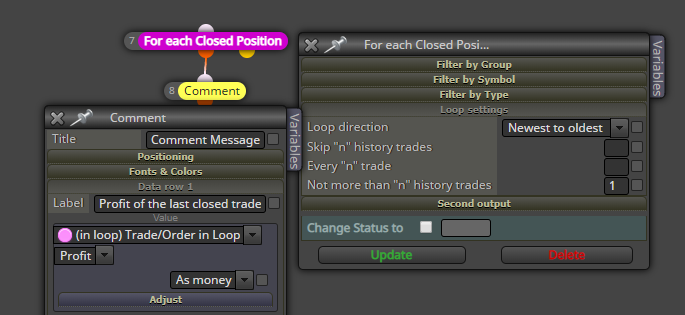
      What about this:
      0_1565892419231_86ed0b2c-d549-458b-a0d3-3b92ebe29a9b-image.png
      To load the last trade only, set that "Not more than..." parameter to 1. The direction is already set to "newest to oldest", so it will start with the newest one. And then get the value in the other block.

      posted in Questions & Answers
      fxDreema
      fxDreema
    • RE: How to calculate profits for current day, current week and current month ?

      There is also a block "Check profit (period of time)". Initially I made this block for people who wanted to check the profit for the last day, but with the options that I added you should be able to select any period of time.

      posted in Questions & Answers
      fxDreema
      fxDreema
    • RE: auto lot sizing issue

      So there is something called lot step. For example, if the lot step is 0.01, you can open 0.01, 0.02, 0.03... lots. If the lot step is 0.1, you can open 0.1, 0.2, 0.3 and so on. Lot step is the difference between two possible lot sizes. If you try some middle value, for example 0.012345, it will give you an error. So the EA that is generated would always use possible values. If your balance is 2641 and the lot size is calculated as 0.02641, this value is then rounded to the nearest possible. I guess that I used MathRound(). But as roar wrote, you can always write your own function. Some functions that you can use are AccountBalance(), AccountEquity(), MathFloor(), MathCeil() and MarketInfo() if you want to get the lot step. Take a look at their description in the documentation for MQL4 in MetaEditor (Help -> MQL4 Reference)

      posted in Questions & Answers
      fxDreema
      fxDreema
    • RE: Backtest problem

      I would also blame the history data. I'm not aware of anything in the code that can change the behavior of the Tester. Almost everything in the code happens in that OnTick() function that is automatically called by the Tester on each tick. So it's the Tester that is preparing the ticks data before even start testing, and then using that data to call OnTick().

      Just in case, you can try another EA... even EA downloaded from internet. I think you should see the same effect on any EA. But if you see it only on FxDreema EAs, then this obviously means that the problem is in them and I need to investigate it.

      posted in Questions & Answers
      fxDreema
      fxDreema
    • RE: Variables are changing after update in formula block

      Weird problems are possible of course. I think the letters ATR in one of the variables have something to do with this, because in the other topic they have a variable containing ATR as well. I also made my example here: https://fxdreema.com/shared/r9zXidGDb - but I don't really know what to do to cause the problem to happen. It should not be completely random, there should be certain order of actions to cause the problem... but what are these actions

      posted in Bug Reports
      fxDreema
      fxDreema
    • RE: Current Lot size

      In your example I see you are doing something with the objects that are created by the EA, but I don't really recommend to use the data from them.

      And yes, try "For each position". In case you don't know, in netting mode you can have 1 position per symbol. This block would load only that position if it exists. In its filters by default the current symbol is used (the value is empty, which means the current symbol). It's also possible that you can even omit this block and still be able to load the position in 203, but I recommend using "For each trade", so it can be clear what is going on. And yes, as it was said, block 203 doesn't work now in this example only because it is not connected to another block.

      posted in Questions & Answers
      fxDreema
      fxDreema
    • RE: Make EA close all trades when balance is below 10%

      No, no, no... don't add one of these "inp..." things in Constants. And don't use == when you compare prices or money. Use anything else, but not ==.

      10%, but 10% of what? Balance is the amount of money you had the last time you had 0 opened orders. Close all opened orders and the Balance is equal to Equity now. Do you really want to compare Balance with Equity?

      10% sounds to me like such a small value that you should not reach it so quickly. If Equity can be less than 10% of the Balance, this EA is not good from the start.

      If you mean 10% from some initial value... for example you can deposit 1000 dollars and you want to close everything when you reach 100 dollars, even if this is 6 months in the future... then the problem is that the EA can't really know what is that initial value that you had in mind half a year ago. There are ways to remember values for a while, but in this case maybe it's better to hard code the value in the EA

      Otherwise you can try something like this:
      0_1565217848199_58cb372c-6814-4d42-8f80-0f905b52717d-image.png
      Remember that here Equity and Balance are those global values that are result from all trades.

      Or this one:
      0_1565219159496_dc51f238-e9de-4002-b386-8ba2900de4e3-image.png
      Here this block calculates the profit from the running orders only, it doesn't care about closed orders. AccountBalance() gives you the balance. This is function from MQL4. There is also AccountEquity() and other functions.
      So, let's say the we have initial deposit of 1000 dollars. This is the Balance. Then we start losing and the block calculates that out profit is negative. The block would pass if the profit is < 20, because -1 * 1000 * (0.02) is 20. I made my tests and it was easier for me to close the trades when the loss was below 98% of the balance, that's why I used 98 there.
      Note that the values used there have .0 at the end. Apparently, if you do it like this (100 - 98 / 100), the calculation will fail, because in MQL4 these numbers are integers and the final result is also integer. The result can't be 0.02, it will be 0. To get the result as floating point number, I wrote these numbers as floating numbers.

      posted in Questions & Answers
      fxDreema
      fxDreema
    • RE: i don't why my indicators are not working on mt4

      I can see that you have 2 custom indicators. I can't find something wrong with their definitions and I'm not sure what is the problem. I can say that it is important to have all input parameters with their correct data types and correct orders. The names can be different, but each name should look like MQL variable name.

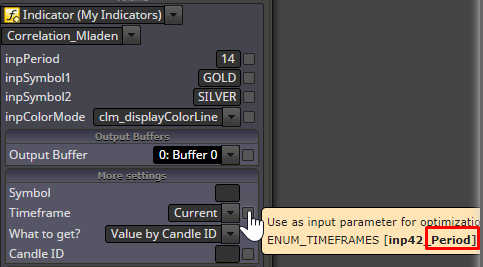
      There is one known bug in FxDreema. You can see there are few extra parameters for each custom indicator:
      0_1565216936254_cb542307-dc21-4d40-83c0-9fc4e39187b5-image.png
      Each one of these parameters have some name. At the end the names of the indicator's parameters and these parameters are merged. Problem happens when the name of one parameter of your indicator is the same as the name of one of those system parameter names. For example this one on the picture is named Period. There are few others - IndicatorBuffers, Symbol, Shift, ModeOutput and some others. These who cause problems are normally Period, Symbol and Shift. So if you have parameter with one of these names, rename it to something else... MyPeriod instead of Period... anything like that.

      posted in Questions & Answers
      fxDreema
      fxDreema
    • RE: Licensing ideas

      I'm not sure if the WebRequest() function in MQL supports HTTPS. In the documentation they used the word HTTP only. The problem is that if you make this with HTTP, I can easily make a redirect to my local server and respond to any requests from the EA in any way I want. It's not very secure. With HTTPS not only the messages are encrypted, but also the identity of the destination server is checked.

      Otherwise if you don't know what GET is, this is for example when you request the website from the address bar. Key-Value pairs can be send in this format: http://example.com?key1=value1&key2=value2&key3=value3. The whole request is in this address string and there is some limit in the length of the string. POST is another method, it's a little bit different. All web servers can handle GET or POST requests.

      posted in Questions & Answers
      fxDreema
      fxDreema
    • RE: Closing trade based off different indicator

      I notice you have two blocks one after another who have x< and x> inside. Take a look at how the crossover works in these blocks: https://fxdreema.com/tutorial/builder/crossover The problem when you have 2 crossovers in 2 blocks connected one after another is that it is expected the crossovers to be true at the same candle. When you are using different indicators, this is normally not the case. So, what you can do is to use just one crossover and use > or < in the other. The idea is that if line A is > line B now, then surely line B crossed line A some time ago. Maybe one candle, maybe 10 candles... the question is do you care how much candles.

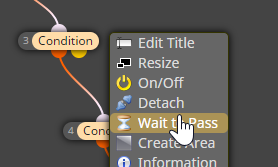
      If you still want to wait for one crossover to happen and then wait until the other, try this on the block you want to wait: 0_1563915991187_f06bc9cd-69e7-40c7-bc4e-4da9f58766f7-image.png But even if this option looks promising, I found out that when I use it, I only get lost. If you resolve some problem with it, there is a chance to create some other issue. For example, what happens if certain block is waiting for its crossover to happen too long and meanwhile in the strategy you no longer want to create a trade ๐Ÿ™‚
      posted in Questions & Answers
      fxDreema
      fxDreema
    • RE: How can I ensure that only 1 trade is made per day?

      Try something like this:
      0_1563915378283_3a7cb574-48b3-4746-b449-7c6a34b0dbeb-image.png
      Here I load the last closed trade, then I check its age. This is the time since it opened or closed, you will see these settings in "check age".

      posted in Questions & Answers
      fxDreema
      fxDreema
    • RE: Where are my screenshots?

      For sure, MQL5 is much more crazy.

      So, most of the time the screenshot has height of 102 pixels, but the width is right. I wonder, do you have something around the chart that has the same height? My idea is that even if the height is wrong, it has some size and this size might be coming from somewhere.

      posted in Questions & Answers
      fxDreema
      fxDreema
    • RE: How can we display the profit ON chart after a closed trade?

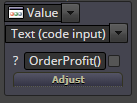
      @roar This will output OrderProfit() as a string. Better use the other "Text" option: 0_1563913574363_2ea17bd2-c529-4e8c-adae-828fa0887490-image.png

      posted in Questions & Answers
      fxDreema
      fxDreema
    • RE: detect vertical line

      The logic for this is easy - you need to start looking at the objects and for each one of them to find its Candle ID (shift) and check if it is between 1 and 3. Ideally, when you reach the desired number (you want to find at least 2) you need to stop searching for more (the loop needs to break).

      Here is what I made: https://fxdreema.com/shared/mOnIB2tqd But I use few blocks + one variable for this, and I don't break the loop. So this is not the best way to do it, but it will work.

      posted in Questions & Answers
      fxDreema
      fxDreema
    • RE: Compilation errors

      The problem is because of the letters P3 in TP3_Pips. If you look on the left side, P1, P2, P3 and other Px can be used in the same way as V1, V2 and so on. So basically the P3 letters in TP3_Pips are replaced with something that doesn't need to be there.

      Anyway, I added some code in few regular expressions and I think I fixed this problem. But if you will need to save the block again.

      posted in Bug Reports
      fxDreema
      fxDreema
    • RE: Desktop error

      So yes, it was the NodeJS version. I tried to make it work on the latest version that I installed, but nothing worked. I installed older one where it works.

      posted in Questions & Answers
      fxDreema
      fxDreema
    • 1
    • 2
    • 9
    • 10
    • 11
    • 12
    • 13
    • 365
    • 366
    • 11 / 366