fxDreema

    • Register
    • Login
    • Search
    • Back to the main page
    • Categories
    • Recent
    • Tags
    • Popular
    • Search
    1. Home
    2. fxDreema
    3. Posts
    • Profile
    • Following 0
    • Followers 693
    • Topics 23
    • Posts 7308
    • Best 258
    • Controversial 18
    • Groups 1

    Posts made by fxDreema

    • RE: Undeclared Identifier EA Wont Compile

      The problem is in that there is no constant with name MODE_JJMA defined. Looking at the code, this constant comes from enumeration called Smooth_Method. But this enumeration is defined in another file - smoothalgorythm.mqh. This file is of course not read from the EA builder and it didn't know what this enumeration is.

      What's about these enumerations? They are used to make such custom data types, you see what the result is in the Inputs of the indicator, you have nice select menus there. But when the indicator uses its own enumerations, because they are custom data types, the EA doesn't know about them. The EA knows what double, int, string, bool is, there are even some pre-built enumerations that can be accessed from both, the indicator and the EA. But when the indicator uses its own custom enumeration, this same enumeration must be copied into the EA so the EA knows what it means. Or at least I don't know how the EA can "see" these custom enumerations in the Indicator. So when you add a new indicator in fxDreema, it tries to read the enumerations. This indicator uses two enumerations, however one of them is imported from another file. It's actually written in the indicator itself, but it is commented.

      I added this enumeration to your indicator. Hopefully it will work now.

      posted in Bug Reports
      fxDreema
      fxDreema
    • RE: MT5 tries to open 250 lots position when it shoudn't

      I tried this on EURUSD with 10,000 initial balance and it gives me lots of 0.01 every time. Actually I tried your current version where the calculation is lot_size*0.0001/2. The default value of lot_size is 6 and with that the % is some really small number. Even if you put 100 in the input field, the lot size should be normal.

      The idea of this option is that if you have $1000, the lot size would be 0.01 lots, if you have $10.000 the lot size would be 0.1 lots and of course if you have $100.000 the lot size would be 1.

      So I don't see something wrong in the project... well, you are maybe using the wrong option, because the input value for the option is too small. But what is wrong is that if anything, you should see only lots of 0.01 or whatever the minimum is. I programmed it so if the input value for the lot size is lower than the minimum, the minimum is taken (and the same goes for the maximum value).

      Put some Comment block before of after the Buy block to print what is really the value of lot_size*0.0001/2. It should be 0.0003. Also try to write a value directly - 5, 10, 100, 200.

      If nothing works, what is the symbol you are tesing on? Give us the information about it from the Symbols list.

      posted in Questions & Answers
      fxDreema
      fxDreema
    • RE: How to specify a Group Range

      Damn, your project looks very professional. This is extremely rare sight. But unfortunately the Group thing is very simple, I only programmed it to accept multiple groups separated with "," (thinking that this was advanced). And 30 groups... I never even imagined something like this. I'm afraid to ask why ๐Ÿ™‚

      By the way, as someone with obvious programming knowledge, maybe you can share what in the EA builder is bad, what must be done, or even what is good.

      posted in Questions & Answers
      fxDreema
      fxDreema
    • RE: Stochastic Levels

      I think you are working on the demo platform at the index page. The right place is here: https://fxdreema.com/builder

      Maybe you can show what you are trying to do. When you make a project in the builder, go to Projects -> Create a Shared Copy and you will get a public copy of the project as a link.

      posted in Questions & Answers
      fxDreema
      fxDreema
    • RE: 5 dollars in one hour

      There is a special block Check profit (period of time). This block is a little bit confusing even for me, but I made it for that reason, to calculate the profits made in certain period of time. I think the settings for you should be like this:

      0_1638910129771_e614a726-c159-45dd-b1cf-fe08a6733298-image.png

      If for some reason this doesn't work, try with 1 instead of 01:00.

      posted in Questions & Answers
      fxDreema
      fxDreema
    • RE: How to do include in "Custom MQL code" ?

      @mndiarra said in How to do include in "Custom MQL code" ?:

      Is there any workaround for that ? Thanks in advance for your help.

      You can try to make a custom block here https://fxdreema.com/studio/MQL4

      Here is some example of the things you can add in the code of the block to make it functional:
      0_1638908503543_02d10922-e595-4673-b5a6-4790e475fe51-image.png

      Think of the ~Indicator~ thing as the value from the parameter Indicator (look at the right where the parameters are).
      ~datatype:Indicator~ is obviously there to deal with the different data types, but this is only needed in very few blocks like this one, you probably don't need this.

      Think of ~next~ as the orange output. ~inext~ is for the yellow output (the "i" probably means inverted). To have a gray output, which is normally to indicate that there is an error, try ~error~.

      Imports and such stuff is to be put below on the other code field at the bottom. But better don't put very fancy code.

      posted in Questions & Answers
      fxDreema
      fxDreema
    • RE: Fx dreema app desktop problem

      The only possible solution for problems with the desktop version that I could think of, is to try to run it as administrator. Or possibly put it somewhere outside Program Files.

      posted in Bug Reports
      fxDreema
      fxDreema
    • RE: My FxDreema is not working since Friday. I am a paid member

      It seems that this "loading..." problem is always about some browser extension that for some reason blocks some of the .js files of the website. But when people fix it, they don't write to me back saying what exactly it was the problematic extension.

      If someone has this problem and finds which browser extension makes the problem, please send me an email so I can try the particular extension and hopefully find what it doesn't like.

      posted in Bug Reports
      fxDreema
      fxDreema
    • RE: My EA does nothing

      @l-andorrร  said in My EA does nothing:

      @crazycnw said in My EA does nothing:

      shared/oTgHrvqcb

      IIRC that feature was designed years ago and not updated so probably it doesn't work as initially intended.

      I forgot about this feature, now that I read this I was like "oh wow, look what I had". And it seems to work when you connect some block after the one where the feature is used. I don't remember if this was intentional or it is a bug.

      posted in Questions & Answers
      fxDreema
      fxDreema
    • RE: does the keyboard function on chart event actually work?

      The block works for me, but only in real work, not when testing in Visual mode.

      posted in Questions & Answers
      fxDreema
      fxDreema
    • RE: MT4 to MT5 converter

      The names of the blocks is not a problem. In MT4 where you see the word "trade", in MT5 you see "position", but this is because I just left it that way.

      Each block has another hidden name, let's call it ID. Almost all blocks from MT4 have their MT5 variant. There are few differences, I thin in the blocks from "on Trade". Also, I think in MT5 there are 1-2 extra indicators. Maybe some parameters are also different here and there, but I forgot what it was.

      You can download .mq4 file, rename it to .mq5 and import it. This should create MT5 version of the project, but the block will be named as they were in the MT4 project. And just test how it works.

      Of course, there is one huge difference between MT4 and MT5 - if you have Netting account in MT5, it works in a different way, you can't have multiple "trades" in the same symbol at the same time. This changes the whole logic completely. Any equality between MT4 and MT5 is possible when you have Hedging type of account in MT5.

      posted in Questions & Answers
      fxDreema
      fxDreema
    • RE: "pips away from open price" alternative

      I think you have a problem in For each Position. You say "last opened order", which probably mean that in For each Position you intend to set that Not more than n trades to 1. Looking at the block we see that you have put some 1 there... but not exactly at Not more than n trades.

      posted in Questions & Answers
      fxDreema
      fxDreema
    • RE: Why my robot is not taking profit

      @jrpscanavini said in Why my robot is not taking profit:

      https://fxdreema.com/shared/io1TTN7hc

      I tested this in my MT5 and it closes the positions at their stop-loss or take-profit. I see that you used these checkboxes to make some parameters inputs for the EA:
      0_1637608577554_05b81b4c-5b05-404a-8dfa-3e5edd636707-image.png
      Check your inputs to see if you have value of 0 somewhere.

      posted in Questions & Answers
      fxDreema
      fxDreema
    • RE: Anyone knows how to deal with Error 4002?

      @l-andorrร  said in Anyone knows how to deal with Error 4002?:

      @fxdreema So are you suggesting that we should not use any value 0 for any constant that is used on any indicator? I think I understand the problem, but not get the solution, sorry.

      Now I don't think that this is a new behaviour in MT5. I found that the files where these values are cached are located in MQL5/Profiles/Tester, they are .set files. I found many files there, almost as many EAs I have in MQL5/Experts. And these files are created since 2017 and even 2016.

      Maybe nothing is different, maybe only now you have this problem with this EA, because it has too many Inputs and you forgot to set at least one of them.

      I actually still do most of my tests in MT4, and I don't use Constants very often in my own projects. Only sometimes when I work on someone else's project I choose to change these values. And I normally assume that if someone shows me his project that contains Constants, the values for them are correct. So I don't have a good chance to fall into this problem. Also, when I have Constants/Inputs, I'm aware that they are there and I expect such problems.

      I think that MetaTrader should alert us when there is a change in the Input values in the code, or maybe automatically change those values that are changed in the code.

      posted in Questions & Answers
      fxDreema
      fxDreema
    • RE: Anyone knows how to deal with Error 4002?

      When I tested this, I got error for RSI, not for MA. I deleted all unnecessary blocks until I ended up only with block 134 (and one Pass block). In this block, a Constant is used for "RSI period" and that Constant is named RSI_period.

      0_1636402526462_1fe393ea-457e-4e78-82ad-10422177b469-image.png

      I noticed that if I remove the Constant, the EA works. When I put it back - it gives me error 4002. So I focused on the Constant.

      After some investigation I found the problem. Look at this screenshot:
      0_1636401702657_d8fee72b-8867-48d3-b36c-c128b633d720-image.png

      I removed all Constants except RSI_period. But note that its Value is 0. This is interesting, because in the EA builder I changed it to 14. I also exported .mq5 file and changed the value there as well. However, it seems that there is some caching happening here and the value doesn't change when I change it in the code.

      Such caching also happens in MT4, I'm aware about it, but there it only happens after I manually go to change any of these values. But this can only happen when I want to run the Optimization process, which is rare for me. So normally I never touch the Inputs. They are never cached, so I'm free to change the values of the Inputs in the project itself via the Constants.

      Maybe they introduced this into MT5, to always cache the Inputs. And you see that error 4002, because some of your values are still 0. Turns out that if you try to run RSI or MA with period 0, this particular error appears. Its meaning in the documentation is "Wrong parameter in the inner call of the client terminal function"

      posted in Questions & Answers
      fxDreema
      fxDreema
    • RE: Indicator inside a sub window

      Even if it's possible to get the values from the horizontal line and the MA, how can you compare these values? I mean, visually they appear to be crossing, but I think this is only the way it looks on that particular subwindow with the particular zoom. If you resize the window or zoom a little bit, I think the MA line will move and the cross would appear somewhere else. So how can you detect such cross when the cross appears only visually. I mean, these are pixels on the chart that MetaTrader draws, but they cross only visually, not mathematically.

      Otherwise it could be possible to compare two indicators with different values, but if you can put limits on them. For example you have indicator that moves between 0 and 100 and another one that moves between 200 and 500. You can adapt the values, so that 0 relates to 200 and 100 relates to 500, and any value between 0 and 100 relates to some very particular value between 200 and 500. But how relatable CCI and MA are? CCI value 120 relates to what value of MA? If you can solve this problem, then you can compare both indicators. Here is some explanation for how CCI works: https://www.metatrader4.com/en/trading-platform/help/analytics/tech_indicators/commodity_channel_index
      Obviously CCI depends on MA values... but MA with other periods... I don't know, I'm very bad in mathematics, for me it looks unsolvable ๐Ÿ™‚

      posted in Questions & Answers
      fxDreema
      fxDreema
    • RE: Object naming with arrays

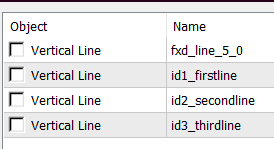
      They are in fact 4 lines printed on the chart.

      0_1613316388520_57ecc03e-7e3a-4d58-a38e-ff8beb9bf886-image.png
      fxd_line_5_0 is the one that appears first on candle 1. Eventually id3_thirdline appers on top of it.

      Well, as @miki says, there is right and wrong code in this particular situation. But the thing is that there could be a reason for "// Set variables (in)" to be at the bottom, and this is because in that Variables window you could use those P1, P2, P3 things, which are shortcuts for ObjName, ObjectType, ObjColor and the others. It's like the chicken and egg problem.

      It looks that my assumption was that in the Variables window we should be able to use the Px values after they are modified. And there could be an use case where we want this, for example:
      https://fxdreema.com/shared/5zi3oorD
      0_1613319210950_29fdf18f-54bc-42af-b934-44854e770b51-image.png

      But when I'm thinking about it, this use case is less intuitive and less possible from the one @roar stumbled upon, so I decided to fix the problem by moving "Set variables (in)" at the top. This means that the example that I'm giving above will be wrong.

      I hope that this update doesn't change anyone's project, because it is always possible that someone is doing the things in the way my example works.

      posted in Bug Reports
      fxDreema
      fxDreema
    • RE: fxDreema Last Update Error

      I found that Telegram.mqh file (and the other files) from this topic https://www.mql5.com/en/articles/2355 and I uploaded them on the server. There were some errors coming from Jason.mqh (because there they use variable names 'v' and 'c' that I use too), but I modified this file on the server, so these errors doesn't appear. But the errors that Miro posted now remain, they are coming from the code in the EA now.

      posted in Bug Reports
      fxDreema
      fxDreema
    • RE: Block Trade Closed

      I fixed it... I believe ๐Ÿ™‚ I will give you all some extra time ๐Ÿ™‚

      posted in Bug Reports
      fxDreema
      fxDreema
    • RE: new update bug

      I will take a look. Thank you guys for reporting the problems ๐Ÿ™‚

      posted in Bug Reports
      fxDreema
      fxDreema
    • 1
    • 2
    • 7
    • 8
    • 9
    • 10
    • 11
    • 365
    • 366
    • 9 / 366