@jstap Lines are almost invisible. Even for that reason alone I wouldn't call this an indicator - it doesn't indicate anything, it's too dim.

@jstap Lines are almost invisible. Even for that reason alone I wouldn't call this an indicator - it doesn't indicate anything, it's too dim.
@l-andorrà, I can at least try to finally make some kick-ass documentation 
Vertical lines have only Time. No Price. You selected price value for its Time. I will suggest to manually draw a vertical line and inspect it - you will see that the only thing for it is Time:

As a matter of fact, your EA actually creates vertical lines, but you can't see them because they are set to appear at times like this:

This happens because the Time is actually an integer value where the value of 0 means 1 January 1970. Since you get the value from the price, which is something like 1.2, the Time is like 1 second after 1 January 1970. Here is how the time looks as an integer value: https://www.epochconverter.com/
By the way all those "Specific properties" are specific to the lines, but for some lines they don't apply. The vertical line doesn't have angle and it's all ray(s).
If you want to quickly try it with particular pips levels, try this:
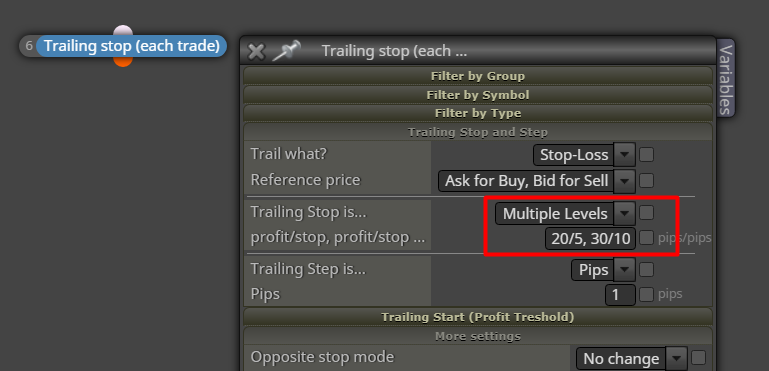
Otherwise something like this:
https://fxdreema.com/shared/j8353dHqc
@jstap I don't understand what you are trying to do in the screenshot
To understand what buffers are, first look at their colors. For this indicator they were recognized quite well.
Then, use the Trace block (connected with some Pass block in "on Tick") to see the values in Visual mode. While the EA is working manually add the indicator with the same inputs just to see it on the chart as well as the lines from the Trace block.
I did that and saw what I expected:
Buffer 0 is the middle DimGray line.
Buffer 1 is the upper Maroon line.
Buffer 2 is the lower DarkBlue line.
These 3 buffers are continuous lines, so for them "Indicator appear" will not work.
Buffer 3 is the Red X arrow.
Buffer 4 is the Blue X arrow.
For these buffers "Indicator appear" would work, because this block expects to see value that is EMPTY_VALUE most of the time and eventually turns into some different value.
But yes, the indicator repaints too much. Not only the X arrows, but the lines too. When I backtest it in Visual mode and I manually add it, I see the lines as expected... but at the end when I stop the test, the other instance of the indicator appears, but it looks different:
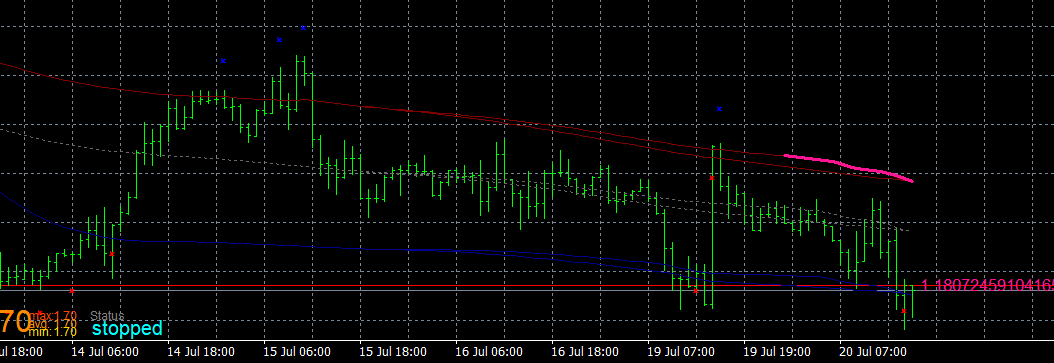
Both have the same input parameters. It matters when I manually add the indicator. If I add it at the end, both are the same.
It's not a bug, it's a feature :))) Try it with 0.1 initial lots and it works.
The problem is that there is something called Lot Step. If the Lot Step is 0.01 (in most cases), you can open the following lots (assuming that the minimum lots are 0.01): 0.01, 0.02, 0.03 and so on. The difference between each possible value is the Lot Step. Above 0.1 lots the possible values are not 0.1, 0.11, 0.12, 0.13 and so on.
The block would open open 0.012 lots if it was possible, but it itsn't. Instead, it opens whatever is the nearest possible lot. Try to open 0.012 lots manually - doesn't work as well.
Well, I expect that most people don't have this problem, but the idea is that I want to see if there are poeple who did have the problem :))) Because I think there is some problem, but I'm not entirely sure, maybe it was only on the PC of the person who reported it to me.
I think there is a problem that some people experience - they can't login with correct pass. There is an error that says "Invalid login credentials". But apparently, the login form of the forum works.
Anyone experienced this problem lately?
Put "Draw Arrow" afrer block 2 - run the EA and see where or if there are arrows on the chart. Then disconnect that "Draw Arrow" and connect it after block 3. Again, run the EA and observe. Do this for block 12 and 8 as well. Eventually you will probably find after which block the arrows doesn't appear.
By the way I'm not very sure with Monthly and Weekly timeframes. These timeframes don't exist in the Tester. I hope the blocks are working with them properly, but better check it (in the way I explained above).
@mantadiver said in How to specify a Group Range:
The forum is a great source for solving many issues but I appreciate you must get frustrated with answering repetitive questions from new users. One solution might be a Premium Support service where individual questions can be answered for a fee or users can pay an additional subscription for advanced support. This wouldn't put off new users with prohibitive charges but would be a huge benefit for more advanced users wanting a guaranteed way to gain premium support.
This topic is hard for me. I think I should hire someone to answer to the questions, but I'm afraid of this process And also I'm afraid of this Premium Support thing, although it sounds reasonable at this point.
@mantadiver said in How to specify a Group Range:
The main issue for me is the gnawing uncertainty of how committed, you may or may not be to the product going forward. Certain comments & the lack of forum input over the last few years raise questions for people who rely heavily on this excellent software.
Having said that I appreciate you responded to my post and also that you indicated an upcoming price increase in a separate post. I have no issue with a price increase. The more the product undergoes continuing development the more I would be happy to pay.
If I have to be honest, I want to make similar site, but for crypto. The problem is that many things are very different there, mostly because in the crypto world there are exchanges instead of brokers and there are no such things like MT and MQL. So I have to make these missing things, maybe not it the same way, but something to fill the gap. Which could be used for this EA builder as well. I'm talking about the ability to run the strategy on the website with all the indicators. But this is not an easy task at all. So I'm commited by proxy, if you understand.
The Group number is a string. So you want to convert for example 1-5 to 1,2,3,4,5. It's possible with a custom code and using some string functions. Detect that "-", get the first part of the string that is "1", also the second part that is "5". Convert these to integers. Then with a loop from 1 to 5 construct another string that will look like this "1,2,3,4,5". And then use this string as a Group number.
But I don't know what is the performance with so much numbers. Yes, MQL is based on C++ (I think), but from my experience with it I know that sometimes it can be slow as hell.
This is not a bad idea to show in which block the problem is. I have some idea how to make this, but I don't know if I'm ready yet to make it. But it's also not that hard to find the block by yourself. I do this every time there is a problem. Save the source code, try to compile it in MetaEditor, find the row where the problem is, and if it's in the class of some block, there is a comment above that class that says the number of the block that appears in the project. Here for example:

The class names have different numbers, so don't look at them.
Or, if the EA will only be used to work with manual trades, instead of setting this in every block, just set the magic number to 0 globally from here:
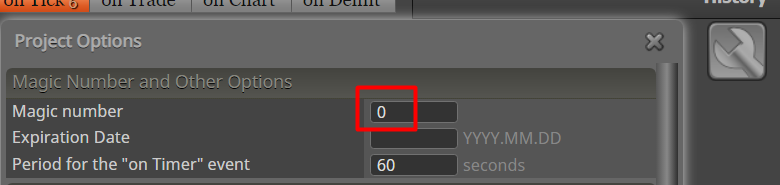
This is actually that strange MagicStart input of the EA.
The problem in your project is that it starts with "If trade" blocks instead of "No trade".
"If trade" means - If there is at least one trade with the properties specified in the block.
"No trade" means - If there is NOT even one trade with the properties specified in the block.
Here is how the extension works. The first time when you download a file with particular name, you download it somewhere. At this moment the extension knows that any file with such name should be placed at the same location. And the next time you click on .ex4 for example, the browser will not ask you where to save the file, the extension will save it directly.
But this works only when you initially save the file in the same directory that is specified in Global Options. You will know that the specified directory is the same when you see green message when you save the file. If you save the file somewhere else, for example on the Desktop, you will see red message. And not only that, but the extension will not remember this file location and the next time you try to download this project, it will ask you again where to save the file. Until you save it in the specified paths in Global Options.
What path to set in Global Options? Open MetaTrader, go to File -> Open Data Folder, and copy this path.
I think the block should work, but not in the Tester. Anyway, the function to play sound is very simple and if you want, you can easily use it in let's say "Custom MQL code". Here it is:
https://www.mql5.com/en/docs/common/playsound
There is a /Sounds folder where the .wav files are. You can use this functon as simple as writing something like PlaySound("ok.wav");
@jstap, I'm not sure that the Draw blocks are very helpful when you want to make many objects. To make few objects... fine. But I think that in this case it could be more beneficial to write the code manually. Object functions are actually not that complicated. I'm saying this to anyone who decides to make fancy panels on the chart.
The question to ask ourselves is - If each of these blocks has to do something relatively simple, like drawing an object, isn't it easier and more manageable to just write the code?
Is this 250 attempt really made by this EA? Maybe there is another one working in the background?
The Equity is even lower number than the Balance, but not very different after all. I really don't know what is the problem. But just in case, place some block to print the value, maybe Alert message.
Init is where the blocks run only once, in the beginning when you add the EA to the chart. At this time you surely have some information to show, but whatever happens after that will not be updated... assuming that you are using the Comment block. So it depends - do you want to print that information once, or not?
There is one block Run blocks who can remotely run other blocks by their number. Normally you know that one block runs other blocks by these connections. But you can't connect blocks from Tick to Init, or whatever. So in this case if it's needed, you can use this Run blocks block. And I suggest that if you do, better change the number of the block/s you want to run with some simple text that means something (better don't use spaces and fancy symbols). Because the numbers are kinda confusing.
@uriel-0 said in MACD Backtest:
MACD True.mq4
Put some "Draw Arrow" or similar block below block 1, then 2, then 24 and so on... and observe how rare the arrow starts to become. After the crossover block (20) the signals that I get are already rare, combine this Bulls in a row and maybe the chance to get a signal is almost impossible.
Maybe you don't understand the crossover block. It could only pass in the span of 1 candle where the crossover happens. If you want to check when it passes, try only this block with some "Draw Arrow".