- Dear @roar you absolutely right about implied vs actual impact on the volatility during news events.
- News filter during backtest is also kinda irrelevant due to the simulative nature of the backtest environment itself
- Although I believe, News filter would still be relevant to FXDreema users taking challenges for a prop firm funding nowadays
- Simply because avoid trading so called official big impact calendar news is kinda what prop firm strictly demand to be followed by the funding applicants no matter the actual volatility impact
- With all the respect, kindly please allow to disagree with you on the news filter usefulness for the FXDreema platform users cc @l-andorrà @fxDreema
G
Posts made by GeoFX
-
RE: We need to have an in-built News Filter...It is high time we have this MT4 and MT5posted in General Discussions
-
RE: Finally , Integration of News Filter :) [ MT4 Only ]posted in Tutorials by Users
Dear @fxDreema hear our cry please : - any chance to have News filter Condition Block built-in to FXDreema platform any time soon? Many many thanks!!
Link to the new thread on this Topic: https://fxdreema.com/forum/topic/16490/we-need-to-have-an-in-built-news-filter-it-is-high-time-we-have-this-mt4-and-mt5/11
-
RE: We need to have an in-built News Filter...It is high time we have this MT4 and MT5posted in General Discussions
-
Dear @fxDreema - to add more to the reasoning, why a robust built-in News filter in FXDreema platform would be much much appreciated:
-
You're probably familiar with these prop-firms that are becoming a mainstream for retail traders to get the trade capital asap, nowadays
-
One of the key rules most of the prop-firms typically want the traders to strictly follow, is to avoid trading major news events
-
So in case any aspiring trader participate in prop-firm challenges with his algo w built-in News filter, it would reduce chances of getting disqualified thus adding to the probability of passing the prop-firm challenge successfully
Thank you in advance for approving this FXDreema pltf update
-
-
RE: We need to have an in-built News Filter...It is high time we have this MT4 and MT5posted in General Discussions
Agree. Default News filter block would be a great addition to make the FXDreema platform even more user-friendly
-
RE: News during Backtestposted in Questions & Answers
I wonder why there is still no such Condition block in the default block list. That alone would make many aspiring coders wiling to play around with that
-
RE: Experiencing considerable lagposted in Bug Reports
-
Hi folks! To update this thread on bulky Project Saving/Syncing failures that may appear from time to time.
-
This typically happens to the extended Projects with more than 500+ connected Condition Blocks.
-
Not sure if the solution I've found was already described on this Forum or in any of the platform Manuals, but just for the Community contribution sake:
-
There is no need to store all the Condition blocks you've already built once in the same Project if those planned to be used for the future use on new Projects, as that entails that your Project will eventually become more bulky and unexportable.
-
In case anyone needs to use any of the older Condition blocks or some parts of the previous Projects you've already built, FXDreema actually supports Copy/Paste operations through the OS Default Clipboard BETWEEN THE DIFFERENT PROJECTS
-
Example: one can store his older Condition Blocks in a single "Archive project", occupying any of the Project tabs: OnInit/OnTick/OnDeinit etc for a later use on a new Project, and copy a certain Condition Blocks from the "Archive project" to any new project through the clipboard, when required
-
The only requirement would be the "Archive Project" must remain exportable, to make sure you always keep a local recovery backup copy.
-
This allows keeping the new Project lightweight, while retaining access to the older Condition blocks through an "Archive Project", thus the building and syncing operations on a new Project will be performed much more efficiently and quickly
-
Additionally, by organizing a personal FXDreema workflow according to the scheme described above, user can significantly optimize the time spent on EA testing and building operations, as he can always use parts of his previous Projects to start with or enhance on the new Projects WITHOUT REBUILDING SAME BLOCKS FROM THE GROUND UP each time
-
Hope that will help many of the aspiring FXDreema users moving forward
-
-
RE: builder doesn`t respondposted in Bug Reports
-
Hi folks! To update this thread on bulky Project Saving/Syncing failures that may appear from time to time.
-
This typically happens to the extended Projects with more than 500+ connected Condition Blocks.
-
Not sure if the solution I've found was already described on this Forum or in any of the platform Manuals, but just for the Community contribution sake:
-
There is no need to store all the Condition blocks you've already built once in the same Project if those planned to be used for the future use on new Projects, as that entails that your Project will eventually become more bulky and unexportable.
-
In case anyone needs to use any of the older Condition blocks or some parts of the previous Projects you've already built, FXDreema actually supports Copy/Paste operations through the OS Default Clipboard BETWEEN THE DIFFERENT PROJECTS
-
Example: one can store his older Condition Blocks in a single "Archive project", occupying any of the Project tabs: OnInit/OnTick/OnDeinit etc for a later use on a new Project, and copy a certain Condition Blocks from the "Archive project" to any new Project through the clipboard, when required
-
The only requirement would be the "Archive Project" must remain exportable, to make sure you always keep a local recovery backup copy.
-
This allows keeping the new Project lightweight, while retaining access to the older Condition blocks through an "Archive Project", thus the building and syncing operations on a new Project will be performed much more efficiently and quickly
-
Additionally, by organizing a personal FXDreema workflow according to the scheme described above, user can significantly optimize the time spent on EA testing and building operations, as he can always use parts of his previous Projects to start with or enhance on the new Projects WITHOUT REBUILDING THE SAME BLOCKS FROM THE GROUND UP each time
-
Hope that will help many of the aspiring FXDreema users moving forward CC @l-andorrà
-
-
RE: Experiencing considerable lagposted in Bug Reports
@iagnew it is because i can feel your pain, bro. Make sure to keep the unused blocks/block-chains on DEINIT tab disabled, so they are not triggered. Also, you may try to experiment with storing unused blocks in other tabs, as well, and let me know in this thread if they are applicable for this purpose. Enjoy!) cc @FXDREEMA @l-andorrà
-
RE: Experiencing considerable lagposted in Bug Reports
Hey there! Check out my 1000+ blocks on the same project-related issue post here : -> https://fxdreema.com/forum/topic/14841/builder-doesn-t-respond/14
-
RE: builder doesn`t respondposted in Bug Reports
-
@biztet I can confirm i experience same problem sometimes as i have many blocks on my project FYI same as many other users here. It seems like it is FXDreema performance-related bug. It fails to process too many blocks at once, so user must keep the backup mq4 file at all times to make sure not to lose the track of the project progress.
-
The suggested block quantity per tab is no more than 1000 pieces, based on my experience with the platform so far. Severe lags and other functional failures start to appear if this threshold exceeded. I guess that is the platform code capacity or maybe infrastructural limit when if exceeded, the performance drops significantly, so the errors start to occur
-
Also, the Load project option isn't reliable as it just keeps the last 1 project instead of let's say last 5, which is pretty much useless if the last one exhibits the problem in this topic for example, then it is useless as that last project is not recoverable
-
I bet, admin knows about these issues, but not doing much about it, so i always keep the last MQ4 saved aside and do backups as frequently as possible, especially after any major project change
-
Given the conditions, admin is not too active on improving on such fundamental bugs, I suggest a quick workaround : -> if users want to keep many blocks on the SAME project, ON DEINIT tab may be used as a storage buffer, where user can keep temp. unused, disabled blocks/chains of blocks for a future use. This setup allows to keep the block quantity on the ON TICK tab relatively low thus not compromising the performance too much. Hope, that suggestion will help all who struggle here with data loss and will save many working hours of rebuilding similar block-chains over and over again either after a project loss, or in the multiple EA programming scenario where the block-chains can be shared between the different EAs staying within the same project framework
-
In the past I've proposed to create something like a vault/buffer where the blocks could be temp. kept and shared between the projects, for the users to have under their finger tips and save their time and efforts, but admin not moving on that evident refinement. No argue, it can be challenging though for him, but i believe he should love challenges because he is a true dreamer same as we are all here..))
-
-
RE: Too many requests bugposted in Bug Reports
@roar ..Yea, thanks roar) I do use chains of blocks in the loop manner you describe. Maybe indeed, no on so advanced lvl as you would have do, but I certaily avoid evident single-use repetitive duplication of the block chains and aim to implement as many scenarios as possible from a single chain of blocks, using Flags, for instance. Although, there are other reasons, why I intentianally do not delete some chains already built previously, that I've described in this post: https://fxdreema.com/forum/topic/12108/temporary-chain-of-blocks-template-cloud-storage
Pray one day @fxfreema here our call

-
Too many requests bugposted in Bug Reports
Dear @Fxdreema, in addition to my previous post on platform improvements:
https://fxdreema.com/forum/topic/12108/temporary-chain-of-blocks-template-cloud-storage/2Id like to report a bug I believe not many platform users receive. Since my average project numbers 1000 condition blocks on average, I receive "Too many requests" (screenshot) error a lot, especially when I disable more than 10 blocks at once. I think this has to do with the platform hosting provider limitations per IP, but nonetheless, the temporary solution I found is to switch to VPN but after some time with VPN turned on, if I do the same operation the platform might return me the same error.
Will be happy to hear your comments on this

-
RE: Not sure if this is a bug or I'm missing somethingposted in Questions & Answers
Dear @Fxdreema, hear our prayers
-
Temporary Chain of blocks template cloud storageposted in Questions & Answers
Dear @Fxdreema, Its been 2+ years im with platform.
One of my projects has exceeded the block counter with 2000+ blocks recently that caused many lags and saving project problems until I found a workaround: - put the disabled blocks on o different project tab I do not use..)
I do not use all those blocks simultaneously on same project, so I keep half of blocks disabled on the same project. Reason I do not delete them is because I combine different block chains and dont want to loose time with building block chains that I already have built in the past.
My question is : - is there such function in platform that would allow to temporarily store the chain of condition blocks that already was built, for a future use?
For instance: I have designed 200+ connected chain of blocks for the custom Take profit conditions, that I want to use on a completely different EA. This requires some kind of pre-built conditions block template storage operational space, so a user could store/save/duplicate/copy/paste the blocks in/from his current project.
This would be a FXDreema hell of worth killing feature.
Will be happy to hear your thoughts
-
RE: Not sure if this is a bug or I'm missing somethingposted in Questions & Answers
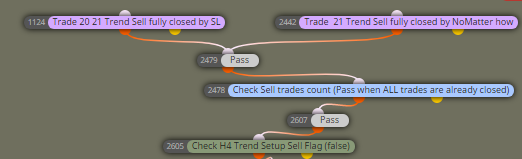
Guys, I can confirm: if the feature "Closed How: Fully closed" in block "Trade closed" on "On Trade" tab, with settings according to the screenshot below, acts wierd in case I use 50% partial profit close for each trade (pink blocks). The "Trade closed" block treats "Partial profit close" as Fully closed order, for some reason, while the same order with the second half of the volume still runs open.
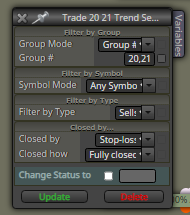
This is why I forced to use additional condition "Trades Count <1" in the same chain with "Trade closed" block, so the bot waits for both conditions to be met to pass.
-
RE: Position´s Expirationposted in Questions & Answers
@fxdreema I've stumbled on the "Check age" block encompasses weekends issue. It is pity this simple but useful block is not flexible to skip weekends, market holidays or skip any given period market was closed, because the period of time that is implied by the notion "CHECKING AGE" is the actual period market was open only.
Yes, there are other ways to check age excluding holidays, but the "Check age" block is the most intuitive one for the newbies, and IMHO deserves to have such options. Even for me, because I still struggling with variables) Thank you @fxDreema for the great robot-building framework, nonetheless. @GeoFX/2+ years happy FXDreema user -
RE: EX4 custom indicator with licence key conversionposted in Questions & Answers
Folks, if fxdreema builder fails to build the .MQ4 EA file, try to rebuild the block IDs first.
Go to: Options -> Project Options -> Project Blocks: Normalize IDsAnother bug i've noticed along my fxdreema experience and I suppose the problem lies within the MT4 platform itself and how it keeps its logs and history, is when you save your .MQ4 file, sometimes it is saved with an old modifications from your previous fxdreema edits. You can notice such bugs when you check your latest version EA modifiable parameters over the EA Input Settigs tab which just arent there. All you can observe is an old parameters from your EA previous version, only.
I cure it with EA name modification BEFORE of each save + Block IDs rebuilding, so everytime I save my project to the MT4 experts directory, Im confident my EA been saved with the latest parameters I've put.
Those tricks can really help, when it seems you have already done everything right, but for the unknown reason your EA doesnt work as expected
-
RE: Tutorial 06 - My Indicators in fxDreemaposted in Tutorials by Users
My topic has been transfered here: https://fxdreema.com/forum/topic/9807/ex4-custom-indicator-with-licence-key-conversion
@miro1360, please, delete my pics above.Thanks