R
Posts made by RGoo
-
RE: Stop loss issue?posted in Questions & Answers
@jstap
Yes, I agree with that. But since in this specific example one position can be bought and one sold independently, these positions would hedge. Unless one would close the other. But then you would not need a trailed SL. -
RE: Multiple custom trailing steps.posted in Questions & Answers
@tho401
Yes, I have now also tested the problem.
The program fxdreema does not allow to change the BE after the first setting.
As @jstap already wrote it goes however with a TSL.
See attachment.
But your idea was good!
https://fxdreema.com/shared/iYHlokvmb -
RE: Stop loss issue?posted in Questions & Answers
@jstap
Yes, of course, sorry, I didn't want to interfere either. I had only (hastily) wanted to give a little hint that he or she could also use the same block.
You would also have to separate the actions, right?
-
RE: Exit after certain higher highs and lower lowsposted in Questions & Answers
@rebearv
Yes, I think so, TipsyWisdom described it perfectly on page 1. -
RE: no more tradeposted in Questions & Answers
Another hint would be that you have to pay attention to the order in which the blocks are processed.
The order shown in the picture NOW is correct.
The block (5) that asks for the result of blocks (1) and (2) and their successors
must have the highest number, otherwise it would possibly be executed with the wrong result before the query.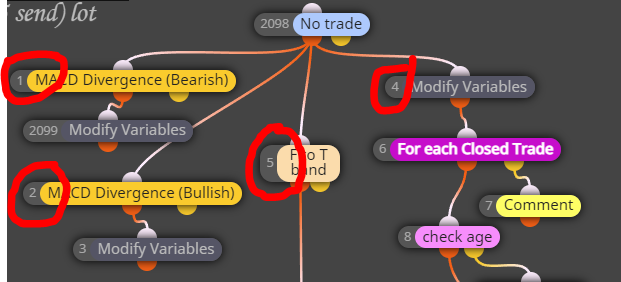
-
RE: no more tradeposted in Questions & Answers
@haidang8055
I am not familiar with the specific use of multiple currency pairs in the groups.
But if this doesn't have any special meaning,
I would say that after the first trade you can't open another one because
the condition "no trade" is not fulfilled. You don't have "no trade" after the first trade. -
RE: Multiple custom trailing steps.posted in Questions & Answers
@tho401
I have not tested it. Take a look at the BE 3 block, you have set the OFFset to 0.3, maybe that should be 3.0. -
RE: Exit after certain higher highs and lower lowsposted in Questions & Answers
@rebearv
Have you already tried the ZICKZACK indicator? -
RE: Multiple custom trailing steps.posted in Questions & Answers
@tho401
The idea is good, it should actually work. But you have defined the blocks differently. (Picture) I wouldn't use all the symbols either, you probably only want to address the ones on the chart.

-
RE: Hey allposted in Questions & Answers
@frank-2
It doesn't matter, it only matters if you could trade the product at that time (even as a demo).
What do you want to trade and on which stock exchange? -
RE: Hey allposted in Questions & Answers
@frank-2
Have you checked whether your broker allows trading of this product at this time?
So, can you trade manually at this time? -
RE: EA not compiling due to incorrect data types of input parametersposted in Questions & Answers
@laudable222
Yes, exactly, with custom indicators there are problems in various places.
Use the existing CCI first. -
RE: About price range.posted in Questions & Answers
Of course, you can write the code even simpler,
I just put a few blocks together to give an idea.What "Gauss" wants to do with it, I don't know, of course.
But on the chart it looks like this. -
RE: EA not compiling due to incorrect data types of input parametersposted in Questions & Answers
@laudable222
This is a problem with the indicator. First try to use another one and then replace it.
You also have to save the indicator in the MT under "Indicators". -
RE: true,fasle to be in constantsposted in Questions & Answers
@somporn69

Constant or variable is the same procedure. -
RE: Create EA based on vertical Lineposted in Questions & Answers
@zedeai2
You are currently looking for objects that have the colour "lime" or "red".
Then draw a vertical line. When the line is drawn, you want to buy or sell.
Drawing the line is done by fulfilling one or more conditions. And you must also use this event for buying/selling. So do not draw a line first and then search for it. Because you want to buy / sell immediately when the line is drawn, don't you? The line is also not an indicator but an object.
Currently, the EA buys and sells at the same time because both objects can be found on the chart.
Which indicator do you use?

You are looking for a green and red object, these are the arrows.
When you have found them, draw the lines.
Even if you delete the lines afterwards, the arrows are still on the chart.You have to use the indicator directly.
-
RE: About price range.posted in Questions & Answers
Small example.
Background "black"! switch on,
otherwise the comment is not visible.
Note blocks in the "on Init" function.
