you can create own blocks here:
https://fxdreema.com/studio
on first sight it is not very easy, but after few tries it is working ... search through forum keyword "studio" and it shows you few tips how to working here ... it doesnt exist yet tutorial or something step-by-step how to work here ...
M
Posts made by miro1360
-
RE: Custom Indicator Candlestick patternsposted in Questions & Answers
-
RE: INPUT VARIABLESposted in Questions & Answers
-
sure, magic can be in settings default as 0 :

-
yes, many ways how to do this, one can be as this:

-
yes, using flags, or as point 2 with logic and some input parameters / variables you can do a lot of stuffs ...
-
-
RE: Custom Indicator Candlestick patternsposted in Questions & Answers
I looked on this indicator and it repaints pattern description on previous candle, so I think it is not possible to use in EAs in good way, better for you when you create own indicator or own logic into fxdreema based on blocks and custom code for patterns ... values from buffers can be taken easily (just import indicator manually in case of ex4 file -- look for few my previous posts - I replied few times how to do this) ... but this are only values and signals as all arrows, next text description is not in buffer and can be also controlled by EA, but I dont know if in tester it works good for looking into few history candles - I doubt it can working, in forward test (demo) it can working (indicator must be attached into chart with EA) and you can try something as this:
(for working web link firstly import indicator into "My indicators") ...
this is for Candle ID 1 https://fxdreema.com/shared/XdN8lM6Hd (repaints because candle ID 1 signal from indicator repaints)
this is for Candle ID 2 https://fxdreema.com/shared/1IH77YI3 (not working in tester, maybe only demo forward tests, maybe not at all)... but from my observation, this is not best indicator for EA
-
RE: important questions about pending order ?posted in Questions & Answers
spread you pay is 3.00
it is caused because spread is difference between Ask price and Bid price (bid price is price from which are candles/chart created)you place pending order at "any price", but when one of these prices (current Ask or current Bid) goes through your pending price, trade is created and it can be:
Buy - opened with current Ask price,,, but closed (sl/tp) with current Bid price
Sell - opened with current Bid price,,, but closed (sl/tp) with current Ask priceand Ask > Bid ,, or Ask-Bid=Spread
hope you understood this

-
RE: ea stop making orders at 162000$posted in Questions & Answers
it can be caused by broker, not sure but it is possible, just broker stoped next orders
-
RE: Tutorial 06 - My Indicators in fxDreemaposted in Tutorials by Users
my intention is, you learn do it also for other indicators from example I provided you :simple_smile:
-
RE: Tutorial 06 - My Indicators in fxDreemaposted in Tutorials by Users
... I dont need your money, I am not doing this for money
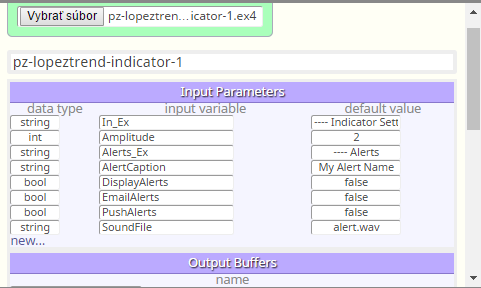
...take this EX file indicator and import it into your indicators, - it import only its name (because it is ex file and not mq), for this reason you need type all input parameters manually:
continue with adding all buffers, numers are enough:
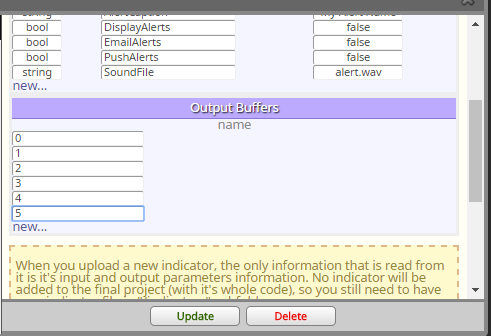
click update and your indicator is in fxdreemacreate easy logic to test your indicator:
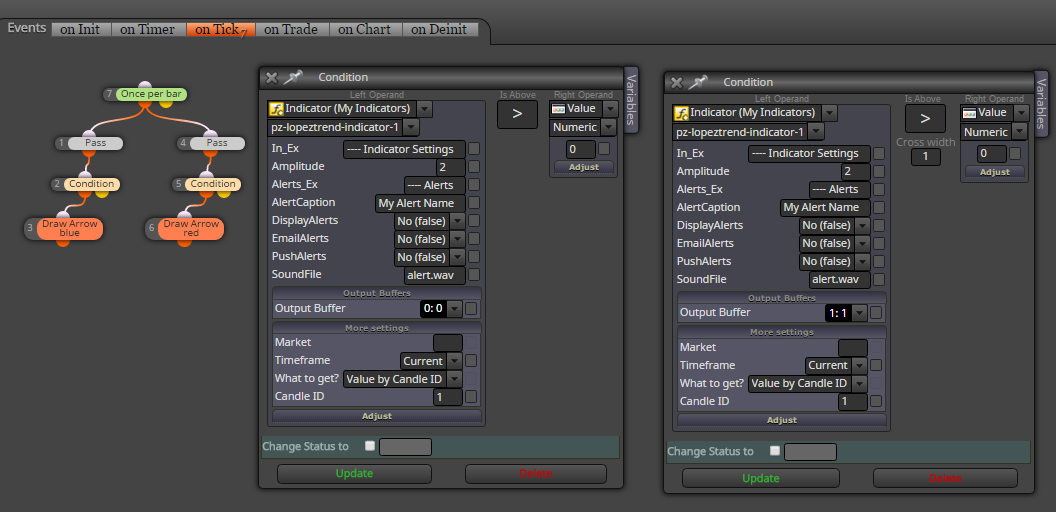
and you see, that all is working:
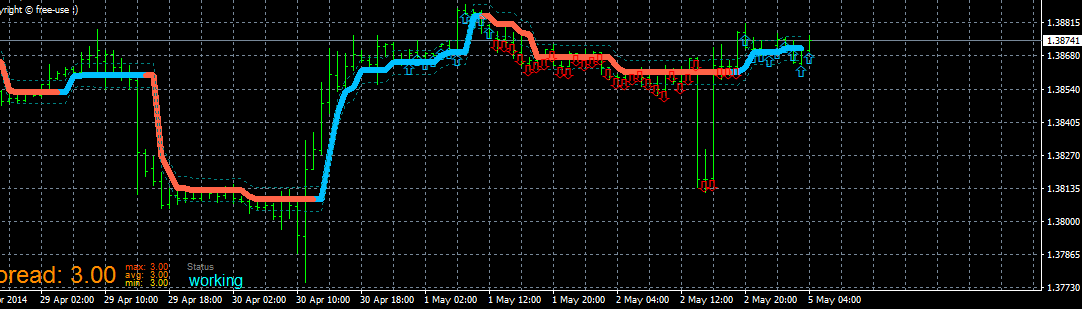
always observe in details how indicator is working with all buffers, in this case you need take value from candle 1 (because candle 0 have no indicator data - it is seen from chart) ... hope you do it right ...
-
RE: Tutorial 06 - My Indicators in fxDreemaposted in Tutorials by Users
sure, it should working, add all buffers and all input parameters with right data type ...
-
RE: Loop through bucket of tradesposted in Questions & Answers
I was already replied you with that StringReplace function and you solved it, than it is ok
.. -
RE: Loop through bucket of tradesposted in Questions & Answers
than try save groups from trades into string variable and this variable use into group # instead of static values
improve this logic:
https://fxdreema.com/shared/RUr7b3j7e -
RE: Two programming Questionsposted in Questions & Answers
- block Once per bar can do this job
- yes you are able create this, just learn basics with fxdreema and after while you can do a lot of stuffs
-
RE: Loop through bucket of tradesposted in Questions & Answers
you can type all groups where it is looking for into Group # and separate them with comma:
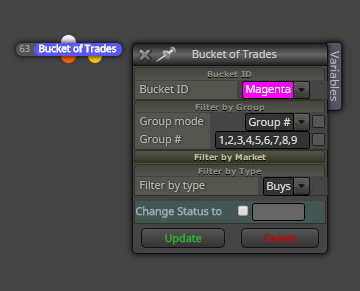
-
RE: How it works on last 300 bar?posted in Questions & Answers
remove green block "Loop" and run it in tester (visual mode) and you can see how it works in history bars
-
RE: Text object on the top of each barposted in Questions & Answers
I do it this way:
https://fxdreema.com/shared/aT7UkLfQdin on Init is calculation through history bars using loop:

and than in on Tick section is logic for updating candle 1 and candle 0:

...
-
RE: Fixed lots or risk %Money Managementposted in Questions & Answers
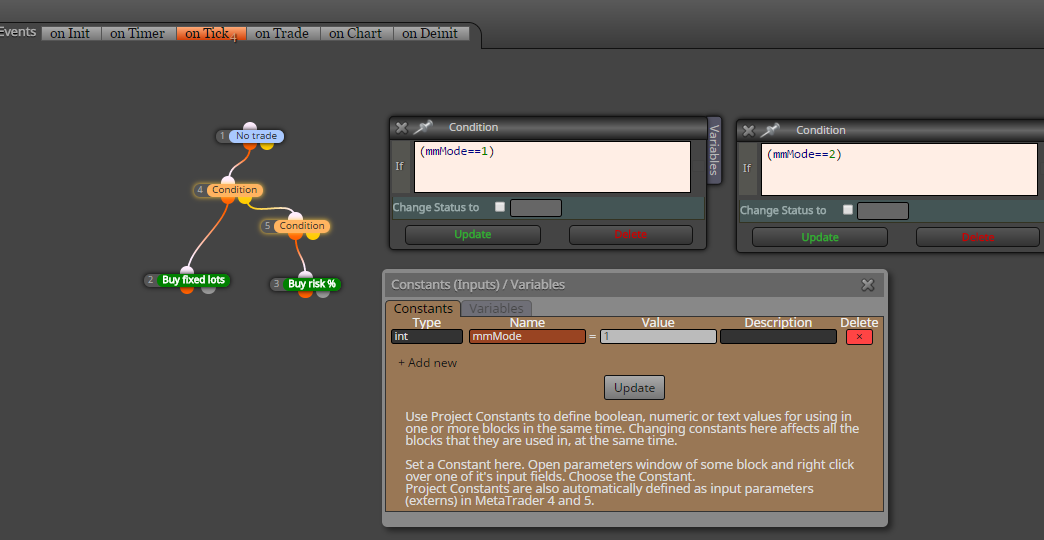
use two Buy blocks, one with fixed and other with MM
-
RE: How create 1-2-3 breakout based on Zigzag?posted in Questions & Answers
zigzag is little tricky ... you need custom code to detecting .. nothing easy to do ...
-
RE: Closing at the same levelposted in Questions & Answers
you are doing all right, ....
sell is closed by Ask price (and opened by Bid price)
buy is closed by Bid price (and opened by Ask price)
visible price (price from which are bars created) is Bid price, in this situation 1.29576 is Bid price, and you can see that buys at 17:35 were closed by Bid price (at same time) and sell was closed earlier
you can know, that Ask>Bid, and spread is difference between both (in case of MT4 tester, it is fixed spread), and when Ask>Bid, depends on spread Ask price triggered sell trade earlier, here turned into another direction (Bid was not 1.29576, but was below this price) and after while goes back and than Bid reached 1.29576 (Ask was in this case more) and here was Buy closed ....
.... I am not sure if this is right explanation why it happens, but what else it can be (it is not caused by fxdreema) ... -
RE: Delete pending order when reached TPposted in Questions & Answers
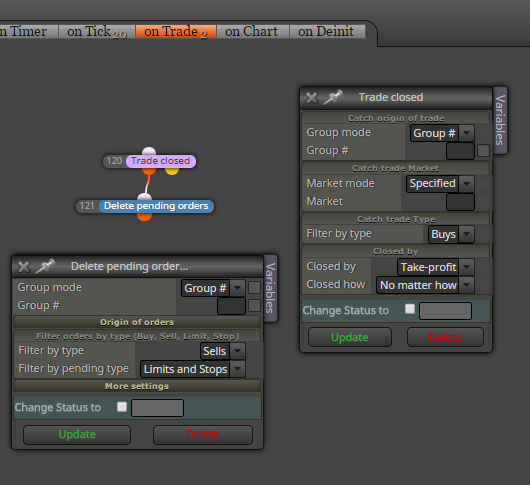
hi, place few blocks into "on Trade" section: