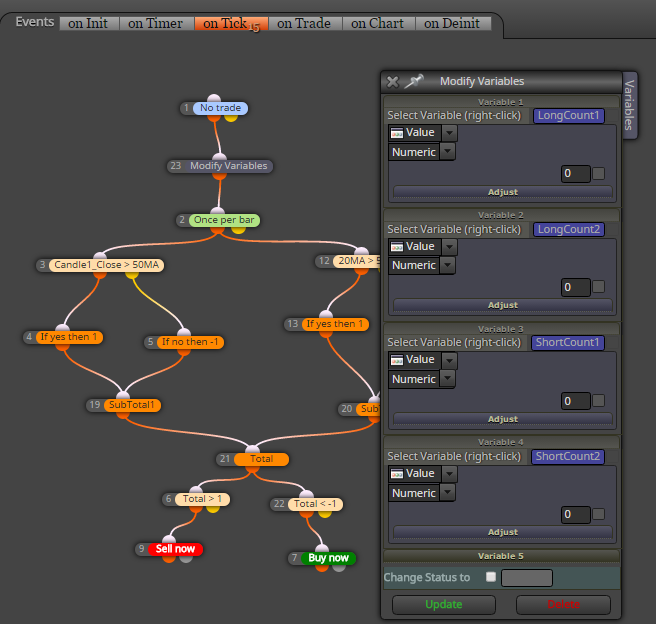
null your variables before they are changed by conditions:
M
Posts made by miro1360
-
RE: Art Collins_Scoring Systemposted in Questions & Answers
-
RE: Previous candle high / lowposted in Questions & Answers
yes, you can test it with visual tester


-
RE: Previous candle high / lowposted in Questions & Answers
sure you can do it simple ...
https://fxdreema.com/shared/bbZdGUbJb -
RE: partial close based on candle size of the pastposted in Questions & Answers
yes, that is how variables works
-
RE: partial close based on candle size of the pastposted in Questions & Answers
one variable is holding one value until is changed, when is changed, new value is in this variable

-
RE: partial close based on candle size of the pastposted in Questions & Answers
use on Trade section for storing candle size into variable while Trade is created (pending is triggered) ..

and rest in onTick:

note, that this is working for one trade, when you have opened more trades, you need complicated system of differentiate between trades
-
RE: Candle ID and open buy/sell problemposted in Questions & Answers
yes they occurred as false signals, but in time of creating trade they were valid signals (because candle was not closed and was in state of creation -- up/dn) ... from market bahaviour, these signals is not possible to filter, even with time duration etc, it was tested many times ... Candle0 -- nobody knows how it will be closed
-- if you know that, you will be millionare in few days -
RE: partial close based on candle size of the pastposted in Questions & Answers
Candle 1 is fixed candle on which trade is opened, or it is changeable candle as market is moving?
-
RE: Candle ID and open buy/sell problemposted in Questions & Answers
remove once per bar block
in My indicator set Candle ID to 0 -
RE: draw and delete specific chart objectsposted in Questions & Answers
using custom counters .... here are many ways ... I recommend using 1M timeframe ...
search through my posts, I added here few times example how to create some counters ...... this is basic principle for your question:
https://fxdreema.com/shared/ySaaK92Ac(note, on Trade section is also used)
-
RE: draw and delete specific chart objectsposted in Questions & Answers
this delete only lines with start name lineRed

-
RE: My EA Zigzag did not run as I wantposted in Questions & Answers
actually it is problem
... because here is something like high ID , low ID and these IDs reprezenting high/low of zigzag ... but ID 0 means first High or Low ... and from core of this logic current ID is sometimes High 0 and sometimes Low 0 ... that means, you need some separated custom code which can detect previous High when (High 0 == current zz value) ...
working with zigzag is really complicated and I dont recommend it for people who can not working with basics mql code, if you are coder you can resolve it but can take a lot of time ...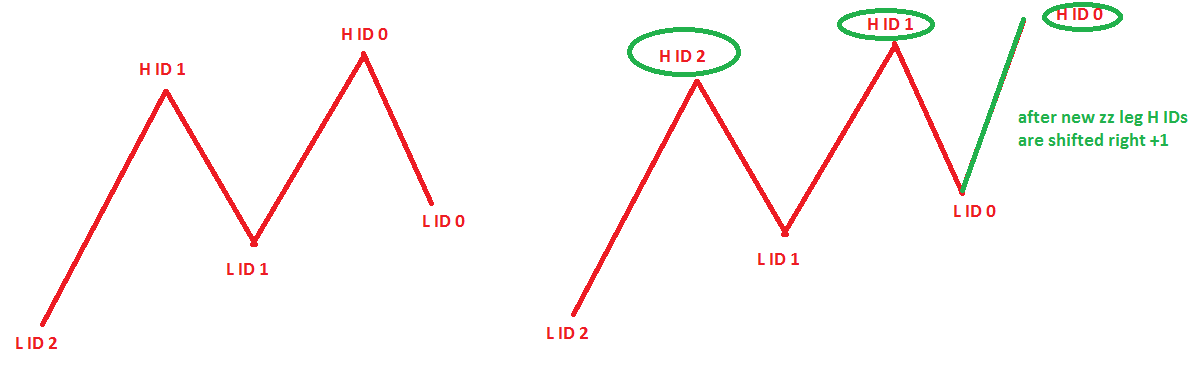
and it is why this simple project can not working properly ....
https://fxdreema.com/shared/ymOGQbagb -
RE: How to enable variable inputs before to attach EA to chartposted in Questions & Answers
constants are value that can not be changed when EA is running (it does not mean when EA is inserting - while inserting you can define constants values) ... ... variables are used by EA itself and can be changed by EA ...
-
RE: New option to my EA. Help required.posted in Questions & Answers
- because "on Trade" is called with your purple "close" block ... and it terminates EA before "modify stops" block is in action ...
- this one you need play in deepness and test it because I have not test it at all when you find solution, post it here
-
RE: New option to my EA. Help required.posted in Questions & Answers
problem 1 ... if you switch these blocks (modify stops and close) like this?
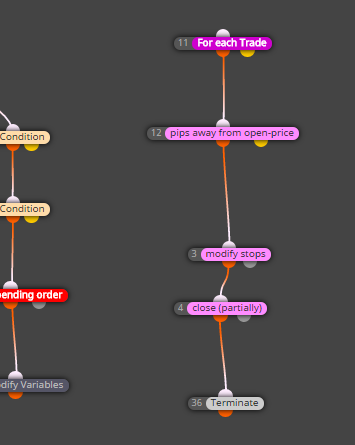
problem 2 ...
if you change this to fully closed?
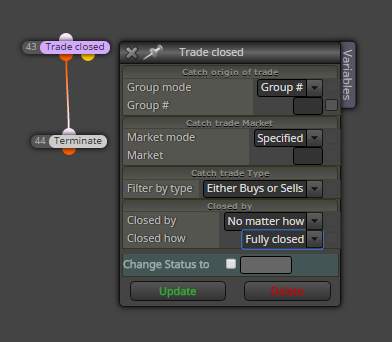
-
RE: How to enable variable inputs before to attach EA to chartposted in Questions & Answers
you need define it in Constants ... and if you will it modificable, do it like this:
https://fxdreema.com/shared/Z3yYVSOIb
in on Init section

-
RE: New option to my EA. Help required.posted in Questions & Answers
it is closed on SL
because your SL is same value as pips away from open-price ....
next problem can be this On Trade section ... where trade is closed, it is terminated ... -
RE: How to enable variable inputs before to attach EA to chartposted in Questions & Answers
I dont understand what exactly you need ....
-
RE: My EA Zigzag did not run as I wantposted in Questions & Answers
@Ahlanbika
you probably dont know how exactly zigzag works .... last leg is reapainting, so "current value" can never cross itself ... please run zigzag indicator in tester and see its behaviour ...
