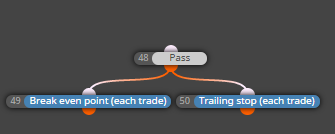
variables are not as inputs, constants are inputs 
M
Posts made by miro1360
-
RE: How to enable variable inputs before to attach EA to chartposted in Questions & Answers
-
RE: Different results between Optimization and single back test.posted in Bug Reports
when I did optimalization and than selected best results and tryied normal backtest and also visual backtest, I got the same results ... so maybe somebody with different experience can say where can be problem ...
-
RE: Once per clickposted in Questions & Answers
https://fxdreema.com/shared/OsQ3a7oqc
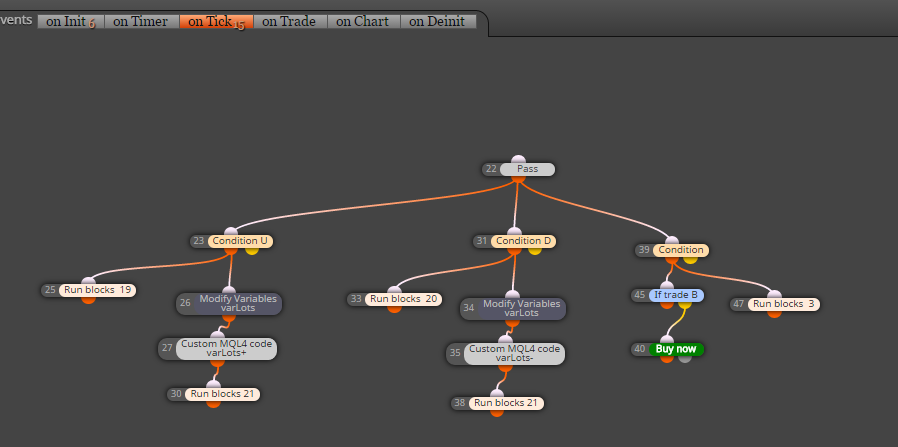
note, this is ok only for tester (because is waiting for tick and reason is small delay until new tick is arrived)
-
RE: How can I put Take profit as Level Price ?posted in Questions & Answers
you need average whole portfolio into one TP price level? (TP placed right into trade? - for each trade? ) ... this can be more complicated ...
-
RE: Once per clickposted in Questions & Answers
nothing from these have worked?
https://fxdreema.com/forum/topic/4417/buttons/2 -
RE: How can I put Take profit as Level Price ?posted in Questions & Answers
you will store these pips into variable?
maybe this can help:
https://fxdreema.com/shared/VWzeV7Yub
https://fxdreema.com/shared/0jg2mq5wdor this (but be careful with this):

-
RE: Once per clickposted in Questions & Answers
mouse click? ... you can working with "on Chart" section and there are blocks "Mouse clicked"
note, that "on Chart" is not working with tester -
RE: Heiken Ashi EAposted in Questions & Answers
I think, problem can be that you are working with candle ID 0, and it is not closed candle
try to change these IDs to 1

and be sure, you are using right Timeframe for all indicators/candles ...
and maybe change in block No trade Filter by type to "Buys" (and in sell section to Sells) ... I am not sure with this, it depends on your strategy ... this block No trade is working as "no buy OR no sell" - when one is true, output is true ... when you change it to only Buy, output is true when is here "no buy" ...

-
RE: Sorry, I can't find a thread I found some months agoposted in General Discussions
I maybe forget to mention, that all your EAs must have the same magic number, when
AUDUSD EA have magic 10
EURUSD, GBPUSD, USDCAD, etc. EAs must have magic also 10
and also "pipcounter closer" must have magic 10
-
RE: Closing trades by crossoverposted in Questions & Answers
post here shared link what you tried to do and what was not working for you ...
-
RE: Not updating the EAposted in Bug Reports
check if you are working with right folders, each metatrader have own folder to store EAs
https://fxdreema.com/help/basics/prepare-your-terminal
.mq4 file is only code, you need also .ex4 file -
RE: If indicators condition met, buy just onceposted in Questions & Answers
use block Once per bar, or No trade/If trade
-
RE: Sorry, I can't find a thread I found some months agoposted in General Discussions
lets take photoshop subscription as example ... somebody will make profi picture based on specific requirements ... ask in photoshop help how to do it ... nobody solve his problem during subscription ... who is responsible for creating this picture, photoshop company or member?

another example ... subscription in CAD system, member ask how to create engine based on this requirements .... again nobody solve his problem during subscription .. who is responsible for creating his engine? ...
I think, fxDreema is tool and every member must learn how to take this tool into own creativity.see here, this is one way how to solve your EA (and it is not only way, there sure many others):
- run on each pair one trading EA (trading only 1 pair as chart is)
-
-
- this can be "pipcounter closer", again, this is not only right way (and I am not sure if it is working because I have not test it ) .. https://fxdreema.com/shared/PyAu2bB4b ... as another separated EA
so result are 2 EAs, 1. EAs for each pair you trade, and 2. EA for controling situation (only as one EA for all pairs)... these EAs can communicate between using Terminal variables
... in my example is "terminal variables" startTrading ... this is terminal variable which can be used for communication between EAs ...
- this can be "pipcounter closer", again, this is not only right way (and I am not sure if it is working because I have not test it
-
your 1. EAs needs have in top of blocks condition which check this Global variable and run trading only when its state is 1 :
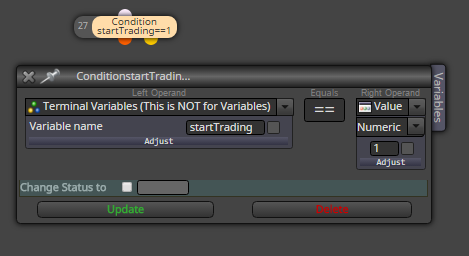
it means, when your 2. EA finds, that profit was reached for day, close trades and change this variable to 0 (and other EAs are not abble opening next trades because variable is not 1) ...
but you also need for new day change this variable again to 1 because you will opening new trades .... this can be done:
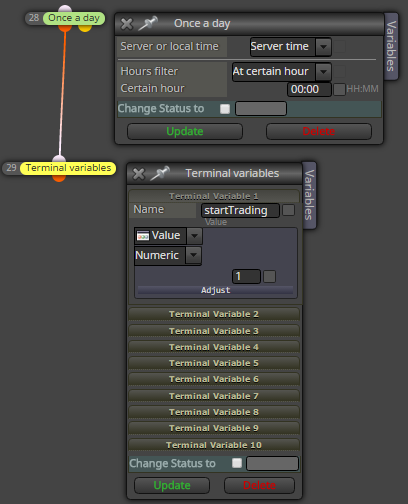
or
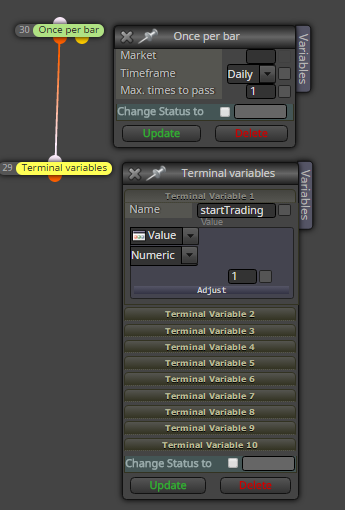
this variable can be modified also manually in metatrader
hope you get it complete (if that checker/closer is not working properly, try to figure out why, but I think it can work) ...
-
RE: How not to repeat the first buying position?posted in Questions & Answers
this can switch first buy than sell again buy and sell ... using flags
https://fxdreema.com/shared/tF1UfiMrc
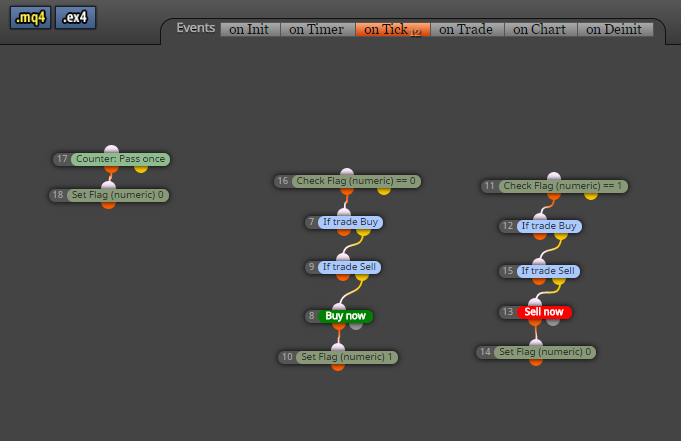
-
RE: wait and watchposted in Questions & Answers
while looking for Condition2, Condition1 must be true? .. easily connect Condition1 with Condition2
or
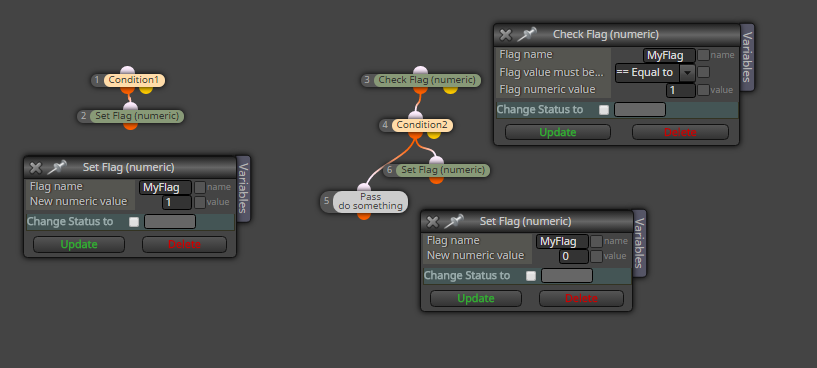
while looking for Condition2, Condition1 can be false? .. for this situation you can use Flag, Set flag and Check flag ... with Set flag you set some state, like:
Condition1 is true --- Set flag 1
now with Check flag look if flag == 1, when true, look Condition2 ...
when Condition2 is true, do something and Set flag back to 0
this is example for second situation: