By bad then good to know 
S
Posts made by seb 0
-
RE: False Cross Signalposted in Questions & Answers
@traderline
Are you using Heikin-Ashi candles ?
The open and close are not the same as those from normal candles, idk what candles you selected in your project. -
RE: Change icon EA?!posted in Questions & Answers
@kidoppa
I don't think you can, i don't even think a programmer can. It is the "universal" Expert Advisor image
Is it that important ? -.- -
RE: Right way for Candle Break-Out..?posted in Questions & Answers
@jjot
Case 1 : Adds the spread
Case 2 : Doesn't add the spread
Case 3 : Doesn't add the spread, adds a minimum turnover
None is right or wrong, but if you are looking for long term profitability, you need to go further. -
RE: Can we create a custom indicator like this one?posted in Questions & Answers
@fxmich78
I would have made it like that : https://fxdreema.com/shared/3PoPleWie
Don't forget to select "Opening prices only" for backtesting. -
RE: Can we create a custom indicator like this one?posted in Questions & Answers
@fxmich78
This site is more dedicated to make EAs using indicator than to make indicators using other indicators, but it's still possible.
Except if you know all the inputs of this custom indicator, yours is not gonna look exactly the same.
What are your conditions ? -
RE: Avoid stack overflowposted in Questions & Answers
@roar
Thanks for quick answer, i'll tell you guys when I find my logical error. -
RE: Avoid stack overflowposted in Questions & Answers
@l-andorrà
You right i'm gonna ask them : )
@roar @miro1360 an idea ? -
RE: new EA /indicatorposted in Questions & Answers
@edwin-2
I don't get your logic, how the SL could be above the Buy price -
RE: Avoid stack overflowposted in Questions & Answers
@l-andorrà
I don't know if i can do that, it doesn't open trade, it's a drawing tool
-
RE: Awesome oscillator - Parameterposted in Questions & Answers
@traderea6
The indicator is green when the bar is higher than the previous one so you can set :
-if Awesome > 0;
-and if Awesome (candle ID 1) > Awesome (candle ID 2);
-Buy -
Avoid stack overflowposted in Questions & Answers
I'm working on a EA with some loops, and its operating is "heavy". Even adding filters it loads a lot of data.
I don't think there is any infinite recursive call, cause with a relative little number of looping before exit(like 500), works all day long. Beyond this number the EA stops after few bars, that's what happen :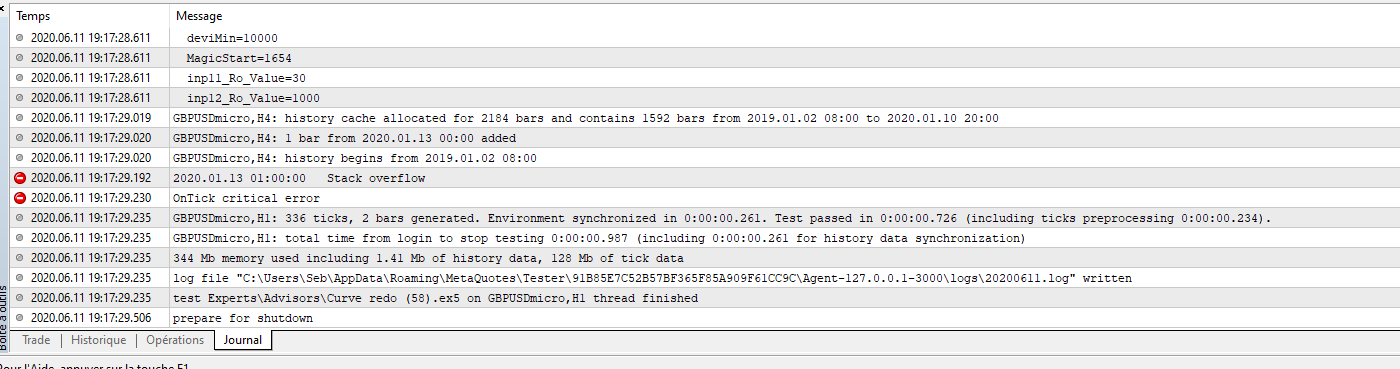
Do you know any way of avoiding that with blocks like "skip ticks" or increasing allocated space thingy ? -
RE: Moving stop-lossposted in Questions & Answers
@mkozar
You can use "trailing stop" block setting step.
In this case if if the distance from line 1 to 0, is the same than from 0 to SL, set trailing stop Y pips, trailing step Y pips. -
RE: new EA /indicatorposted in Questions & Answers
@edwin-2
Yes, should use "check how it was closed" block connected to "for each closed position", then "buy pending order" block with same SL pips. -
RE: Please help. It doesn't open any positionsposted in Questions & Answers
@akulus
I think it comes from blocks 72 and 77, the candle 1 can not be above the highest price from candle 1 to 20 cause when this last candle reaches the previous top it is the new one, the candle 1 will be at most the top, never above.
Set highest price from candle 2 to 20. -
RE: Display current profit/ close profit (money) of EAposted in Questions & Answers
@migen
It's me i didn't read you well. I don't know how this work with multiple EAs, try this block
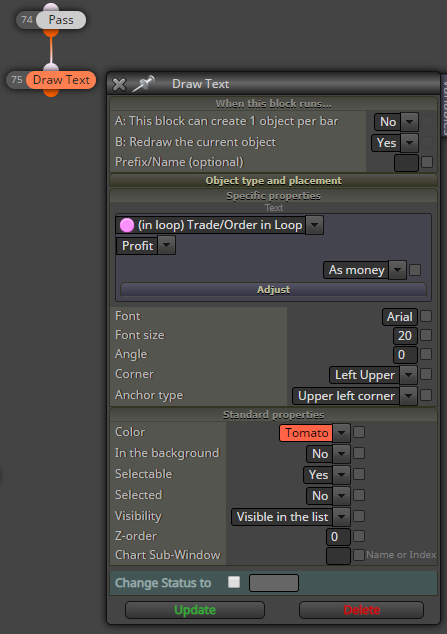
Otherwise maybe you need to load the profit of each closed trade in a variable, accumulating them. -
RE: Display current profit/ close profit (money) of EAposted in Questions & Answers
@migen
You can backtest it, however the results of tests will always be different from reality, you can't be 100% sure that an EA will be profitable in the future.
Further going, you can check @roar tutorial : https://fxdreema.com/forum/topic/9406/tutorial-test-eas-like-a-pro/11 -
RE: Condition not always working.Help welcomedposted in Questions & Answers
@rawad-0
The first condition block compares 200MA calculated on close prices with candle close 0, the candle close 0 is the close of the actual candle, which hasn't stopped forming, its close price is gona be different once it will stop forming. So you have to set candle ID 1. -
RE: EMA with Fibonacci Levelsposted in Questions & Answers
@mrzel
Levels in the MA settings seem to be expressed in pips on my MT5 broker, which case there is no need to divide or multiply by ten. You can easily adjust the MA level in FxDreema. In the condition block, below moving average, in adjust juste type : -377 pips
For exemple
However, (except if you want to use a bit more complex structure with a variable) you are gona need as many condition block as the number of levels.