fxDreema

    • Register
    • Login
    • Search
    • Back to the main page
    • Categories
    • Recent
    • Tags
    • Popular
    • Search
    1. Home
    2. timmyhanke
    3. Posts
    • Profile
    • Following 2
    • Followers 6
    • Topics 18
    • Posts 257
    • Best 18
    • Controversial 2
    • Groups 0

    Posts made by timmyhanke

    • RE: buy stop and sell stop

      @Jennifer

      I made this using horizontal lines instead of pending orders
      It will create a line at the highest price in 10 candles and one at lowest .

      https://fxdreema.com/shared/2TNdSrC9c

      posted in Questions & Answers
      timmyhanke
      timmyhanke
    • RE: buy stop and sell stop

      @Jennifer

      do you want a buy pending and sell pending in every high/low of the zigzag ?
      so if the price continues you buy , and if it reverses you sell ?

      posted in Questions & Answers
      timmyhanke
      timmyhanke
    • RE: Chart Objects from external indicator

      @coverman

      If you need further help don't be afraid to ask 🙂

      posted in Questions & Answers
      timmyhanke
      timmyhanke
    • RE: Chart Objects from external indicator

      @coverman

      usually for arrows from indicator that dosnt plot objects use the indicator is visible block , and be sure that the indicator draws the arrows at the same candle otherwise you have to set how many candles back that block shall check for the buffer arrow.

      posted in Questions & Answers
      timmyhanke
      timmyhanke
    • RE: pending orders expiry

      @Pipperoni

      are you sure ? all of mine dont have a minimum , xm , alpari, fxopen because you should be able to adjust your pending order at any time , but they always have a minimum size from closed price thats around 2 pips .

      posted in Questions & Answers
      timmyhanke
      timmyhanke
    • RE: is there a way to get every trade a lot size bigger?

      @troparzum

      https://fxdreema.com/shared/GeAvRtw7e

      Here is one way , i dont have a closing strategy in that one but hope you understand.

      Made 2 alternatives 🙂

      posted in Questions & Answers
      timmyhanke
      timmyhanke
    • RE: pending orders expiry

      @guyha04 said in pending orders expiry:

      if i want the pending order to expire after 5 minutes how do i do it.

      You have expiry option in pending buy/sell , set that to 5 minutes .

      posted in Questions & Answers
      timmyhanke
      timmyhanke
    • RE: how to re-open position after take-profit or stop-loss frist tick

      @tito78

      On trade

      Trade closed - buy / sell

      You can even specify if it were closed by take profit or stoploss.
      Like if it hit take profit you can specify that and let it have another shot ☺

      posted in Questions & Answers
      timmyhanke
      timmyhanke
    • RE: Object on chart on chart that EA is not running on

      @nickmccomb

      I usually do it this way , this is by moving the line but it should work with everything , i use select object by name , and if that object exists it will move it to my referred point in price.

      In this case , if price is > high line it will move it along price as long it has contact with it and the other line '' low'' will follow that by -10 pips below.
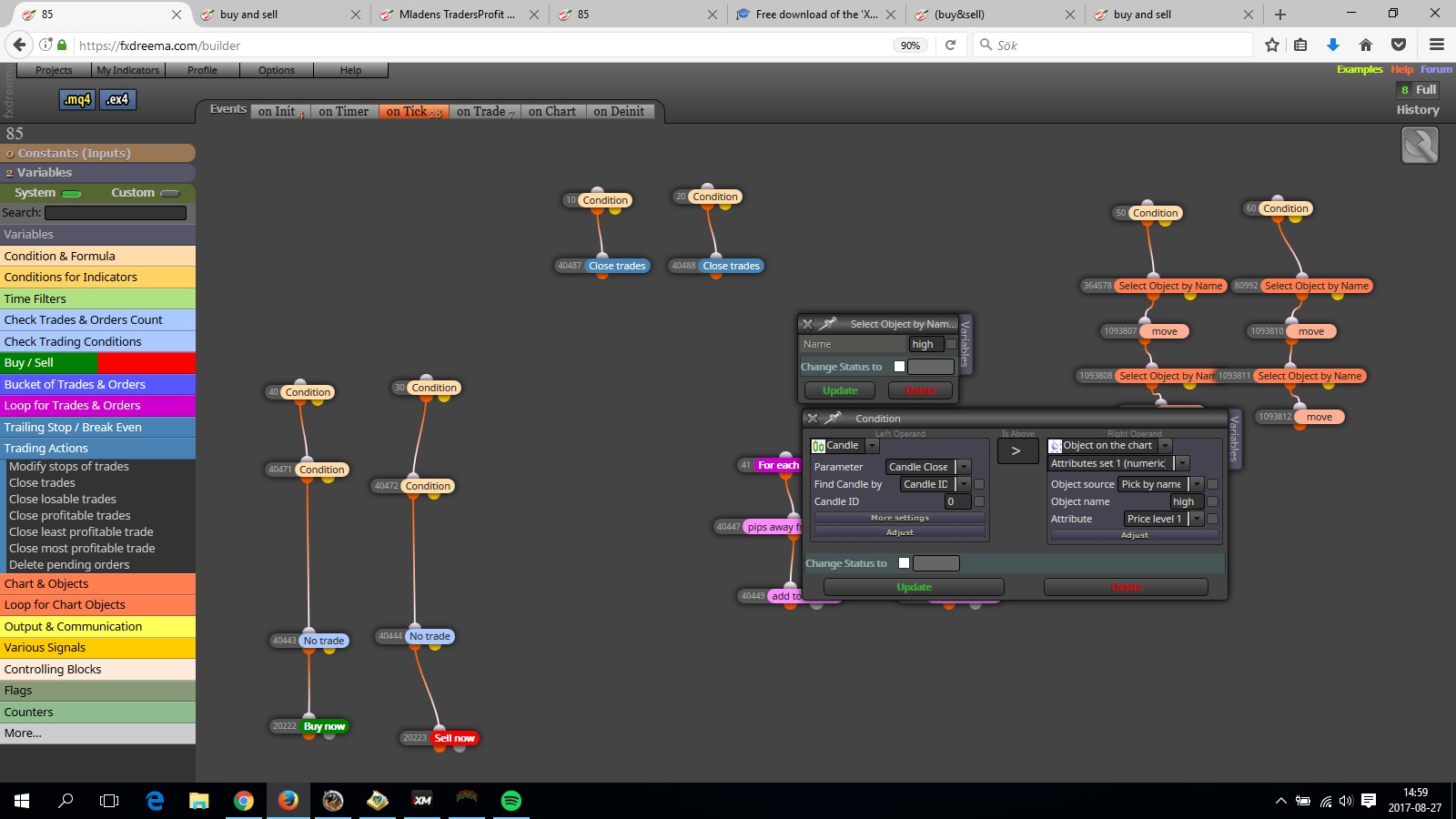
      0_1503839009102_high.jpg

      posted in Questions & Answers
      timmyhanke
      timmyhanke
    • RE: Change "Comment Message" text color

      @Alex254 like hey guys , I have made an insane expert advisor that makes you a million $ every minute , ooooh no the colour of the comment isn't what I want, add to trash 😄

      Sure every point is something but colour editing often means a sell of your work 😎

      posted in Questions & Answers
      timmyhanke
      timmyhanke
    • RE: smart trailing stop

      @guyha04

      In the trailing stop you have the option to filter it , add a value of pips or profit that has to bee reached before it starts

      posted in Questions & Answers
      timmyhanke
      timmyhanke
    • RE: workgroup project need help from all

      @abanob

      maybe now ? 🙂

      https://fxdreema.com/shared/EZxtebD2b

      posted in Questions & Answers
      timmyhanke
      timmyhanke
    • RE: TP at moving average and enter when stoch leave zones:)

      @troparzum

      if you dont figure it out you can upload your work here and the indicator you are using and i will try to help you further 🙂

      posted in Questions & Answers
      timmyhanke
      timmyhanke
    • RE: Object on chart on chart that EA is not running on

      @nickmccomb

      it should work by using select object by name , if that block finds a object with that exact name it will pass , or you can use the yellow dot , meaning if the object is not found then that will pass

      posted in Questions & Answers
      timmyhanke
      timmyhanke
    • RE: The builder not working what should I do?

      @meky55

      have you tried firefox ? if yes try google chrome and others 🙂

      posted in Questions & Answers
      timmyhanke
      timmyhanke
    • RE: Close partially multiple trades with "Once per Trade/Order"

      @Alex254

      and the solution was ? 🙂

      just so i maybe can learn something new and to anyone else reading this post 🙂

      posted in Questions & Answers
      timmyhanke
      timmyhanke
    • RE: Where are my Alerts?

      @yalgaar

      I see , i dont know how to see the previous history of alerts in the alert tab , but look in your expert tab , is your alert messages printed there ?

      posted in Questions & Answers
      timmyhanke
      timmyhanke
    • RE: Suggestion: Create Check loss (last close) block

      For each closed trade - check loss

      posted in Questions & Answers
      timmyhanke
      timmyhanke
    • RE: TP at moving average and enter when stoch leave zones:)

      @troparzum

      With turn block on an off , one section that detects when it goes above /below the level and when that have been detected it activates the other section on chart that detects when it leaves the zone ( reverses) and when that is true the second section closes itself out and can't pass more than once ☺

      posted in Questions & Answers
      timmyhanke
      timmyhanke
    • RE: Where are my Alerts?

      @yalgaar

      Have you used the alert block correctly?
      And is your expert advisor running as it should, with a smiley face on the top right corner of the chart ? ☺

      posted in Questions & Answers
      timmyhanke
      timmyhanke
    • 1
    • 2
    • 5
    • 6
    • 7
    • 8
    • 9
    • 12
    • 13
    • 7 / 13