I found 2 problems responsible for the slow convert and another problem that caused the data in the output file to be corrupted. I think it's all fixed now.

I found 2 problems responsible for the slow convert and another problem that caused the data in the output file to be corrupted. I think it's all fixed now.

In few days I will upload NodeJS version of fxDreema, because I decided to use this platform and I rewrote the whole thing + I changed the database as well. The forum will be NodeBB, which is the only forum I can find for NodeJS New features... I don't know, even now people don't understand everything. Maybe it's better to make everything easier to work. Also, I think I have to write descriptions for most options in the blocks. I will also probably do some MQL4/5 code optimizator, because the generated output code needs to be cleared from unnecessary stuff.
When you look from EA's perspective, the chart in which it is opened is giving its parameters to the EA. For example, in MQL4/5 there is a function Symbol() that returns the symbol name of the chart. Also, the EA receives the ticks from the symbol of the chart.
But otherwise, you can open a trade in a symbol that is different from the one of the chart. The opened trade is in no way linked to the chart. And the way to do that is of course to write the exact name of the other symbol. It really should work if the variable named "fxname" is really a string variable with value USDNZD.
I looked into your last EA and I see that the variable has no initial value, but in Init it is defined like this:
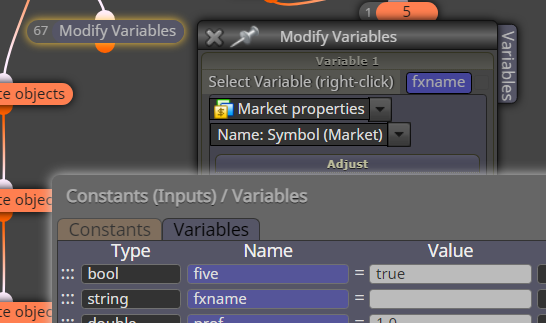
Well, this sets the value USDCAD (assuming you opened the EA in USDCAD chart). I found one more place in Tick where you set the same variable in the same way (block 73). You have some Custom MQL blocks, but I don't see this variable there. So I don't really see where the value of this variable could become USDNZD.
I see that you are opening another charts with a custom code in block 311. But when you do that, I don't see how this changes the fact that the EA is still working on the original chart. ChartOpen() is just opening another chart, similar to how you would do it manually.
I already started with the steps to update fxDreema. Now it works on Apache/PHP, but I rewrote everything for NodeJS. The current forum is phpBB and will be changed with NodeBB.
I expect problems! I spent months to prepare everything, but unexpected problems always appear. So, be prepared and I apologize in advance.
Everyone, write in this topic if you have problems. I will try to fix everything as fast as possible.
Well, the parameters extraction happens on the browser and the code I wrote for this is not very capable, it doesn't really understand the MQL language. In this case I can see why the problem happens:
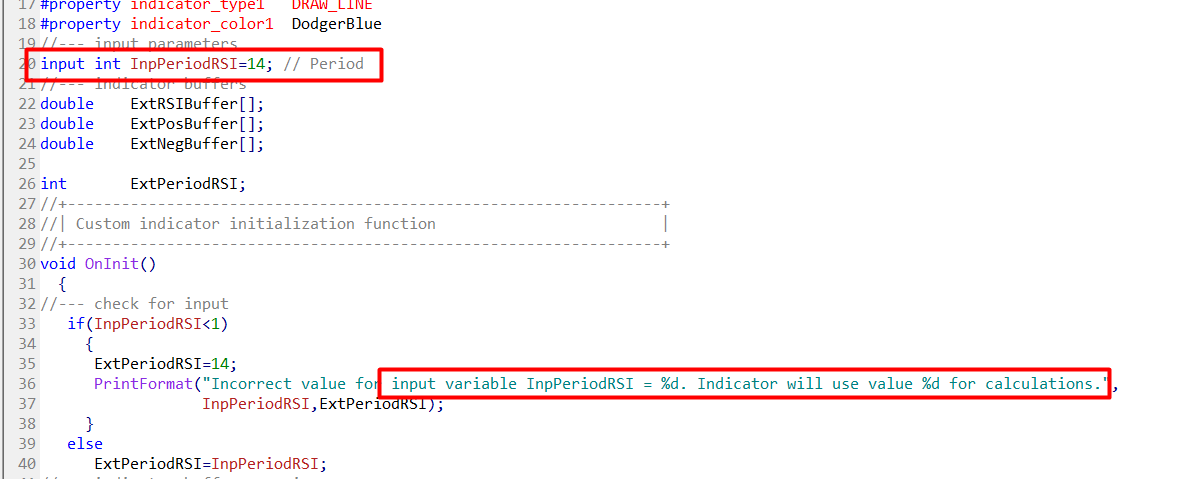
the code that I wrote thinks that the variable is defined on line 36 where this is clearly a string. In reality the variable is defined at line 20.
The correct values are:
data type => int
name => InpPeriodRSI
default value => 14
This forum is brand new even for me and I'm still looking at its functions. Yes, there are 2 types of pagination - by scroll and by pages. I also think that it's better with classic pages style.
@l-andorrà said in "For Each Closed Position" block is not working.:
Yes, there ere some changes in the code a few weeks ago. You should use a new block in your projects instead of holding the old ones in your projects.
No, the blocks can stay the same, they don't need to be replaced with new ones. There is a situation when block replacement works, but this is when somewhere in its hidden properties (because they are all there, but some of them are hidden visually) some broken constant or a variable is lurking.
When I'm changing the code of some block, I prefer to do it in a way to not change it's assumed behavior. I only want to fix some bug or to add some new option. If I ever decide to really replace a block, which happened in the past, what I do is that I create a new block and the old one I deprecate. There is such functionality that when some block is deprecated, in the project where it used it appears darker and there is a warning message.
@ambrogio said in "For Each Closed Position" block is not working.:
@rafaelgrecco i tested your project in the strategy tester and it doesn't show the count, i replace the block "comment" with a new one, it works now
His "Comment" block is working fine, but he selected some dark colors and the text can't be seen on the default black background.
@roar said in When to stop OnInit():
Some event tabs have those specific filters, maybe the OnInit could have similar blocks too...
The problem with this is that if I want to add such blocks, I should remove this code and allow the whole OnInit() body to run always, which can change the behavior of the EAs for some people.
There are such problems everywhere in the EA builder where if I want to change or remove something, unexpected things could happen to many user's projects. And this is not like fixing a bug. If it's a bug, at least I can say "Yeah, but it worked wrong before and now I fixed it".
I think I should somehow make a whole new version of the EA builder, incompatible with this one, on a different link. Like 2.0 or something. Similar to how MT4 and MT5 exist in parallel. But I don't think I have enough breaking changes in mind to justify this.
@roar I had parthership proposals from brokers, and not only brokers, but I always decline. I'm very anti-parthership for some reason, so much that I don't even want to hire someone to do something instead of me. But lately, and especially after the hack, I started to realize that I'm probably not enough for this project and my strong anti-parthership shell is starting to crack a little bit.
But brokers... I look at them as the enemy, although without them this website would not exist.
@owneroxxor The problem is in block 45 where you use end_min. I will investigate this, but who knows when I will fix this, so I can give you quick fix. Revert back to the normal value below the Variable, clear it and then select the Variable again
I probably put this code there when someone was having issues when changing the parameters of the EA, or changing the timeframe. I don't remember exactly.
I think the only two possible uninitialize reasons in OnInit() are REASON_CHARTCHANGE or REASON_PARAMETERS, which means that the "else" statement is about REASON_PARAMETERS.
It looks that I wanted to prevent re-execution of blocks in "on Init" when the user changes the timeframe or the EA parameters. Only if the symbol is changed, the blocks would run again, which was probably because I have some symbol-related functions just below this code.
I guess it depends. Maybe the user wants to redraw his objects, maybe not.
Actually these REASON_CHARTCHANGE and REASON_PARAMETERS are forming possible events, something like "on Timeframe Change", or "on Parameters Change". Sometimes I'm thinking about adding some more events in the EA builder, or better changing the way events are used in the EA builder, maybe allowing for making custom events. But at the moment there are only these standard events and the use of REASON_CHARTCHANGE and REASON_PARAMETERS in on Init is opinionated.
By the way, I don't think this is a bug.
Well, I can compensate everyone and I already added few extra days to some people. I was working on this update for the last year and I delayed it for months, so I'm actually happy that I finally did it. The problems... they were expected and they will disappear eventually
Anyone who wants compensation, tell me
I think your MetaEditor is an old version.
Lately I was touching some trading functions in MQL5, doing this on my local MetaTrader 5, which is updated automatically to the latest version. On the server I had old compiler (MetaEditor) and when it came time to upload the changes I made, I also noticed this error. So I updated the compiler on the server.
The problem seems to be that not a long time ago MetaQuotes added these two identifiers - DEAL_TP and DEAL_SL for the HistoryDealGetDouble() function. They don't exist in your version of MetaEditor/MetaTrader and that's why you can't compile that EA.
I wonder, if the EA is compiled by fxdreema, does it work on your MT5 at all? And if it works, does it work correctly?
Otherwise the easiest solution to this problem will be to update MetaTrader 5.
It was just reported to me that there are compilation errors on the latest build of MT5 - build 3674. I tested it and it's true, if you try to compile (probably) any EA, generated by fxDreema in MetaEditor build 3674, you will get this error.
It's about Function templates. See the documentation here: https://www.mql5.com/en/docs/basis/oop/templates
So, even if you try the simplest example from the documentation, this error appears.

I think they introduced a bug in their latest compiler. This problem is also reported in their forum, see this: https://www.mql5.com/en/forum/445197
I also found this topic from yesterday (https://www.mql5.com/en/forum/445154), where another bug was reported in build 3672 that apparently has been fixed in build 3673. So I think the current "template" bug will be also fixed eventually.
In short, for now I'm not going to try to fix anything, because I believe that it's a MetaQuotes bug that will be fixed in some of the following builds. The compiler on the website is older version and there are no problems there.
People were asking for stopping the EA for some time multiple times before and it's time for me to do something about it. It will be some block with name like "Skip ticks" or similar, and the idea will be that when this block runs, it will tell the EA to skip the following ticks for some time.
The same thing can be done right now as well, but with some datetime variable that needs to be set and then checked.
I have to say this once again. If anyone suspects a bug, please, make a simple project with the minimum blocks required (should be no more than 4-5 blocks) to demonstrates the bug + short explanation of what is expected to happen.
Sorry, but I don't have this will to dissect projects with 100s of blocks, and even worse - containing many input properties, which will probably be way different on my end.
I ran your project in my tester for a period of 1 year and guess what - I got only 2 positions for the whole time. I don't know why, but I don't want to know why. I just want a simple example, that when I run it, it will fail.
Don't forget that if you (I mean everyone) understand your project, this doesn't mean that I understand it.
When there is a bug, I really want to fix it, but I don't want to explore anyone's projects, strategies and ideas, while searching for a bug that may not even appear on my side at all.
How to make such example?
I feel that every 5th person have the same trouble with multiple trades these days
Always remember this - when blocks are positioned under "on Tick", this means that they run on every tick! Well, those on the top.
Also remember this - blocks like "Buy now" create a new trade every time they run, every time! So the idea is to prevent these blocks from running on every tick. That's why we put those "No trade", "Once per bar" and similar stuff above them.
Exactly the same is true for "Close trades" block - this one would close trades when it runs, every time. So this one also needs some extra blocks on top... sometimes.
Here in this example the number of blocks is small, but still everything works fine: https://fxdreema.com/demo/mt4-buy-sell-buy-sell-opposite-conditions
