fxDreema

    • Register
    • Login
    • Search
    • Back to the main page
    • Categories
    • Recent
    • Tags
    • Popular
    • Search
    1. Home
    2. fxDreema
    3. Best
    • Profile
    • Following 0
    • Followers 691
    • Topics 32
    • Posts 7485
    • Best 277
    • Controversial 18
    • Groups 1

    Best posts made by fxDreema

    • RE: BUG URGENT in block (Bucket of Position) Blue

      Note that the blocks have numbers. Most of the time these numbers doesn't matter, but sometimes they do.

      Take a look at this: https://fxdreema.com/documentation/builder/builder-basic-rules#block-numbers

      If you have 10 blocks connected one after another, their numbers doesn't matter, because the order of execution is from the first block to the last, and there is only one possible path.

      However, things are a little bit different when there are 2 or more possible paths. If you have a block that is connected to 2 or more blocks after it, which of these block should run first? They can't run at the same time, because the code is synchronous.

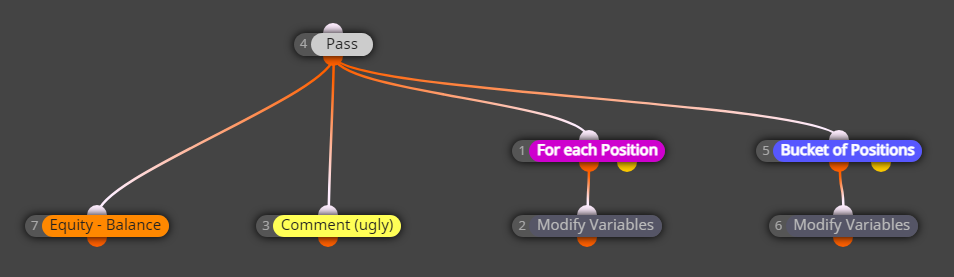
      This is what you have in your last example:
      83f4ec05-f2b3-4de1-8e9f-0273e1785b1b-image.png

      Here block 4 doesn't even matter, it just passes. But what follows block 4? Blocks 7, 3, 1 and 5. Ok... let me rearrange the blocks just a little bit:
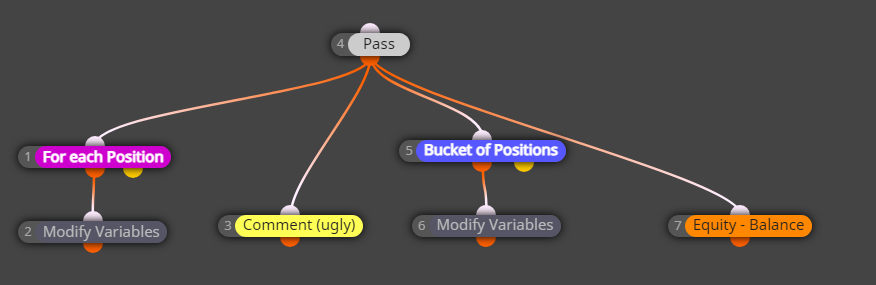
      65c02495-d270-4507-9574-6ada7707df0e-image.png

      Now there is a visual difference, obviously, I changed the position of the blocks. Will this example produce different results in the Tester? If the position of the blocks mattered, yes. But the position of the blocks doesn't matter, so the results will be absolutely the same, and in your opinion - wrong. What matters is the number of blocks. The lower number runs first. This means that the order of execution of blocks is 1, then 3, then 5, then 7.

      Let's imagine that you already have one position. Let's look at what happens on the very first run of these blocks.

      • First, the program goes to blocks 1, which passes and causes block 2 to run. You now have a value for Floating_For_each.
      • Then, the program goes to block... can you guess... block 3, the Comment block. At this time only Floating_For_each has a value that is not 0. The other variables still have their initial values of 0.
      • Then block 5 (and 6) runs, then 7 runs => now we have all variables set.
      • On the next tick we recalculate Floating_For_each, then we print it in Comment. But this time the other two variables have values.... from the previous tick. That's why the values are close, but different.

      Change the number of block 3 to say 30 and the bug will be fixed.

      posted in Bug Reports
      fxDreema
      fxDreema
    • RE: how to make hedge trades?

      My "favorite" topic again. I hate these kind of strategies with passion 🙂 You can search for "Sure-Fire" in the forum. I posted the same example that I did looong time ago many times. But my opinion is that hedging is just a stupid way to do Martingale. It makes the whole process hard to make, hard to maintain and more complex in general. Jim Dandy is on the same opinion: https://www.youtube.com/watch?v=6ux63AhGmFE

      posted in Questions & Answers
      fxDreema
      fxDreema
    • RE: Position Closed block MT5 not working

      At this point I'm convinced that even MetaQuoted don't know what they are doing with their Positions/Orders/Deals functions.

      This bug happens in a code that I rewrote months ago. I was very careful to write everything properly, and I believe I did. I also made some tests to ensure that everything is good, and it was.

      Since then, I didn't touch any MQL5 code, so this bug (and possibly other bugs) is introduced after some of the newest MT5 builds.

      I wanted to explain what the problem is and why I think it makes no sense, but I think it's too complicated and maybe no one even cares.

      But in short, now it seems that when we want to use for example this function:

      long  HistoryDealGetDouble( 
        ulong ticket_number, // Ticket
        ENUM_DEAL_PROPERTY_DOUBLE property_id  // Property identifier 
      );
      

      ... first we have to use this one to select the deal:

      bool  HistoryDealSelect( 
        ulong  ticket      // Deal ticket 
      );
      

      ... which is crazy, because why do we have this ticket_number property in HistoryDealGetDouble(), if not to select the deal and get whatever data we need?

      It's probably the same mess with HistoryOrderGet... functions.

      One way for me to fix this is to scan the code I wrote for any usages of HistoryDealGet... and HistoryOrderGet... functions, and put some HistoryDealSelect() and HistoryOrderSelect() functions on top. Then hope to remember in the future that I have to do every time, because it's not intuitive at all.

      And the other way is to write overloads for all HistoryDealGet... and HistoryOrderGet... functions without the ticket_number property. But then if MetaQuotes decide to to the same, there will be errors.

      posted in Bug Reports
      fxDreema
      fxDreema
    • RE: Do not open position on the last day of the month.

      I added these options in Condition - Market properties - Symbol Trade Time. I have no idea whether it works or not 🙂

      posted in Questions & Answers
      fxDreema
      fxDreema
    • RE: Position Closed block MT5 not working

      I did some fixes in many files, I hope it is ok now. If there were similar bugs in other blocks, maybe I fixed them as well.

      posted in Bug Reports
      fxDreema
      fxDreema
    • RE: What is "Change Status to" used for in a block?

      In the picture you can see blue text "stopped". Which is automatically generated after the end of the EA's work. But if you use "Change Status to" this text can be changed to whatever text you want.

      The idea is that you can choose some blocks to tell you something in the chart. The alternative is of course to use "Draw Text"

      posted in Questions & Answers
      fxDreema
      fxDreema
    • RE: Help With Fibonacci

      Be careful with the first 2 options in "Draw..." blocks. Look here - https://fxdreema.com/help/working-with/chart-objects And also yesterday I added description for those 2 options, just click on their titles when they become yellow.

      posted in Questions & Answers
      fxDreema
      fxDreema
    • RE: Help with money management formula

      Well, I have this row of code somewhere in the functions:

      size=((value/100)*AccountBalance())/(sl*((TickValue/ticksize)*point)*PipValue(symbol))
      

      but what is what... hard to explain everything right now. Plus, the lot size would be rounded to the nearest possible, don't expect lot size such as 0.0434

      posted in Questions & Answers
      fxDreema
      fxDreema
    • RE: EA bridge to eToro platform

      You know, I always reject proposals. I just can't work with people and for their projects. I'm doing my little thing the way I feel and this is what I can 🙂

      posted in Questions & Answers
      fxDreema
      fxDreema
    • RE: can i convert file.ex4 to mq4 or edit on file.ex4 ?

      This was possible years ago with some decompilers, when MetaTrader was at version 224. But now I have no idea who can do that.

      posted in Questions & Answers
      fxDreema
      fxDreema
    • RE: Open new order with new lot size depend on how far loss in pips are!

      And instead of using block 15, the formula can be written directly into the input filed where you normally see the lot size.

      posted in Questions & Answers
      fxDreema
      fxDreema
    • RE: How i can disappear my strategist in case it use my EA in tester MT4?

      You want to hide what?

      posted in Questions & Answers
      fxDreema
      fxDreema
    • RE: Trailing Stop

      Set the Trailing step to 5. Here is more info: https://fxdreema.com/help/working-with/trailing-stop

      Now, the first step where you want to put SL to BE+1pip, this can be done with the Break even block. But then in the Trailing stop block you should set some "Trailing Start" to make it wait until there is some profit, and then to start moving SL.

      Actually depends on what the initial SL needs to be. If it needs to be at 5 pips (at most), then I think you can forget about that +1pip and just use the Trailing stop only (with 5 pips step)

      posted in Questions & Answers
      fxDreema
      fxDreema
    • RE: Cannot load and/or export ex4 normally anymore (web version)

      How often do you have problems with the website? People from China told me that their connection with the website is bad, but I have no idea how much. I personally live far away from the actual server and I have delay for each request about 120 ms, but even with that the website works fast enough for my taste (and I like speed). But maybe there is something else, I don't know...

      There are few possible problems with .ex4/.ex5 files. The first problem is that the compiler (metaeditor.exe) starts very slow. This program can run as a normal Windows program as you know (MetaEditor) and also in command line mode. But with every new version the program starts slower and slower in command line mode. Unfortunately I can't fix that. But half of the waiting time is because of that.

      The other half of the time you wait is for the file to be downloaded, because it is bigger that 1MB. Here I have some feeling that the speed should be faster, so I will investigate this.

      There is another possible reason - the compile time could be slow. This is the time for which the MQL code is compiled. For your project this time is not very small, probably because of the size of the source code. But fortunately it compiles relatively fast. Because I noticed few times that with certain content in the MQL code, the compilation time becomes huge.

      posted in Questions & Answers
      fxDreema
      fxDreema
    • RE: what i can use it ? and when ? options indicator

      Hold the mouse over one of these and orange "?" sign will appear on the left side. Click on it.

      posted in Questions & Answers
      fxDreema
      fxDreema
    • RE: i use the no trade and once ber but there problem ?

      Block "Once per bar" can only pass 1 time per bar. You can put this block directly on top level in "on Tick" (which means that the block will run many many times, maybe few times per second) and it will pass only 1 time per bar.

      https://fxdreema.com/demo/mt4-once-per-bar

      When you use the crossover options in "Condition" (x> and x<), you could have multiple signals (passes of the block) in the same candle, but then after that candle closes all signals stop, at least for the whole next candle. This is because of the way these crossovers are detected, you just can't have crossover detected in one candle and then another crossover on the very next candle.

      Again, while in the same candle you will see many many signals (passes of the Condition block), because the crossover detection is made out of 2 simple IF checks, as it is described here: https://fxdreema.com/help/working-with/crossover That's why the "Once per bar" block is normally used before or after this Condition block, as described here: https://fxdreema.com/demo/mt4-once-per-bar

      posted in Questions & Answers
      fxDreema
      fxDreema
    • RE: About Ask/Bid and custom price levels

      There are 10s of different objects that can be printed on the chart. The simplest objects - horizontal and vertical lines have only 1 coordinate - price (horizontal line) or time (vertical line). But some objects are made out of 3 points, where each point is one price-time coordinate. So Price level 2 and Price level 3 can only be used for particular objects. And even Price level 1 - there is no reason to use this for vertical line.

      Ask and Bid are properties of the price. A horizontal lines are just line placed on particular price.

      posted in Questions & Answers
      fxDreema
      fxDreema
    • RE: Place 3 Break even

      In the Trailing stop block try this option http://prntscr.com/el6d4i

      posted in Questions & Answers
      fxDreema
      fxDreema
    • RE: How to get running orders count

      I would suggest something like this: https://fxdreema.com/shared/eJY9ZYWnc
      But there is a catch. The thing is that these Bucket blocks normally does not pass when they can't find any trade. I connected both of their outputs because of that, but as a result you will see some big values instead of 0. Basically these blocks can't be easily put to work with 0 trades and I need to decide how to deal with this.

      posted in Questions & Answers
      fxDreema
      fxDreema
    • 1
    • 2
    • 6
    • 7
    • 8
    • 9
    • 10
    • 13
    • 14
    • 8 / 14